Construction ERP Software Guide for Mid-Size GCs (2026)
Construction ERP software explained for mid-size GCs this November 2026, covering real costs, timelines, and what vendors overpromise.
Your accounting works. Your project management tool works. The problem is that those two systems don't talk to each other, so your job cost reports are always a little stale and your controller is always chasing field data. That gap is exactly what construction ERP software is designed to close, but whether a full ERP is the right answer for your size and setup is a different question entirely.
TLDR:
-
Construction ERP unifies job costing, billing, payroll, and field ops in one database so margin gaps don't hide in spreadsheet reconciliations
-
Most mid-size GCs end up owning two of three software categories and bridging them by hand; that seam is where cost-to-complete forecasts drift
-
Vendor-quoted ERP timelines of 1-3 months typically stretch to 6-12 months once data migration, workflow configuration, and training are scoped
-
Implementation services for a $20M-$80M GC typically add 20-40% on top of the first year's license cost, so get the full scope in writing before comparing vendors
-
Constructable is built for GCs in the $20M-$150M range who need field execution connected to QuickBooks Online, QuickBooks Desktop, Sage Intacct, Sage 300, or Acumatica without a 6-12 month ERP rollout, and is an official Sage Intacct partner and a QuickBooks Online Silver partner
What is construction ERP software?
Construction ERP software is a business management system built for contractors, not a general accounting tool with construction modules bolted on later. Where a generic ERP might handle invoices and payroll across any industry, construction ERP is structured around how contractors actually make money: job by job, with costs tracked against a budget, progress billed against a schedule of values, and subcontractors managed through commitments and change orders.
The core idea is a single database. Job costing, project billing, procurement, payroll, and field operations all write to and read from the same source. When a subcontractor submits an invoice, it flows into the job cost ledger. When a change order gets executed, the budget updates. This connectivity is driving the construction ERP market forecast through 2036, as contractors replace fragmented, spreadsheet-based workflows with unified systems.
Most mid-size GCs don't start with ERP. They start with a solid accounting tool, add a project management system, and eventually end up manually bridging those two in Excel once a month. Construction ERP is the answer to that seam: one system that answers both what happened in the field and whether the job is making money, without requiring someone to manually bridge those answers.
Construction ERP vs. construction project management software
Three software categories dominate contractor tech decisions, and they're routinely confused with each other.
General accounting software answers what you owe and what you are owed. Construction project management software answers what happened in the field. Construction ERP answers both from one database, which is the only way to answer the question that actually matters: whether a job is profitable now.
Most mid-size GCs own two of the three and connect them by hand. Project managers work in one system, the controller works in another, and the reconciliation is a monthly spreadsheet built by one person. That seam is where margin disappears, not from bad execution, but from a structural data gap.
Construction project management tools like Procore or Autodesk Forma handle drawings, RFIs, submittals, and daily logs well. They don't give you real-time job cost visibility because field activity and financial data live in separate systems. Construction ERP closes that gap by design.
Core features every construction ERP should have
Treat this list as your baseline evaluation filter. Any system missing more than one or two of these is probably a general business ERP with a construction skin, not a purpose-built tool.
Job costing
Costs must be tracked at the job level, broken down by CSI division cost code, in real time. If your team can't see budget versus actual by cost code while work is in progress, you can't catch overruns before they happen.
AIA G702/G703 progress billing
Standard payment applications need to generate automatically from your schedule of values. Manually assembling G703 continuation sheets from spreadsheets every billing cycle is a reliable way to delay cash flow.
Retainage management
Retainage tracking needs to work on both sides: what you're holding from subcontractors and what the owner is holding from you. These numbers need to match cleanly at closeout.
Change order workflows
Change orders should move through a defined approval path, stay linked to the cost codes they affect, and update the budget when executed. A change order sitting in someone's inbox for three weeks is a cash flow problem.
Committed and non-committed cost tracking
Committed costs are subcontractor contracts and purchase orders. Non-committed costs cover everything else: direct receipts, small purchases, T&M work. Both need to appear in the job cost ledger or your cost-to-complete forecasts are wrong.
Subcontractor compliance and lien waivers
The system should track insurance certificates and lien waiver status by payment event. Chasing these manually at closeout is a predictable problem that software can solve.
Payroll and equipment tracking
Field labor costs and equipment usage are two of the largest cost categories on most jobs. If they don't flow into job costing automatically, someone is entering them twice.
What construction ERP software actually costs
Sticker price is rarely the number that hurts. The license fee is visible; everything else surfaces after you've already committed.
Construction ERP pricing generally runs one of two ways: per-user monthly fees or flat-fee annual contracts. Per-user models feel affordable at first, but costs escalate as you add subcontractors, consultants, and owners to projects. For example, a team that starts at a few hundred dollars per month can see its bill multiply several times over once the full project roster is included; exact figures vary by vendor and seat count, but the pattern is consistent. Flat-fee structures remove that scaling problem, but they often carry higher base rates and multi-year contract requirements.
Beyond licensing, implementation is the real cost. Mid-market ERP deployments typically require professional services for data migration, workflow configuration, and training, often sold separately at hourly or project rates. For a $20M to $80M GC, expect implementation services to add 20 to 40% on top of the first year's license cost. The global construction ERP market was valued at $3.7 billion in 2024 and is projected to reach $7.6 billion by 2034. Get the implementation scope and support model in writing before comparing vendors on price.
How long construction ERP implementations actually take
Vendor timelines and reality rarely match. Most construction ERP vendors quote 1 to 3 months during the sales process. Mid-market firms typically land at 6 to 12 months once the full scope is clear.
The gap comes from four predictable places. Data migration is almost always messier than expected: job cost history, open commitments, active schedules of values, and subcontractor contact records all need to move cleanly, or your first month of reporting is worthless. Workflow configuration takes longer because the system needs to reflect how your team actually approves invoices, routes change orders, manages commitments, and follows your specifications, not how the vendor's default setup assumes you work.
Training is routinely underestimated, especially for field staff who weren't part of the selection decision. Change management, getting PMs, supers, and accounting to actually use the new system instead of reverting to email and spreadsheets, is the part that kills timelines most often.
Research on ERP and digital transformation consistently finds that the majority of ERP implementations fail to reach their original business case goals. For contractors, the most common failure mode is a technically successful installation that nobody uses consistently. The system goes live, field teams revert to old habits, and financial data becomes unreliable within six months.
Budget the implementation as seriously as the license. For mid-size GCs, that means scoping data migration, configuration, and training before signing, not after.
How to choose a construction ERP: a practical checklist for mid-size GCs
Before signing anything, get clear on what you're actually buying against. Here's how to run that evaluation without getting sold a system that fits someone else's business.
Define your broken workflows first
List the three or four processes costing your team the most time or money right now. Monthly reconciliation between your project management tool and accounting? Change orders sitting unexecuted for weeks? Job cost reports that are always two weeks stale? Your ERP selection should solve those specific problems. Vendors will demo their strengths; your job is to test against your weaknesses.
Audit your integration requirements before shortlisting
If you're on QuickBooks, Sage Intacct, etc. confirm whether each candidate integrates natively or through a third-party connector, and compare Sage Intacct integrations carefully before shortlisting. A middleware layer adds cost, a separate vendor relationship, and another failure point. Ask directly: is it a true two-way sync, or does someone still manually accept exports before data moves?
Score field usability separately from office financial depth
Have your superintendent run the mobile app on a real project drawing, not a demo dataset. Have your controller process a subcontractor pay app through the full approval workflow. Both need to work without a support call.
Calculate five-year total cost of ownership
License fees, implementation services, data migration, training, and ongoing support all belong in the number. Get each line itemized in writing.
Verify contractor-specific experience at your volume
Ask for references at $30M to $100M GCs, not $500M contractors. The workflows, support model, and implementation complexity are all different at that scale.
Which construction ERP systems are most common
The systems that show up most often in mid-size GC shortlists fall into a predictable set. Here's how they break down by best fit:
| System | Best fit |
|---|---|
| Acumatica Construction Edition | Mid-market GCs and specialty contractors wanting cloud-based job costing with flexible licensing |
| Sage 300 Construction and Real Estate | Mid-to-large contractors with complex job cost accounting needs |
| Sage Intacct | Finance-heavy organizations that need GL depth and multi-entity consolidation more than field tools |
| CMiC | Large GCs running high project volume who need integrated financials and field operations in one system |
| Viewpoint Vista | Enterprise contractors with dedicated IT support; deep payroll and union labor capabilities |
| Viewpoint range/mid-market edition (Vista) | Mid-size contractors wanting Viewpoint's accounting depth without Vista's implementation weight |
| Foundation Software | Smaller to mid-size contractors focused on payroll, job costing, and AIA billing |
| Deltek ComputerEase | Small to mid-size contractors, particularly subcontractors, focused on job cost and payroll |
| Jonas Premier | Mid-size GCs and specialty contractors needing project management alongside construction accounting |
| Microsoft Dynamics 365 Business Central | Contractors already standardized on Microsoft infrastructure who want ERP with construction add-ons |
| Oracle NetSuite | Multi-entity construction businesses focused on financial reporting and revenue recognition over field workflows |
Where construction ERP falls short for field operations
Construction ERP systems are built to answer financial questions, and that design choice shows up everywhere in the field experience: dense interfaces, desktop-first workflows, and approval chains optimized for a controller reviewing invoices, not a superintendent logging crew hours from a muddy jobsite.
The result is a structural adoption gap. Field crews encounter software that wasn't designed with them in mind, and they respond the way anyone would: they revert to paper, text messages, and whiteboard tallies. That data never makes it into the ERP, so the financial picture the system produces is only as accurate as what the office can reconstruct from incomplete field input.
This isn't a training problem. Most traditional construction ERPs were developed by accounting software companies that later added project management modules, and the field workflows carry that lineage. Daily logs feel like forms designed for audit compliance, not for a super trying to close out the day at 4:30pm.
The practical consequence for mid-size GCs is a split operation: the ERP handles financials cleanly, while field documentation lives in a separate tool, a shared drive, or nothing at all. Job costing is only as good as the data feeding it, and when field activity doesn't flow into the system reliably, cost-to-complete forecasts drift from reality well before anyone in the office notices.
The role of accounting integrations in your ERP decision
For mid-size GCs, the accounting integration question often decides the shortlist before any demo happens. If your controller runs Sage Intacct and a vendor's connection requires third-party middleware, you've added a separate contract, a separate support relationship, and a new failure point between your project data and your books.
The distinction that matters most is true two-way sync versus one-directional import. A one-directional connection means someone still manually triggers exports or re-imports updated records, and that manual gate is where billing delays and duplicate entries live. A true two-way sync writes changes from either system back to the other automatically, using executed documents as the trigger.
Your current accounting system determines how much this matters. QuickBooks Online and Sage Intacct have native integrations across most major construction project management tools. Sage 100 Contractor and Sage 300 connect through middleware or not at all with some vendors. Viewpoint's mid-market and enterprise editions have even fewer native connections; firms running either should treat integration as a primary evaluation filter. If a vendor can't show a live, tested connection to your accounting system, get the gap in writing before proceeding.
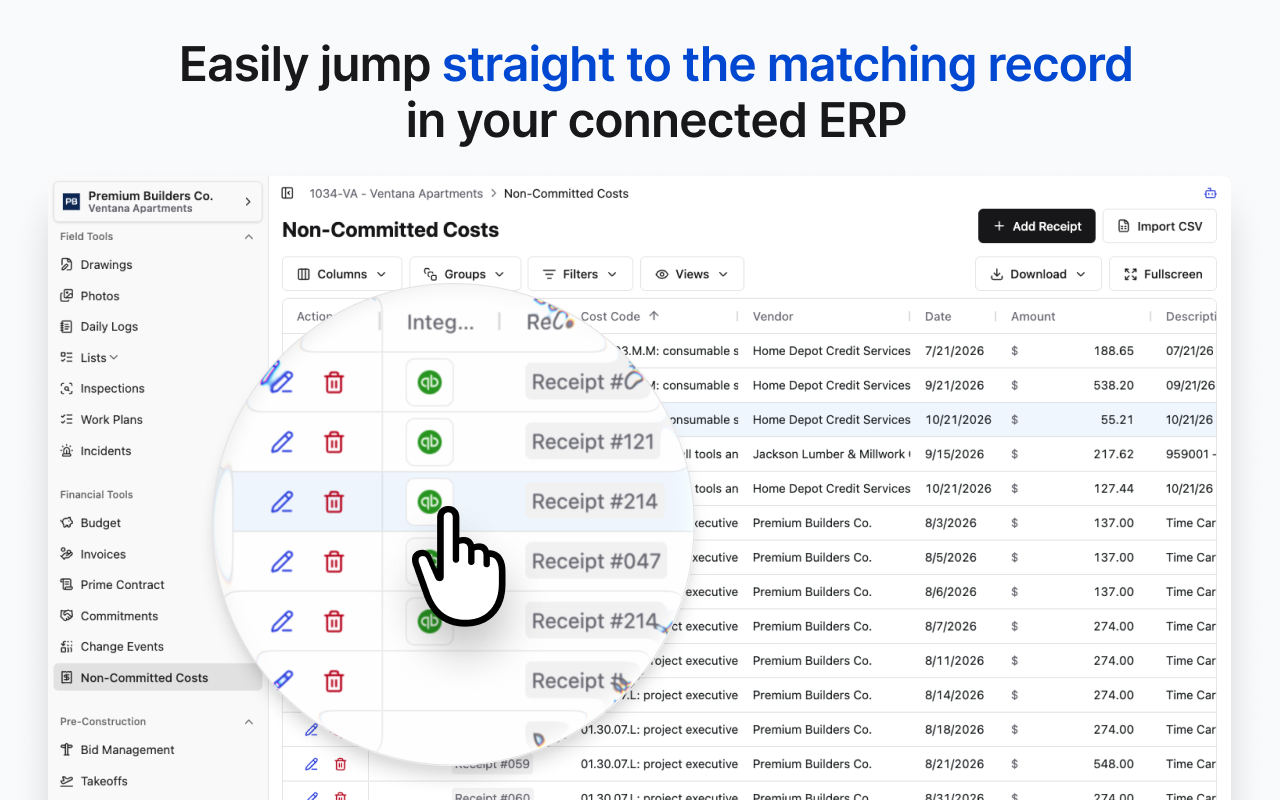
At Constructable, the only accounting ERP integrations we're interested in providing are robust, two-way integrations, because they provide the best user experience. Not only does the data flow without interruption, our integration framework also let us do other useful things like provide a button for every record that opens the matching record in your ERP software itself. That way, if you need to manually adjust something, or you just want to verify that it landed correctly, you don't have to go search for it in your accounting software.
User permissions and role-based access in construction software
Role-based access sounds administrative until you're three months into a deployment and your subcontractors can see your committed contract values, or your field crews can't access the drawings they need because permissions weren't set up before go-live.
Most construction software organizes access across two layers: a role assigned at the organization level (admin, manager, field employee) and project-level overrides that adjust what a specific person can see or do on a given job. The organization role sets the ceiling; project overrides can restrict below it but rarely rise above it.
Where systems diverge is in how granular those roles get. Enterprise ERPs often support fully custom role configurations. Mid-market tools typically offer a fixed set of internal roles, which covers most GC workflows but creates friction when you need something specific, like a laborer who can log time but has no access to budget data, or a superintendent who can view committed costs but not execute change orders.
External collaborator access matters just as much. Subcontractors need enough visibility to submit invoices, track submittals, and upload lien waivers, but they shouldn't see your full budget or other subs' contract values. Systems like Constructable handle this with dedicated external roles (Subcontractor Office, Subcontractor Field, Consultant, Owner, and Bidder) that limit financial exposure by design, not manual configuration per project.
To make this concrete: in Acumatica Construction Edition, a superintendent can be configured with a role that grants read access to committed costs and approved change orders on their assigned projects, but no write access to the budget or contract values. That same role can be scoped to exclude other projects entirely, so a super on Job A can't browse Job B's financials. That kind of layered control, with the organization role setting the ceiling and project-level overrides narrowing it, is what keeps sensitive bid data off screens that don't need it. Systems that only offer a fixed "field user" bucket with no project-level scoping force you to choose between too much access and too little.
The practical test: run a subcontractor through their typical workflow and confirm what they can and can't see. Then do the same for a superintendent. If either requires a support call to configure correctly, budget that time across every new project.
How Constructable fits mid-size GCs who have outgrown basic tools but don't need full ERP
Most mid-size GCs searching for construction ERP software aren't actually missing an ERP. Their accounting already runs in QuickBooks Online or Sage Intacct. What they're missing is a connected system for drawings, RFI management, submittals, daily logs, change orders, and field collaboration that syncs back to those accounting tools without a six-to-twelve-month implementation and a consultant invoice to match.
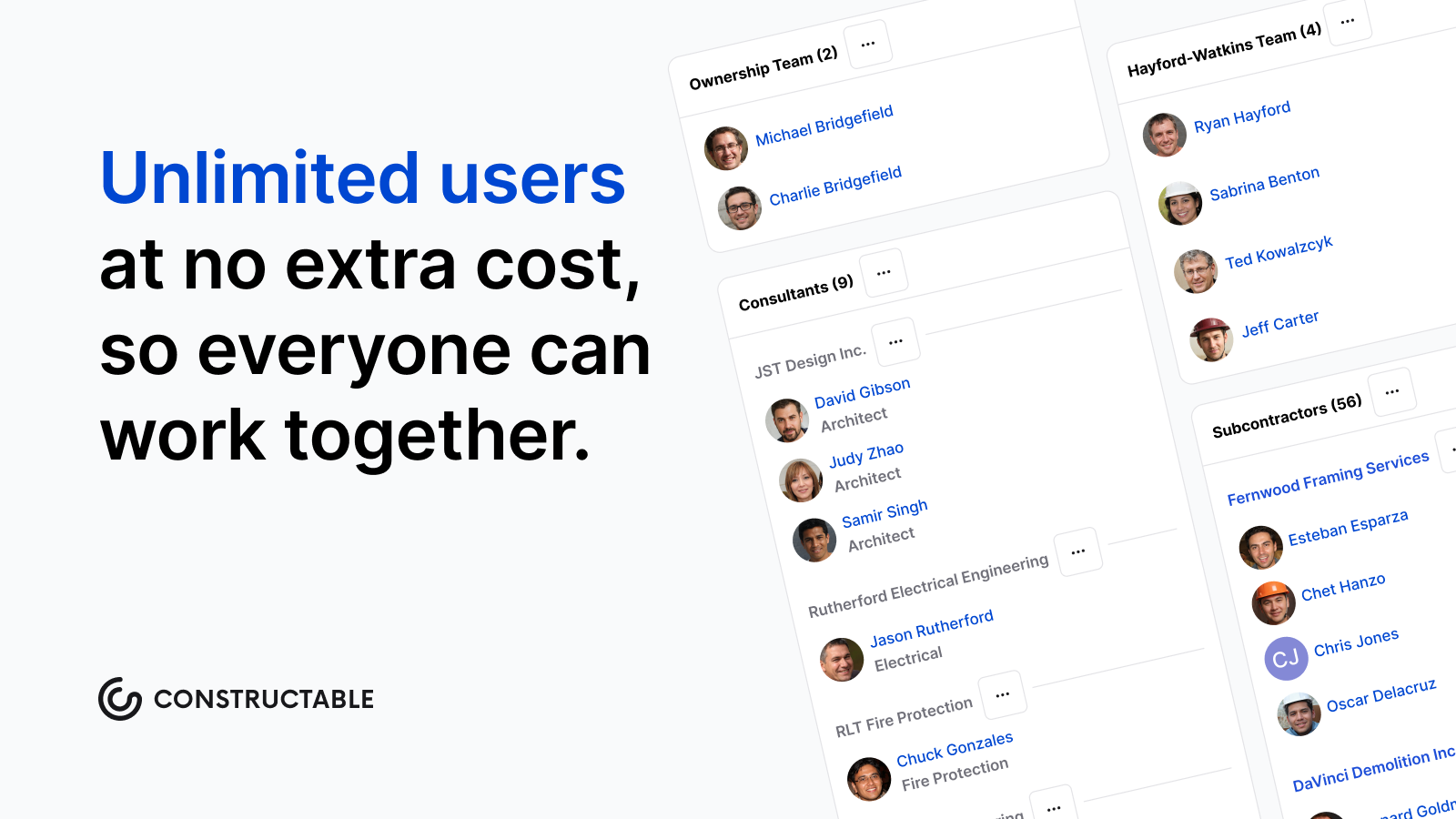
Constructable is built for that gap. It's purpose-built for commercial GCs in the $20M to $150M range: flat-fee pricing with unlimited users so costs don't escalate as you add subcontractors, consultants, and owners to projects, true two-way sync with QuickBooks Online, QuickBooks Desktop, Sage Intacct, Sage 300, and more, built natively into the system, and onboarding that averages under 21 days with no migration fees.
That accounting connection has credentials behind it. Constructable is an official Sage Intacct partner and a QuickBooks Online Silver partner, which matters when the real question is whether the link between your field data and your books will hold up month after month.
The right question for most mid-size GCs isn't which ERP to buy. It's whether connecting field execution to existing accounting through a purpose-built connected system removes more friction, faster, than replacing the accounting infrastructure you already trust. For teams where the books work but the jobsite data doesn't flow cleanly back to them, that answer is usually yes.
Final thoughts on choosing construction ERP software for mid-size GCs
The ERP evaluation process can expand until it consumes months of your team's time, so getting the scope right early matters. If your accounting is already working, the question worth asking is whether your field data flows back to it cleanly, because that's usually where job cost accuracy falls apart. A full ERP may be the answer, but for a lot of GCs it's more than what the problem actually requires. Talk with the Constructable team and figure out which bucket your situation falls into.
FAQ
What's the real difference between construction ERP software and construction project management software like Procore or Autodesk Forma Build?
Construction ERP software runs from a single database where job costing, billing, procurement, and field operations all read and write to the same source, so a subcontractor invoice automatically hits the job cost ledger and an executed change order updates the budget without anyone bridging the gap. Construction project management tools like Procore or Autodesk Forma Build handle drawings, RFIs, submittals, and daily logs well, but field activity and financial data still live in separate systems. Most mid-size GCs end up owning both and connecting them by hand, which is the monthly reconciliation problem construction ERP exists to solve.
What hidden costs come with implementing construction ERP software that vendors don't quote upfront?
The license fee is visible; the rest shows up after you've signed. For a $20M to $80M GC, implementation services (data migration, workflow configuration, and training) typically add 20 to 40% on top of the first year's license cost. These services are almost always sold separately at hourly or project rates. Budget the implementation as seriously as the license, and get the full scope in writing before comparing vendors on price.
Should a mid-size GC buy a full construction ERP system, or does a connected project management system with native accounting integrations cover what we actually need?
Most mid-size GCs searching for construction ERP software aren't actually missing an ERP. Their accounting already runs in QuickBooks Online or Sage Intacct. The real gap is a connected system for drawings, RFIs, submittals, daily logs, and change orders that syncs back to those accounting tools without a six-to-twelve-month implementation. The right question is whether connecting field execution to existing accounting through a purpose-built system removes more friction, faster, than replacing accounting infrastructure that already works.
How long do construction ERP implementations actually take, and why do vendor timelines so rarely match reality?
Most construction ERP vendors quote one to three months during the sales process; mid-market firms typically land at six to twelve months once the full scope becomes clear. The gap comes from four predictable sources: data migration is almost always messier than expected, workflow configuration takes longer because the system has to match how your team actually approves invoices and routes change orders, training is routinely underestimated for field staff, and change management (getting PMs, supers, and accounting to actually use the new system instead of reverting to spreadsheets) is the part that kills timelines most often.
What does a true two-way accounting sync mean in construction software, and why does it matter more than a one-directional integration?
A true two-way sync automatically writes changes from either system back to the other, using executed documents as the trigger, so no one manually accepts exports or re-imports updated records between your project management system and your accounting tool. A one-directional connection keeps a manual gate in place, and that gate is where billing delays and duplicate entries live. If your controller runs Sage Intacct and a vendor's connection routes through third-party middleware with its own contract and support relationship, you've added a separate failure point between your project data and your books; size up that gap before the demo, not after.