Change Orders in Construction: What They Are and How to Manage Them in March 2026
Learn what change orders are in construction and how to manage them in March 2026. Get strategies for tracking, pricing, and approving changes faster.
Most teams treat a change order like it's just a form you fill out when scope changes. You price it, draft it, send it for signatures, and hope it gets approved before you're too far down the road. But what actually slows your project down isn't the complexity of the change itself. It's that you're documenting it weeks after it happened, piecing the story back together from scattered text threads and photos buried on someone's phone. By the time you sit down to write it up, you've forgotten the details that matter. Your subs don't have context. Your owner's looking at a number with no backup. The disconnect between when change happens and when you finally get it approved is where you lose time and money.
TLDR:
- Change orders modify your contract's scope, cost, or timeline after signing; over 75% of projects include them
- Late documentation averages 24 days between field work and formal requests, causing lost context and delayed payment
- Change events track the initial trigger, while change orders handle formal approvals across multiple contracts
- Constructable groups related change orders under parent events with built-in e-signing and automatic cost tracking
What Is a Change Order in Construction?
A change order is a written modification to your original construction contract. It updates one or more things: scope, cost, or timeline. After all parties sign, it becomes part of your contract.
Over 75% of construction projects include change orders, with the average project seeing cost increases of 10-15% from changes alone. Change order costs can account for 10-15% of the contract value, and a higher frequency of changes can reduce productivity by 10-30%.
Most teams treat change orders like one-off paperwork: a request comes in, you price it out, draft a document, collect signatures, and hope for approval before work begins. Good construction management software can completely change this workflow. But a change order is the end result of a longer chain of events that includes the request itself, pricing, review, negotiation, and routing.
When you handle each change order as a separate file instead of a connected sequence, you lose context on what triggered it, who signed off, and how it impacts your subs and budget. Modern tools keep all this information connected.
Common Types of Change Orders in Construction
Change orders generally fall into three categories based on how they affect your contract:
| Trigger Category | What Happens | Common Causes | Example |
|---|---|---|---|
| Design Gaps or Errors | Incomplete or conflicting plans require adjustments | Missing details, conflicting drawings, specs that don't match field conditions | Structural drawings show beam depth that conflicts with MEP routing, requiring redesign |
| Unforeseen Site Conditions | Hidden conditions discovered during construction | Contaminated soil, unmarked utilities, unexpected rock or groundwater | Excavation reveals underground storage tank not shown on site surveys, adding $38K for removal |
| Owner-Initiated Changes | Client requests modifications to scope or materials | Upgraded finishes, reconfigured spaces, added features, value engineering | Owner upgrades from standard to premium finishes, adding $45K to contract |
| Trade Coordination Conflicts | Systems clash in ways drawings didn't anticipate | MEP conflicts, ceiling height issues, access problems for maintenance | HVAC ductwork interferes with electrical conduit runs, requiring rerouting and material changes |
Most projects see a mix of these triggers, sometimes multiple issues hitting at once. The key is catching them early. When you spot something that doesn't match the drawings or hear the owner mention a change in passing, document it right then. Early documentation makes pricing easier because the details are fresh and your subs can provide accurate numbers. Once you've logged what triggered the change, the approval process stays the same, no matter which category caused it.
Why Change Orders Slow Projects Down
Change orders don't slow projects because they're complex. They slow projects because of how most teams manage them.
Late documentation is the first problem. Work happens today, but you don't write it up for weeks.
The average time between completing work and submitting a change order request is 24 days when working manually. By then, you've forgotten details and lost receipts.
Missing context makes pricing harder. The initial request lives in an email thread. Photos are on someone's phone. The scope conversation happened over text. When you sit down to draft the change order, you're hunting across six places to rebuild the story. When changes aren't properly documented, their impacts compound quickly.
Back-and-forth approvals sit in inboxes because there's no clear workflow. You email the sub, wait three days, email the owner, wait five more, then chase signatures. No one knows whose court the ball is in.
Disconnected systems force you to enter the same line items twice: once in your change order doc, again in your accounting software. Every handoff is a chance for errors or delays.
A Better Way to Manage Change Orders
The fix isn't better templates or faster approvals. It's tracking changes from the moment they show up, not weeks later when you finally get around to the paperwork.
When you spot something in the field that's going to cost time or money, log it right then. Attach photos, note the location on your drawing, and link the people who need to see it. That entry becomes the source of truth as you move from observation to pricing to formal approval.
Every conversation, markup, and line item stays connected to the original issue. Your project manager sees what triggered it. Your subs know what was agreed to. Your owner has full context when they review pricing. Drawing-centric collaboration workflows keep everyone on the same page.
No hunting through email to piece together what happened; no duplicate data entry between your change order doc and your budget. One record, updated as it moves through your workflow, visible to everyone who needs it.
Change Events vs Change Orders
A change event is the initial trigger when the project scope, conditions, or requirements shift. Document it immediately whenever something changes, before pricing or approvals occur. A single change event can affect multiple contracts in your job.
A change order is a formal contract modification with finalized pricing and scope details. It's what gets sent for signature once you've worked through the numbers. A single change event may generate multiple change orders if the issue affects both your prime contract and your subcontractor agreements.
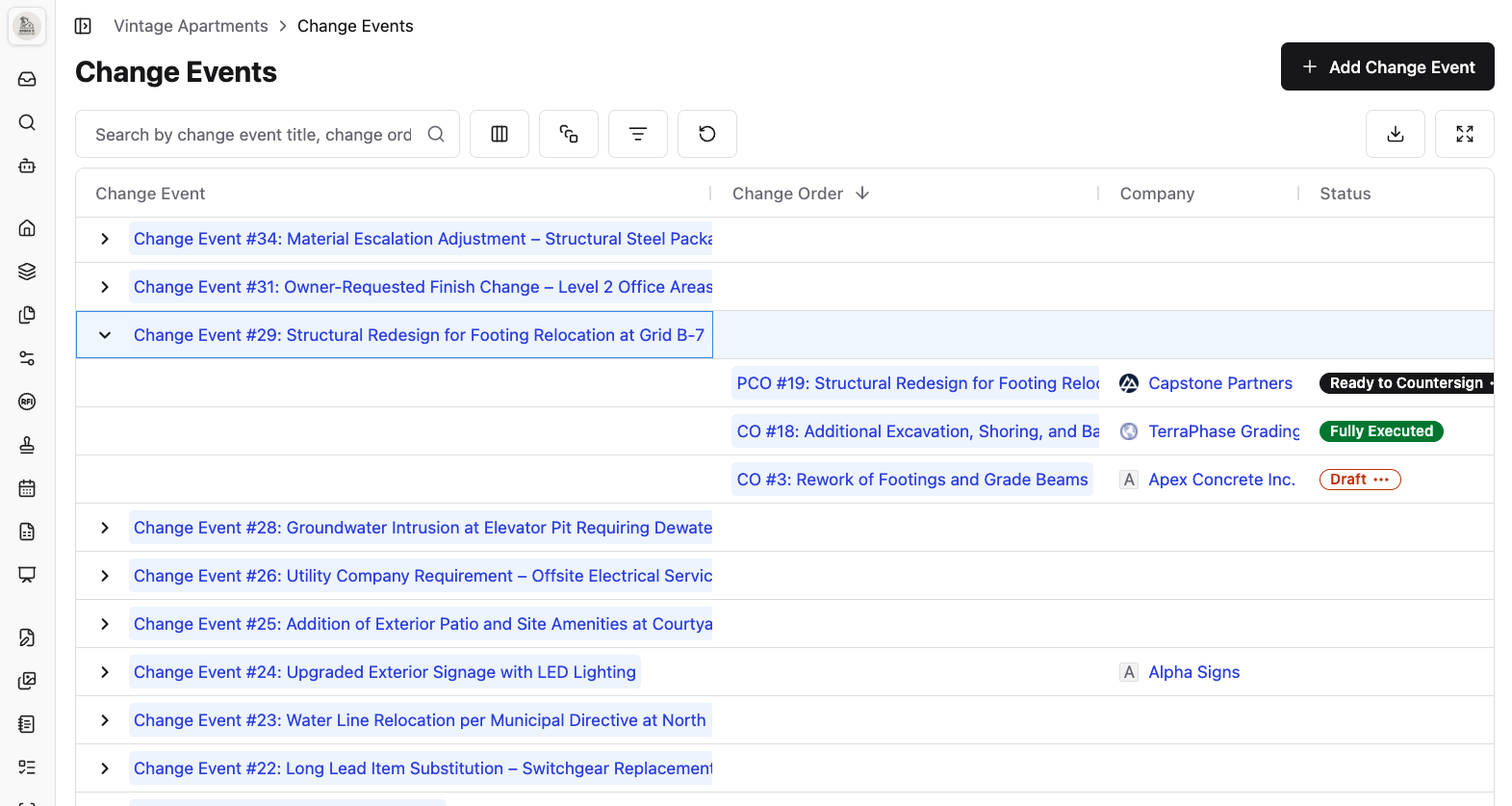
Constructable keeps all Change Orders grouped under their parent Change Events
Keeping change orders grouped under their parent event preserves the full context. Field-to-office documentation keeps everything connected from the jobsite to the back office. When your electrician's pricing is ready, you can reference those line items for the prime contract version without rebuilding cost breakdowns or re-entering the same information across multiple documents.
How Construction Software Improves Change Order Management
Construction software with field management features cuts the time between when a change happens on-site and when you actually get paid for it. Your project data, field photos, drawing markups, RFI threads, and cost breakdowns all live in one place, ready when you need to price the work or document what happened.
E-signatures move approvals from weeks to days. Send it out, get notified when it's signed, and route it to the next person. No scanning, no trips to the office, no guessing if it's buried on someone's desk.
Cost tracking connects each change order to your budget and commitments without re-entering numbers. Line items update where they need to go, and your running total reflects what's been approved in real time.
Your superintendent sees what's been signed off. Your subs see their change orders tied to the events that triggered them. Your owner gets a clear view of what changed and why, without having to chase down paperwork.
Managing Change Orders With Constructable
We built change events and change orders to fix the disconnect between when a change happens and when you document it.
Create a change event the moment you spot something that will affect the scope or cost. Add context like photos, descriptions, and attachments. Then build your change orders underneath it. If the same issue hits your electrical sub and your prime contract, both change orders live under one event, so the full story stays intact.
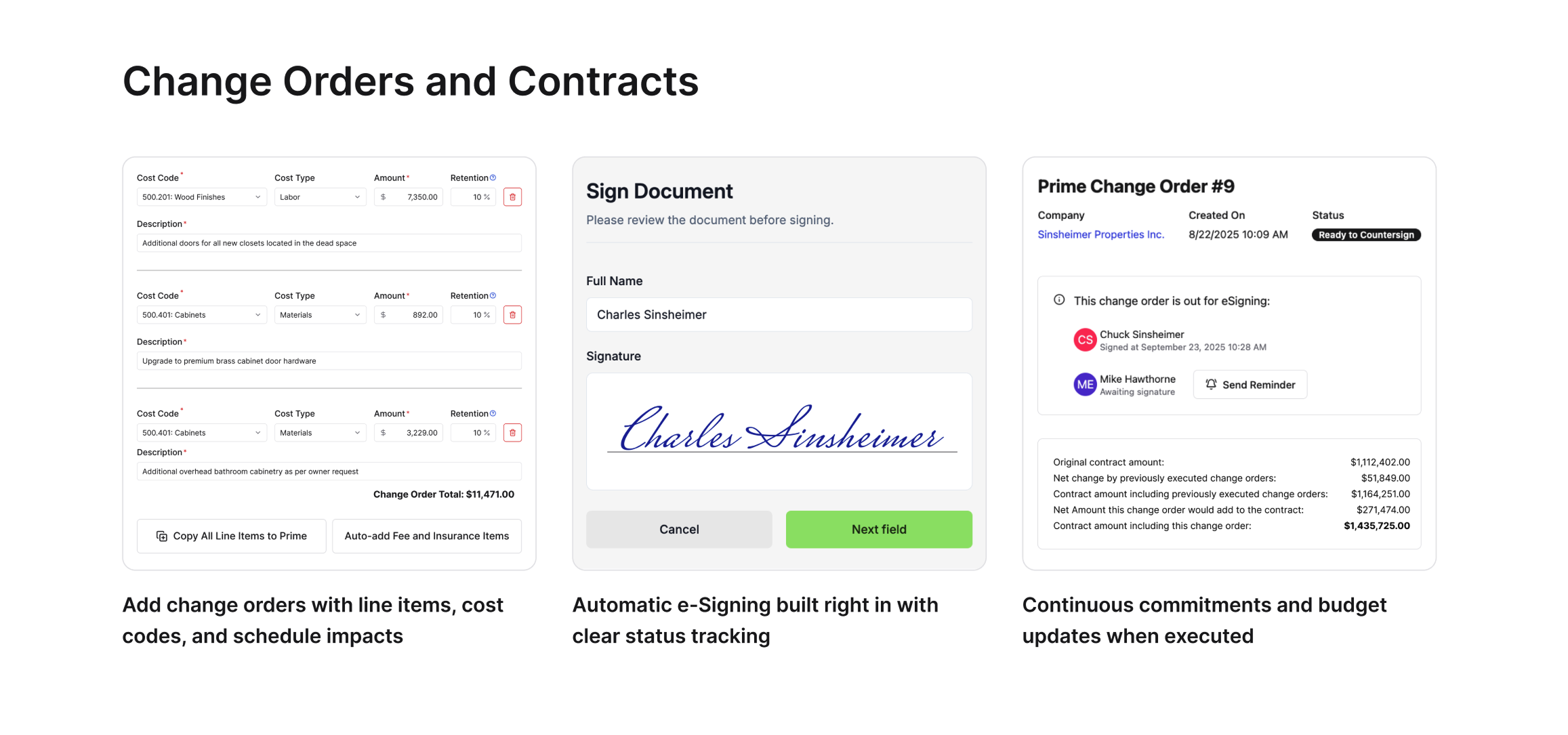
Line items auto-fill from the parent event. No re-entering descriptions or cost codes across multiple documents. Company View shows you exactly where each change order sits: draft, in progress, or executed. You know whose court it's in without opening six different files.
Send for e-signature directly or download as a PDF if you're working with someone who wants paper. Either way, everything stays linked back to what triggered it and keeps the work moving without making you hunt through email threads or rebuild pricing from memory three weeks later.
Final Thoughts on the Change Order Process
Most teams lose time and money because they treat change orders as separate files rather than as connected events. Track change orders in project management from the moment something changes on site, and you'll stop hunting for context when it's time to price the work. Keep the full story intact, your approvals will move faster, and you'll actually get paid for the work you're doing.
FAQ
What's the difference between a change event and a change order?
A change event is what you create the moment something changes in the field: unforeseen conditions, design gaps, or owner requests. A change order is the formal contract modification with final pricing that gets signed. One change event can generate multiple change orders if the issue affects both your prime contract and several subs.
How long does it typically take to submit a change order after the work happens?
When working manually, teams average 24 days between completing work and submitting the change order request. By then, you've lost details, misplaced photos, and forgotten the full context. Logging changes immediately when they happen cuts this down to days instead of weeks.
Can I use the same pricing across multiple change orders?
Yes. When you build change orders under a change event, line items and descriptions auto-fill from the parent event. If the same issue hits your electrical sub and your prime contract, you reference those numbers without re-entering cost codes or descriptions across multiple documents.
Why do design errors cause so many change orders?
Incomplete or inaccurate design documents drive roughly 40% of all change orders. Missing details, conflicting plans, or specs that don't match field conditions force you to stop, reprice, and adjust scope. The earlier you catch and document these gaps, the faster you can get approvals and keep work moving.
Do I need separate software for e-signatures on change orders?
No. Send change orders for e-signature directly from your project management system, or download as a PDF if someone prefers paper. Either way, the signed document stays linked to the original change event, so you don't lose track of what triggered it or where it sits in the approval process.