Comparing Sage Intacct Integrations for GCs (Oct 2026)
Mid-size GCs should compare Sage Intacct sync scope and pricing before committing to a connector this October 2026.
Two systems that were never built to share one record will drift apart, and your close is where it shows. Even after setup, an accounting approver queue sits between every financial export and Sage, owner invoices can skip the connector entirely, and bringing an in-progress job onto the connector often calls for paid services. That's why a Sage Intacct integration is worth a closer look before you commit. Here's how the options really differ.
TLDR: Procore's Sage Intacct connector moves budgets, commitments, invoices, change orders, and projects through an approver queue, so a designated person has to manually accept every export, which adds a round of double-entry at close. Owner invoices don't cross the connector in either direction, and bringing an open or in-progress job onto the integration requires a paid professional services engagement. Autodesk Forma's Forma Build reaches Sage Intacct through Agave, a third-party connector sold under its own contract, so that pairing adds a second vendor to the accounting handoff. Constructable ships a two-way Sage Intacct sync that moves all of that automatically, with no separate middleware, onboarding under 21 days, and no migration fees under its flat-fee pricing. Procore ties cost to volume plus per-seat Sage licensing; the flat-fee model tends to win above $20M in annual volume.
How the Procore and Sage Intacct integration works
Run a commercial job long enough and the split becomes familiar. Your project data lives in Procore, where the team logs commitments, invoices, and change orders. Your books live in Sage Intacct. At month-end, the two have to agree, and getting them to agree is where most of the work hides.
In 2021, Procore and Sage teamed up to launch the Procore and Sage Intacct Construction integration, a cloud-to-cloud connector that passes project financial data between the two systems. Budgets, commitments, invoices, and change orders move across the link so the same figures show up on both sides.
The connector runs on a documented sync map with a long list of defined rules governing what moves, in which direction, and when. Most records flow one direction on a scheduled basis instead of updating live, so a change logged in Procore shows up in Sage Intacct on the next sync cycle, not the moment it's entered. Each data type also has to be mapped before anything moves: cost codes, projects, and vendors have to line up on both sides, and that mapping is set during implementation instead of being configured on the fly. When a record falls outside the mapped rules, it stays put until someone squares it up by hand.
How Autodesk Forma Build handles Sage Intacct integration
Autodesk Forma, which many teams still know as Autodesk Construction Cloud, covers Sage Intacct through a partner connector. Forma Build, the project execution product inside it, connects to Sage Intacct through the Sage Intacct Connector by Agave, which Autodesk lists in its partner directory. Autodesk's own ERP integration series describes Agave as the integration layer between Forma Build and construction ERPs, so this is the standard route, not a workaround.
Agave runs as its own cloud app. You create an Agave account, log in to Forma Build and Sage Intacct inside it, pick the data objects to share, and set how often each one syncs, from manual runs to hourly. Each object moves in one direction that you choose. Based on Agave's field mapping, vendors, cost codes, projects, estimates, and prime contracts come in from Sage Intacct, while subcontract change orders, subcontractor payment applications, owner change orders, and owner payment applications export out to it. Sync logs show each run so someone can trace a failed record.
For a team already standardized on Autodesk for drawings and design coordination, that is a reasonable setup, and the coverage is broad: commitments, subcontractor invoices, change orders, prime contracts, and owner billings all have a defined path. The catch is structural. Agave is a separate company with its own contract, onboarding, support channel, and renewal, so the handoff between project and books sits with a second vendor alongside Autodesk and Sage. That makes it another middleware layer, and another party to call when a record fails.
On cost, Agave prices on four factors: the systems being synced, the number of companies, the modules you choose, and how far your needs depart from its defaults. It does not publish rates, so the number comes from a quote. Plan for it as its own line item, separate from your Autodesk licenses.
How Constructable approaches Sage Intacct integration
Constructable takes a different path to the same problem. Constructable is an official Sage Partner, and it's one connected system built for mid-size general contractors in the $20M to $150M volume range, where financials, drawings, RFIs, submittals, and daily logs all share the same project record. The Sage Intacct integration is a true two-way sync maintained by the same team that builds everything else, running on that same data layer instead of a separate connector stitched in later.

That design choice matters at month-end. Financial data moves automatically between Constructable and Sage Intacct without a middleware layer to license, configure, or pay for during implementation, supporting real-time project cost and commitment visibility across both systems. The sync moves all relevant data on its own, including prime contract data that often gets left behind in other setups, a shift reflected in why Clear Group left Procore:
What each integration moves between systems
Both integrations move the core financial records a contractor needs tied out at close. The scope difference shows up at the edges, particularly with prime contract data.
| Data type | Procore + Sage Intacct | Forma Build + Agave + Sage Intacct | Constructable + Sage Intacct |
|---|---|---|---|
| Budgets | Syncs | Syncs (Sage Intacct estimates import into Forma Build budgets) | Syncs |
| Commitments | Syncs | Syncs (purchase orders and subcontracts) | Syncs |
| Invoices | Syncs | Syncs (subcontractor payment applications export to Sage Intacct) | Syncs |
| Change orders | Syncs | Syncs (subcontract change orders export to Sage Intacct) | Syncs |
| Prime contract data | Syncs (import from Intacct only; later edits require manual refresh and re-import) | Syncs (prime contracts import from Sage Intacct; owner change orders export back) | Syncs (two-way automatic; creates and updates SOV lines) |
| Owner invoices | Not supported (listed as unsupported in Procore docs) | Owner payment applications export to Sage Intacct AR | Imported from Sage AR automatically; updates and deletes when Sage does |
| Open / in-progress jobs | Require paid professional services to bring over | Not covered in Agave's public documentation; confirm with Agave | Imported from existing Sage projects during onboarding |
| Who maintains the sync | Procore's connector, with partner-side configuration | Agave, a third-party vendor under a separate contract | Constructable, the same team that builds the rest of the system |
The workflow differences show up in how each system handles the details. On Procore, subcontractor invoices are entered in Procore and pushed to Sage Intacct only after an accounting approver accepts the export. On Constructable, invoices are posted in Sage Intacct first and pulled into the project record, with GL lines already represented by those bills excluded so costs don't get counted twice.
Prime contract data now syncs through Procore's Sage Intacct integration, but the import runs one direction, from Sage Intacct into Procore, and later edits need a manual refresh and re-import to carry over. Constructable's sync creates and updates prime contracts and schedule of values lines automatically in both directions.
Setup, middleware, and implementation cost
Standing up the Procore and Sage Intacct integration involves more than the software license. The quoted price covers the software, but the full cost picture also carries a Construction subscription charge, implementation work, and partner-side configuration for jobs already open. Many contractors end up hiring third-party consultants to set up the connection, then stay through the first month-end close to confirm the numbers tie out.
Forma Build customers add Agave on top of their Autodesk licenses. Agave says Agave's onboarding timeline typically takes 4 to 8 weeks. Agave's documentation also says the connector needs Sage Intacct's Construction Accounting module and a separate Web Services license, which Agave's documentation lists at $2,500 per year for 100,000 requests per month.
Constructable sits on the other side of that math. The Sage Intacct integration comes with the system, with no separate middleware to license and no additional implementation fee. There is simply a flat cost for the use of the Constructable Sage Intacct Integration, added to the monthly price of your software package. Contact us for more details.
Open jobs and historical data
Procore states that projects already in progress, or created before the integration is connected, can't be synced, and that bringing them over through professional services is an additional fee. Commitments also can't be imported from Intacct into a Procore project, so subcontracts already written in Sage don't come across to the job.
Constructable imports existing Sage projects during onboarding and can pull purchasing documents back in as subcontracts and purchase orders. Each flow carries its own begin-syncing date to limit how much history comes across, and older records can still be linked during onboarding.
Prime contract sync and reconciliation
Procore added prime contract import from Sage Intacct and prime change order export back to Sage in mid-2024, so the connector is no longer missing that piece outright. The friction now shows up in how the sync behaves day to day, not in whether it exists.
Prime contracts import from Intacct only, and any edit made after that first import needs a manual refresh and re-import. That re-import won't run if the contract is unapproved, the job isn't synced, the same contract was attached to two Procore projects, or there are no new unsynced lines to pull. Deleted schedule-of-values lines aren't detected at all; someone has to contact Procore's ERP support team to clear those out. Prime change orders carry their own gap: the export only sends revenue, so it doesn't update the Sage budget estimate, and any estimate change has to be re-entered by hand as a separate budget change. New prime change order lines also need the accounting approver to manually assign a Sage contract item ID, and most punctuation gets rejected in those fields.
Constructable takes a different approach on the owner side. Project contracts and contract lines create and update prime contracts and schedule-of-values lines in Sage on their own, and executed prime change orders push straight to Sage project change orders. Lines that exist in Constructable but haven't landed in Sage yet get created there automatically, and deletion stays off by default but can be turned on per flow for teams that want it.
Owner invoices and month-end billings
Procore's Sage Intacct documentation lists integrated owner invoices and related payments as unsupported, and the connector's data map has no owner-invoice row. If pay apps live only in Procore, job-to-date billings in Intacct come up short, and over/under billing entries built from those figures are wrong at close.
Constructable imports posted, partially paid, and paid Sage AR invoices onto the project record, then updates or deletes them when Sage does. Owner invoices aren't pushed from Constructable into Sage AR, so Intacct stays the billing source, but posted owner billings show up on the project automatically. On Procore's connector, owner invoices don't cross in either direction.
The accounting approver queue
Procore's connector requires a designated accounting approver who must accept every export before data leaves Procore for Sage. That queue covers budgets, commitments, change orders, subcontractor invoices, companies, and projects, beyond just prime contracts.
At export, this person must manually re-enter or confirm the Sage document ID, bill number, and bill description. Commitment titles must be 35 characters or fewer, a start date is required, and change order titles and descriptions carry hard character limits that reject most punctuation. That re-entry is the manual double-entry this post describes, and it lives inside the normal workflow, not merely at unusual data boundaries.
Constructable uses executed commitments and change orders as the gate instead of a manual approver queue. Each sync flow can be turned on, paused, or given its own begin-syncing date without touching the others. Record-level failures stay visible as an error that can be retried.
Cost code structure and multi-entity setups
Procore's connector treats cost codes as a format contract. Codes must be sectioned, follow one tier scheme and one delimiter style, carry unique names, have categories turned on, and sit on a standard cost code list. Custom WBS segments aren't supported, new codes have to be created in Intacct, and project-level code changes go through the accounting approver.
Multi-entity Intacct setups add more friction. Companies must be created at the top level or the connector won't see them, entity-level vendors are unsupported, and job costs aren't picked up across projects. Once a vendor is linked, address changes stop syncing, and vendor insurance never syncs.
Constructable takes Sage standard tasks and standard cost types as the cost structure and project tasks as the codes on each job, with no sectioned-code rule. A missing project task or cost type can be created in Sage straight from Constructable. For multi-entity companies, the sync can include private entity records, and outbound creates can be stamped with a Sage entity ID.
Here's a look at how things map between Constructable and Sage Intacct:
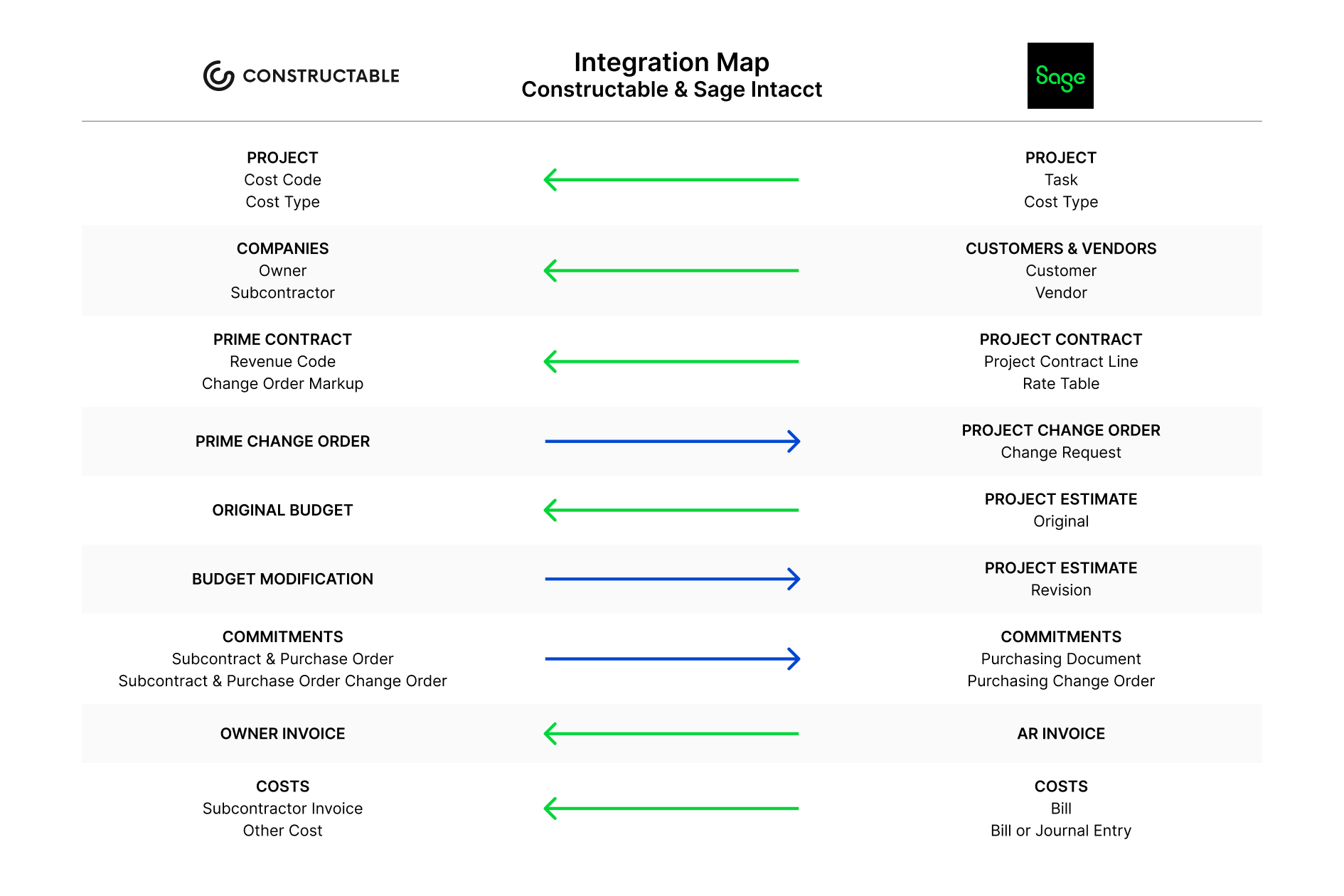
Pricing models and total cost of ownership
Procore ties cost to your construction volume or project size, billed to scale as revenue grows. The Sage Intacct side carries its own license, sold by the seat, plus a paid connector and partner setup fees. Those pieces stack into a total that moves with headcount and project count, a factor worth weighing when defining the best construction management software for your team.
Forma Build's Sage Intacct sync runs through a separate Agave subscription, priced on the number of systems, companies, modules, and customizations connected. Agave's documentation states that each additional Sage Intacct entity linked to an Autodesk hub counts as a new sync configuration, adding cost on top of the base subscription. Constructable keeps the Sage Intacct integration inside its flat fee, so that growth in entities or modules doesn't translate into a separate bill.
Constructable runs on a flat monthly or annual fee with unlimited users. No per-user charges, no overage fees, and the Sage Intacct integration is included instead of priced as a separate connector. Owners, consultants, subcontractors, and vendors all get access without changing the bill.
The crossover tends to land around $20M in annual construction volume. Above that, the flat model usually comes out cost-competitive against volume-based and per-seat pricing once every stakeholder is counted, a comparison worth running against other best all-in-one construction platforms.
Why integration depth matters for mid-size GCs
The quality of an integration shows up in places nobody budgets for. When project management and accounting sit in separate systems that don't agree, someone re-keys the difference by hand, and that re-keying carries a documented price. Research from PlanGrid and FMI found that rework caused by miscommunication and inaccessible information would cost the U.S. construction industry more than $31 billion in a single year.
On a mid-size GC's books, that abstraction turns concrete fast. It looks like a controller spending the back half of close tying out line by line, the same invoice entered twice across two systems, and schedule buffer burned chasing a prime contract total that won't tie, a pattern detailed in the Clear Group customer story.
None of that is a team failing at its job. It's a structural gap between two systems that were never built to share one record, as outlined in the JDL Construction customer story.
Choosing the right fit for your accounting workflow
Procore earns its place for large enterprise contractors running dedicated implementation teams with the internal resources to stand up a partner-configured connector. At that scale, the setup overhead is absorbed and volume-based pricing pencils out, a tradeoff detailed in the Holladay Construction Group customer story. Forma Build fits teams already standardized on Autodesk design and coordination tools who are comfortable adding Agave as a separate integration vendor in the accounting chain. That setup works for firms willing to manage an added vendor relationship to connect the accounting side.
The question changes for a mid-size GC standardized on Sage Intacct. One side offers a connector needing partner setup that may stall on prime contract sync. The other offers a two-way sync that ships inside the system, moves prime contract data on its own, and carries no separate implementation line.
Constructable was built for that second case: the $20M to $150M GC who wants the books to tie out without a project to get there.
If that sounds like your month-end, book a demo and see whether it fits your workflow.
Final thoughts on getting Procore, Constructable, and Sage Intacct to agree
The cost of a weak integration rarely shows up on an invoice; it shows up in the back half of your close, line by line. For a mid-size GC, the smart move is picking a sync that moves prime contract data without a partner-configured connector and a separate setup bill. Constructable ships that two-way Sage Intacct sync inside the system with no middleware to license. Walk through a demo and see if it fits how your team works.
FAQ
Does the Constructable Sage Intacct integration sync prime contract data better than the Procore Sage Intacct integration?
Teams switching off Procore have reported being unable to get prime contract syncing to work through Procore's Sage Intacct connector, which pushes that reconciliation back onto the controller at close. Constructable's two-way sync is built to move prime contract data on its own, alongside commitments, invoices, and change orders.
How does Autodesk Forma Build connect to Sage Intacct, and does it cost extra?
Forma Build connects to Sage Intacct through Agave, a third-party connector that syncs each data object in a direction you choose, on a schedule ranging from manual to hourly. Agave is sold under its own contract with quote-based pricing, and Agave's documentation adds a Sage Intacct Web Services license on top of that. Constructable's Sage Intacct sync comes with the system instead, with no separate middleware to license.
How much does the Sage Intacct integration cost with Procore, Autodesk Forma Build, and Constructable?
Procore's setup carries the connector license plus a Construction subscription charge, implementation work, and partner-side configuration, often involving third-party consultants. Forma Build customers add Agave as a separate subscription with quote-based pricing, plus a Sage Intacct Web Services license that Agave's documentation lists at $2,500 per year, and Agave's onboarding typically runs 4 to 8 weeks. With Constructable, the Sage Intacct integration comes with the system under a flat fee, with no separate middleware to license and no added implementation charge, and data migration and onboarding is typically completed in under 21 days.
When does Constructable's flat-fee pricing make more sense than Procore's volume-based model?
The crossover tends to land around $20M in annual construction volume. Above that, Constructable's flat model with unlimited users usually comes out cost-competitive against volume-based and per-seat pricing once owners, consultants, subcontractors, and vendors are all counted.
Which Sage Intacct integration is the right fit for my team?
Procore fits large enterprise contractors with dedicated implementation teams who can stand up a partner-configured connector and absorb the setup overhead. Forma Build fits teams already standardized on Autodesk design and coordination tools who are comfortable adding Agave as a separate integration vendor. Constructable was built for the $20M to $150M GC standardized on Sage Intacct who wants a two-way sync that ships inside the system and moves prime contract data without a separate implementation line or other middleware.