RFI Management in Construction: What Works in May 2026
Learn what works in RFI management for construction projects in May 2026. Cut delays, improve response times, and keep your project documentation organized.
Most RFI management workflows fall apart because your log, your drawings, and your email responses never actually meet in the same place. You write the question in one system, reference a sheet in another, and then copy the architect's answer back into a third spot, hoping nothing critical gets dropped. What works better is treating RFIs like they belong on the drawing itself, where the markups, responses, and version history stay together without you manually stitching it all back into context later.
TLDR:
- RFIs create a formal paper trail that protects you from absorbing costs that weren't yours to own
- The average RFI takes 9.7 days to get a response, and there are roughly 9.9 RFIs per $1M of project value
- Write RFIs with specific drawing references, one clear question, and a proposed solution to get faster answers
- Running coordination checks on your models before construction can reduce avoidable field RFIs before they happen
- Constructable pins RFIs directly to drawing sheets so questions, responses, and markups stay connected
What an RFI Is and Why It Matters to Your Projects
A Request for Information (RFI) is a formal written question submitted during construction when something in the project documents is unclear, incomplete, or contradictory. That could be a dimension that doesn't add up, a spec that conflicts with the drawings, or a detail the architect forgot to include. When those gaps appear on a live project, work stops until someone with authority weighs in.
The word "formal" carries real weight here. You're not texting the architect a quick question. An RFI creates a documented chain of communication that shows exactly what was asked, by whom, and what the answer was. That record is what separates a contractor who eats the cost of rework from one who has the paper trail to prove the mistake wasn't theirs to own.
Why the Paper Trail Matters
On most commercial projects, RFI volume runs higher than most teams expect. Each one is a potential scheduling risk if left unanswered. The documentation behind each RFI is what gives you standing in a dispute, strength in a change order conversation, and protection when an owner asks why the schedule slipped.
The Real Cost of RFI Delays
The average RFI response time is 9.7 days, and on a typical project, there are 9.9 RFIs for every $1M of construction value. On a $10M job, that's nearly 100 questions with an average wait of almost two weeks each; questions stack up fast.
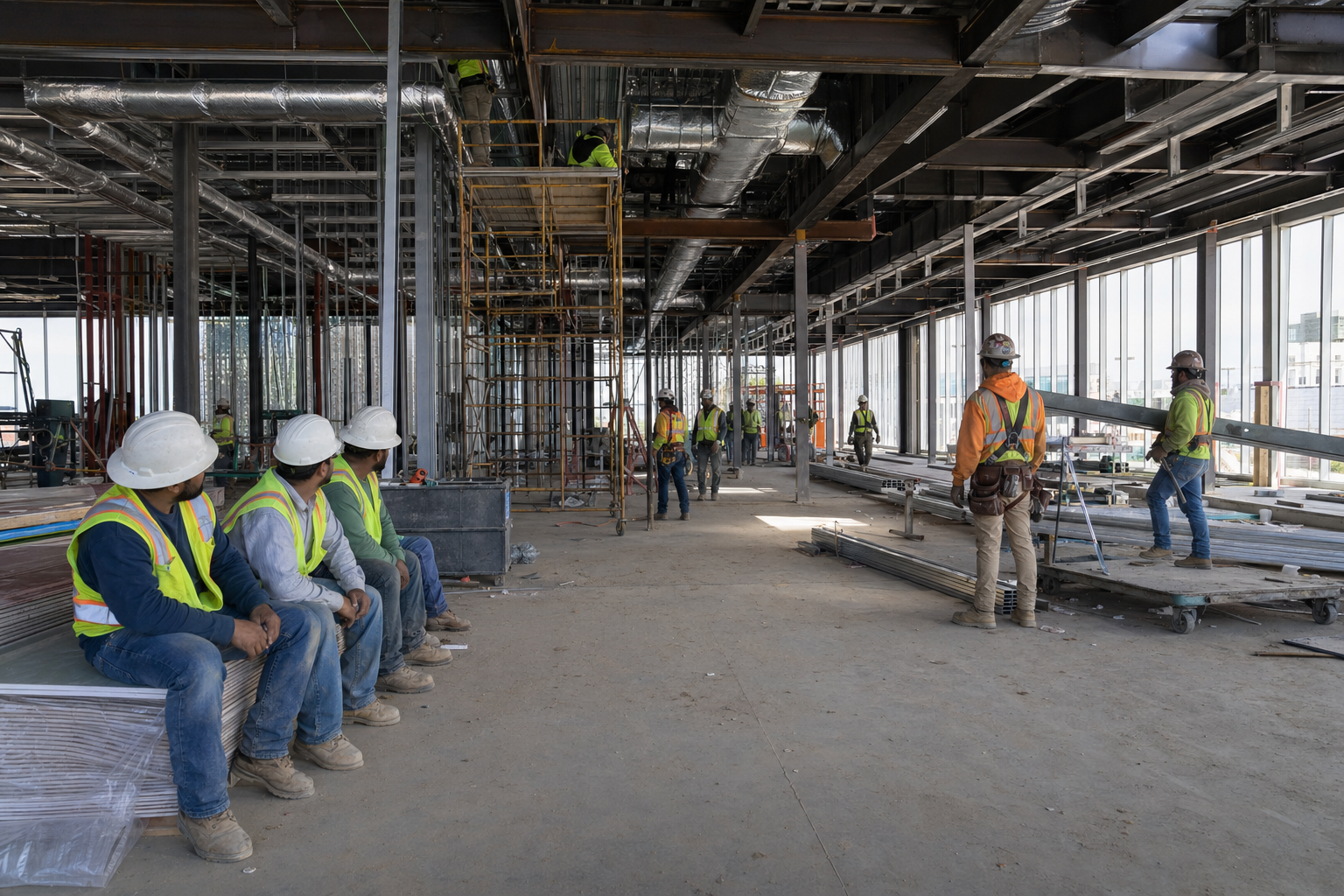
Here's what that actually looks like on a job:
- A subcontractor hits a conflict between the structural drawings and the MEP coordination plan. Work stops while they wait for an answer.
- The architect takes four days to respond. The sub has moved crews elsewhere.
- By the time the answer comes back, the schedule has shifted, and now three other trades are affected.
That one RFI didn't just cost five days. It cost a ripple of rescheduling, remobilization, and hard conversations with an owner who wants to know why the building isn't on schedule. When you multiply that across dozens of open RFIs on a single project, the math gets uncomfortable fast.
Common Types of RFIs You Will Encounter
Not every RFI is routed to the same person or resolved on the same timeline. Knowing the type you're dealing with saves real time on the backend.
- Design clarification RFIs surface when drawings conflict, dimensions don't add up, or a spec is too vague to act on. These go to the architect or engineer of record.
- Coordination RFIs come from clashes between disciplines, like HVAC ductwork running straight through a structural beam. These often require multiple design team members to weigh in before work can move forward.
- Constructibility RFIs question whether something is actually buildable as drawn. The design may be technically correct on paper, but the sequence or physical constraints make it impractical in the field.
- Site condition RFIs document when reality doesn't match the drawings: unmarked utilities, unexpected soil, or existing structures that weren't accurately captured.
Routing an RFI to the wrong party burns time you don't have. A constructibility question sent to the architect when it really needs the structural engineer just sits in the wrong inbox until someone catches the mistake.
| RFI Type | Typical Causes | Routes To | Average Resolution Time |
|---|---|---|---|
| Design Clarification | Conflicting dimensions between drawings, vague specifications that can't be built from, missing details on connection methods or finishes | Architect or Engineer of Record | 3-7 days depending on design team availability |
| Coordination | Clashes between disciplines like HVAC ducts running through structural beams, conflicting ceiling heights between architectural and MEP plans | Multiple design team members (requires coordination between architect, structural, MEP) | 5-10 days due to multi-party review requirements |
| Constructibility | Design is technically correct on paper but impractical to build due to sequencing constraints, access limitations, or material availability | Structural Engineer or Architect (may require contractor input) | 4-8 days, often requires field visit or shop drawing review |
| Site Condition | Unmarked utilities encountered during excavation, unexpected soil conditions, existing structure dimensions that don't match as-built drawings | Architect and potentially Geotechnical or Civil Engineer | 7-14 days, may require testing or field verification before response |
Writing RFIs That Get Answered Fast
A vague RFI is a slow RFI. When a reviewer has to guess what you're actually asking, they either request clarification or give a non-answer. Neither moves the job forward.
There are four things that separate RFIs that get answered quickly from ones that sit in someone's inbox:
- State the specific drawing or spec section you're referencing, instead of a general topic. Reviewers need to pull the right document before they can respond.
- Describe the conflict or gap in one or two sentences. If you need a paragraph, the RFI probably needs to be split into multiple submissions.
- Propose a solution when you have one. A suggested resolution gives the reviewer something to approve or redirect, which is faster than building an answer from scratch.
- Set a clear response date and explain why it matters to the schedule. Deadlines without context get ignored.
How to Track and Manage Your RFI Log
A good RFI log keeps every open question visible and assigned. Without one, RFIs slip through the cracks, deadlines get missed, and suddenly you're in a dispute over who knew what and when.
Your log should track, at minimum:
- The RFI number and date submitted, so nothing gets lost in the shuffle
- Who submitted it and who it's assigned to for response
- The current status (open, pending, answered, closed)
- The required response date and actual response date
- Any cost or schedule impact flagged by the response
Most teams start with a spreadsheet, which works fine for smaller jobs before moving to dedicated software. Excel or Google Sheets can handle the basics. The problem shows up on larger projects where you're juggling 200-plus RFIs across multiple subs, and the log stops being a tool and starts being a liability.
Whatever format you choose, consistency matters more than sophistication. A log everyone updates beats a fancy system nobody touches. Effective RFI process management depends more on consistent execution than on the specific tools you choose.
Reducing RFI Volume Before Construction Starts
The best time to cut RFI volume is before a shovel hits the ground. Projects that invest in thorough pre-construction coordination consistently see fewer clarification requests during construction, which means fewer delays and less back-and-forth eating into your schedule.
A few habits that make a real difference:
- Running coordination checks on your models before construction means fewer "this doesn't fit" surprises in the field, which are responsible for a large share of avoidable RFIs.
- Detailed scope packages give subcontractors fewer reasons to ask questions. Vague specs create RFIs almost automatically.
- Pre-construction RFI review sessions with the design team let you surface ambiguities early, when answers are cheap and changes don't blow up the schedule.
- Pulling historical RFI logs from past projects can show you where your specs tend to break down repeatedly, so you can fix them before they become a problem again.
None of this replaces a good RFI process once work starts, but it does mean your team spends less time managing paperwork and more time building.
When RFIs Connect to Change Orders
An RFI asks a question. A change order authorizes changes to scope, cost, or schedule. These are not the same thing, even though one often leads to the other.
When an RFI response reveals a scope that differs from what was bid, flag the potential change order before you act. Document the cost and schedule impact inside the RFI itself, not after the fact. If you proceed with work based on an RFI response without first capturing that impact, you've likely given up your right to recover those costs later. Reviewers rarely go back and retroactively approve expenses tied to a closed RFI.
Keeping both processes separate protects the contractor and the owner. You don't absorb work you were never paid to deliver. The owner doesn't get surprised by costs they never approved. That boundary, held consistently, is what keeps scope creep from quietly killing a project's budget.
How Constructable Connects RFIs to Your Drawings
Most RFI logs live in a separate location from the drawings they reference. That gap is where context gets lost.
In Constructable, we pin RFIs directly to drawing sheets. The question, the response, every markup, and every comment live together at the exact location on the plan. When you open an RFI in the drawing viewer, any markup you create is automatically saved to it. No copying, no cross-referencing, no reconstructing what was asked and why from three different email threads.
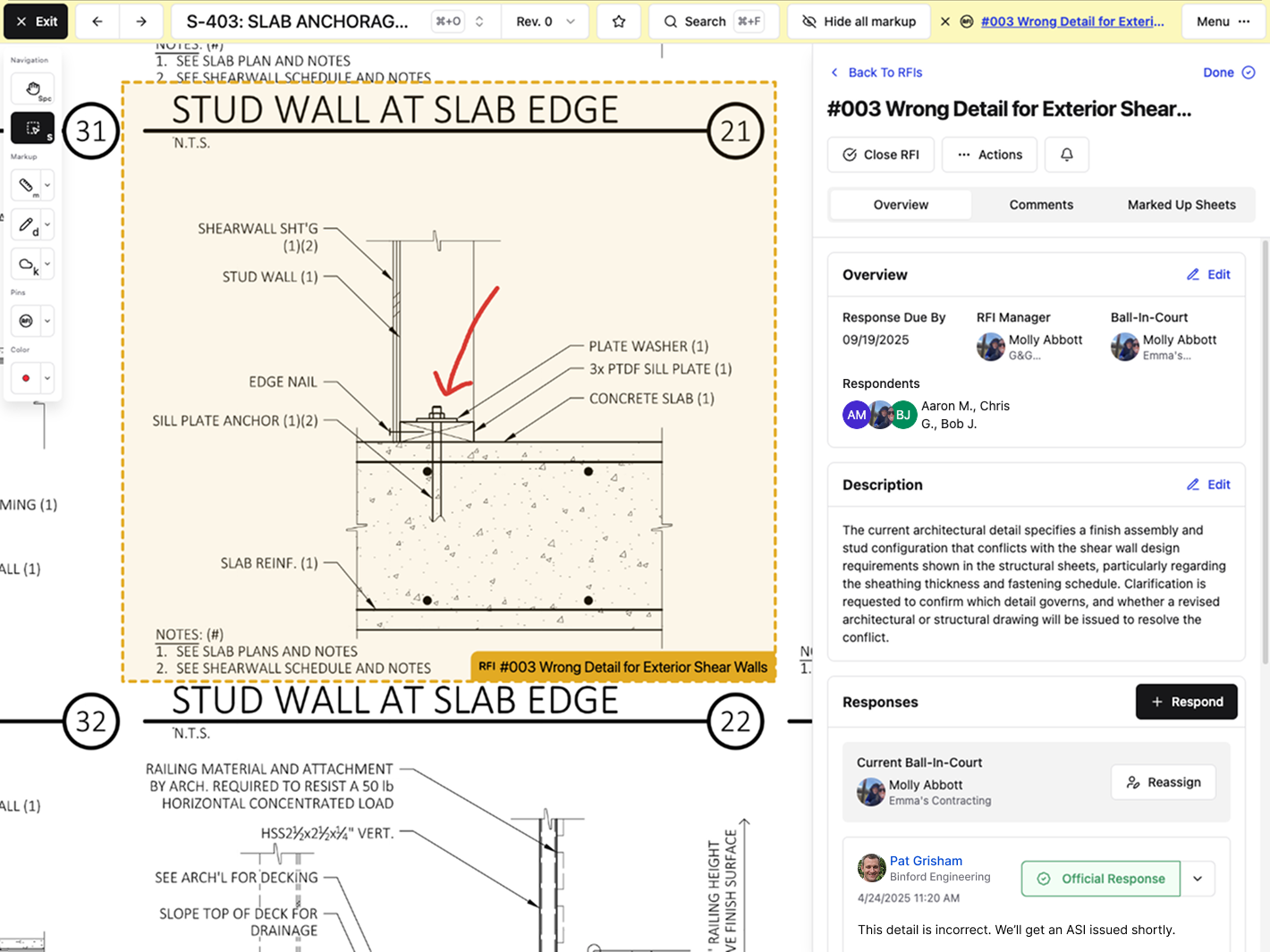
Ball-in-court tracking keeps responsibility visible at the top of the log, so nothing sits unanswered without someone knowing about it. When an RFI closes, you can export all tagged sheets to PDF and distribute them in one step.
RFI management works better when it lives inside the drawing workflow, not bolted on afterward as another place to check.
Final Thoughts on RFIs and Project Control
Good RFI management comes down to asking the right questions, tracking who owes you an answer, and making sure nothing disappears between your drawings and your inbox. You're going to have conflicts and gaps no matter how tight your docs are. What matters is how quickly you can document, route, and close them without losing context. If you want to see how Constructable handles this, we can walk you through it.
FAQ
What is an RFI in construction?
An RFI is a formal written question submitted during construction when project documents are unclear, incomplete, or contradictory, like a dimension that doesn't add up or a spec that conflicts with the drawings. It creates a documented chain showing what was asked, by whom, and what the answer was, giving you protection when disputes arise.
RFI management software vs spreadsheets?
Spreadsheets work fine for smaller jobs, but on projects with 200-plus RFIs, they become a liability instead of a tool. RFI management software keeps questions pinned directly to drawings, automatically tracks ball-in-court assignments, and prevents RFIs from slipping through the cracks when multiple subs are involved.
How do I reduce RFI volume before construction starts?
Run coordination checks on your models before breaking ground, write detailed scope packages that leave fewer questions unanswered, and hold pre-construction RFI review sessions with the design team to surface ambiguities early. Pull historical RFI logs from past projects to fix specs that repeatedly break down before they become problems again.
When should an RFI trigger a change order?
When an RFI response reveals a scope that differs from what was bid, flag the potential change order before you act. Document the cost and schedule impact inside the RFI itself, not after the fact, or you'll likely give up your right to recover those costs later.
What's the difference between design clarification and constructibility RFIs?
Design clarification RFIs surface when drawings conflict, or specs are too vague to act on. These go to the architect or engineer of record. Constructibility RFIs question whether something is actually buildable as drawn. The design may be technically correct on paper, but the sequence or physical constraints make it impractical in the field.