Critical Path Method (CPM) in Construction (November 2026)
Critical path method in construction, with a worked CPM example: forward pass, backward pass, total and free float, and how GCs keep the critical path current.
The owner's spec calls for a CPM schedule, the scheduler sends over a 600-line P6 file, and the superintendent wants to know one thing: if the roofer shows up a week late, does the building finish late? The critical path method answers that question, but only if someone on the job can read the logic and do the math. This guide works a full CPM example on a commercial shell building, with every number shown, so you can run the forward pass, the backward pass, and the float by hand once and read them on any schedule after that.
TLDR:
- The critical path is the longest chain of linked activities from the start of the job to the finish. It sets the shortest time the job can take, and any slip on it moves the finish date.
- You find it with a forward pass for the early dates, a backward pass for the late dates, and total float, which is late start minus early start. Activities with zero total float are critical.
- Total float is how far an activity can slip before it delays the job. Free float is how far it can slip before it delays the next activity. Total float is shared along a chain; free float belongs to one activity.
- The critical path moves. In the worked example, a 6-day roofing slip costs nothing, and a 12-day slip moves the finish from day 78 to day 80 and puts roofing on the critical path.
- Owner specs often require a CPM baseline and monthly updates with a narrative, usually under spec section 01 32 16, and they check for open ends, hard constraints, and long activities.
- Constructable shows Total Float on every activity, turns the critical path red on the Gantt, and compares the current plan against a saved baseline.
What is the critical path method in construction?
The critical path method (CPM) is a way to schedule a project from the logic between its activities. You list the work, give each activity a duration, and link each activity to the ones that must happen before it. The critical path is the longest chain of linked activities through that network. Because nothing on it can overlap, its length is the shortest time the whole job can take.
Every activity on the critical path has zero float. If one of them finishes a day late, the job finishes a day late, unless you recover the day somewhere else on the path. Activities off the critical path have float: room to slip without moving the finish date.
CPM came out of industry, not academia. Morgan Walker at DuPont and James Kelley Jr. at Remington Rand developed it in the late 1950s to plan plant construction and maintenance shutdowns. Construction picked it up within a decade, and it is now the standard way to schedule commercial and public work.
GCs use CPM for reasons that go beyond the field:
- Owner specs require it. Many commercial and most public contracts require a CPM baseline schedule and monthly updates as a submittal.
- Pay applications reference it. Owners often won't process a pay app until the schedule update for that period is in.
- Delay claims depend on it. A time extension request has to show that the delay hit the critical path. Our guide to construction delay types covers why critical and non-critical delays are treated differently.
- It tells you where to look. On a job with 400 activities, only a fraction are critical in a given month. Those are the ones the PM and superintendent watch every week.
Key CPM terms: activities, logic, ES, EF, LS, LF, and float
CPM has a small vocabulary. These are the terms you'll see in a spec, a P6 report, or a schedule review.
| Term | What it means |
|---|---|
| Activity | A piece of work with a duration, such as "Slab on grade, 4 days." |
| Duration | Working days to do the activity, on the activity's calendar. |
| Logic (links) | The relationships between activities. A predecessor comes before; a successor comes after. |
| Finish-to-start (FS) | The successor can start when the predecessor finishes. Most links are FS. |
| Early start (ES) | The earliest the activity can start, given its predecessors. |
| Early finish (EF) | ES plus duration. |
| Late start (LS) | The latest the activity can start without delaying the project finish. |
| Late finish (LF) | The latest the activity can finish without delaying the project finish. |
| Forward pass | Working left to right through the network to find every ES and EF. |
| Backward pass | Working right to left from the project finish to find every LF and LS. |
| Total float | LS minus ES. How far the activity can slip before it delays the project finish. |
| Free float | The earliest ES of its successors minus its own EF. How far it can slip before it delays any successor. |
| Critical path | The chain of activities with zero total float. |
| Near-critical | Activities with a little float, often 10 working days or less, that could become critical. |
| Constraint | A date imposed on an activity, such as Start No Earlier Than or Finish No Later Than. |
| Lag | A wait added to a link, such as 3 days between two activities. |
How to calculate the critical path, step by step
You can calculate a critical path with a pencil for a dozen activities. Software does the same math for a thousand. The steps are the same either way:
- List the activities. Break the work into pieces a crew or a sub can own, with a clear start and finish. Include procurement and submittals, not only field work.
- Set durations. Use working days. Base each one on crew size and production rates, not on the date you'd like it done.
- Set the logic. For each activity, ask what must finish before it can start. Every activity except the first needs a predecessor, and every activity except the last needs a successor.
- Run the forward pass. Start the first activity at day 0. For each activity, ES is the latest EF of its predecessors, and EF is ES plus duration. The last activity's EF is the project duration.
- Run the backward pass. Set the last activity's LF equal to its EF. Working backward, each activity's LF is the earliest LS of its successors, and LS is LF minus duration.
- Calculate float. Total float is LS minus ES. Free float is the earliest ES among an activity's successors minus its EF.
- Find the zero-float chain. The activities with zero total float, linked start to finish, are the critical path.
This guide uses the day-zero convention: the first activity starts at day 0, and EF = ES + duration. Some textbooks, and Primavera P6, count from day 1, where EF = ES + duration - 1 and each successor starts the next day. The arithmetic changes, but the critical path and the float do not.
CPM example: a commercial shell building worked by hand
Here is a single-story commercial shell building with 11 activities. Durations are in working days, and every link is finish-to-start.
| ID | Activity | Duration | Predecessors | ES | EF | LS | LF | Total float | Free float |
|---|---|---|---|---|---|---|---|---|---|
| A | Mobilize and site prep | 5 | None | 0 | 5 | 0 | 5 | 0 | 0 |
| B | Foundations | 10 | A | 5 | 15 | 5 | 15 | 0 | 0 |
| C | Underground plumbing and electrical | 6 | A | 5 | 11 | 9 | 15 | 4 | 4 |
| D | Slab on grade | 4 | B, C | 15 | 19 | 15 | 19 | 0 | 0 |
| E | Structural steel erection | 12 | D | 19 | 31 | 19 | 31 | 0 | 0 |
| F | Roofing | 8 | E | 31 | 39 | 41 | 49 | 10 | 10 |
| G | Exterior walls and storefront | 15 | E | 31 | 46 | 48 | 63 | 17 | 17 |
| H | MEP rough-in | 18 | E | 31 | 49 | 31 | 49 | 0 | 0 |
| I | Interior framing and drywall | 14 | F, H | 49 | 63 | 49 | 63 | 0 | 0 |
| J | Finishes | 10 | I, G | 63 | 73 | 63 | 73 | 0 | 0 |
| K | Punch list and closeout | 5 | J | 73 | 78 | 73 | 78 | 0 | 0 |
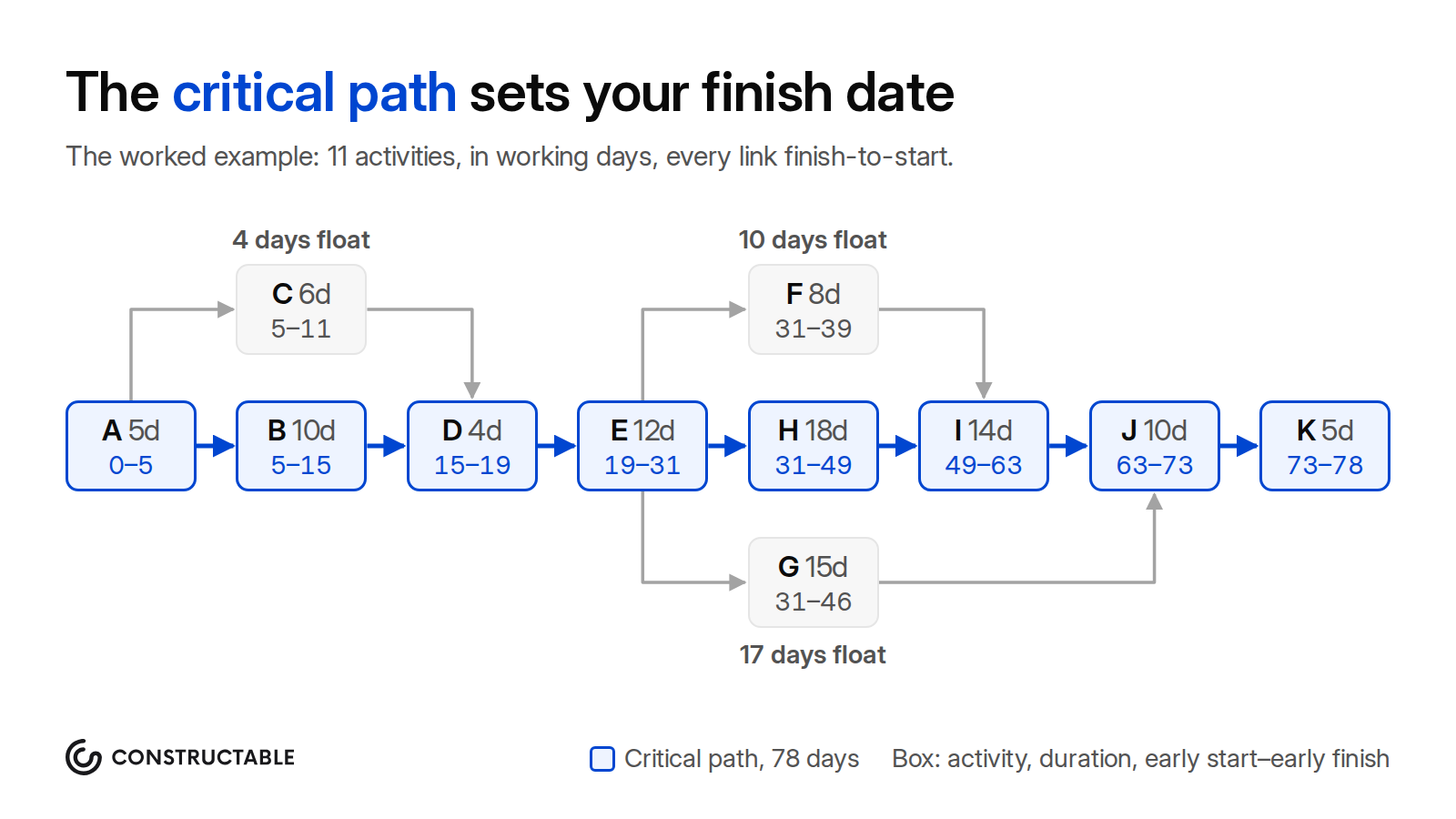
The critical path is A, B, D, E, H, I, J, K, and it takes 78 working days. Underground plumbing and electrical (C) is near-critical, with 4 days of float.
The forward pass
Most activities are simple: ES is the predecessor's EF. The ones worth working through are the ones with two predecessors, because that's where the forward pass makes a choice.
- Slab on grade (D) follows foundations (B, EF 15) and underground utilities (C, EF 11). The slab can't start until both are done, so ES is the later of the two: day 15. EF = 15 + 4 = 19.
- Interior framing and drywall (I) follows roofing (F, EF 39) and MEP rough-in (H, EF 49). ES is the later: day 49. EF = 49 + 14 = 63.
- Finishes (J) follows drywall (I, EF 63) and exterior walls (G, EF 46). ES = 63, EF = 73.
Punch list (K) finishes at 73 + 5 = 78. The project takes 78 working days.
The backward pass
Now start from the finish. K's LF is 78, so its LS is 78 - 5 = 73. Each activity's LF is the earliest LS among its successors.
- Exterior walls and storefront (G) has one successor, finishes (J), with LS 63. So G's LF is 63, and its LS is 63 - 15 = 48.
- Structural steel (E) has three successors: roofing (F, LS 41), exterior walls (G, LS 48), and MEP rough-in (H, LS 31). Its LF is the earliest of those: day 31. LS = 31 - 12 = 19.
- Mobilize (A) has two successors: foundations (B, LS 5) and underground utilities (C, LS 9). LF is 5, LS is 0.
The backward pass takes the earliest successor date for the same reason the forward pass takes the latest predecessor date. The schedule is only as fast as its slowest chain.
The float
Total float is LS minus ES:
- G: 48 - 31 = 17 days
- F: 41 - 31 = 10 days
- C: 9 - 5 = 4 days
- Every other activity: 0 days, so it's critical.
Free float for G is the ES of its successor, J (63), minus G's EF (46): 17 days. For C, it's D's ES (15) minus C's EF (11): 4 days. In this network, total float and free float match on every activity, because each non-critical activity is the only one on its side branch. The next section shows a case where they don't.
Total float vs free float
Total float and free float answer two different questions:
- Total float: how many working days can this activity slip before the project finish moves?
- Free float: how many working days can this activity slip before the next activity has to move?
Free float is never more than total float. When an activity's free float is used, nobody else notices. When its total float is used, every activity after it on that chain loses float too.
Take exterior walls (G) from the example, with 17 days of total float and 17 days of free float. Now split it into two activities: wall framing and sheathing (G1, 8 days), then storefront and glazing (G2, 7 days), linked finish-to-start. The total is still 15 days, and the chain still feeds finishes on day 63.
- G2 runs from day 39 to 46 and must finish by 63. It has 17 days of total float and 17 days of free float, since nothing after it starts until day 63.
- G1 runs from day 31 to 39, and G2 starts the day it finishes. G1 has 0 days of free float, because any slip pushes G2. But it still has 17 days of total float, because G2 can absorb the slip before finishes notice.
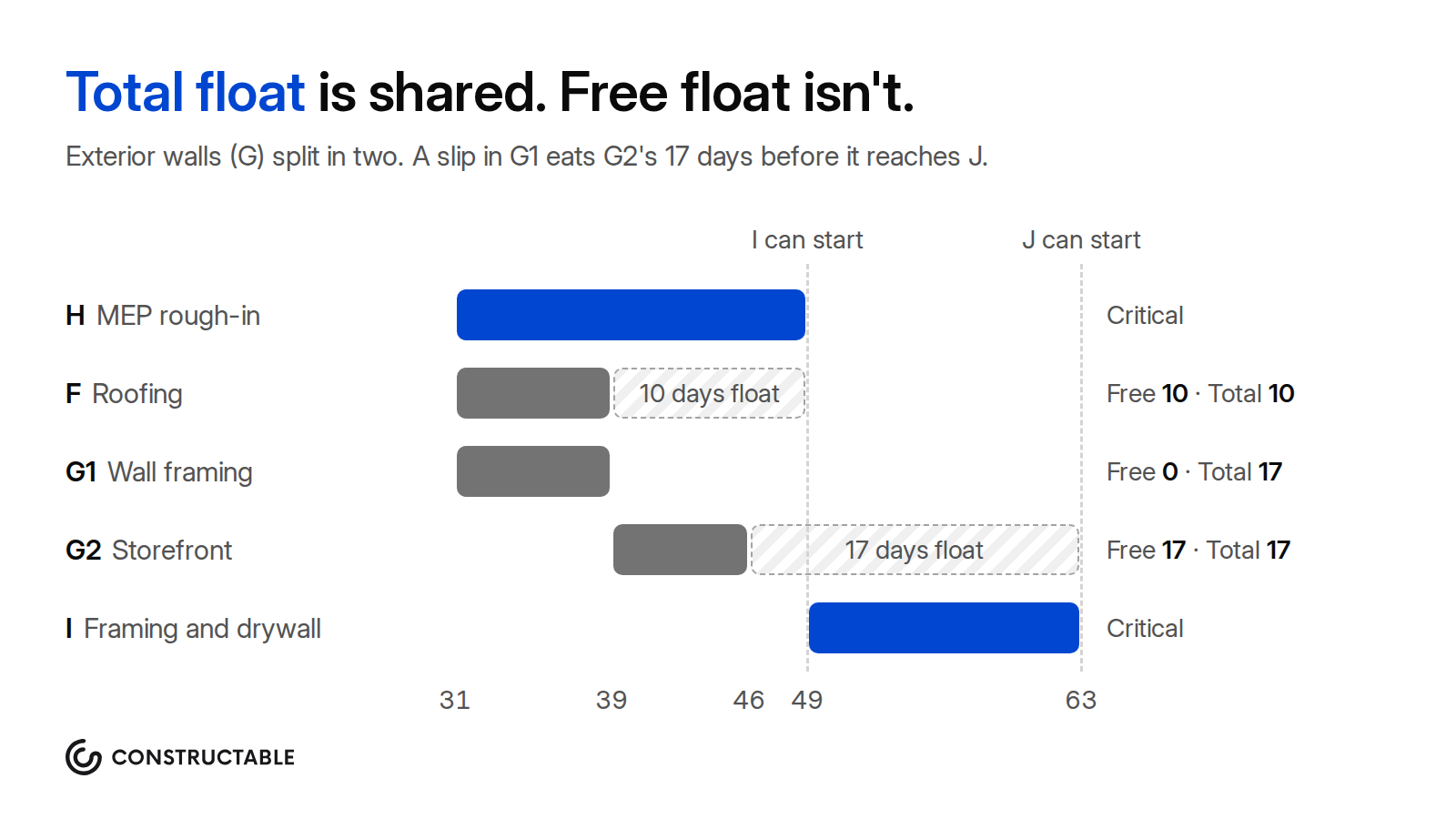
That's the practical difference. The framing sub sees 17 days of total float on the schedule and may assume they have two and a half weeks to play with. They do, but only if the storefront sub doesn't need it. If framing uses 10 of those days, storefront is left with 7. The float belongs to the chain, not to whoever reaches it first.
Who owns float?
Because total float is shared, someone has to decide who gets to use it. Contracts answer this in a few ways:
- The project owns the float. Many contracts and owner specs say float is a shared resource, available to whichever party needs it first. Under this clause, an owner-caused delay that only uses float doesn't earn the GC a time extension.
- The contractor owns the float. Some contracts give float to the contractor, on the logic that the contractor built the plan and should benefit from beating it.
- The contract is silent. Then the outcome depends on the jurisdiction and the facts, and it often comes up in a claim.
Read the float clause before you submit the baseline. If the spec says float belongs to the project, a GC that pads durations to build hidden float can expect the owner's scheduler to look for it.
Link types, lag, constraints, and calendars
The worked example uses only finish-to-start links. Real schedules use all four link types, plus lag, constraints, and calendars, and each one changes the math.
The four link types
| Link | Rule | Construction example |
|---|---|---|
| Finish-to-start (FS) | B starts after A finishes. | Steel erection starts after the slab is poured and cured. |
| Start-to-start (SS) | B starts after A starts. | Taping starts 3 days after drywall hanging starts (SS with a 3-day lag). |
| Finish-to-finish (FF) | B finishes after A finishes. | Testing and balancing finishes 2 days after HVAC installation finishes (FF with a 2-day lag). |
| Start-to-finish (SF) | B finishes after A starts. | Temporary power can't be removed until permanent power is energized. |
SS and FF links let work overlap, which is how most real schedules fit into the owner's dates. SF links are rare, and many spec sections discourage them, because they're hard to read and easy to misuse.
Lead and lag
Lag is a wait on a link. An SS link with a 3-day lag between drywall hang and tape means tapers start once hangers are three days ahead. A cure time between a pour and stripping forms is another common lag.
A lead is a negative lag, which lets the successor start before the predecessor's link would normally allow. Many owner specs limit or ban negative lags because they hide overlap. A better approach is to break the predecessor into smaller activities and link the pieces.
Date constraints
A constraint fixes a date that the logic would otherwise calculate. The common ones:
- Start No Earlier Than (SNET). The activity can't start before this date, such as a utility tie-in on the date the utility has committed to.
- Finish No Later Than (FNLT). The activity must finish by this date, such as dry-in before winter.
- Must Finish On. A hard date that overrides the logic in both directions.
Constraints can create negative float. Say the owner requires substantial completion by day 75, and you put a Finish No Later Than constraint on punch list (K) at day 75. The forward pass still says the job takes 78 days. The backward pass now starts from 75, so every activity on the critical path has a total float of -3. Negative float tells you the plan as built can't meet the date. You need to recover 3 days, or have a conversation with the owner.
A hard constraint that holds an activity in place regardless of its logic also hides problems. If predecessors slip, the constrained activity doesn't move, and the schedule shows a date nobody can hit.
Calendars, holidays, and weather days
CPM counts working days on a calendar. A Monday to Friday calendar with holidays off turns a 10-day activity into two weeks; a six-day calendar shortens it. Most schedules use more than one calendar:
- A five-day standard calendar for most work.
- A six- or seven-day calendar for work that runs longer weeks, such as concrete curing or a crew working Saturdays.
- A calendar with weather days for exterior work. Some specs require the baseline to include a set number of anticipated weather days per month, based on historical data for the site, on the calendars for weather-sensitive activities.
Holidays come off every calendar the crews follow. If the schedule is in working days and the calendar is wrong, every date downstream is wrong too.
CPM schedule vs Gantt chart vs look-ahead
These three get confused, but they do different jobs.
| CPM schedule | Gantt chart | Look-ahead | |
|---|---|---|---|
| What it is | The logic and the math | A picture of the schedule on a timeline | The next 2 to 6 weeks of field work |
| Who builds it | Scheduler or PM | Generated from the schedule | Superintendent and foremen |
| Detail | Activities linked by logic, with float | Bars, links, and milestones | Tasks by crew, area, and day |
| Updated | Monthly, sometimes weekly | Whenever the schedule changes | Weekly |
| Used for | Contract submittals, delay analysis, forecasting | Meetings, owner reports | Coordinating subs and crews |
A CPM schedule is usually shown as a Gantt chart, so the two often look the same. The Gantt is the picture; the logic and float behind it are what make it CPM. Our Gantt chart scheduling guide covers reading and building the chart itself. The look-ahead breaks the next few weeks of critical and near-critical activities into crew-level tasks; the look-ahead schedule guide walks through building one each week.
CPM scheduling requirements in construction contracts
On most commercial jobs, the contract is why the CPM schedule exists. Two documents set the rules.
AIA A201-2017, Section 3.10. The AIA A201 General Conditions require the contractor to prepare and submit a construction schedule for the work promptly after the contract is signed, revise it at appropriate intervals, and perform the work in general accordance with the most recent schedules submitted. A201 itself doesn't say the schedule must be CPM. The project specification usually does.
Spec section 01 32 16, Construction Progress Schedule. In CSI MasterFormat, section 01 32 16 covers the construction progress schedule, and 01 32 16.13 covers network analysis (CPM) schedules. Requirements vary by owner and by spec, but they often include:
- A baseline submittal within a set number of days after notice to proceed, often 30 to 60, for the architect's or owner's review.
- Monthly updates with actual start and finish dates, percent complete or remaining duration, and a written narrative that explains changes to the critical path, delays, and recovery plans. Many owners tie pay applications to the update.
- Activity limits, such as no activity longer than 15 or 20 working days except procurement, and a minimum count of activities.
- Logic rules, such as no open ends, limited use of constraints, no negative lags, and limits on SS and FF links without lag.
- Cost or resource loading on some public jobs, so the schedule ties to the schedule of values.
- A float clause saying who owns float.
- The software, often Primavera P6 or Microsoft Project, with native files submitted alongside the PDF.
Read the actual section in your spec book before you build the baseline. A schedule that breaks the spec's rules comes back rejected, and some owners hold payment until it's accepted.
How to keep the critical path current: updates, baselines, and when the critical path moves
A baseline is a saved copy of the accepted schedule. Every update after that is measured against it. A CPM schedule is only useful if it's current, so most GCs run a status cycle like this:
- Status the work. Each week or month, record actual starts and finishes, and update remaining durations on work in progress.
- Recalculate. Run the schedule so the forward and backward passes reflect what actually happened.
- Compare against the baseline. Look at the variance on the finish date and on key milestones, and at which activities moved.
- Check the critical path. Is it the same chain as last month? If it moved, find out why.
- Watch near-critical paths. An activity with 4 days of float is one bad week from being critical. Many teams track everything with 10 days of float or less.
- Write the narrative. Explain what changed, what's driving the critical path, and what you're doing about any slip.
When something slips: the roofing example
Go back to the worked example. Roofing (F) has 10 days of total float.
Roofing slips 6 days. Roofing now finishes on day 45 instead of 39. Drywall (I) can't start until both roofing and MEP rough-in are done, and MEP rough-in finishes on day 49. Drywall still starts on day 49, and the job still finishes on day 78. Roofing has 4 days of float left.
Roofing slips 12 days instead. Now roofing finishes on day 51. That uses all 10 days of float and 2 more. Drywall can't start until day 51, so it finishes on 65, finishes run from 65 to 75, and punch list ends on day 80. The job is 2 days late.
The critical path has also moved. It now runs A, B, D, E, F, I, J, K, through roofing instead of MEP rough-in. MEP rough-in now has 2 days of float, and exterior walls have 19. If you only watched the old critical path, you'd have missed this until the drywall sub showed up to an open roof.
Getting the days back
There are two standard ways to recover time on the critical path:
- Crashing. Add resources to a critical activity to shorten it, such as a second roofing crew or a Saturday shift. It costs money, so crash the critical activity that's cheapest per day saved.
- Fast-tracking. Overlap activities that were in sequence. In the roofing example, you could start drywall in the areas that are already dried in, by replacing the FS link from roofing to drywall with an SS link and a lag. It costs less, but it adds coordination risk.
Recovering only works on the critical path. Shortening an activity with float doesn't move the finish date. If the slip came from the owner or the design team, document it the way your contract requires before you spend money on recovery. Our guide to construction delay claims covers notice, records, and the delay analysis methods that rely on these schedule updates.
Common CPM scheduling mistakes
Most schedule rejections and most bad forecasts come from the same handful of problems:
- Open ends. An activity with no predecessor or no successor floats free. If it slips, nothing downstream moves, and the critical path is wrong. Every activity except the first and last needs both.
- Too many hard constraints. Constraints override logic. A schedule that's held together by dates instead of links will show the dates you typed, not the dates the work supports.
- Logic replaced by constraints. A related problem: putting a Start No Earlier Than on an activity because nobody linked it to its real predecessor. The date looks right until the predecessor slips.
- Activities that are too long. An activity longer than about 20 working days hides what's happening inside it. Break it up by area or floor, the way most specs require.
- Missing procurement and submittals. Long-lead items, such as switchgear, elevators, curtain wall, or rooftop units, are often the real critical path. If submittal review and fabrication aren't in the schedule, the critical path you see is the wrong one. Our post on construction schedule templates shows how to lay out these phases.
- One calendar for everything. Exterior and weather-sensitive work on the same calendar as interior work hides the real risk in winter months.
- Updating dates instead of status. Typing new dates over the plan, instead of entering actual starts and remaining durations, breaks the logic and makes the baseline comparison meaningless.
How Constructable shows the critical path and float on your schedule
Constructable's scheduling software keeps the issued plan in one place and does the CPM math on it, so the whole team reads the same float and the same critical path.
Import the plan or build it. Select Add Schedule and upload a Microsoft Project .mpp or .xml file or a Primavera P6 .xer file. Constructable imports the activities, links, calendars, and constraints. Or choose Start from scratch and build the Gantt in Constructable.
Link activities. Drag from one bar's start or finish to another bar to draw a Finish to Start, Start to Start, Finish to Finish, or Start to Finish link, then set Lag (work days) on the link. When you move an activity, its linked successors move later on the work calendar when the link requires it.
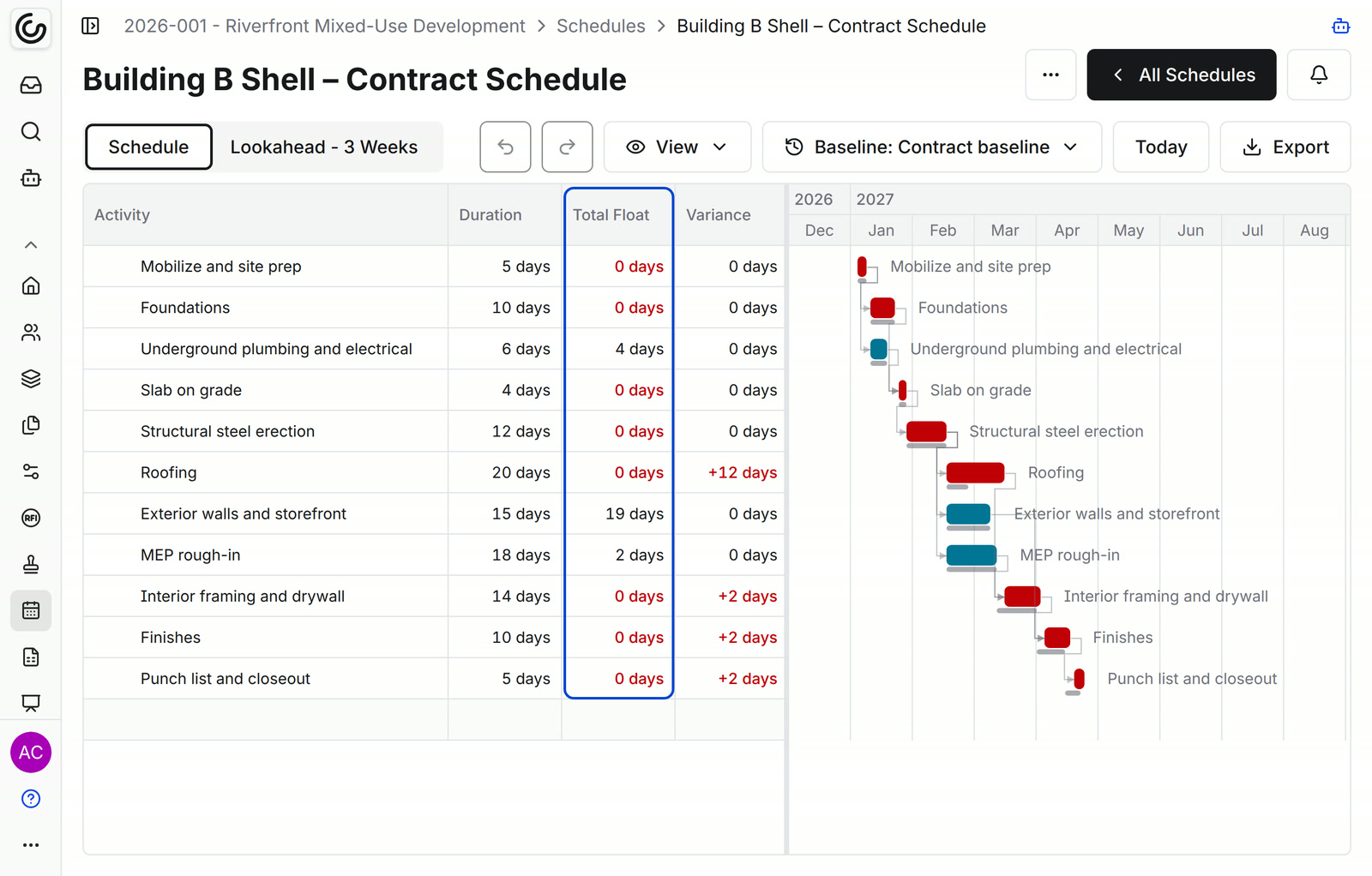
Read float and the critical path. The Total Float column shows how many working days each activity can slip before it delays the end of the plan. Unfinished activities with no float, and the summaries above them, turn red on the Gantt and in the Total Float column. Anyone who can open the schedule sees the float and the critical path, so the superintendent and the owner's rep read the same numbers as the scheduler.
Set constraints. Edit Activity has Constraint and Constraint date, with Start No Earlier Than, Finish No Later Than, Must Start On, Must Finish On, and the other standard types. When predecessors push an activity past its constraint date, a pin icon warns you.
Use real calendars. Durations count working days on the schedule's primary calendar. A schedule started from scratch gets a Monday to Friday Standard calendar with the major US holidays off, and you can add exceptions to mark any date as working or non-working.
Compare against a baseline. Open Baseline, save a snapshot, and use it as the baseline. The Gantt shows the baseline bars behind the current ones, and the Variance column shows how many working days each finish has moved.
Share it. Select Export to download a schedule PDF with the critical bars in red and, if you choose, the links drawn between them, or a Microsoft Project XML file that keeps the activities, links, lags, constraints, and percent complete. The Lookahead tab breaks the next few weeks into crew-level tasks under the same activities, for the field.
Final thoughts on the critical path method in construction
The critical path method is arithmetic on logic. Once you've run the forward pass, the backward pass, and the float by hand on a small network like this one, you can read any CPM schedule an owner hands you and see where the real risk sits. Keep the logic clean, status it every cycle, and watch the near-critical work as closely as the critical path, because that's where the next slip will come from. To see the critical path and float on your own schedule, book a demo of Constructable.
FAQ
What is the critical path in construction?
The critical path is the longest chain of linked activities from the start of a construction project to its finish. Its length is the shortest time the project can take. Every activity on it has zero total float, so a one-day slip on any of them delays the finish by a day unless the time is recovered elsewhere on the path.
How do you calculate the critical path?
List the activities, give each a duration, and link each one to its predecessors. Run a forward pass to find each activity's early start and early finish, then a backward pass from the project finish to find each late start and late finish. Total float is late start minus early start, and the chain of activities with zero total float is the critical path.
What is the difference between total float and free float?
Total float is how many working days an activity can slip before it delays the project finish. Free float is how many working days it can slip before it delays the next activity. Free float belongs to one activity, while total float is shared by every activity on the same chain, so one activity using it leaves less for the others.
Can the critical path change during a project?
Yes. When a non-critical activity slips by more than its total float, the chain it sits on becomes longer than the old critical path and becomes the new one. Changes in logic, durations, or constraints during schedule updates can also move it, which is why each update should check which chain is driving the finish.
What is a near-critical path?
A near-critical path is a chain of activities with a small amount of total float, often 10 working days or less. It isn't driving the finish date today, but a short slip would make it critical. Some owner specs ask the monthly narrative to report near-critical paths alongside the critical path.
What is the difference between CPM and PERT?
CPM uses one duration for each activity and calculates float and the critical path from the logic. PERT, the Program Evaluation and Review Technique developed for the US Navy's Polaris program in the late 1950s, uses optimistic, most likely, and pessimistic durations to estimate the probability of finishing by a date. Construction schedules almost always use CPM, and PERT shows up mainly in research and risk analysis.
What software do contractors use for CPM scheduling?
Oracle Primavera P6 and Microsoft Project are the tools owners most often name in their specs for building and submitting CPM schedules. Many GCs build the baseline in one of those and share it with the project team in a construction management platform. Constructable imports .xer, .mpp, and Microsoft Project .xml files and shows Total Float and the critical path on the Gantt.
Who owns float in a construction schedule?
The contract decides. Many contracts and owner specs say float belongs to the project and is available to whichever party needs it first, so an owner delay that only uses float doesn't earn a time extension. Some contracts give float to the contractor, and where the contract is silent, the answer depends on the jurisdiction and the facts.