Construction Schedule Templates and Best Practices for October 2026
Find the right construction schedule template for your project in October 2026. Covers Gantt charts, CPM, Excel setup, and best practices for keeping schedules
If your construction schedule only gets updated when something goes wrong, your team is already working off gut instinct by the time they look at it. A free construction schedule template in Excel or a downloadable PDF is a reasonable starting point, but the format is just the container. The real work is in how you sequence tasks, assign ownership, lock a baseline, and keep the live schedule accurate week to week. We'll show you how to do all of that, and give you simple construction schedule examples and residential construction schedule templates you can actually use.
TLDR:
-
A construction schedule needs seven core elements to hold: WBS, durations, dependencies, milestones, resource assignments, float, and a locked baseline.
-
CPM controls commercial work; Excel Gantt charts fit residential and light commercial jobs where a single person manages dependencies by hand before manual updates become a liability.
-
Lock a baseline before work starts, update the schedule weekly, and trigger a review with every approved change order.
-
Excel handles early-stage scheduling well, but past 25-30 tasks across multiple trades, the lack of a logic engine creates compounding risk.
-
Constructable runs scheduling inside the same connected system as RFIs, daily logs, and drawings, with MPP file support and onboarding averaging under 21 days.
What is a construction schedule and why it matters
When a mid-size GC runs three jobs at once, a missing or ignored schedule can put concrete on site before MEP rough-ins are done, send subs to an unprepared location, and leave the owner waiting for an explanation no one can document. The schedule is the sequenced plan that ties every task, trade, and milestone together, from mobilization to final walkthrough, assigning durations, defining dependencies, and setting the dates that owners, subs, and inspectors all plan around.
Without one, work happens in whatever order feels right that day, which usually means concrete poured before MEP rough-ins are done, subs showing up to a site that isn't ready, and an owner asking why the project is three weeks behind with no documented answer.
The schedule is also a risk management tool. When a trade slips, a well-built schedule shows exactly which downstream activities are affected and by how much, giving the project manager and super a clear target for recovery.
What a construction schedule should include
Every construction schedule worth following contains the same core set of elements, regardless of project size or delivery method. Miss one and you'll feel it downstream.
Here's what belongs in any schedule you build:
-
Work breakdown structure (WBS): A full list of tasks organized by phase or trade, broken down far enough that individual activities are assignable and trackable.
-
Task durations: Time estimates for each activity, grounded in crew size, productivity rates, and realistic sequencing. Not wishful thinking.
-
Dependencies and logic ties: Which tasks must finish before others can start, including finish-to-start, start-to-start, and any lag time built into the logic.
-
Milestones: Owner-facing or permit-driven dates that the rest of the schedule works backward from, such as substantial completion, inspections, and occupancy.
-
Resource assignments: Who or what is doing the work, so you can spot conflicts before they hit the field.
-
Float and critical path: Which activities have zero room for slippage and which carry buffer, so you know where to focus when things inevitably shift.
-
Baseline and current versions: A locked original plan to measure against, plus a live version that reflects actual progress.
A schedule missing any of these is less a plan and more a list of hopes. The baseline especially matters: without one, you have no way to quantify delay or defend a time-extension claim.
Construction scheduling methods explained
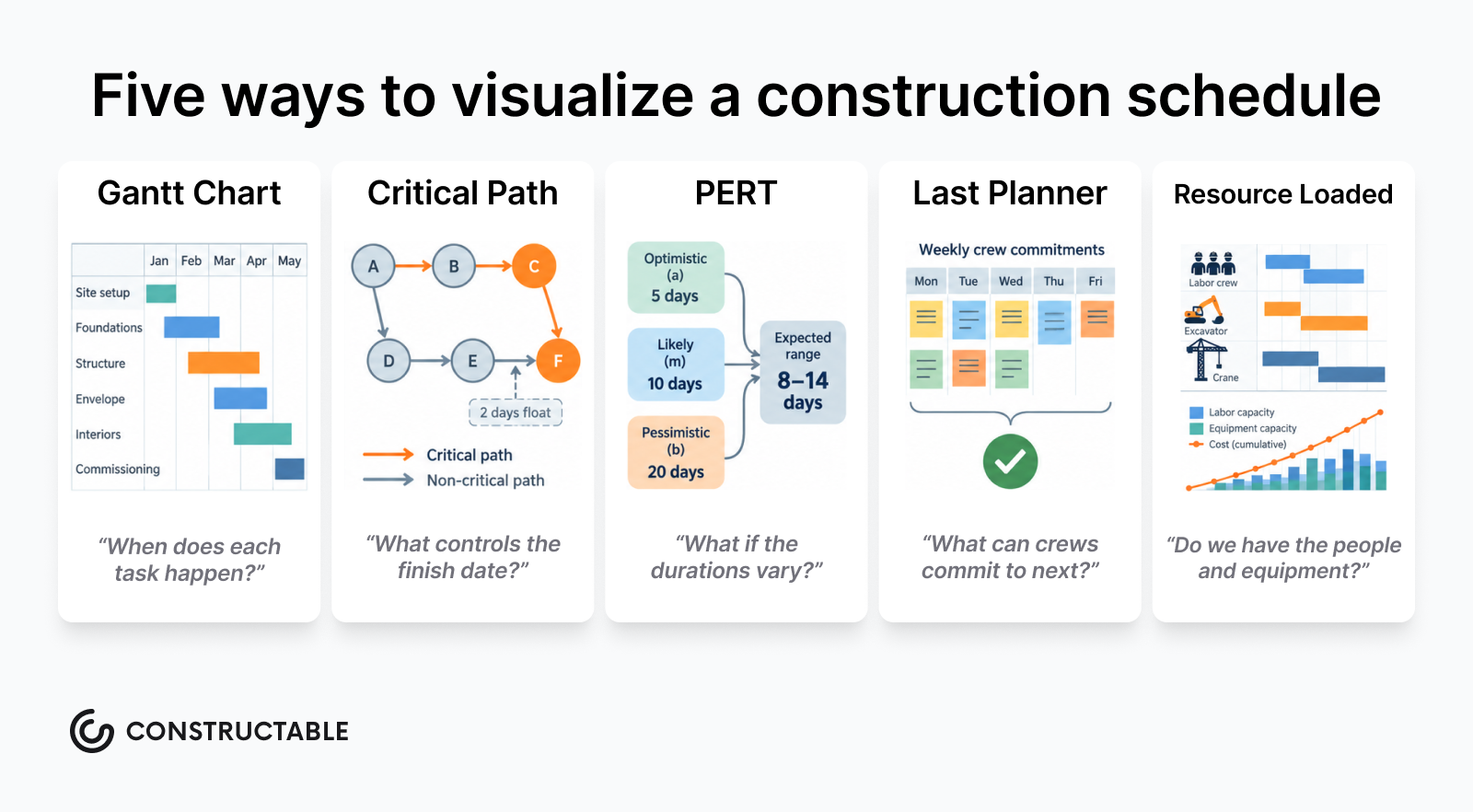
Four methods dominate construction scheduling, and choosing the wrong one adds time and confusion to a job that already has plenty of both.
Critical path method (CPM)
CPM maps every task in a project and identifies which sequence of dependent activities controls the finish date. Any delay to a task on the critical path delays the project. It's the industry standard for commercial work because it gives PMs a defensible basis for schedule analysis and delay claims. Autodesk's CPM scheduling overview covers how teams apply it on complex builds.
Linear scheduling method (LSM)
LSM works best for repetitive, linear projects like roads, pipelines, or multi-story residential buildings where the same crews cycle through identical work in sequence. It plots production rates over distance or floors, not discrete task durations.
Critical chain project management (CCPM)
CCPM moves focus from individual task durations to resource constraints. It builds schedule buffers at the project and feeding-chain level instead of padding every individual activity, which tends to shrink overall project duration on resource-heavy jobs.
Agile scheduling
Agile is borrowed from software development and shows up in some design-build and preconstruction contexts. Work is organized into short sprints with frequent replanning. It suits projects with high design uncertainty but fits poorly on a conventional GC-led build where subcontractors need firm lead times.
How to create a construction schedule step by step
Start with the scope document, not a blank spreadsheet. Before you type a single task, you need a confirmed scope of work, a set of contract drawings, and a list of every trade involved.
Here is the step-by-step process most experienced teams follow:
-
Build your WBS first. Break the project into phases (sitework, foundation, framing, MEP rough-in, enclosure, finishes, closeout), then break each phase into assignable activities with a clear owner.
-
Sequence the tasks. Map which activities must finish before others can start. You can't pour concrete before formwork is done, and MEP rough-ins cannot happen before framing closes.
-
Estimate durations using crew size and realistic productivity rates, not best-case scenarios. Optimistic durations are how schedules fall apart in week three.
-
Assign resources. Identify who owns each activity so overlapping commitments surface before they hit the field, not after.
-
Identify the critical path. The longest chain of dependent tasks controls your finish date. Everything else has float, and knowing which is which changes how you respond to delays.
-
Set milestones. Pin owner-facing dates like permit inspections, substantial completion, and occupancy to the schedule so the whole team plans around the same markers. A punch list is typically tied to these closeout milestones.
-
Lock a baseline. Freeze the original plan before work starts. Every update after that measures against it, which is the only way to have a clear-eyed conversation about slippage.
-
Schedule regular updates. Weekly pulls with your super keep the live schedule accurate. A schedule that never gets updated is just a wall decoration.
Types of construction schedules
Construction schedules come in several forms, and the right one depends on your project type, team size, and how much detail your owner or GC requires.
Bar chart (Gantt) schedules
The most common format in residential and light commercial work. Tasks are listed vertically, with horizontal bars showing duration across a calendar. Easy to read for anyone on the project, from the super to the owner's rep. Most free construction schedule templates in Excel and Google Sheets follow this format. Planera's guide to Gantt charts walks through how to use dependencies and milestones effectively within this format.
Critical path method (CPM) schedules
Used on larger commercial and public projects where float analysis matters. CPM schedules map task dependencies and identify which activities, if delayed, push the project end date. MS Project sample construction schedule files almost always use CPM logic.
Linear or time-location schedules
Common in infrastructure and vertical repetition projects (think multifamily with identical floors). They show work progressing through physical locations over time, which helps crews see where they should be and when.
Look-ahead schedules
A working schedule pulled from the master, typically covering a three- or six-week window. Superintendents use these to coordinate daily trades. They are often formatted as a simple construction schedule in Excel or even a printed PDF shared at the weekly meeting.
| Schedule type | Typical format | Best for |
|---|---|---|
| Gantt / bar chart | Excel, Google Sheets, Word | Residential, small commercial |
| CPM | MS Project, Primavera P6 | Mid-size to large commercial |
| Linear / time-location | Specialized software or PDF | Infrastructure, multifamily |
| Look-ahead | Excel, printed PDF | Weekly trade coordination |
Construction schedule templates: formats and when to use each
The right format for a construction schedule depends on the size and type of the project, who needs to read it, and how often it gets updated. A format that works for a custom home builder tracking phases in a spreadsheet will fall apart on a commercial job where the owner, GC, and a dozen subs all need to read the same document.
Here are the most common formats and where each one actually fits:
Excel and Google Sheets
Spreadsheet-based schedules are the most widely used format in the industry, and for good reason. They're flexible, require no special software license, and most project teams already know how to read them. A simple construction schedule in Excel typically lays out tasks in rows, durations in columns, and uses conditional formatting or color-coding to visualize progress.
Excel works best for small-to-midsize residential and light commercial projects where one or two people are managing the schedule. Google Sheets adds real-time collaboration, which helps when a PM is in the office and a super is on-site making updates from a phone. The tradeoff is that neither tool was built for scheduling, so managing dependencies, baselines, or resource loading gets messy fast.
Microsoft Project (MS Project)
MS Project is the standard for schedule-heavy commercial work. It handles task dependencies, critical path analysis, resource allocation, and baseline tracking natively. Sample MS Project construction schedule files (in .mpp or exported as PDF) are frequently shared between GCs and owners as the basis for contract schedules.
The limitation is the learning curve and licensing cost. It's genuinely powerful software, but it's overkill for a 10-unit residential development or a small TI job. Teams that need MS Project are usually contractually required to use it by an owner or general contractor.
PDF schedules
PDF is the distribution format, not the working format. Construction schedule PDFs show up in owner submittals, RFI logs, and contract packages because they're static, non-editable, and easy to share. A schedule in PDF form is typically exported from Excel, MS Project, or scheduling software after a review cycle.
The problem with PDFs is that they go stale immediately. A construction schedule PDF free download you find online might be a useful visual reference, but it's not a living document.
Word templates
Word-based construction schedules are the least common for a reason. They're useful for simple milestone lists or narrative schedule summaries in a project proposal, but they don't handle Gantt-style visualization well. A construction schedule template in Word format is best treated as a communication document, not a tracking tool.
The table below summarizes how these formats stack up across the criteria that matter most on the job:
| Format | Best use case | Collaboration | Dependency tracking | Cost |
|---|---|---|---|---|
| Excel / Google Sheets | Residential, light commercial | Good (Sheets) / Limited (Excel) | Manual only | Free |
| MS Project | Commercial, schedule-heavy jobs | Limited without add-ons | Native, full-featured | Paid license |
| Submittals, owner distribution | None (static) | None | Free to export | |
| Word | Proposals, milestone lists | Basic | None | Included in Office |
How to build a construction schedule in Excel
Open a blank workbook and build four base columns: Task Name, Start Date, Duration (days), and End Date. For End Date, use a simple formula: =Start Date + Duration - 1. That keeps the date range accurate without pulling in an extra day.
For the Gantt bars, add date headers across the top row starting from your project start date. Select the date grid, open Conditional Formatting, and write a formula rule that fills any cell where the column date falls between a row's start and end date. You get a filled bar per task row with no chart objects to manage.
Dependencies are manual. When a task slips, you update downstream start dates by hand. A few setup habits help:
-
Freeze the Task Name column so it stays visible while scrolling right across a wide date range
-
Group rows by phase using Excel's Row Grouping feature to collapse completed work and keep focus on what's active
-
Save a locked copy as your baseline before work begins so you can measure slippage against the original plan
Excel is a reasonable fit for residential schedules and early-stage planning. Past 25 to 30 tasks across multiple trades, the manual dependency updates become a liability. One duration change cascades, and no logic engine catches it automatically. That gap between what Excel can do and what a live multi-trade schedule demands is where dedicated scheduling software earns its keep.
Common construction scheduling challenges and how to handle them
Even the best construction schedule can fall apart in the field. Understanding where schedules break down is the first step toward keeping projects on track.
Resource conflicts and over-allocation
Subcontractors get double-booked, crews show up to a site that's not ready, and material lead times get ignored until it's too late. A change directive can make these resource conflicts even harder to track. These aren't random failures; they're what happens when a schedule is built around ideal conditions instead of real ones. Build float into trades with long lead times, and sequence work around confirmed sub availability, not assumed availability.
Scope changes without schedule updates
When an owner requests a change order or an RFI reveals a design conflict, the scope changes but the completion date stays frozen. The schedule stops reflecting reality, and the team starts working off gut instinct. Every approved change order should trigger a schedule review, even a quick one.
Poor communication across trades
A framing crew finishes early, and nobody tells MEP. A concrete pour slips two days and electrical rough-in doesn't get the memo. RFI management often breaks down the same way. Coordination gaps like these compound fast—a schedule only works as a communication tool if everyone with a stake in the sequence actually has access to it.
Construction schedule best practices
Even the most experienced project teams run into schedule trouble when best practices aren't baked into the process from day one. A construction schedule is only as good as the discipline behind it.
Here are the practices that separate schedules that hold from ones that fall apart mid-project.
Break work into phases before sequencing tasks
Start by grouping work into logical phases before you sequence individual activities. On a residential build, that might mean pre-construction, foundation, framing, MEP rough-in, enclosure, finishes, and closeout. On a commercial job, phases might track permit milestones, tenant coordination windows, or inspection holds. Defining phases first gives your schedule a skeleton before you add the muscle of individual tasks.
Use realistic durations, not aspirational ones
Durations should reflect actual crew productivity, material lead times, and inspection turnaround in your specific market. A framing duration that works in Phoenix may not work in a coastal California jurisdiction where inspection wait times add days. Build durations from historical data on comparable projects wherever possible, and build float into activities that are historically unpredictable.
Sequence by dependency, not by wishful thinking
Every task should be linked to its predecessors and successors. Finish-to-start relationships are the most common, but don't overlook start-to-start or finish-to-finish constraints, particularly in MEP coordination where trades are often running parallel. A schedule that ignores real dependencies will break the first time a single trade slips.
Assign ownership to every activity
A task without an owner is just a wish. Every line item in your schedule should have a responsible party, whether that's a specific subcontractor, your own superintendent, or a third-party inspector. Ownership creates accountability and makes it easier to flag when something is at risk before it becomes a delay.
Update the schedule weekly, even when things are running smoothly
A construction schedule is a living document. Weekly updates keep it accurate and give the team a reliable reference point for look-ahead planning. Most experienced supers maintain a three-to-six week look-ahead alongside the master schedule so crews always know what's coming and what they need to be ready for.
Communicate schedule changes across all parties
When the schedule changes, every stakeholder needs to know promptly: the owner, the architect, your subs, and your own field team, which is exactly why OAC meeting best practices matter. Changes communicated late create downstream confusion, material delivery mismatches, and subcontractor conflicts. A schedule update that only lives in your project management software but never gets communicated to the people executing the work is not a real update.
How Constructable handles scheduling inside a connected project system
Constructable handles the schedule inside the same environment where RFIs get opened, daily logs get filed, and drawings get marked up. Upload an MPP file directly, and it loads natively into the scheduling workflow, with sticky task name headers, horizontal scrolling, and visual dependency arrows connecting related activities. No conversion, no PDF export for the team to squint at.
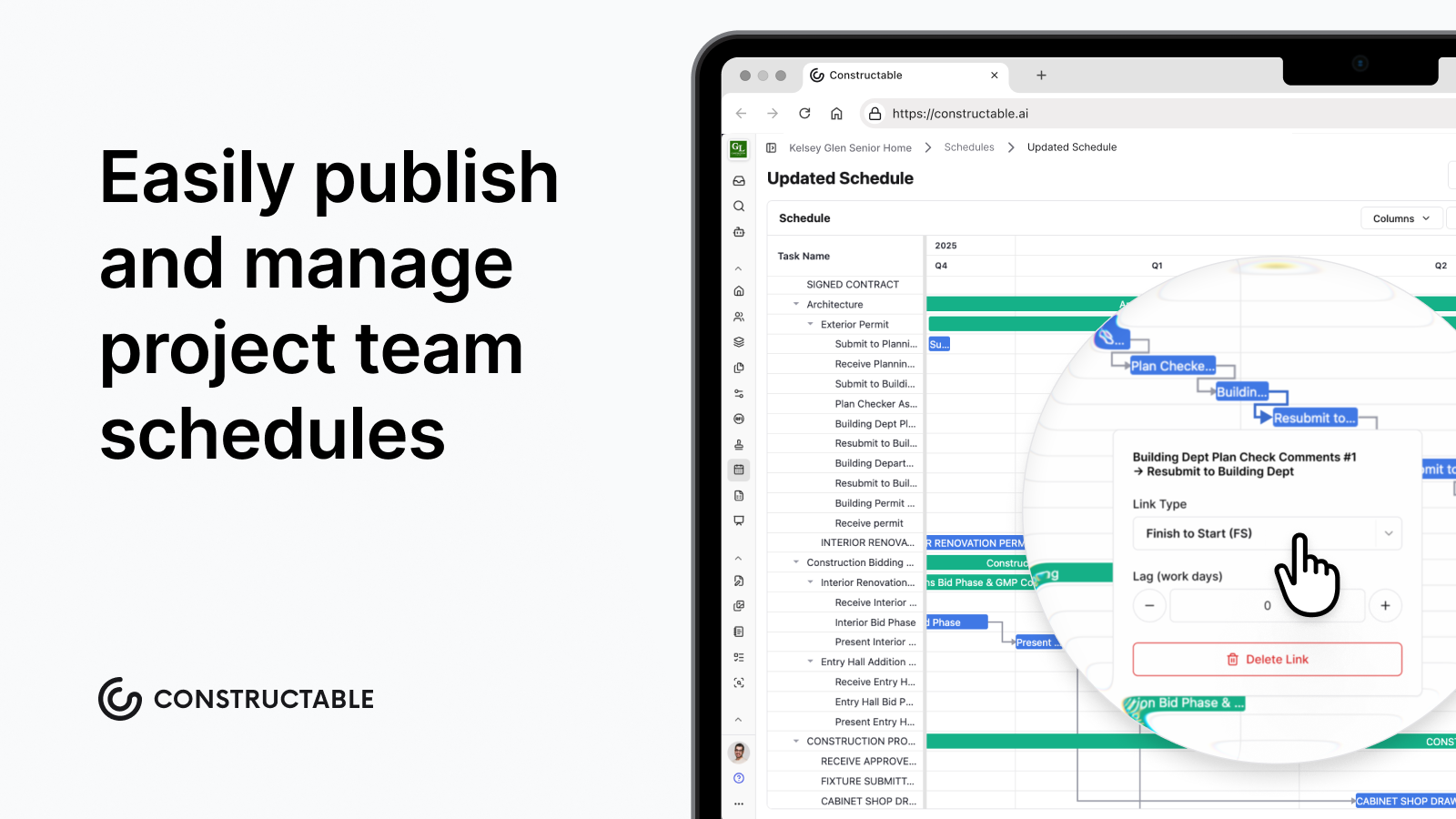
The real problem for most mid-size GCs is the gap between the schedule and the field. A delay logged in a daily log stays there until someone manually surfaces it as schedule risk. When everything lives in one connected project management system, that reconciliation step disappears. Onboarding averages under 21 days with no migration fees, so moving to a connected schedule workflow does not require a six-month implementation before the real work begins.
Final thoughts on construction schedules, templates, and the tools behind them
Whether you start in Excel or jump straight to MS Project, the schedule is only as good as the process behind it. Realistic durations, clear dependencies, and weekly updates beat any fancy format. Pick the tool that your whole team will actually use and keep it current. See how Constructable handles scheduling.
FAQ
What should every construction schedule include regardless of project size?
Every construction schedule needs a work breakdown structure, task durations grounded in real productivity rates, dependency logic, milestones, resource assignments, float and critical path analysis, and both a locked baseline and a live version. The baseline is the one element most teams skip. Without it, you have no defensible basis for quantifying delay or supporting a time-extension claim.
Excel vs. MS Project for a construction schedule: which one should I use?
Excel works well for residential and light commercial projects up to roughly 25 to 30 tasks, where one or two people manage the schedule and dependencies stay simple enough to update by hand. MS Project is the better fit for commercial work where you need native critical path analysis, resource loading, and baseline tracking, and where an owner or CM may contractually require it.
How do I build a construction schedule in Excel?
Set up four base columns (Task Name, Start Date, Duration (days), and End Date) using the formula =Start Date + Duration - 1 to keep date ranges accurate. Add date headers across the top row, then use Conditional Formatting with a formula rule to fill cells where the column date falls between a row's start and end dates, creating Gantt bars without chart objects. Freeze the Task Name column, group rows by phase using Row Grouping, and save a locked copy as your baseline before work begins.
What's the fastest way to close the gap between my schedule and what's actually happening in the field?
The gap usually comes from delay information sitting in daily logs while the schedule lives somewhere else entirely. Someone has to manually surface the connection, and it rarely happens fast enough. Keeping your schedule inside the same connected system as your daily logs, RFIs, and drawings removes that reconciliation step instead of making it someone's job.
When does a construction schedule need to be updated?
Update a construction schedule weekly at minimum, not only when something goes wrong. Weekly pulls with your superintendent keep the live version accurate and feed a reliable three-to-six-week look-ahead for trade coordination. Every approved change order should also trigger a schedule review, since scope changes that don't update the schedule quickly make the document useless as a planning reference.