Bid Tabulation in Construction: Accurate Sub Bid Comparison (Nov 2026)
A practical guide to bid tabulation covering templates, public agency results, and how to compare subcontractor bids accurately. November 2026.
You've logged every bid, lined up the columns, and now you're staring at a spread of numbers that don't quite match. Some carry allowances, some list exclusions, some skip a line item entirely. That's the real work of bid tabulation, and getting it right is what keeps a low number from winning work it never actually priced.
TLDR:
-
Bid tabulation organizes every bid into one record; leveling normalizes scope so you compare the same work.
-
Awarding off a raw tab hides exclusions and missing alternates that resurface later as change orders.
-
Public agencies like TxDOT, WSDOT, and ADOT post tabs online, so you can benchmark unit prices before bidding.
-
Excel handles active comparison, Word suits printable forms, and PDF works for locked archives.
-
Constructable organizes bid packages by scope and tracks bidder status upstream, though it does not offer side-by-side comparison or automated leveling (yet).
What is bid tabulation in construction?
Bid tabulation is the process of compiling every subcontractor or vendor bid received for a project, or a single trade package, into one organized record showing who bid, what they submitted, and their pricing. It documents and organizes bids by recording who bid, what they offered, and when it arrived.
You'll also hear it called a bid tab, a bid tabulation sheet, or a bid tabulation form. The document is identical. What changes is the shorthand.
In the bid-to-award workflow, tabulation sits after bids come in and before you compare them line by line. It organizes the raw submissions so the deeper analysis has somewhere to start.
Bid tabulation vs. bid leveling: why the difference matters
A bid tab lays out the raw numbers. Bid leveling goes further, normalizing each proposal against a scope baseline so you are comparing the same work across every bidder.
That gap matters. The lowest number on a tab can hide exclusions, missing alternates, or scope a competitor left out. A tabulation shows you the totals. It does not tell you whether those totals cover the same work.
Awarding straight off a raw tab is where trouble starts, and the difference shows up later in change orders. Treat tabulation as the organizing step and leveling as the analysis that makes an award defensible.
What a bid tabulation sheet includes
A usable bid tab captures more than a bottom-line number. The standard fields:
-
Bidder name and contact
-
Base bid amount
-
Unit prices, where work is priced per quantity
-
Line-item or scope breakdowns
-
Alternates and their add/deduct pricing
-
Allowances carried in the bid
-
Stated exclusions
-
Bond and insurance status
-
Addenda acknowledgment
-
Submission date and time
Public agencies run this differently. DOT-style tabs are built around standard bid items, each with an item number, description, unit, quantity, and unit price. Multiply quantity by unit price across every line for the extended total. That per-item view, sometimes called a unit bid analysis, lets an agency compare a single pay item across bidders and against historical pricing, well beyond the grand total.
How to create a bid tabulation: step by step
Building a tab follows the same sequence whether you work in a spreadsheet or software:
-
Gather and log every bid received, with the date and time each arrived.
-
Verify each one is complete and submitted before the deadline.
-
Enter base and unit pricing into a consistent format so columns line up across bidders.
-
Note exclusions, allowances, and qualifications next to the numbers they affect.
-
Flag anything missing or non-conforming, like an unacknowledged addendum or a skipped line item.
-
Set bidders side by side for comparison.
Agencies and eProcurement systems handle that last step two ways. Some produce a vendor-total tab ranking bidders by grand total. Others build an all-bid-item tab, listing every pay item down the page with each bidder's unit price beside it.
Public vs. private bid tabulation requirements
Public projects run under the "lowest responsive and responsible bidder" standard, where the tabulation becomes a formal, published record supporting an award that must hold up under scrutiny. Two terms carry the weight:
-
Responsive: the bid conforms to the solicitation requirements, complete, on time, with the required bonds and forms.
-
Responsible: the bidder has the capacity, experience, and financial standing to perform the contract, as California's procurement manual defines it.
That standard is why agencies like TxDOT, WSDOT, ADOT, PennDOT, and the NYC SCA publish their tabs. Agencies can bypass a non-responsive lowest number and move to the next bidder, and the documentation defends that decision.
Private general contractor bidding carries more discretion. The lowest price does not have to win, and no outside party needs to be satisfied with the rationale, so the tab serves the team's own comparison.
Where to find public bid tabulation results (TxDOT, WSDOT, ADOT, and more)
Public agencies post their tabs online, and contractors mine them to benchmark future pricing against what actually won. Understanding what a GC actually does helps frame how that data gets used.
-
TxDOT publishes a bid tabulations dashboard alongside bid results updated after each letting.
-
WSDOT keeps monthly bid tabulations in its contract history, plus a unit bid analysis that averages unit prices across recent lettings.
-
ADOT posts current advertisements, bid opportunities, contract awards, and historical bid prices through its contracts and specs pages.
-
PennDOT and the NYC SCA publish their own tabs for state and school construction work.
The value sits in the unit prices. Pull the historical average for a pay item, compare it against your own number, and you know whether your bid runs high or low before you submit.
Bid tabulation templates: Excel, Word, and PDF
Most teams start with a downloadable template, and the format you pick shapes how far it carries you.
-
Excel and Google Sheets: formulas total columns automatically and set bidders side by side for quick math. Best for active comparison.
-
Word: clean for a formal, printable form when you need a fixed submission record.
-
PDF: locked and consistent, good for archiving or sharing a tab that shouldn't be edited.
| Format | Strengths | Best for |
|---|---|---|
| Excel / Google Sheets | Formulas total columns automatically and set bidders side by side for quick math | Active comparison |
| Word | Clean, formal, printable form with a fixed submission record | A fixed submission record |
| Locked and consistent, shouldn't be edited | Archiving or sharing |
A good reusable template keeps one row per line item or bid package, a column per bidder, and dedicated fields for exclusions, alternates, and addenda acknowledgment.
Free downloads get you started. But static templates strain as bid volume climbs and scope grows, where version control and manual re-entry start costing more than they save.
Common bid tabulation mistakes and how to avoid them
The same errors show up on tab after tab, and most trace back to the process, not the person running it.
-
Comparing bids across different scopes, so a low number wins work it never priced.
-
Missing exclusions or qualifications buried in the fine print until they resurface as a change order.
-
Ignoring unit-price spreads on unit-price contracts, where a lopsided line item balloons at final quantities.
-
Overlooking addenda acknowledgment, which can render a bid non-responsive on public work.
-
Transcription errors from manual re-entry that quietly shift a total.
-
Awarding on the lowest number without confirming the bidder is responsive.
Each one is a scope gap you did not catch, the leveling step the tab alone cannot do.
Manual tabulation vs. bid tabulation software
Spreadsheets work fine when bid volume is low, and one person runs the tabs. They cost nothing, and everyone already knows how to use them. The strain comes with scale, where version control, manual re-entry, and scattered email threads start eating time.
Construction management software centralizes bid collection, tracks bidder status, keeps communication history in one place, and handles column math automatically. What it does not replace is leveling. Normalizing scope across bidders remains a human judgment call in most tools.
As a rough rule, if you only run a handful of bid packages a year, a spreadsheet will do the job. Once you're juggling dozens of bidders across many active projects, software starts earning its keep.
How Constructable supports bid collection and tracking before tabulation
Constructable is a connected system built for mid-size general contractors, and to be clear: it does not currently offer side-by-side bid comparison or automated leveling, so that work stays manual or external for now. Where it earns its keep is upstream, in Pre-Construction bid management. Bid packages are organized by scope, per-scope amounts captured per bidder, and status tracked across every trade. Automated reminders go out, and bidder engagement and tracking are logged per bidder, so the numbers you eventually tabulate arrive cleaner.
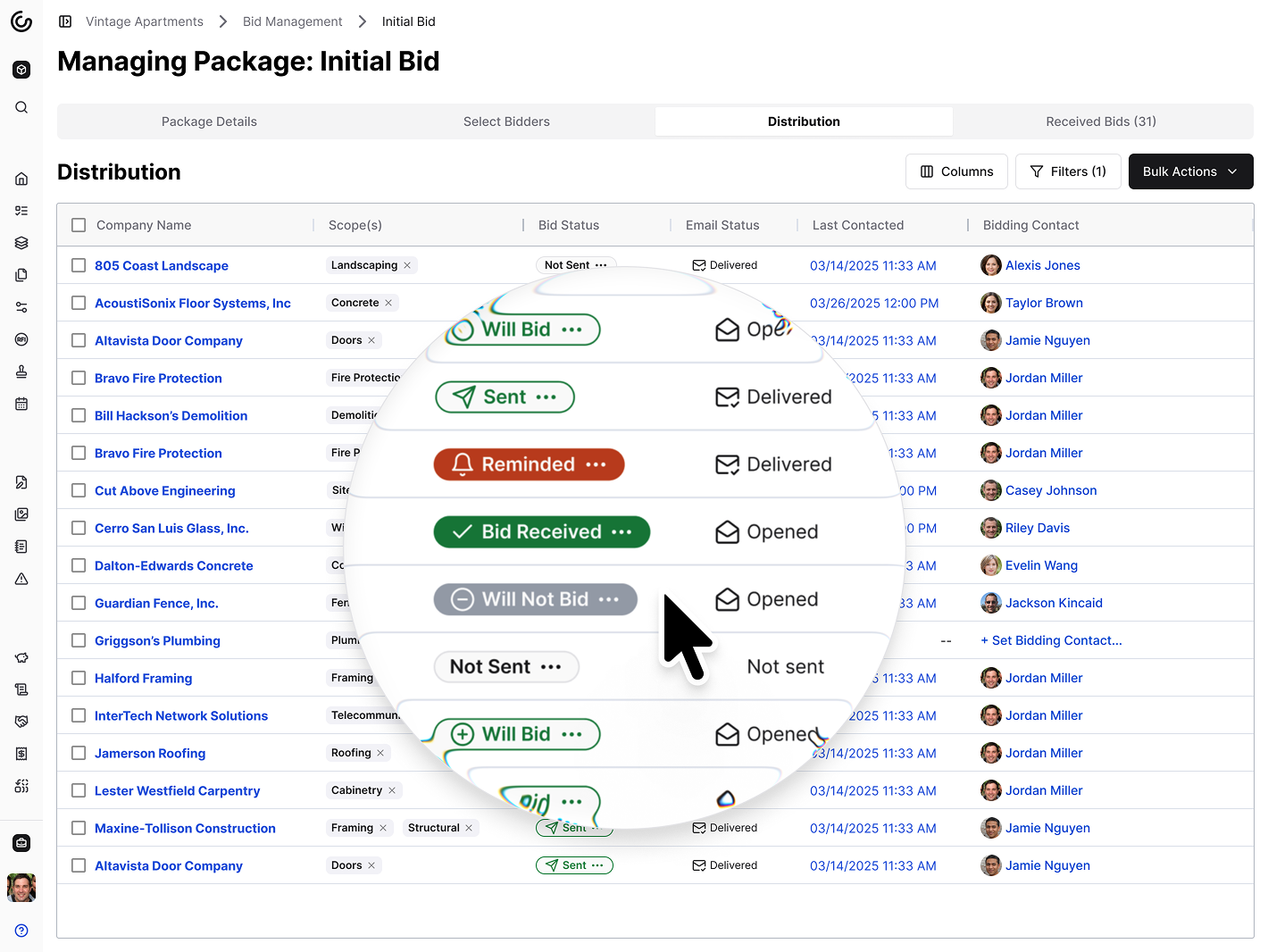
A screenshot of the Bid Management Distribution tab in Constructable. Manage, remind, and see the exact status of all bid correspondence.
A few supporting pieces cut friction along the way:
-
A centralized directory with duplicate-contact detection
-
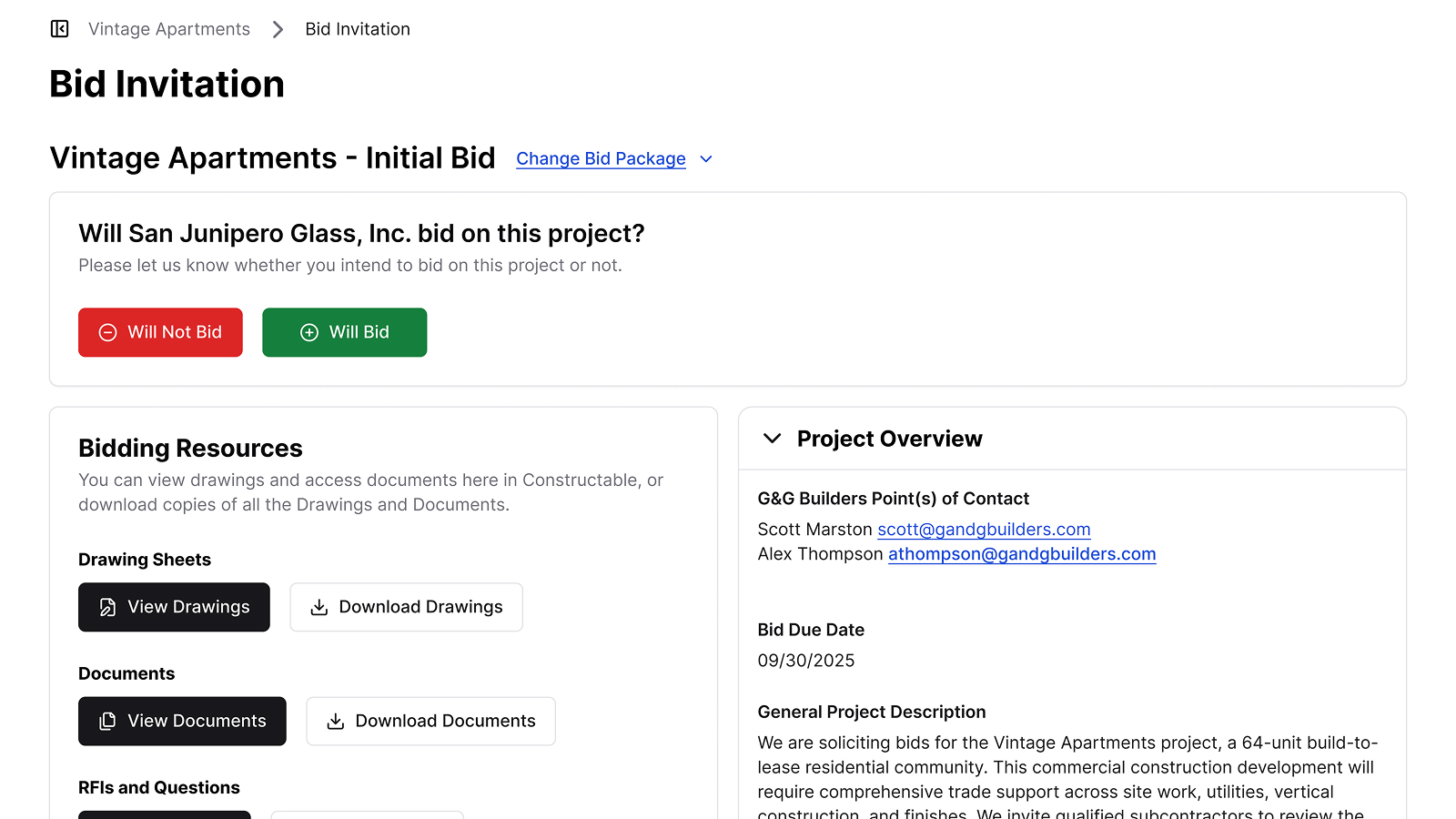
A bidder landing page for viewing and submitting bids online
-
Construction takeoffs performed directly on drawings with one-click export to estimating
-
AI bid import that populates fields from an uploaded PDF
The AI here is built-in and assistive, removing steps inside workflows you already run instead of living in a separate window.
Here's a look at the bidder landing page, where everything your bidders need is easy to access:
Final thoughts on building a bid tabulation
The tab is your organizing step, and the leveling that follows is what tells you whether those totals cover the same work. Keep your fields consistent and watch for buried exclusions. Use published tabs from agencies like TxDOT and WSDOT to benchmark your own pricing. You can book a walkthrough with our team to see how Constructable keeps your bids organized upstream.
FAQs
What's the difference between bid tabulation and bid leveling?
Tabulation records who bid and what they submitted; leveling normalizes scope so totals are comparable. See the section above for detail on why that distinction matters for a defensible award decision.
What's the best format for a bid tabulation template: Excel, Word, or PDF?
Excel or Google Sheets is best for active comparison because formulas total columns automatically and set bidders side by side; Word suits a clean printable submission form; and PDF works for locked, archival tabs that shouldn't be edited. A good reusable template keeps one row per line item, a column per bidder, and dedicated fields for exclusions, alternates, and addenda acknowledgment.
Where can I find public bid tabulation results from TxDOT, WSDOT, and ADOT?
TxDOT publishes a bid tabulations dashboard with bid results after each letting, WSDOT keeps monthly bid tabulations and a unit bid analysis in its contract history, and ADOT posts current advertisements, bid opportunities, contract awards, and historical bid prices through its contracts and specs pages. PennDOT and the NYC SCA publish their own tabs for state and school construction work, and the unit prices let you benchmark your own number before you submit.
Does Constructable do side-by-side bid comparison or automated bid leveling?
No. Constructable does not currently offer side-by-side bid comparison or automated leveling, so that analysis stays manual or external for now. Where it helps is upstream in Pre-Construction bid management, organizing bid packages by scope, tracking bidder status across trades, sending automated reminders, and logging communication history per bidder so the numbers you eventually tabulate arrive cleaner.
Should I use a spreadsheet or bid tabulation software?
Stay in a spreadsheet if you run a handful of bid packages a year with one person managing the tabs, since it costs nothing and everyone already knows how to use it. Bid management software starts earning its keep at dozens of bidders across many active projects, where version control, manual re-entry, and scattered email threads eat time, though it won't replace the human judgment of leveling scope across bidders.