Defining the Best Construction Management Software (July 2026)
This July 2026 guide helps GCs cut through the noise and find what actually defines the best construction management software on the market.
Somewhere between the drawing markup tool, the RFI log, the field chat app, and the ERP, a lot of projects quietly lose ground. Each handoff between systems is a place where context drops, decisions go undocumented, and overhead piles up in ways that only become visible when something goes wrong. What separates genuinely good construction management software is whether it was built to replace that whole setup or just to plug into it.
TL;DR
-
Most GCs run 4 separate tools for drawings, RFIs, field comms, and financials. The best construction management software replaces that stack in one connected system.
-
Table stakes include drawing revision management, RFI tracking with timestamped audit trails, submittal logs, plan-linked punch lists, daily logs, and live financial reporting.
-
The real differentiator is unification: drawings as the center of gravity, with RFIs, punch items, Topics, and financials all anchored to exact sheet locations.
-
Constructable is a connected system built for mid-size GCs that handles drawing markup, RFIs, submittals, punch lists, field documentation, and project financials without requiring separate tools.
So what actually defines the best construction management software?
The best platforms unify the work GCs already do across these tools, keep everything drawing‑centric, and use AI strategically and practically to save people time.
That’s exactly why we built Constructable.
The table stakes: what every serious platform must do well
Before we talk about differentiation, it’s worth naming the baseline capabilities you should expect from any modern construction management system.
If a platform fumbles any of these, it’s not “best in class”.
Drawing set management
You should be able to:
-
Manage drawing revisions and keep everyone on the latest set.
-
Navigate by discipline, sheet number, and drawing area (if applicable).
-
Add markups, take measurements, and drop location‑aware pins.
In Constructable, drawings are more than static PDFs. They're the center of gravity for everything else:
-
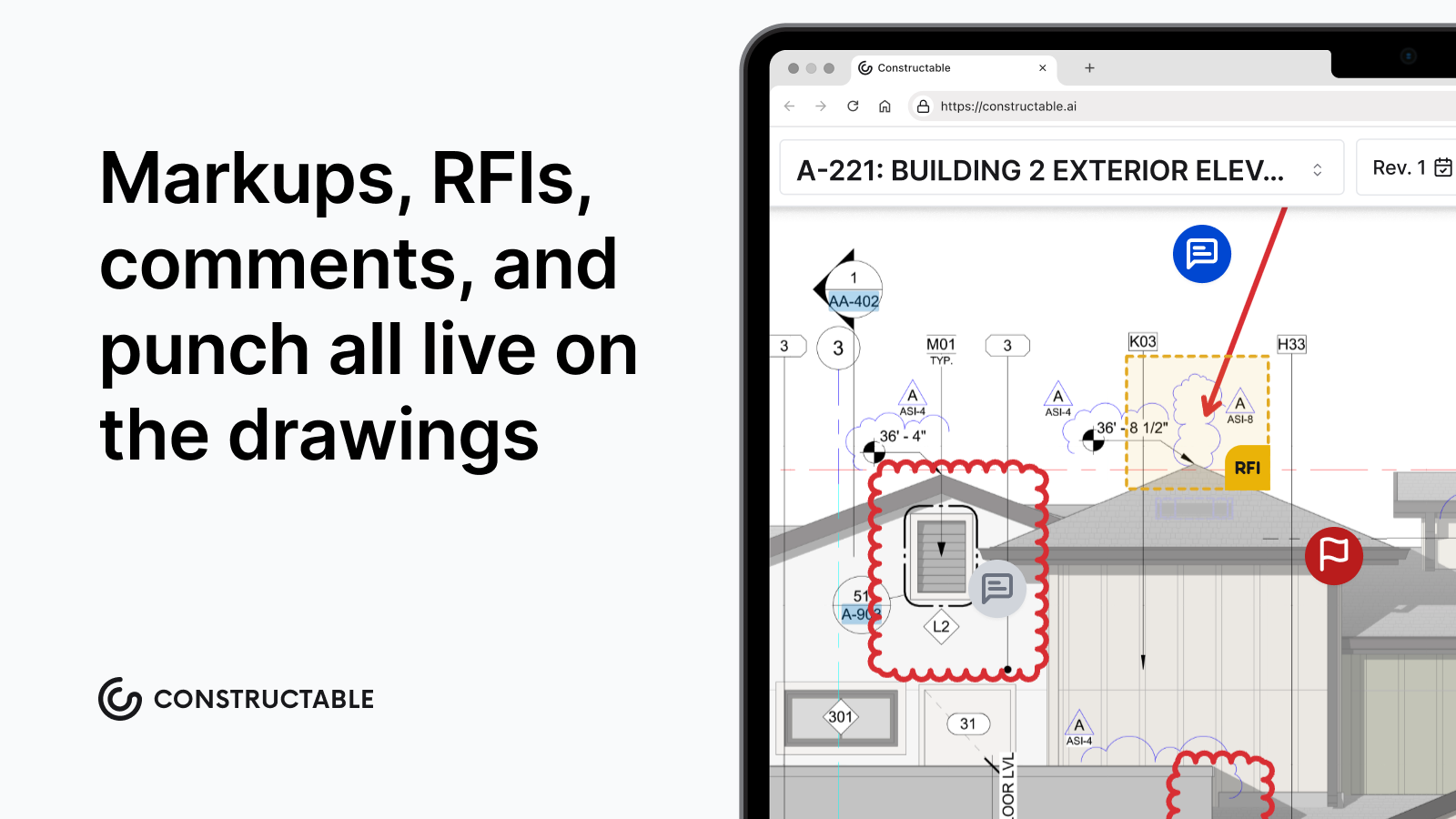
RFIs, punch items, Topics, and photos can all be anchored to exact locations (or areas) on sheets.
-
The Drawing Viewer supports split view (two sheets or revisions side‑by‑side) and blend modes (visually overlaying revisions to see changes at a glance).
-
Markups and measurements live as data, not just scribbles on a static PDF, so they’re searchable and reusable.
If a platform requires you to open Bluebeam every time you want to do real markup or takeoff work, it’s not really drawing‑centric.
RFI management
Good RFI tooling should:
-
Make it easy to draft, send, and track RFIs.
-
Capture a clear ball‑in‑court and due date.
-
Attach supporting files and drawing references.
-
Show a trail of responses and revisions.
An RFI typically originates in the field or during plan review, gets routed to the architect or engineer, receives a formal written response, and closes out once the team acts on that answer. Breakdowns at any stage, a missed due date, lost context between handoffs, or an unclear ball-in-court, translate directly into schedule delays and, in disputed cases, costly claims. The Navigant Construction Forum RFI study found the average review and response for a single RFI takes about eight hours and costs roughly $1,080, meaning a project averaging 800 RFIs carries close to $860,000 in processing overhead alone. Understanding why RFI management breaks down is the first step to preventing it. The system you use either keeps that chain tight or quietly lets it unravel.
A defensible RFI record also requires a timestamped log: who sent what, when responses were received, and which drawing or spec section the question referenced. That audit trail becomes critical during owner disputes, subcontractor claims, or project closeout, and it has to exist inside the system, not reconstructed from email threads after the fact.
In Constructable, RFIs are deeply linked to the drawings and Topics they come from:
-
You can create an RFI directly from a markup or Topic in the Drawing Viewer.
-
The RFI record brings the exact sheet location, context, and markups with it.
-
Once answered, RFIs become part of the project’s searchable knowledge base.
Submittal management
Submittals are another table‑stakes workflow:
-
Log submittal packages and items.
-
Track status and review steps.
-
Attach spec sections, drawings, and vendor docs.
-
Keep a clear audit trail of who approved what and when.
A submittal log is a structured register of every material, shop drawing, and product data sheet that requires architect or engineer approval, organized by spec section, for a deeper look at construction submittals types and best practices, the spec-section structure is where most of the complexity lives. Building it from scratch, reading through every specification division to identify what needs to be submitted, is one of the most time-consuming pre-construction tasks a PM faces.
Constructable eliminates that busywork: it reads the project's specification sections to identify which divisions require submittals, then auto-generates the log items with spec citations pre-filled. The PM's job becomes reviewing and approving, not creating from scratch, so when the responsible contractor is ready to attach documents for review, everything is already structured and waiting.
Punch list management
Every platform claims punch list support. The difference is in how quickly field teams can turn reality into structured data, and how easily managers can review and act on it. Plan-linked punch lists are what make that connection concrete.
In Constructable:
-
Field users can:
-
Drop precise punch pins in Punch List mode in the Drawing Viewer.
-
Dictate descriptions on mobile and let AI autofill key fields (title, trade, location, assignee) based on what’s said and where the pin lives.
-
Attach photos, videos, and notes that stay linked to that exact part of the plan.
-
-
Managers back in the office get:
-
A data‑grid punch list view with grouping and filtering by trade, location tiers, assignee, status, due date, and more.
-
Bulk actions for changing assignees, due dates, trades, or statuses across many items at once.
-
Plan‑linked context: open any punch item and you’re one click away from looking at the sheet(s) it was added to.
-
If “punch list” is just a long flat checklist with no relationship to drawings, you’ll spend more time explaining where the issue is than fixing it.
Daily logs
At minimum, your daily log tool should (for a detailed look at what makes these reports defensible, construction daily report best practices are worth reviewing):
-
Track manpower, companies on site, cost codes, equipment, weather, and notes.
-
Attach photos and videos to specific entries.
-
Export and share clear daily summaries.
Constructable goes further by:
-
Letting your team attach media directly from the field, even when offline, uploads sync when connectivity returns.
-
Re‑using data in reports (e.g., personnel and company hours roll up into Daily Log reports).
-
Treating photos and videos as first‑class data objects that can also show up in Topics, RFIs, and punch items.
Daily logs shouldn’t be a graveyard of notes. They should feed into your project’s larger operational picture and keep everyone in the loop on the reality on the ground.
Financial management
A best‑in‑class platform needs a strong financial backbone:
-
Prime contract management with a clear SOV.
-
Vendor commitments and purchase orders with line‑item detail.
-
Change events and change orders linked back to commitments and cost codes.
-
Invoice submissions tied to SOV line items and billing periods.
-
A Budget report that reconciles revenue, cost, projections, and over/under by cost code.
Constructable models each of these explicitly:
-
Prime SOVs and change orders on the revenue side.
-
Vendor SOVs and change orders on the cost side.
-
General conditions and "non-committed costs" tracked alongside commitments.
-
A full Budget report that shows projected vs actual revenue and costs, cost and revenue % complete, and forecast‑to‑complete per code, with the ability to apply forecast overrides when human judgment matters more than straight math.
If your project team is constantly reconciling Procore exports with an accounting software just to understand where they actually stand, that’s a sign the platform isn’t doing enough heavy lifting for you.
Beyond table stakes: one system instead of four
If table stakes are roughly comparable, where do the best platforms separate themselves?
We believe the answer lies in unification. The best construction management software:
-
Starts from the reality that a GC might otherwise need multiple point solutions,
-
Then replaces those point solutions with one powerful software environment where:
-
Drawings, markups, and takeoffs are built in and easy to use.
-
Field‑to‑office communication is anchored on the plans so context isn't lost.
-
Financials that accurately reflect what’s happening in reality.
-
Deeply integrated AI that indexes all project data and gets you the answers you need.
-
This is the design philosophy behind Constructable.
Drawing viewer, split view, and blend modes (bye‑bye, standalone PDF tools)
Instead of treating drawing markup as an external workflow, Constructable’s Drawing Viewer is powerful and best-in-class:
-
Split view lets you open:
-
Two different sheets side‑by‑side (e.g., Structural vs. MEP, floor plan vs. reflected ceiling plan, exterior elevation vs. a specific detail sheet).
-
The same sheet in two revisions at once.
-
-
Blend modes allow you to:
-
Overlay old and new revisions and visually see what changed without manually flipping back and forth.
-
Gradually blend between sheets by dragging the slider
-
-
Built‑in tools for:
-
Markups and callouts,
-
Measurements and takeoffs,
-
Pins that create RFIs, Topics, punch items, or tasks.
-
For teams used to living in Bluebeam for this work, the question becomes: why keep marking up PDFs in one place, then manually copying those decisions into another system?
Collaboration and comment threads that live on the plans, we call them Topics
In Constructable, Topics are like smart, shareable layers on top of your drawings:
-
A Topic can span multiple sheets and hold:
-
Markups,
-
Media‑rich comments (text, photos, screen recordings),
-
Linked issues like RFIs, punch items, or takeoffs.
-
-
Flexible sharing:
-
Keep Topics private as your own working layer,
-
Share with a specific set of teammates,
-
Or publish them project‑wide when they’re ready.
-
-
Comment threads inside Topics:
-
Use @‑mentions to notify or “summon” collaborators directly to the relevant part of a drawing,
-
Tag comments (e.g., “structural review”, “MEP coordination”) for easy filtering later.
-
We’ve seen customers use Topics for:
-
Three‑week lookahead mapped spatially as markup on site plans,
-
Asynchronous plan review with architects and consultants,
-
Private measurement scratchpads that don't have to leave the drawings.
Instead of scattering markup screenshots in email and chat apps (which are then immediately out-of-date), Topics keep the conversation in context and on the plans.
Real‑time question‑answering across your project
The more data lives in one system, the more valuable it becomes when you can ask natural questions of it.
Constructable indexes:
-
Drawings and markups,
-
Topics and comment threads,
-
RFIs and submittals,
-
Punch items and daily logs,
-
Photos, videos, and screen recordings,
-
Financial records tied to cost codes, commitments, and change orders.
That means you can ask questions like:
-
“Show me all open punch items on Level 3 related to fire stopping.”
-
“What did we agree with the owner on ceiling height changes in the lobby?”
-
“Which change events impact the electrical rough‑in schedule?”
-
“Where are we over budget on drywall, and which commitments and change orders are driving it?”
Instead of clicking through five different tools and folders, you get direct answers grounded in the project data you already have.
Field workflows with AI in the loop
A lot of “AI” in construction software is just marketing hype. We’ve focused on specific places where AI directly shortens work for field teams and PMs.
Here's one example:
-
AI punch list item generation:
-
Dictate what you see at a location on the plan.
-
Constructable uses the pin’s location, nearby drawings, and your narration to propose:
-
A clear title,
-
A suggested trade,
-
A location tier (e.g., level, area, room),
-
A likely assignee.
-
-
You review and tweak instead of typing and inputting everything manually.
-
The goal is not to “replace” your judgment, but to compress the gap between observation and structured data.
Jobsite communication and photos without a separate app
Jobsite communication tools like Rivet emerged because traditional tools didn't feel good in the field. Best‑in‑class construction management software should fix that, not bolt on a chat app.
Constructable:
-
Lets field users:
-
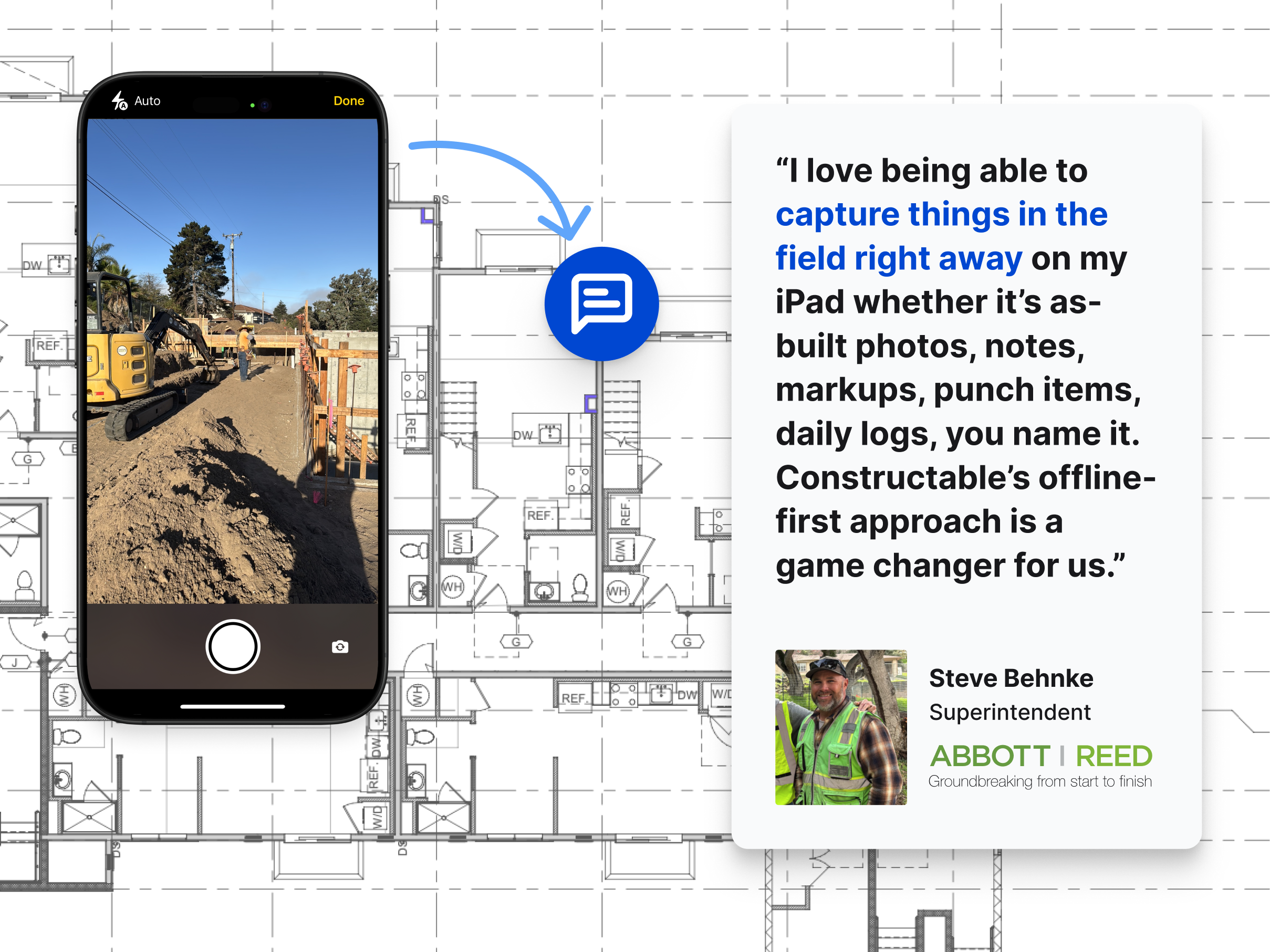
Capture photos and videos directly in the app,
-
Attach them to daily logs, Topics, punch items, RFIs, or other records,
-
Record screen walkthroughs inside the Drawing Viewer to explain issues visually.
-
-
Handles tough realities:
-
Offline conditions with background upload queues,
-
Automatic retries when connectivity returns.
-
Because every photo and video is linked to a specific context (a log entry, Topic, punch item, or sheet location), reviewing issues later doesn’t feel like scrolling a random camera roll.
Financial clarity without sacrificing your ERP
For many GCs, the ERP (like CMiC, etc.) is the system of record for corporate finance. The project team, though, needs day‑to‑day visibility that’s closer to the work:
-
Which commitments are close to fully invoiced?
-
How much approved change order value is still unbilled?
-
Are we over or under on a given cost code once pending COs are accounted for?
Constructable focuses on giving the project team a live, up-to-date view, the kind of real-time cost and commitment visibility that ERPs alone rarely provide:
-
Prime contract and SOV on the revenue side.
-
Vendor commitments and COs on the cost side.
-
Daily invoicing and billing period logic tracked at the SOV line level.
-
A Budget report and Change Orders report that describe what’s actually happening on this job.
You don’t have to choose between “ERP truth” and “field reality”, Constructable is the layer where those two meet in a way project teams can actually use.
| Workflow | Typical tool | How Constructable handles it |
|---|---|---|
| Drawing markup, takeoffs, and plan review | Bluebeam | Built-in Drawing Viewer with split view, blend modes, markups, and measurements. No separate PDF tool needed. |
| RFIs, submittals, and project documentation | Procore | Linked to exact drawing locations; submittal logs auto-generated from spec sections |
| Field communication and photo documentation | WhatsApp or chat apps or Company Cam | Photos, markup and media anchored to plan locations, with offline sync and automatic upload when connectivity returns |
| Back-office financials and accounting | Computer Ease, Sage, CMiC or another ERP | Live budget, SOV, commitments, and change orders at the project level (the layer ERPs alone rarely provide) |
Quality of life: dark mode and late‑night reality
It sounds small, but if you’ve ever stared at a bright white UI at 11:30pm trying to close out RFIs or align a change order, you know it matters.
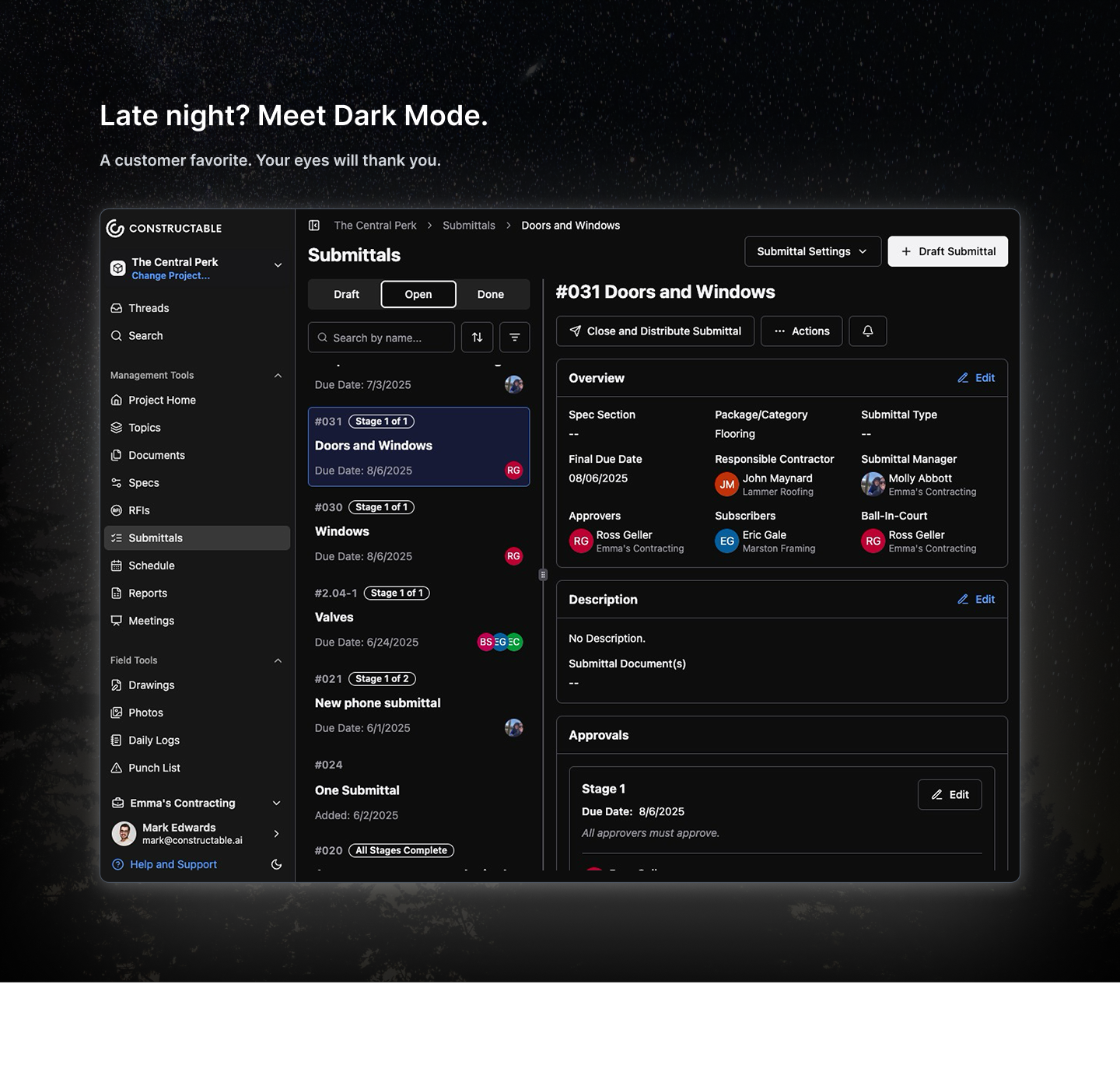
Constructable includes a polished dark mode that:
-
Respects the way project teams actually work (often outside normal hours),
-
Reduces strain when you’re reviewing drawings, Topics, or reports late at night,
-
Makes long design and coordination sessions more comfortable.
The best construction management software sweats these details. We have put a lot of thought and care into how it feels to live in the tool all day.
Final Thoughts on What the Best Construction Management Software Requires
Most construction software solves one piece of the puzzle and leaves you to figure out the rest. The difference with a truly connected system is that context doesn't fall through the cracks between tools, and your team isn't spending Friday night reconstructing an RFI trail from email threads. That's not a small thing when you're running 800 RFIs on a single job. Talk to the Constructable team to see how it holds up against the way your projects actually run.
FAQs
What is the difference between an RFI and a submittal in construction?
An RFI (Request for Information) is a formal question sent to the architect or engineer to clarify design intent, what something should be or how it should work. A submittal is a contractor-provided document (shop drawings, product data, or samples) submitted for architect/engineer review and approval before work proceeds. Both create formal, timestamped records that matter during disputes and closeout.
What features should I look for in RFI management software?
At minimum, look for clear ball-in-court tracking, due date visibility, and drawing linkage so each RFI references the exact sheet or spec section in question. A complete response history and timestamped audit trail are equally critical, they're what protects you during owner disputes, subcontractor claims, or project closeout. Bonus points if RFIs can be created directly from markups in the drawing viewer.
How does AI help with submittal management?
Instead of manually building a submittal log from scratch, AI can read your spec sections and extract the required submittal items, then auto-populate the structured fields, trade, spec reference, description, responsible contractor. Your team reviews and refines instead of typing everything from scratch. That compression of busywork is where AI earns its keep in construction software.
Can one platform replace Procore and Bluebeam for RFIs and submittals?
Unified systems can handle RFIs, submittals, drawing markup, and field workflows in a single environment, reducing the context switching and version confusion that comes with juggling multiple tools. The trade-off is that purpose-built tools like Bluebeam have deep feature sets some teams rely on. The real question to ask is whether your team actually uses that depth, or just defaults to what's familiar.
What is a submittal log and why does it matter?
A submittal log is the master tracking document for every submittal required on a project, what's been submitted, what's under review, what's been approved, and which spec section each item ties back to. Without it, items fall through the cracks and material procurement stalls. It's also a key closeout document that shows the owner every required submission was properly reviewed and approved.