Best Construction Project Management Software: Mid-Size GCs (2026)
Our July 2026 review of the 7 best construction project management software tools helps mid-size GCs find the right fit for field teams and office workflows.
Pick the wrong project management software for construction and your field team stops using it by week three, your PMs are back in spreadsheets, and you've lost months of setup time. For mid-size GCs, the fit matters more than the feature list. These are the seven systems worth a serious look in 2026.
TLDR:
-
Flat-fee pricing with unlimited users is the clearest dividing line between systems built for mid-size GCs and those that are not
-
Most systems here were built for a different buyer: enterprise firms, developer portfolios, or field-only trade crews
-
PlanGrid is in maintenance mode and closed to new customers, so teams still running it are already on a migration timeline
-
Procore's pricing scales with construction volume, so the bill climbs as your firm grows
-
Constructable is purpose-built for $20M-$150M GCs, with drawings-first workflows, built-in AI, and onboarding under 21 days
What is project management software for construction?
Project management software for construction pulls the moving parts of a commercial job into one place: drawings, RFIs, submittals, daily logs, and financials sitting where the field and office can both reach them.
The category exists to close the gaps between those workflows. A super marks up a plan, a PM tracks a change order, an owner needs a status update, and the software keeps all of it connected instead of scattered across email, spreadsheets, and a handful of logins.
For mid-size GCs, coordination is the whole game. The right construction software for mid-size contractors should carry that weight without adding steps to your team's plate.
How we ranked construction project management systems
We weighed each system the way a mid-size GC feels it once a job is running, not how a feature sheet reads. Seven things carried the most weight:
-
Pricing model. Flat-fee access adds subs, owners, and consultants without a climbing bill, while per-user pricing discourages broad collaboration.
-
Field-to-office alignment. It has to hold up for a super in the field and a PM at a desk, including offline drawing access inside a concrete structure.
-
Drawings as the center of gravity. RFIs, quality items, and markups pin to exact sheet locations, not a disconnected log.
-
Onboarding and migration. Time to productive use matters, plus whether migration help is included.
-
Built-in AI. The useful kind removes a step inside a workflow you already run.
-
Integration depth. Native two-way accounting sync beats middleware and manual re-entry.
-
System cohesion. One product built by one team behaves differently than acquired tools stitched together.
Best overall: Constructable
Constructable is built for one buyer: the mid-size commercial GC running $20M to $150M in volume who wants software to disappear into the work. The whole system is designed around removing steps, not stacking capabilities. Think Ford F-150 instead of a Ferrari. Reliable, practical, built for real work, and it shows up every day.
-
Flat-fee pricing, unlimited users: no per-user fees whether you add internal staff, subs, owners, or consultants, and a field-only plan covers teams that want field tools without the full financial suite.
-
Drawings-first system: RFIs, quality items, and markups pin to exact locations on the sheet, automatic sheet and detail callouts that link your drawings together, and a mobile app mirrors the desktop experience exactly (it also works offline!)
-
AI Answer Engine across projects: questions run across multiple projects at once, pulling answers from drawings, photos, logs, and documents, each linked back to the source so you can verify it.
-
Full read & write integrations with ChatGPT and Claude: Constructable leads the industry here, letting you connect it to other AI tools via MCP (Model Context Protocol) allowing you to further extend Constructable's capabilities by connecting it to your personal context.
-
Under-21-day onboarding: hands-on migration is included at no extra cost, handled directly instead of pushed to third-party consultants. See how Constructable's project management tools remove steps from daily workflows.
-
Native two-way accounting: QuickBooks Online and Sage Intacct sync (we are an Official Sage Partner), with e-signing built in, plus lien waivers, contracts, change orders, and commitments.
Here's a quick overview video of Constructable:
Bottom line: if you run a mid-size GC and want a system that removes steps instead of adding complexity, Constructable is purpose-built for the job.
Procore
Procore covers the full lifecycle, from RFIs and submittals to drawings, budgets, and change orders, with broad accounting integrations including Sage 100 and a large subcontractor network for bid discovery. For a large enterprise firm with staff to configure and maintain the system, that depth earns its keep on complex, multi-stakeholder work.
The trade-offs land hardest on mid-size firms. Pricing scales with annual construction volume instead of a flat fee, so the bill climbs as you grow. Per-event notifications pile up too, and RFIs can slip when the inbox gets that loud.
If you run a $20M to $150M GC and need fast time-to-value, predictable pricing, and a system field teams will actually open, see the full Constructable vs Procore breakdown to understand where the configuration and staffing overhead lands.
Autodesk Forma Build (f.k.a. Construction Cloud)
Autodesk Forma pulls a wide suite together, much of it assembled through acquisitions like PlanGrid and BIM 360, and it dropped the Construction Cloud name in March 2026. The coverage is broad, with Forma Build for field and project management, native Revit and AutoCAD ties, and BuildingConnected bid management now in beta.
For large contractors already living in the Autodesk ecosystem, that breadth and BIM coordination can make the configuration and migration investment worthwhile. But because modules came from different teams, the experience varies across tools, tablet compatibility has documented gaps, and migration usually runs through third-party consultants billed separately.
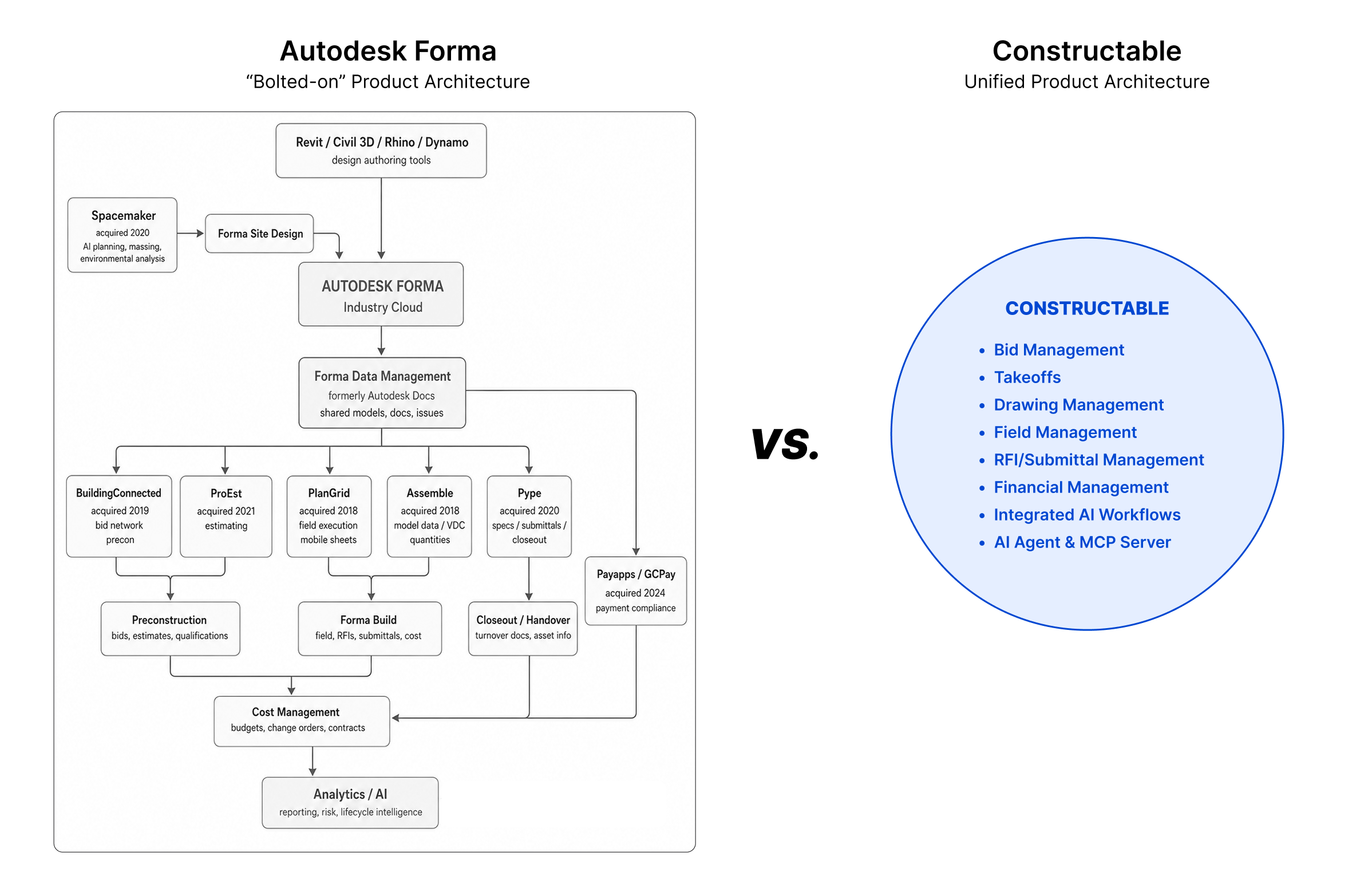
For a mid-size GC where field usability is what gets your team to open the software, the Constructable vs Autodesk Forma comparison shows how a cohesive system built from the start differs from one assembled through bolted-on acquisitions.
Fieldwire
Fieldwire, now part of Hilti, is a field-execution system built around drawing distribution, task management, and punch lists. It started with trade contractors and keeps a field-first reputation, with solid plan markup and offline access on iOS and Android. For a specialty contractor coordinating drawings and tasks on the jobsite, it does that job well.
The gaps show up on the office side. There are no native financial tools, so budgets, SOVs, commitments, and change orders live elsewhere. Pricing runs per user, starting at $39 monthly billed annually, and a Business Plus costs over $21,000 annually before any financials.
If you need field and office workflows, financial visibility, and RFI depth in one place, Constructable covers the full scope Fieldwire was not built for.
RedTeam
RedTeam has been in market since 2006 and sits below enterprise tools on price, with financial reporting as its strongest suit. WIP reports pull up in a few clicks, estimating and proposal generation cover pre-award work, and a Sage 100 integration is available, though users report the sync runs inconsistently. For a cost-conscious GC that runs most of its project management from the office, that reporting depth is a real fit.
The gaps show up in the field. RedTeam's mobile experience is a common reason teams switch mid-contract, cited consistently in G2 and Capterra reviews, RFIs cannot be pinned to specific drawing locations, and the native scheduling tool has reported data-loss issues. There is also no audit log for budget and spend changes.
If you need field crews using the system every day, the Constructable vs RedTeam comparison shows how field workflows and financial tools come together without the mobile trade-offs or gaps in drawing-based collaboration.
PlanGrid
PlanGrid was an early leader in mobile-first drawing management, acquired by Autodesk in 2018 and folded into what is now Autodesk Forma Build. The standalone product still runs, but it sits in maintenance mode and is closed to new customers.
What remains is the field toolset it built its name on:
-
Blueprint distribution and markup across iOS, Android, and web
-
Drawing version control and sheet-based organization
-
Photo and punch list documentation
There are no native financial tools, no change order management, and no RFI-to-drawing pins, so the gaps widen the longer a team stays on it.
If you are still running PlanGrid, you are on a migration timeline. The Constructable vs PlanGrid comparison is a common landing spot for teams pairing the drawings-first field experience PlanGrid was known for with the RFI, financial, and office workflows it never covered.
INGENIOUS.BUILD
INGENIOUS.BUILD manages construction and real estate development from the owner's seat, built for developers watching a portfolio of projects, not the crew running a single job. Its strengths sit at that level: portfolio oversight across developments, financial and program management tuned to ownership, and per-user, per-month pricing with volume discounts.
The distinction is audience, not caliber. Aimed at owner-developer oversight, the day-to-day GC workflows behind RFIs, submittals, daily logs, and change order execution sit outside its center.
If you run active construction from bidding to field closeout, the Constructable vs INGENIOUS.BUILD comparison details how each system aligns to its intended audience.
Feature comparison table of construction project management systems
The table below maps how each system handles the workflows mid-size GCs run daily, from drawings and RFIs to pricing structure. For a broader look at the category, see our guide to all-in-one construction software.
| System | Best fit | Pricing model | Built-in AI | Named integrations |
|---|---|---|---|---|
| Constructable | Mid-size GCs ($20M to $150M) | Flat-fee, unlimited users | Assistive, built-in | QuickBooks Online, Sage Intacct |
| Procore | Enterprise GCs | Per-user, custom quote | Add-on | Broad marketplace |
| Autodesk Forma | Large firms, design-build | Per-user | Add-on | Autodesk ecosystem |
| INGENIOUS.BUILD | Developer portfolio oversight | Per-user, per-month | Limited | Financial tools |
| Fieldwire | Field-first crews | Per-user tiers | Limited | Third-party sync |
| RedTeam | Small-to-mid GCs | Per-project | Limited | Accounting tools |
| PlanGrid | Field crews (maintenance mode, no new customers) | Per-user | None | Autodesk ecosystem |
Why Constructable is the best construction project management system
Most systems on this list were built for someone else. Enterprise GCs, developers watching a portfolio, trade crews running the field alone. If Procore is on your shortlist, our guide to Procore alternatives for mid-market contractors maps out the options before you decide. The question for a mid-size GC is which system was built for a firm your size.
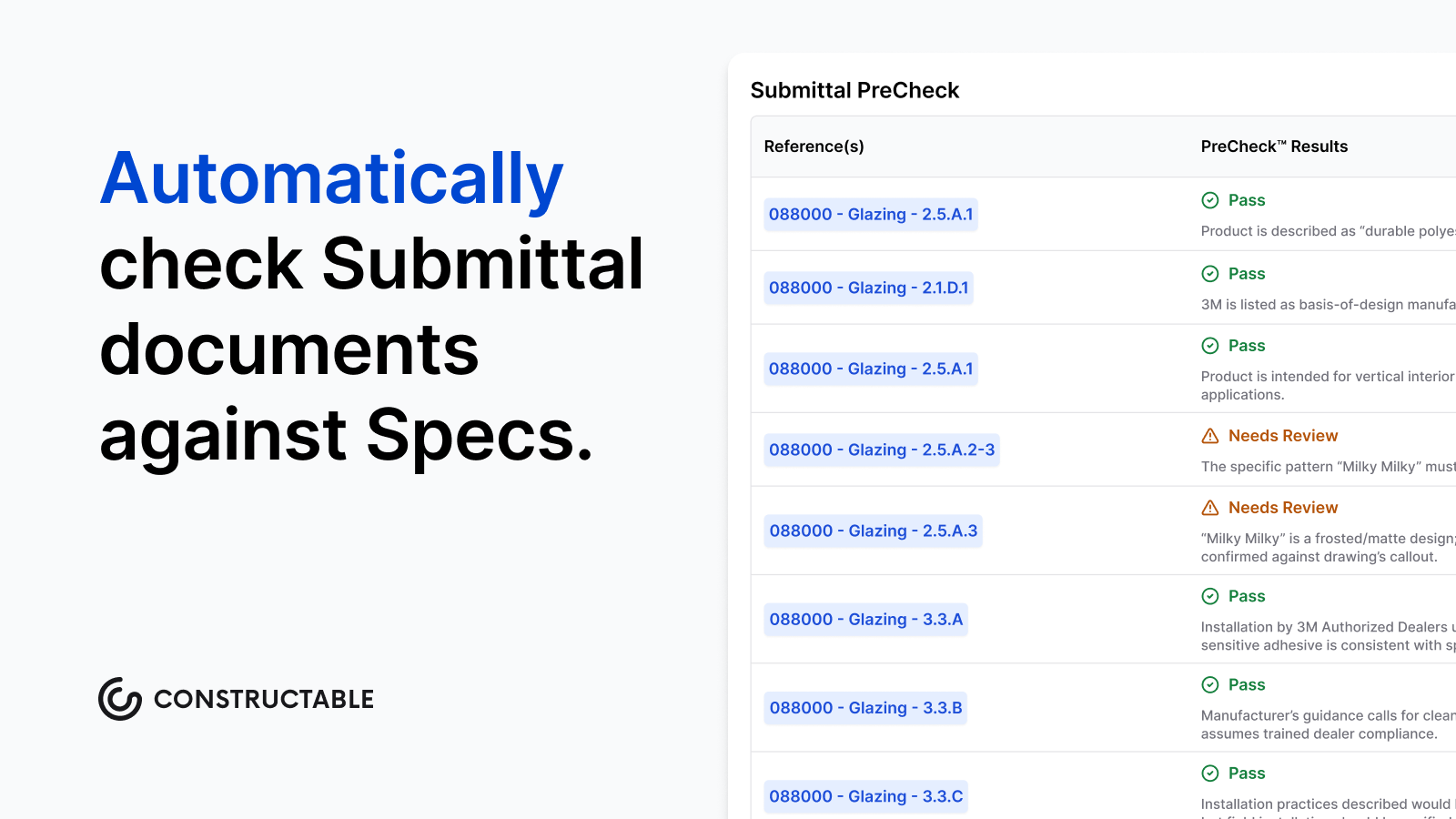
Constructable is the only one here purpose-built for the $20M to $150M GC, with flat-fee pricing, a drawings-first architecture, assistive AI baked into the work you already do (like pre-checking your Submittal documents), and white-glove onboarding under 21 days. If that sounds like your firm, the best way to know is to see it against your own projects. Book a demo and check the fit.
Final thoughts on picking project management software for construction
Software that was built for someone else will feel like it the moment a job picks up speed. Mid-size GCs have specific needs, and the right system should match them without extra configuration or extra cost. Take a look at Constructable and see whether it fits the way your team actually works.
FAQ
How do I choose between Constructable, Procore, and Autodesk Forma for a mid-size GC?
Start with company size and pricing tolerance. Procore and Autodesk Forma are built around enterprise scale, with per-user pricing and configuration overhead that works best for firms with dedicated software staff. Constructable is purpose-built for the $20M to $150M GC that wants flat-fee access, fast onboarding, and a system field crews will actually open on day one.
Is Constructable better than Fieldwire for general contractors who need both field and financial workflows?
Yes, if you need both. Fieldwire is a strong field-execution tool for drawing distribution and task management, but it has no native financial tools, meaning budgets, change orders, and schedules of values live in a separate system entirely. Constructable covers field and financial workflows in one connected system without the per-user cost that pushes a 20-person Fieldwire team past $21,000 a year.
When should a team still on PlanGrid switch to a different construction project management system?
PlanGrid is in maintenance mode and closed to new customers, so the migration timeline is not optional. The key decision is which system to land on. Teams that valued PlanGrid's drawings-first field experience should look for a system that pairs that same approach with the RFI tracking, change order management, and financial workflows PlanGrid never covered.
Which systems on this list include pre-construction estimating tools?
RedTeam includes estimating and proposal generation as part of its pre-construction coverage. Constructable, Procore, Autodesk Forma, Fieldwire, and INGENIOUS.BUILD do not offer native estimating or bid takeoff functionality, so firms that need integrated estimating should factor that gap into their evaluation and plan for a separate tool alongside whichever system they choose.
Is Constructable or RedTeam a better fit for a GC that runs most project management from the office?
RedTeam's strength is financial reporting and WIP visibility, which suits cost-conscious firms that manage projects primarily from the office. If field crew adoption matters, RedTeam's documented mobile gaps and the inability to pin RFIs to specific drawing locations become real friction points mid-project. Constructable pairs the same financial depth with a mobile experience that mirrors the desktop, so field and office teams work from the same system without workarounds.