Constructable vs Autodesk Forma: Which is Better in June 2026?
Compare Constructable vs Autodesk Forma in June 2026. Pricing, onboarding, features, and which system works better for mid-size contractors.
If you're weighing Constructable vs Autodesk, you're probably trying to decide whether the enterprise-level breadth of Autodesk Forma (f.k.a. Autodesk Construction Cloud) is worth the setup time and per-user pricing. For teams with existing Autodesk infrastructure and IT resources, that tradeoff might make sense. But if you're a mid-size contractor who needs software that works in the field on day one without hiring consultants to configure it, the gap between what Autodesk Forma offers and what you actually need day-to-day matters more than the feature count on paper.
TLDR:
- Autodesk Forma offers broad module coverage but requires months of setup, implementation fees up to $5,000+, and ongoing per-user costs between $175-$350 monthly.
- Constructable delivers one unified system with flat pricing, unlimited users, and under 21 days to go-live with no onboarding fees.
- Autodesk Forma's architecture stems from multiple acquisitions, creating navigation gaps between modules that weren't built to work together from day one.
- Constructable connects drawings, RFIs, submittals, and change orders in one cohesive system built by one team for mid-size GCs running $20M-$150M annually.
- Constructable's AI Answer Engine finds project details instantly across plans, photos, and documents with direct source links, which means no digging through folders.
What is Autodesk Forma?
Autodesk Forma is Autodesk's answer to the construction software market, built largely through a series of acquisitions instead of a single unified product vision. PlanGrid for field and drawings, BuildingConnected for preconstruction, Assemble for model-based estimating, and ProEst for estimating. Autodesk bought them and wrapped them under one brand.
The result is a wide-ranging suite that covers document management, project coordination, field execution, and cost control. On paper, it checks a lot of boxes. Large general contractors and owners managing complex commercial projects will find tools for nearly every workflow.
Autodesk Forma is unquestionably powerful. It integrates with BIM workflows, supports large enterprise deployments, and carries the weight of Autodesk's broader ecosystem. If your firm runs Revit, has a dedicated IT team, and is managing a hospital or airport, Autodesk Forma was probably built with you in mind.
The tradeoff is complexity. Products that started as separate companies still feel that way to many users. Workflows don't always connect the way you'd expect from software built as one thing from day one. For mid-size contractors who need unified systems without a consultant to configure them, that gap matters.
Who Autodesk Forma Is Designed For:
- Large general contractors and owners running complex, multi-phase commercial projects who need broad coverage across every workflow stage.
- Firms already invested in the Autodesk ecosystem, particularly those running Revit or other Autodesk design tools, where BIM integration is a priority.
- Organizations with dedicated IT staff and implementation resources who can manage the configuration work required to get the suite functioning cohesively.
What is Constructable?
Constructable was built in 2023 by people who understood one thing clearly: mid-size general contractors don't need more software. They need less of it, working better.
Everything lives in one place: drawings, RFIs, submittals, daily logs, photos, change orders, quality lists. Not stitched together from acquisitions, but built as one cohesive system from day one. Field staff can pull up plans on their phone. Project managers can track an RFI from drawing pin to official response. The office can manage budgets and change events without jumping between tools.
The AI Answer Engine lets anyone on the team ask a plain-language question and get an answer instantly, with direct links back to the source, whether that's a drawing detail, a daily log entry, or an untagged photo.
Pricing is a flat fee with unlimited users. Subcontractors, owners, and consultants all get access without adding to your bill. Onboarding takes an average of 21 days (or less), with no extra fees for data migration.
Who Constructable Is Built For:
- Mid-size commercial general contractors running $20M to $150M in annual volume who want one system instead of five.
- Project teams tired of tools that work fine in demos but fall apart in the field.
- Owners and PMs who don't have an IT department and need software that works on day one.
System Architecture and Product Experience
The way software is built shows up in how it feels to use every single day.
Autodesk Forma's breadth comes at a cost. PlanGrid, BIM 360, and BuildingConnected all started as separate companies, each with its own interface logic, data model, and idea of how construction should work. Autodesk acquired them and put them under one roof, but different rooms still have different furniture. Teams moving between modules often find themselves relearning navigation, re-entering context, and working around gaps that wouldn't exist if the system had been designed as one thing from the start.
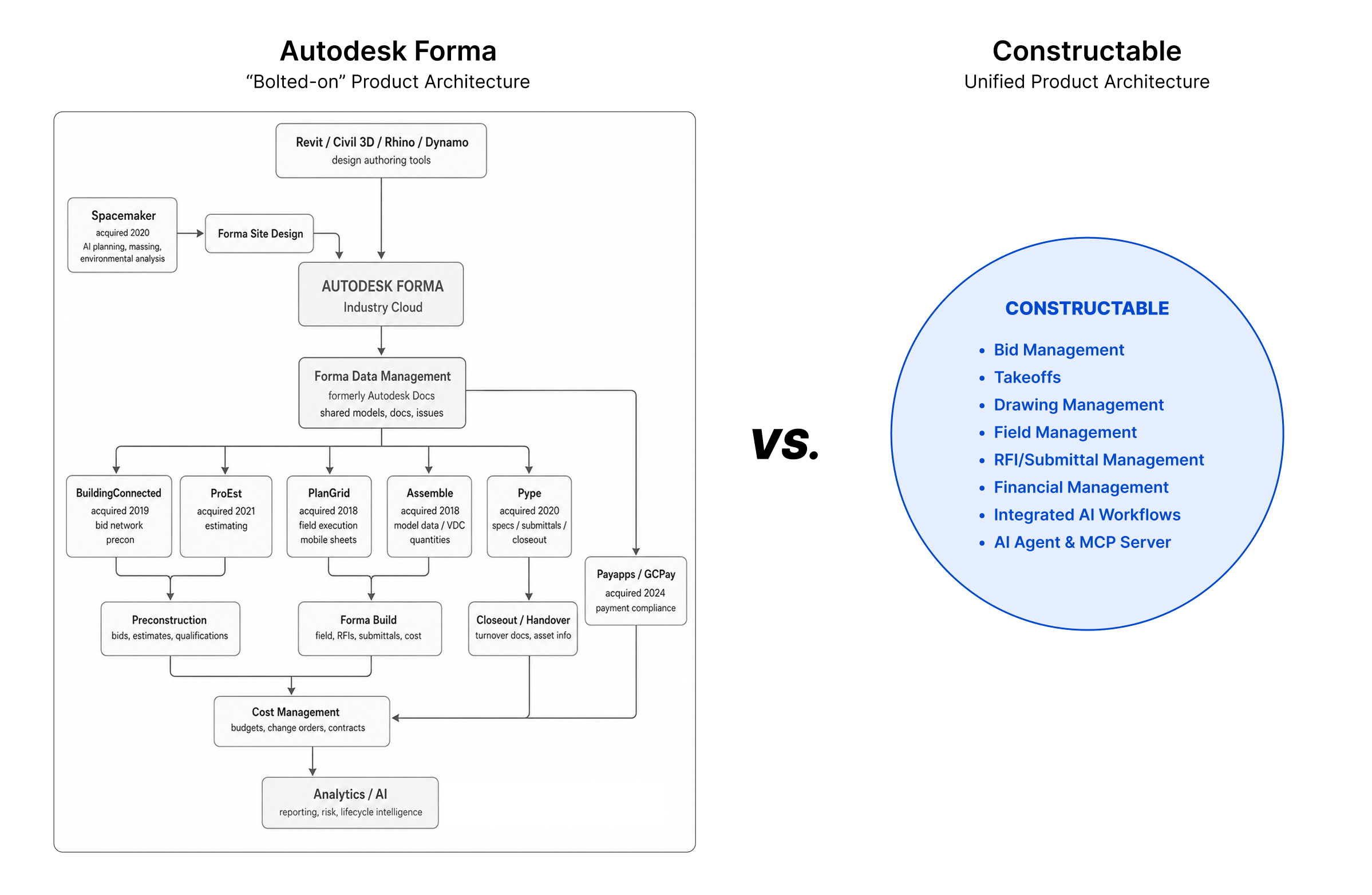
Constructable was built as one product by one team. Drawings connect directly to RFI responses. Photos tie to daily logs. Quality list items can be pinned directly to plans. There's no seam between field and office because there was never a separate product for each.
For teams running BIM-heavy workflows with existing Autodesk infrastructure, Autodesk Forma's depth may be worth the complexity. For everyone else, a system that was coherent from day one just works differently, and you feel it fast.
| Feature | Constructable | Autodesk Forma |
|---|---|---|
| System Architecture | Single unified system built from day one by one team with direct connections between drawings, RFIs, submittals, and budgets | Multiple acquired products (PlanGrid, BuildingConnected, Assemble) integrated under one brand with separate interfaces and data models |
| Onboarding Timeline | Under 21 days average with direct support, no extra fees for data migration or setup | Multi-month implementation requiring third-party consultants, with fees ranging from $500 to $5,000 or more |
| Pricing Model | Flat monthly or annual fee with unlimited users including subcontractors, owners, and consultants | Per-user pricing between $175-$350 monthly, negotiated based on construction volume and module selection |
| Ideal Team Size | Mid-size commercial general contractors running $20M-$150M annually without dedicated IT departments | Large general contractors and owners with IT staff managing complex enterprise-scale projects |
| Technical Requirements | Works immediately in field and office with minimal training, mobile-first design | Requires role-based training, module configuration, and IT resources to manage ongoing system administration |
| Integration Focus | All-in-one system with AI Answer Engine connecting project data across drawings, photos, and documents | Deep BIM integration with Revit and broader Autodesk ecosystem for design-heavy workflows |
Onboarding, Migration, and Time to Value
Getting new software running is its own project. And for most mid-size GCs, it's one nobody budgeted for.
Autodesk Forma
Autodesk Forma onboarding is structured like an enterprise implementation because it is one. Multi-phase rollout, role-based training, module-by-module configuration. Implementation fees commonly run $500 to $5,000 or more, and many teams bring in third-party consultants just to get the system up and running. Timelines are typically measured in months. If you have internal IT resources and a long runway before go-live, that's manageable; if you don't, it's a real problem.
Constructable
We handle onboarding directly, at no extra cost. Data migration is included. Most teams are up and running within 21 days. There's no consultant to hire, no surprise setup invoice, and no month-long training cycle before anyone can open a drawing.
The field shouldn't need a certification to use their project software. Neither should the office. For contractors who want to get moving without the overhead, the time-to-value gap here is hard to ignore.
Pricing Structure and Total Cost of Ownership
Pricing is where software decisions often get made or broken. And in construction, surprises on a contract are never welcome.
Autodesk Forma
Autodesk Forma doesn't publish pricing publicly. What you'll find instead is a sales conversation, a scoping call, and a quote tied to your construction volume, module selection, and negotiated terms. Per-user pricing typically ranges from $175 to $350 per month, before factoring in onboarding fees, add-on modules, or training costs. Industry pricing guides confirm that enterprise construction management platforms typically charge $30 to $350+ per user monthly, with costs scaling based on feature access and construction volume. As your team or project volume grows, renewal conversations can shift the number. For large firms with procurement teams who negotiate contracts regularly, that's manageable. For a 40-person GC, it's a lot of uncertainty to carry.
Constructable
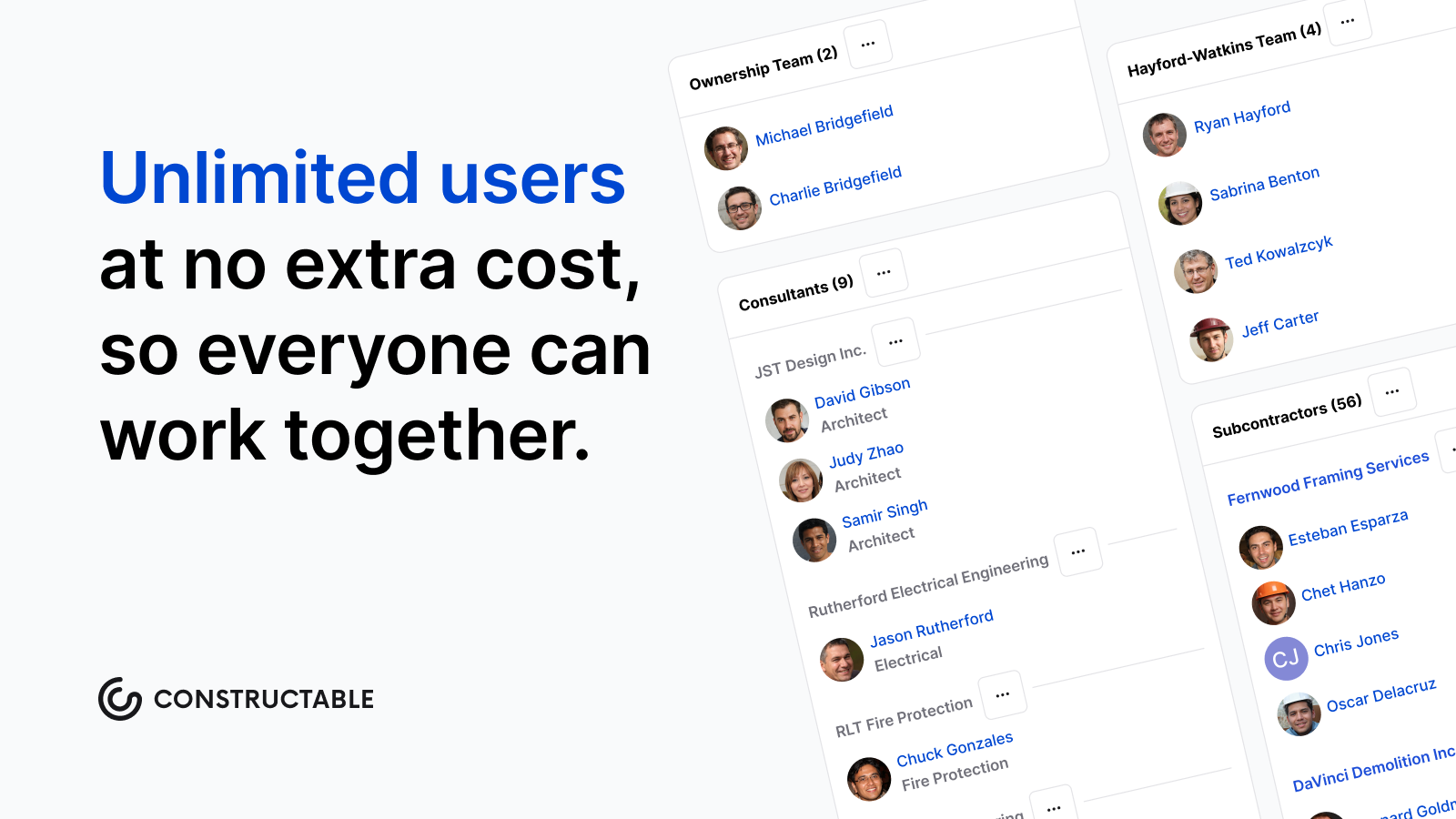
Our pricing is flat. One fee, billed monthly or annually, with unlimited users on every plan. Subcontractors, owners, consultants, vendors: add as many people as the project needs. Nobody gets added to your invoice. Onboarding and data migration are included, not itemized separately after the fact.
That structure matters because construction projects don't stay small. Teams grow, scopes change, and the last thing you need is a software renewal that punishes you for winning more work. Per-user pricing models create budget uncertainty that becomes especially challenging as teams scale, making flat-rate structures increasingly attractive for growing contractors. Predictable pricing means you can actually budget for it, which is a reasonable thing to expect from software you're running your business on.
Why Constructable is the Better Choice
Autodesk Forma is a legitimate product for the right buyer. If your firm runs Revit, has IT support, and needs enterprise-scale coverage across every workflow, it earns its complexity.
But that describes a small slice of the market.
For mid-size GCs managing real commercial work without a dedicated software team, the calculus is different. You need something that works in the field on day one, connects your drawings to your RFIs to your budget without gaps, and doesn't charge you extra every time your team grows.
The choice usually comes down to a few honest questions:
- How fast do you need to be up and running? Autodesk Forma's implementation timeline can stretch weeks or months depending on configuration needs, while Constructable is built to get your team moving quickly without a lengthy onboarding process.
- How much time can you realistically give to training? If the answer is "not much," a leaner, more intuitive tool wins every time.
- Do you want pricing you can actually predict at renewal? Module-based pricing creates budget uncertainty that flat, transparent pricing simply does not.
If your answers lean toward "fast, lean, and predictable," Constructable is worth a serious look. We're not trying to win on feature count. We're trying to be the software that just shows up and works, every single day.
Final Thoughts on Autodesk vs Constructable for Your Projects
Most mid-size GCs don't need more software breadth. They need something that actually connects the dots between field and office without requiring a dedicated IT team to make it happen. That's where Constructable vs Autodesk becomes a pretty clear choice for contractors who want to move fast. Autodesk Forma has its place for large firms with complex BIM needs, but if you're looking for software that just works on day one with predictable pricing, Constructable makes more sense. Want to see it in action? Book a quick walkthrough, and we'll show you a real project setup.
FAQ
How do I decide between Constructable and Autodesk Forma for my company?
Start with three questions: How much IT support do you have? How quickly do you need your team working in the system? And do you need deep BIM integration? If you're a mid-size GC without dedicated IT staff who needs to get up and running fast, Constructable is built for that. If you're running Revit across enterprise-scale projects and have resources to manage a longer implementation, Autodesk Forma may be worth the complexity.
What's the main difference in how these two products are built?
Autodesk Forma is a collection of acquired companies (PlanGrid, BuildingConnected, Assemble) brought together under one brand. Constructable was designed from day one as a single system where drawings, RFIs, submittals, and budgets all connect without seams. That architectural difference shows up in how the software feels to use every day.
Who is Autodesk Forma actually best for?
Autodesk Forma works well for large general contractors and owners managing complex commercial projects who already use Autodesk tools like Revit, have dedicated IT teams to handle configuration, and need enterprise-wide BIM integration. If that describes your operation, the product was built with you in mind.
How long does it actually take to get either system running?
Autodesk's onboarding is typically measured in months and often requires third-party consultants, with implementation fees running $500 to $5,000 or more. Constructable handles onboarding and data migration directly at no extra cost, with most teams running live in under 21 days.
Will I get hit with surprise costs as my team or project volume grows?
With Autodesk, pricing is negotiated per user and tied to construction volume. Renewal conversations can shift your cost as you grow. Constructable charges a flat fee with unlimited users, so adding subcontractors, owners, or consultants to a project doesn't change your bill.