Use this guide to configure, create, complete, review, export, and troubleshoot Daily Logs. It covers the exact controls for recording weather, labor, equipment, materials, deliveries, inspections, delays, notes, phone calls, photos, and files on desktop web, mobile web, and the native app.
Start here
- I configure field reporting: Configure Daily Log sections → Customize Daily Logs for one project → Create the first log.
- I complete the report each day: Build the daily record → Add photos and attachments → Export the finished log.
- I only log my crew's headcount: Record personnel with limited Daily Log entry.
- I review project history: Find logs by date → Read activity and evidence.
- I send the log to the owner or architect: Distribute a Daily Log.
- Something is missing or blocked: Start with Troubleshooting Daily Logs.
Common task recipes
- Start today's report quickly: Add the log for today's date, repeat eligible labor, time cards, equipment, and materials from the prior log, then update quantities and notes.
- Send the day's report out: Open the log, choose Actions → Distribute, pick the photo sections and recipients, and send.
- Document a failed field inspection: Add an Inspection entry, mark it Failed, add notes and attachments, and include inspection photos in the PDF.
- Record a delay: Select the applicable delay types and explain the impact in the log so the delay indicator is visible from the index.
- Log a jobsite phone call: Open the day's log, select Add Phone Call in Phone Calls, set Direction, who was on the call, and Start Time, then save.
- Log a toolbox talk or near miss: Open Safety, write the day's record, and attach the sign-in sheet or photos there so they export as Safety Photos.
- Send a month of logs to the owner: Select Export Daily Logs in the Daily Logs page header, set Start date and End date up to 60 days apart, and select Download for a ZIP with one PDF per log.
- Turn over the full history: Generate a Closeout package with Daily Logs ticked.
- Track something your form doesn't ask for: Open Project Settings → Daily Log Settings, add a field to a section or add a section of your own under Custom fields.
Understand access and availability
Understand how Daily Logs work
A Daily Log is one dated record of a single day on the project — weather we capture for you, entries your crews fill in, and the photos and files that back them up. Saved entries update the live record, there is one log per date, and where you attach a photo decides where it lands in the PDF.
Date → weather and overview → field entries → notes, delays, and evidence → PDF or Closeout package
Your project has one dated sequence of Daily Logs. Anyone with write access edits the live record — which is exactly what you want when a correction surfaces three days later.
Which sections you see is set in two layers. Organization settings decide which optional sections exist anywhere in your organization, and each project can hide built-in sections it doesn't use, add its own fields to a section, and add custom sections of its own. A section turned off for the organization can't be brought back by a project.
Note: Where you attach a file decides where it lands. A file added inside a labor, delivery, dumpster, or inspection entry stays with that entry, files added under Safety stay with the safety record, and media added to the overview belongs to the Daily Log itself. The difference shows up at export time, because photos come through grouped by where you put them.
Permissions, visibility, and platform availability
If you can open a Daily Log but can't change anything, or the log reads fine while its photos are nowhere to be found, that's permissions working as configured rather than something broken. Daily Logs check a few separate kinds of access.
- View daily logs opens the Daily Logs page and the records themselves.
- Create new daily logs, make changes to existing daily logs covers creating a log, editing it, adding entries, attaching media, and deleting.
- Limited Daily Log Entry is a separate, default-off action for Subcontractor, Consultant, and Owner roles. It lets those people open Daily Logs, add a dated log, and record their own Personnel rows — nothing else. See Record personnel with limited Daily Log entry.
- View daily log photos is a separate Photos permission, so someone can read a log without seeing its photos.
- Manage daily log settings, including custom fields lets someone hide built-in sections and fields on a project, add custom fields, and build custom sections. Admin and Manager have it by default.
- Turning a section on or off for the whole organization isn't a Daily Log permission at all. That takes organization-settings access.
By default, administrators, managers, and employees can both view and write Daily Logs. Limited Daily Log Entry starts off for every role, including Subcontractor, Consultant, and Owner — an administrator turns it on when those companies should log their own headcount. Your project may be set up differently, so if what you're seeing doesn't match this, check with your Admin before assuming something is broken.
Once you have the access, writing the day's log works wherever you are — web and the app both handle creating logs and editing entries. You can export a single log, download up to 60 days of logs at once, or prepare the full history through Closeout.
- Everyday creation and entry editing work on desktop web, mobile web, and the app.
- The app gives you a single running list of dates instead of the web layout's weekly groupings, and a + button in the header to add a log.
- Exporting one log to PDF works everywhere. On web it's Actions → Export to PDF; in the app it's the ⋯ button in the header.
- Export Daily Logs downloads a date range of logs and needs only View daily logs. On web it's in the Daily Logs page header; in the app it's the download icon beside +.
Troubleshooting Daily Logs
Most Daily Log surprises come down to one of three things: a section your organization or project turned off, a permission you don't have, or a browser that can't save files. Find your symptom below and work through the checks in order.
An entry section is missing
Check the project first, then the organization. Open Project Settings → Daily Log Settings and select the section under Custom fields — if Show this section is off, the project hid it, and someone with Manage daily log settings, including custom fields can turn it back on. If the section reads Off for this organization, ask an organization administrator to open Organization Settings → Daily Log Settings. Personnel, time cards, safety, equipment, deliveries, dumpsters, inspections, phone calls, and materials can each be disabled for the organization.
A field is missing from an entry
The project probably hid it. Built-in fields such as Hours Worked, Quantity, or Notes can be hidden per section in Project Settings → Daily Log Settings. Values already entered are kept and come back when someone shows the field again.
The Custom fields panel is empty
Nobody with Manage daily log settings, including custom fields has opened the page on this project yet. The outline is set up the first time someone with that permission opens it; until then, people who can only view the settings see an empty panel.
A machine is missing from the Equipment picker
It's probably archived — archived equipment isn't offered for new entries. Someone with Add, edit, and archive equipment and other material assets can restore it from Equipment with Show archived. See Archive and restore equipment.
Repeat from the last log is missing
The action appears only when a prior log contains eligible entries for that section — there's nothing to copy otherwise. Create the first entry manually, or confirm that the previous dated log has active entries.
A photo is missing from the PDF
The export dialog only lists photo groups that actually contain photos, and it ticks every one it lists. So a missing group usually means the photos aren't attached where you think they are — check whether the delivery ticket went on the delivery entry or on the log overview. Also confirm the attachment wasn't deleted and that your role has View daily log photos.
The Export Daily Logs button is missing
It needs View daily logs. On web it's a labeled button in the Daily Logs page header, beside Add New Log. In the app it's an unlabeled download icon in the header, beside +.
Weather looks incomplete
Weather depends on the project's location and the weather data available for it. When the historical or automatic weather doesn't describe the site conditions, add what you actually saw in the notes.
A control is read-only
Confirm Daily Log write permission. Viewing a log or its photos does not grant permission to edit entries. Someone with only Limited Daily Log Entry can add and edit their own personnel rows; the rest of the log is not theirs to change.
I only see Personnel on the Daily Log
That's Limited Daily Log Entry working as configured. Notes, weather, equipment, and the other sections stay hidden unless the role also has View daily logs. If this person should fill out the full report, they need Create new daily logs, make changes to existing daily logs instead.
Set up and complete daily work
Configure Daily Log sections
Every organization reports a little differently, and a log full of sections nobody fills in teaches people to skip the whole thing. Show the sections your organization actually uses so your field teams get a focused, consistent report each day.
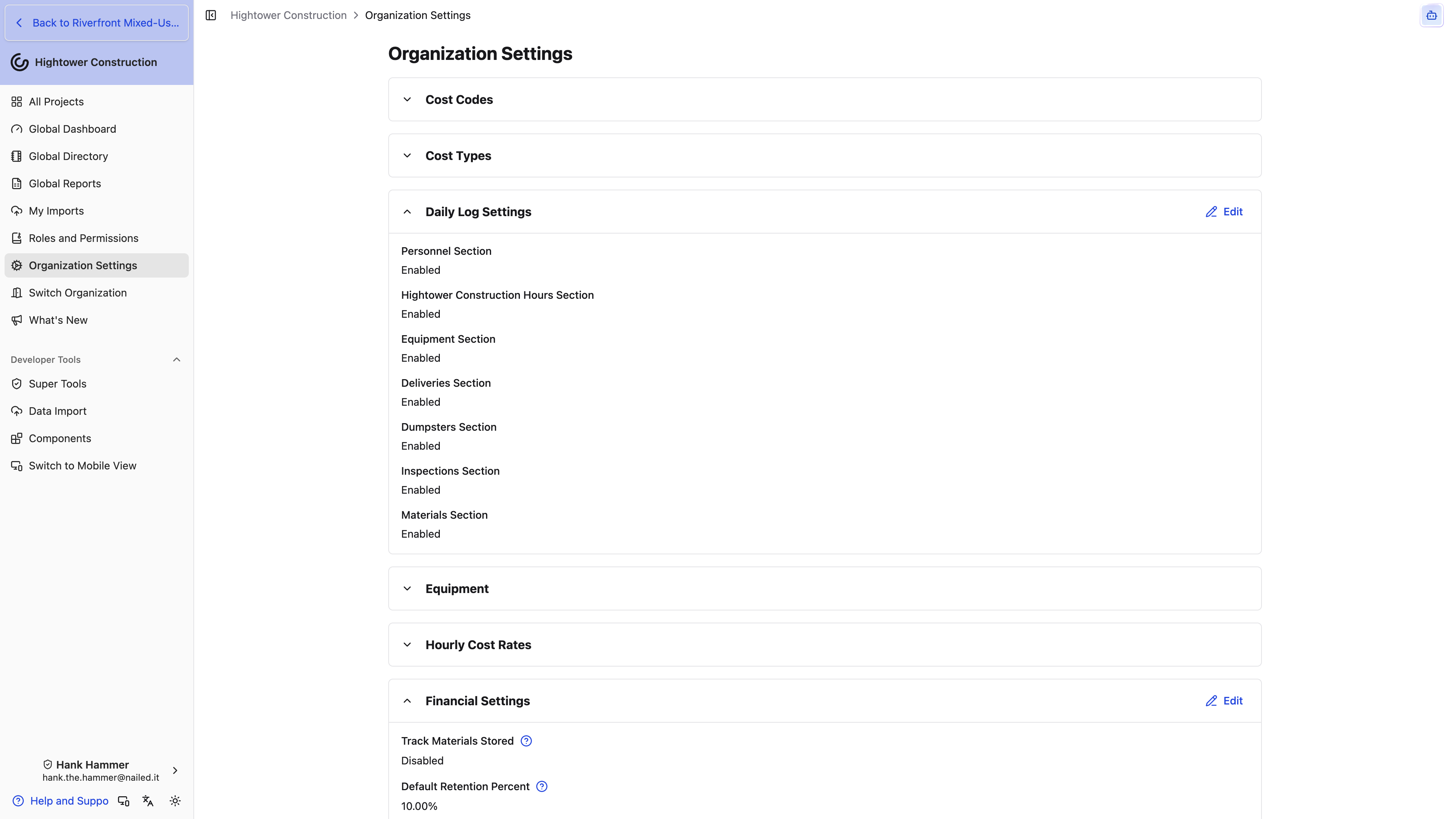
- Open Organization Settings.
- Select Daily Log Settings.
- Enable or disable:
- Personnel Section
- Time Cards Section
- Safety Section
- Equipment Section
- Deliveries Section
- Dumpsters Section
- Inspections Section
- Phone Calls Section
- Materials Section
- Save.
These settings apply across your organization, not just one project. Disabling a section hides that part of the Daily Log, but it does not delete historical entries. Before you change a setting, check the reporting requirements for active projects.
Note: Notes, Weather, and Delays aren't in this list because the organization can't turn them off. A project can still hide Weather or Delays for itself — see Customize Daily Logs for one project. Notes stay on every log.
In the log itself, notes and Phone Calls sit with Overview on the left. The other sections always appear in the same order on the right — Personnel, Time Cards, Safety, Equipment, Materials, Deliveries, Dumpsters, Inspections, Weather, Delays, then any custom sections the project added — so the report reads the same way on every project and anyone reviewing a stack of them knows where to look.
Set this once and every crew in your organization starts from the same report.
Will turning a section off delete what we already recorded?
No. Disabling a section hides that part of the Daily Log, and historical entries stay in the record.
Can I enable a section for just one project?
Not one the organization turned off — a project can't bring back a section that's off here. Going the other way works: leave the section on for the organization and hide it on the projects that don't use it from Project Settings → Daily Log Settings. See Customize Daily Logs for one project.
Customize Daily Logs for one project
A tilt-up job and a hospital fit-out don't need the same daily report. Hide the sections and fields a project never uses, add the fields your crews keep typing into notes, and build sections of your own — without changing any other project.
- Open Project Settings and select Daily Log Settings under General.
- Scroll past Daily Log defaults to Custom fields. The outline on the left lists every built-in section, from Phone Calls to Delays, with its fields beneath it, followed by any custom sections.
- Select a section, a field, or Add Field in the outline. Its settings open on the right.
Changes save as you make them and apply to this project only. Changing anything needs Manage daily log settings, including custom fields — Admin and Manager have it by default. Opening the page takes Update existing projects, hide projects to reach Project Settings plus View daily logs; with those but without the settings permission, the outline is read-only.
Hide a section or field
Select a section heading in the outline and turn off Show this section. The heading gets a crossed-out eye icon so you can spot hidden sections at a glance. A section marked Off for this organization was turned off in Organization Settings, and you can't turn it on from here.
To hide one field, select it and turn off Show this field, or hover it in the outline and select the eye icon. Fields with a lock are needed on every entry and can't be hidden: Company Name on Personnel, Deliveries, and Dumpsters, Equipment, Material Type, Inspector, and every Phone Calls field. Fields you can hide:
- Personnel: Workers, Hours Worked, Notes
- Equipment: Hours Used, Inspected At, Notes, Maintenance
- Materials: Quantity, Unit, Notes
- Deliveries: Notes
- Dumpsters: Received, Removed, Notes
- Inspections: Inspection Result, Notes
A hidden section drops off the log, out of the PDF, and out of the export and distribution photo choices, and its Daily Logs - Personnel Report, Daily Logs - Time Cards Report, or Daily Logs - Materials Report card leaves the project's Reports page. A hidden field drops off the entry form, the entry on the log, the PDF, and the matching column in the Personnel and Materials reports.
Note: Hiding doesn't delete anything. Entries and values already recorded are kept, and they come back as soon as someone shows the section or field again.
Add fields to a built-in section
Phone Calls, Personnel, Equipment, Materials, Deliveries, Dumpsters, and Inspections each take their own custom fields. Time Cards, Safety, Weather, and Delays don't.
- Select Add Field under the section in the outline.
- Enter a Name and choose a Type — the same types Lists offer, from Text and Number to Single Select, Company, Location, and Attachment.
- Turn on Required if an entry shouldn't save without it.
The field shows up on that section's entry form, below the built-in fields. A required field that's left empty stops the save with a message naming the field. Filled-in values show on the entry in the log and print under the entry in the PDF, and the Personnel and Materials reports get a column for each of their custom fields.
Note: Repeat copies only the built-in fields from the last log. Fill custom fields in again on each repeated entry.
Add a section of your own
Use a custom section for something the log has no home for — site visitors, concrete pours, a once-a-day site conditions check.
- Select Add Section at the bottom of the outline.
- Enter a Title.
- Turn on Has many entries when crews will fill the section out more than once a day, such as one entry per visitor. Leave it off for a section filled out once per log.
- Select Add Field to add the section's fields.
Custom sections appear on the log after Delays. A once-per-log section has an edit button on its panel; a section with many entries has Add in its header, an edit button on each entry, and reads No entries until someone adds one. Filling them in needs Create new daily logs, make changes to existing daily logs, and people with only Limited Daily Log Entry don't see them.
In the PDF, custom sections print after Inspections. Only filled-in fields print, and entries or sections with nothing filled in are left out. Each section with many entries also gets its own report on the project's Reports page — see Use Daily Log Reports.
Drag a section to reorder it. Remove field and Remove section take effect right away, with no confirmation, and there's no restore button — what was entered for them stops appearing on logs, PDFs, and reports.
Does a template project carry these settings?
Yes. A project created from a template copies the template's hidden sections and fields, its custom fields and their options, and its custom sections. Daily Logs themselves don't copy.
You now have a Daily Log that asks this project's crews for exactly what this project needs.
Create and find Daily Logs
Today's report starts as an empty dated record, and the same index is where you go months later when someone asks what happened on a Tuesday in March. Create one record for the day, then use the index whenever you need to look back through project history.
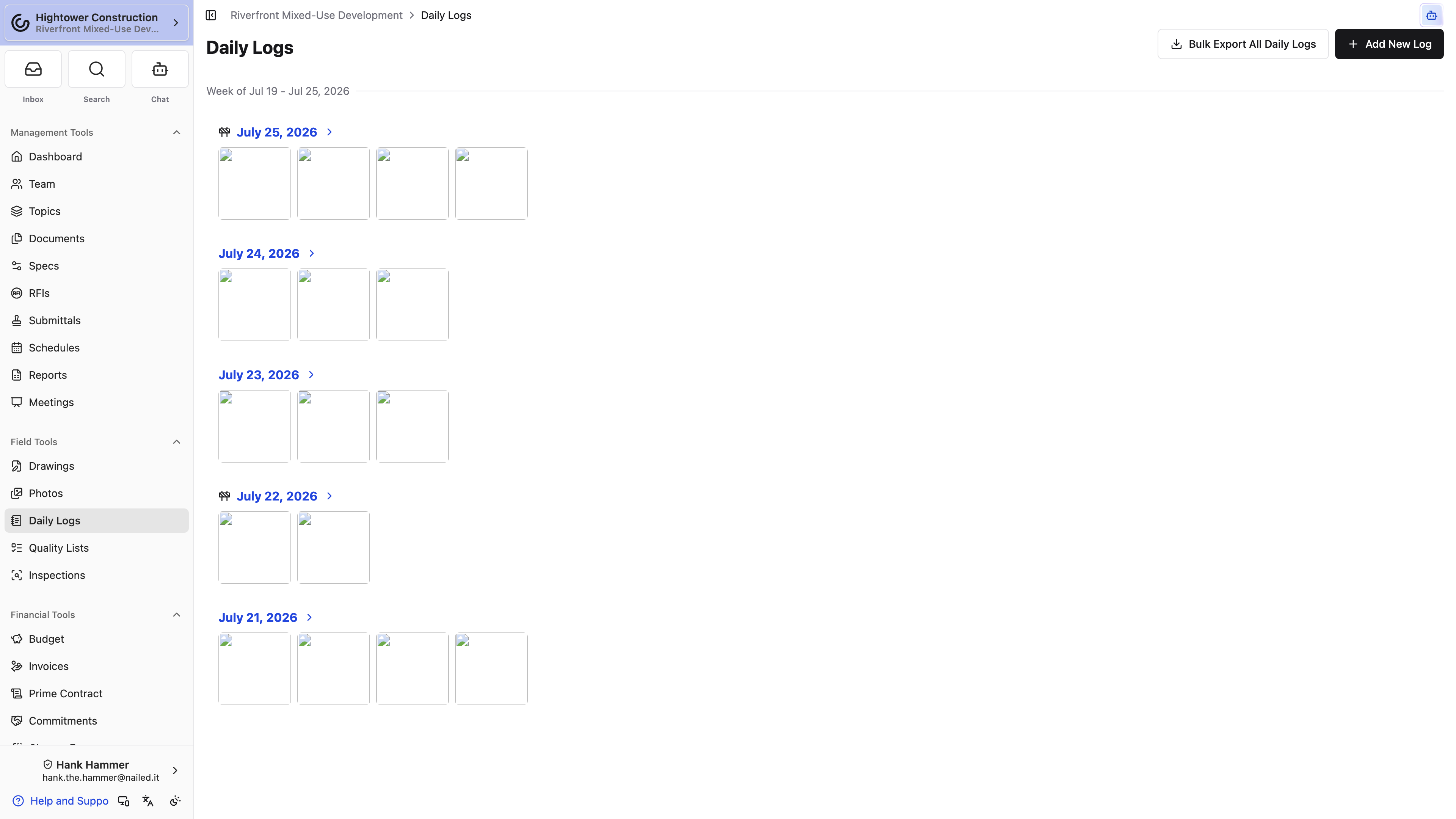
- Open Daily Logs.
- Select Add New Log. In the app, it's the + button in the header.
- The Add Daily Log dialog opens on today's date. Change it if you're catching up, then select Create.
- Open the new date from the index.
A project can only hold one log per date. If you pick a day that already has one, the dialog tells you so rather than creating a second — open the existing log and add to it.
On web, logs are grouped into Sunday-through-Saturday weeks under a Week of heading, newest week first. In the app you get a single running list, newest first, without the week headings. A construction indicator beside a date tells you that a delay was recorded, and photo previews on the web index give you quick context. Select any date to open the full record.
Pro Tip: Add the log in the morning rather than at quitting time. An open record you top up through the day beats reconstructing eight hours from memory at 4:30.
You now have a dated record to fill in, and a history you can scan a week at a time.
Why doesn't my phone show the weekly headings?
The app uses a single running list, newest first. Week groupings are part of the web layout.
What's the small indicator next to some dates?
That's the construction indicator, and it means a delay was recorded on that day. It's there so you can scan back through a month and spot the difficult days quickly.
Record personnel with limited Daily Log entry
A subcontractor on site often needs to record who showed up without writing the rest of the day's report. Limited Daily Log Entry is that narrower access.
It starts off for every role. An administrator turns it on for Subcontractor, Consultant, or Owner when those companies should log their own headcount.
- Open Daily Logs. The item appears with this permission even without View daily logs.
- Select Add New Log. In the app, it's the + button in the header.
- Pick the date and select Create. That creates an empty dated log — you can't fill in notes, weather, or safety on the way in, and you can't edit those fields on a log that already exists.
- Open the date and add a Personnel row. Company Name is locked to the company on your project membership. You can create, edit, and delete only the rows you submitted.
Personnel appears when the organization has Personnel Section on and the project hasn't hidden it. Repeat — the action that copies yesterday's personnel — stays hidden on this permission. Distribution, delete, and export stay with View daily logs and Create new daily logs, make changes to existing daily logs.
Without View daily logs, the rest of the log is hidden: notes, weather, safety, delays, time cards, equipment, phone calls, attachments, and any custom sections. That's expected, not a missing section.
If this person should fill out the whole Daily Log, they need write access instead of limited entry. Limited entry plus write behaves as full write.
You now have the day's headcount on the project log without opening the rest of the report.
Why is Company Name locked?
Limited entry records labor for the company you're on this project with. Changing the company would put someone else's crew on your row.
Can I edit yesterday's personnel?
You can edit or delete a row you submitted. You can't change someone else's personnel row, and you can't edit the log's notes or weather.
Build the daily record
As you complete the day's log, focus on what another person will need to understand later: who was there, what happened, and what affected progress.
Your project's log may not match every section below. A project can hide sections and fields it doesn't use, add its own fields to an entry form — they sit below the standard fields, and a required one has to be filled in before the entry saves — and add custom sections after Delays. See Customize Daily Logs for one project.
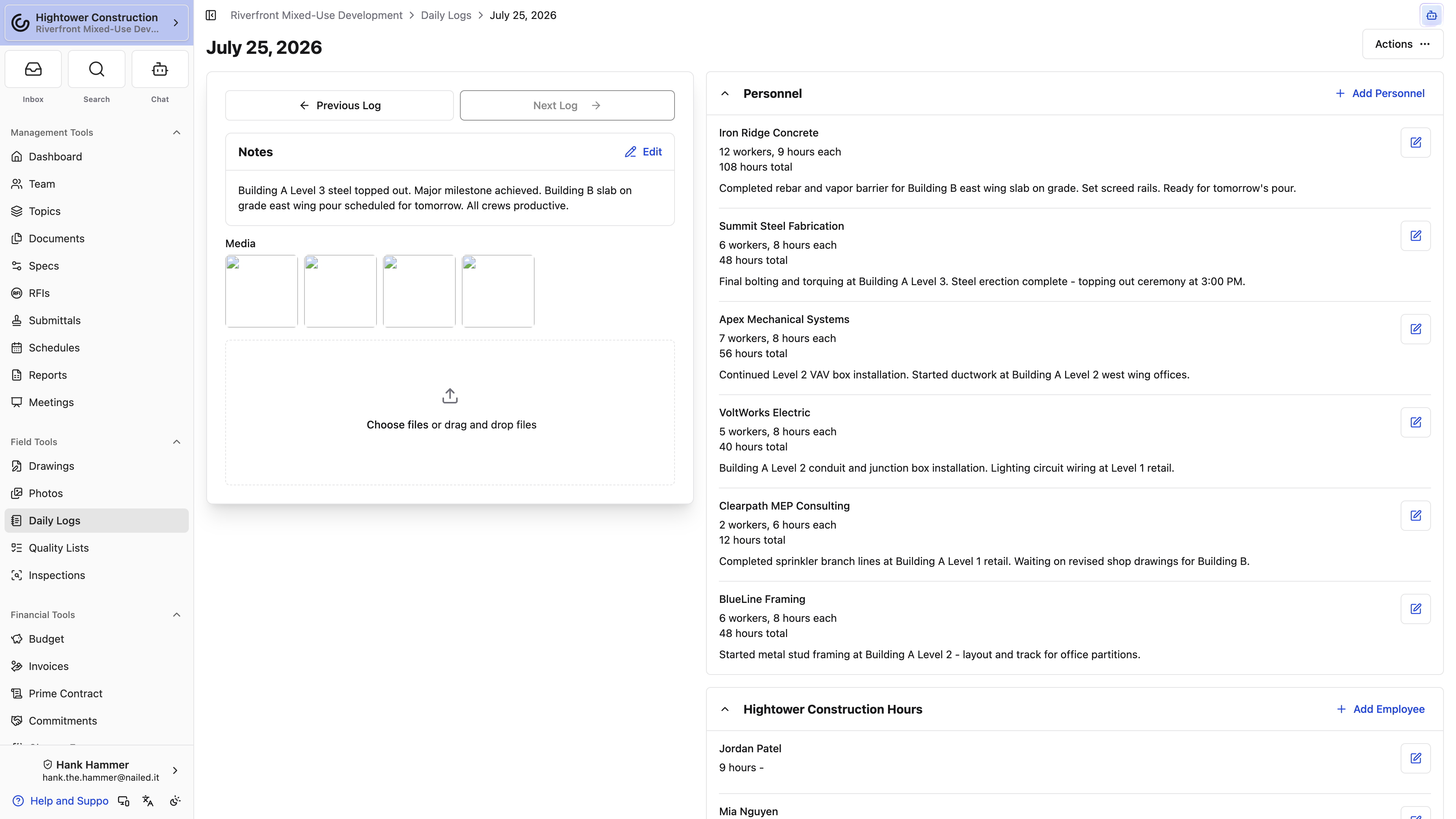
Overview and weather
Add overview photos or videos, check the day's weather, and record general notes. Use notes for useful context that does not fit a structured entry.
You don't record the weather yourself — we capture it hourly for the project's location and attach it to the log. Expand Hourly Weather Details to see the working day hour by hour, from 6:00 AM through 6:00 PM, with columns for Time, Temp, Conditions, Precip, and Wind.
Note: Precip is the chance of precipitation for that hour, not how much fell, and Wind is speed without direction. If a rain delay is going to matter in a claim, write what you actually saw in the Delays notes rather than leaning on the forecast column.
Weather comes from the project's coordinates, which we derive from the project address. A log showing weather for the wrong town usually means the project address needs fixing in Project Settings.
Phone calls
Phone Calls sits with Overview on the left of the log when Phone Calls Section is on — it starts enabled. Empty copy reads No phone calls logged.
- Select Add Phone Call.
- Choose Direction: Inbound or Outbound.
- Fill Call From or Call To (whichever matches the direction) and Phone Number.
- Set Start Time. End Time is optional but must be after the start if you enter it.
- Optionally write a Summary. Leave it blank to generate a summary automatically from the recording.
- Optionally add one Recording — audio files only. The hint reads One optional audio file. Transcribed automatically.
- Save.
Each call can have only one recording. Remove the existing recording to replace it. After save, open the call to read Transcript, Search transcript, and Logged By. While a recording is still being processed, the call shows Transcribing…. Couldn't transcribe this recording. and No speech detected in this recording. are the two failure states.
Phone calls with a summary or transcript ride along in the Daily Log PDF whenever the section is on and the call isn't still a draft. They are written content, so they are not a photo-group tick box at export.
Labor and time cards
- Personnel records company labor by trade and workforce details.
- Time Cards records the hours your own employees worked.
Personnel totals do the arithmetic for you: enter the number of workers and the hours each worked, and the entry shows the combined total. Workers and Hours Worked can stay blank when you don't have a count yet.
A personnel entry starts with Company Name, and your own organization is the first option in that list — pick it when the headcount you're recording is your own crew rather than a subcontractor's. The rest of the list is the project team's companies. If the subcontractor isn't on the project team yet, type the company name; we create a subcontractor company in the Global Directory, or reuse one that already has that name. That does not add them to the Project Team — staff them separately if they need project access. Notes on a personnel entry is a formatted field, so you can use a bulleted list to break out what three separate crews were doing instead of running it all together in one line.
Time cards are per employee. Select Add Time Card and fill in Employee, Cost Code, Cost Type, Hours Worked, and Notes. The entry sheet opens over the log, so you stay on the day you're writing. Cost Code and Cost Type are optional — although filling them in is what lets those hours become job cost, so leave them blank only if your team doesn't track labor that way. If the employee has an hourly cost rate on file, we fill both in for you.
Pro Tip: Most crews are the same today as yesterday. Repeat Personnel from last log — along with the matching actions for Time Cards, Equipment, and Materials — brings yesterday's entries over so you only have to correct what changed. If your time-card write access is Only my time cards, Repeat copies Your Time Cards from last log. On a phone the button shortens to just Repeat.
When you're adding several entries in a row, use Save and Add Another instead of saving and reopening the form each time. It's on Personnel, Equipment, Materials, Deliveries, Dumpsters, and Inspections.
Hours entered here are the same records you'd find under Time Cards in the organization menu — there's no separate daily-log-only copy. See Time Cards for reviewing, exporting, and costing them.
Safety
Safety is where the day's safety record goes — the toolbox talk you held, the near miss nobody wrote up anywhere else, the corrective action you took after a walk. Select the edit action on the block, write it in Add safety notes here..., and attach the sign-in sheet or the photo of the guarded opening under Attachments. Until someone writes something, the block reads No safety notes logged.
Safety notes ride along in the Daily Log PDF like any other section, and safety attachments that are images become their own Safety Photos group at export and distribution time. That grouping is the reason to attach a JHA photo here rather than on the log overview.
Note: This is the day's narrative safety record, not an inspection result. If you're walking the site against a checklist, use the project's Inspections workflow instead — see Inspections.
Equipment and materials
Record the equipment used and material quantities for the day. Equipment choices come from your organization's equipment register. The Equipment picker groups machines by category, with Uncategorized last, and shows each machine's type beneath its name, so you can tell the 20-ton excavator from the mini. Search it by name, number, category, or type. Archived equipment isn't offered.
Creating a new piece of equipment from the Daily Log picker needs Add, edit, and archive equipment and other material assets — without it, the picker only lists equipment that already exists. A machine created this way has only a name, so someone should fill in its category and details later from Equipment. See Log equipment on a Daily Log.
Deliveries, dumpsters, and inspections
Create a separate entry for each delivery, dumpster event, or inspection so the details and evidence stay clear. Daily Log inspection results can be Passed, Failed, or N/A. These are field-report entries and are separate from the project's Inspections workflow.
Delays
Pick the delay types that apply:
- Weather
- Permitting
- Owner Directive
- Material Acquisition
- Waiting on RFI/Submittal
- Other
Then use Delay Notes to explain what was actually affected. The notes field is always available, whichever types you pick — you don't have to select Other to write something. Say which crew or activity stopped and for how long; that's the detail a reviewer needs months later, and it's the detail nobody can reconstruct from memory.
Once you record a delay, the log is flagged in the index so delayed days are easy to spot when you scan back through the project.
Filled in this way, the log answers the questions people actually come back with: who was on site, what stopped, and for how long.
Are Daily Log inspections the same as the project's Inspections?
No. An inspection entry here is part of the field report for that day and records a Passed, Failed, or N/A result. The project's Inspections workflow is separate.
Do I have to select Other before I can write delay notes?
No. Delay Notes is available whichever delay types you pick, so choose the types that genuinely apply and explain the impact in the notes.
Add photos and attachments
A photo is only evidence if someone can tell what it's showing. Add each photo or attachment to the record it supports, and your exports will still make sense to someone who was not on site.
Where you attach something decides where it ends up:
- Add general site media from the Daily Log overview.
- Add files or photos inside Personnel, Delivery, Dumpster, and Inspection entries.
- Add the safety sign-in sheet or hazard photo under Safety.
- In the app, choose the camera or your photo library from the photo action. Taking a photo needs your device's media permission. Personnel, Delivery, Dumpster, and Inspection entries and Safety take photos only in the app; attach PDFs and other files to them from a browser.
Note: Wait for pending uploads to finish before navigating away from the Daily Log.
At export time, images become photo pages grouped by where you attached them — Daily Log Photos, Personnel Photos, Delivery Photos, Dumpster Photos, Inspection Photos, Safety Photos — and non-image attachments appear in linked attachment lists. That grouping is exactly why it pays to put the delivery ticket on the delivery entry rather than on the overview. See Export one or many Daily Logs.
Attach things this way and the day's evidence arrives already sorted.
Where should I put a delivery ticket or an inspection report?
On the entry itself. Files and photos added inside a Personnel, Delivery, Dumpster, or Inspection entry stay with that entry, which is what keeps the export readable.
Why isn't my photo in the exported PDF?
The export dialog lists only the groups that hold photos, and ticks them all. If a group you expected wasn't listed, the photo is attached somewhere other than where you think — check the entry rather than the log overview. Then confirm the attachment wasn't deleted and that your role has View daily log photos.
Review and correct a Daily Log
Daily Logs stay editable, so a mistake you find next week is still fixable. Use the activity area when you need to understand a change, and correct the specific entry instead of replacing the whole log.
- Open the log by date.
- Compare the overview, structured entries, weather, notes, and delays.
- Open the entry that needs correction.
- Save the corrected fields or remove that entry.
- Review the activity section when you need change context.
Note: There is no publish or approval state on a Daily Log. If your team needs daily signoff, set an internal cutoff and make any later corrections deliberately.
The record now matches the day it describes, and the rest of the day's work is untouched.
Someone already exported the PDF. Can I still fix the log?
Yes. The log stays editable, so correct the entry and export a fresh PDF.
Should I delete the log and start the day over?
Almost never. Edit a wrong value, delete a wrong entry, and leave the rest of the day standing — see Delete a Daily Log or entry.
Export and retain
Export one or many Daily Logs
Sooner or later the record has to leave Constructable — an owner asking about a rain week, a claim, a turnover package. Export one PDF to share a day's report, download up to 60 days of logs with Export Daily Logs, or send the whole history through Closeout for a turnover package.
Export one log
- Open the dated log.
- On web, choose Actions → Export to PDF. In the app, open the ⋯ button in the header and choose Export to PDF.
- Review the photo groups. Every group that has photos in it is listed and already ticked — untick the ones this reader doesn't need.
- Download the PDF.
The PDF carries all of the log's written content no matter what — including Phone Calls when that section is on and the day has calls, filled-in custom fields under each entry, and custom sections after Inspections. Sections and fields the project hid are left out. The tick boxes only control photo pages: Daily Log Photos, Personnel Photos, Delivery Photos, Dumpster Photos, Inspection Photos, and Safety Photos. A group with no photos in it isn't listed at all.
Warning: Because the groups start ticked, the risk is sending more than you meant to, not less. A day with a hundred site photos exports all hundred unless you untick them, and a personnel photo that made sense internally reads differently in an owner's inbox. Look at the list before you download.
Export a range of dates
When the owner wants last month's logs, you don't have to export them one day at a time.
- Open Daily Logs.
- Select Export Daily Logs in the page header, beside Add New Log. In the app, it's the download icon beside +.
- The dialog opens on the current Sunday-through-Saturday week. Change Start date and End date if you need a different range — up to 60 days, counting both ends.
- Select Download.
You get one ZIP named for the project and the date range, with a Daily Logs folder holding a separate PDF for each log in the range. Days without a log are simply skipped, and if the range has no logs at all you'll see No daily logs in that date range instead of a download. Pick a longer range than 60 days and Download stays unavailable until you shorten it.
Each PDF is the same one Export to PDF builds, with every photo group that has photos included — there's no photo picker for a range, so export the day on its own if a reader shouldn't get every photo. The ZIP builds in your browser, and a progress message counts through the logs with a Cancel button; keep the page open until the download starts. If some logs can't be prepared, the rest still download and the message tells you how many were left out.
Export every log at once
For the project's whole history — or more than 60 days — generate a Closeout package with only Daily Logs ticked. It builds in the background, so you don't have to keep the tab open. We email you when it's ready, and the tile on the Closeout page carries the Download button and the finished ZIP size. Only you see the packages you generate. Generating one needs Generate closeout packages. See Closeout.
Organization-level Reports also provide cross-project Daily Log reporting for users with access, including personnel, equipment, deliveries, dumpsters, inspections, materials, and phone calls. The equipment report can be grouped and filtered by each machine's category and type — see Report equipment use across projects. Employee hours have their own report — Daily Logs - Time Cards Report in project Reports, and the Time Cards card in Global Reports — and both need View time cards rather than Daily Logs access.
You now have a shareable record for someone who will never log in.
Why can't I find Export Daily Logs?
It needs View daily logs. On web, look in the Daily Logs page header beside Add New Log; in the app, it's the unlabeled download icon beside + in the header.
Does the PDF include photos automatically?
Yes. Every photo group that has photos in it starts ticked, so a plain export includes all of them. Untick the groups you don't want before you download.
Distribute a Daily Log
Exporting a PDF gets the day's record onto your own machine. Distributing sends it — to the owner, the architect, whoever on your team reads the logs — and keeps a record on the log of who received it and when.
- Open the dated log.
- Choose Actions → Distribute. In the app it's the ⋯ button in the header. If the log has already gone out once, the action reads Redistribute.
- Step 1 of 3 is Include Photos. The PDF always carries all of the log's written content; these tick boxes only control which photo sections ride along. Select all and Deselect all are there for a day with a lot of photos. Select Continue to Step 2: Recipients.
- Step 2 of 3 is Notify Recipients, split into your organization's recipients and External Recipients. Your project's default recipients arrive already selected — add or remove people for this particular day. Select Continue to Step 3: Review.
- Step 3 of 3 shows the Email that goes out. Read it, then send with Distribute or Redistribute.
Leave Send email on to deliver the notification. Turn it off and the distribution is still recorded against the log, but nobody gets a message — useful when you've already handed the PDF over another way and just want the record straight.
Once a log has been distributed, a banner on the log shows Distributed or Redistributed with the time, the Recipients, the Attachments, and the Distribution Message. View Sent Emails takes you to the Email Activity report to confirm delivery.
Note: When the PDF and any other attachments add up to more than 25 MB — a day with a lot of photos, for example — recipients get download links below the message instead of attached files.
Note: Redistributing doesn't replace the earlier send. Each distribution is added to the log's history, so a corrected log that goes out twice shows both.
To stop rebuilding the same recipient list every day, set Default distribution recipients under Daily Log defaults. Open Project Settings → General → Daily Log Settings. Until someone sets them, the field shows -- and every distribution starts from an empty list.
You now have the day's report in the right inboxes, and proof on the log that it went.
Do I have to send an email to distribute?
No. Clear Send email and the distribution is recorded on the log without notifying anyone.
Can I change who gets the log by default?
Yes. Open Project Settings → General → Daily Log Settings. Default distribution recipients under Daily Log defaults pre-selects people in Step 2. You can still adjust the list for any single day. Editing those defaults needs Create new daily logs, make changes to existing daily logs. Organization Daily Log Settings is a different page — that's where you turn sections on and off for the whole organization. The project page's Custom fields panel, below the defaults, is where you hide sections or add fields for this project alone.
Delete a Daily Log or entry
Deleting is the bluntest tool in Daily Logs and it's rarely the one you want. Delete only as much as you need to correct the record, which is usually a single entry rather than the whole day.
- Open an entry and choose Delete to remove only that personnel, time card, equipment, material, delivery, dumpster, or inspection entry.
- Open the log's Actions menu — the ⋯ button in the app — and choose Delete Daily Log to remove the full dated record.
Deleting the full log takes the whole day with it: every entry, every note, the delays, and the attached media. The confirmation says the action can't be undone, and it means it. If one value is wrong, edit it. If one entry is wrong, delete that entry instead of the entire day.
Time card hours that carried a project, a cost code, and an hourly cost rate also produced payroll costs under Non-Committed Costs. Deleting the log deletes those linked costs along with the hours, so check the financial impact before removing a log that fed cost tracking. See Send time card hours to Non-Committed Costs.
Note: Export the PDF before deleting a full log. The dated record is often the only place a day's conditions were written down, and once it's gone there's nothing to recover.
Corrected this way, the project history stays intact and only the mistake goes away.