Use this guide to plan, generate, monitor, review, download, and troubleshoot Closeout packages. It covers where to find Closeout, section availability, permissions, background generation, notifications, blocked states, and the final ZIP handoff.
Start here
- I prepare turnover: Plan the package → Prepare source records → Generate → Download and review.
- I only need one tool's records: Export a single tool from its own page.
- I administer access: Understand permissions, packages, and visibility.
- A package is stuck or failed: Start with Troubleshooting Closeout.
Common task recipes
- Create an owner handoff: Untick everything the contract doesn't require, generate the package, and review the ZIP outside Constructable before delivery.
- Create a records-only package: Choose Unselect all, then tick Documents, Specs, Drawings, Photos, Daily Logs, Punch List, and Inspections.
- Create a financial package: Choose Unselect all, then tick the sections under Financial Tools.
- Export just the RFI log: On RFIs, open the settings menu and select Export RFIs. The Closeout dialog opens with only RFIs ticked.
- Retry a failed package: Note the failed section, correct or narrow that source content if appropriate, then generate a new package.
Understand packages and availability
Find the Closeout page
Closeout doesn't sit in the project sidebar with the day-to-day tools, which is the usual reason people can't find it. Open Project Settings, select Closeouts under General, and select Open Closeouts.
The panel is there whenever you have View closeout packages, and it describes what the page is for: "Generate closeout packages to hand off complete project records to the owner."
If Project Settings isn't open to you — which is common for consultants, owners, and anyone whose role stops short of project administration — you'll find Closeouts on the project home page header instead, and in the ⋯ menu in the app. It goes straight to the same page.
RFIs and Submittals also link straight into Closeout with one section pre-ticked — see Export a single tool from its own page.
Bookmark the Closeout page if you're producing handoffs regularly.
Understand how Closeout works
A Closeout package is a photograph of the project as it stood the moment you generated it. It never updates, it only contains what the person who generated it could see, and it arrives as a ZIP that someone still has to open and check.
Current project records → permitted section selection → background generation → ZIP archive → review and handoff
- A Closeout package is a generated snapshot and does not update when project records change.
- The section chooser opens fully ticked the first time, then reopens on your last selection — remembered in this browser and shared across every project.
- Only sections available under the creator's permissions and organization packages appear.
- You can start more than one package at once; each builds independently.
- The Generated Closeouts list shows the packages you generated, with title, date, status, progress, and a download once complete.
A package moves through four statuses while it builds:
- Pending: The request is queued.
- Processing: We're assembling records. The tile reads "Starting closeout..." until we know the total, then shows a count like "214 of 903 items."
- Complete: The ZIP is ready to download.
- Failed: Generation stopped. The tile names the section it failed on and how far it got, as in "Stopped after 214 of 903 items."
A failed package isn't resumed from the Closeout page. Review the failure first, then generate a new package.
Package names come from what you selected. Tick more than one section and the tile reads Closeout Package; tick exactly one and it's named for that section, as in "RFIs Export" or "Daily Logs Export". That's worth knowing before you generate three packages in a row and have to tell them apart by timestamp.
Available sections
The Generate Closeout Package dialog groups its checkboxes under three headers:
- Management Tools: Documents, Specs, RFIs, Submittals, Meetings
- Field Tools: Drawings, Photos, Daily Logs, Punch List, Inspections
- Financial Tools: Prime Invoices, Vendor Invoices, Prime Commitments, Vendor Commitments, Change Orders
Punch List is your Lists content. The checkbox and the folder in the ZIP both use that name, whatever your lists are called in the field.
What you actually see is gated twice. RFIs, Submittals, and Meetings require the Project Management package, and financial sections require the Financial package — then, on top of that, every section requires its corresponding read permission. A whole group header disappears when you can't reach any section in it.
Troubleshooting Closeout
Closeout problems almost always trace back to one of two things: a permission or package you don't have, or a source record that wasn't visible when the package was built. Find your symptom and work through the checks in order.
I can't find Closeout
It isn't in the project sidebar. Open Project Settings and use the Closeouts panel, or use the Closeouts button on the project home page if Project Settings isn't open to you — see Find the Closeout page. If neither is there, you don't have View closeout packages on this project.
Generate Closeout is missing
Confirm you have Generate closeout packages. Every role has it by default, so a missing button means someone changed it in this project's role settings.
A section is missing from the chooser
Check in this order:
- The corresponding feature's read permission — Punch List needs View punch lists, Daily Logs needs the Daily Logs read permission, and so on.
- Whether Project Management is enabled for RFIs, Submittals, or Meetings.
- Whether Financials is enabled for financial sections.
- For Photos, whether you have either View photos, excluding daily log photos or View daily log photos. Either one is enough for the checkbox to appear.
Closeout permission on its own doesn't expose every source section. If an entire group header is gone, you can't reach any section in it.
A colleague's package isn't in my list
That's expected. Generated Closeouts shows only the packages you generated. Ask them to download the ZIP and send it to you, or use Copy Link on their tile to share the archive link.
Progress does not move
Large projects and media-heavy sections take time, and generation runs in the background — so leave the page and come back later. The creator receives an email when generation completes or fails. If it stays unchanged for an unusually long time, contact support with the project, generation date, creator, status, and displayed counts.
The package failed
Read the tile's failed-section message and progress count, then generate a new package with that section unticked to confirm the rest builds. If the same section fails again, contact support rather than repeatedly generating identical packages.
The ZIP is missing expected records
Confirm the records were active and visible to the package creator at the moment of generation. A package is a snapshot, so generate a new one after source records or permissions change.
Prepare and generate
Plan a Closeout package
A Closeout package is only as good as the decisions you make before you open the dialog: what the contract requires, which records have to be final first, and who has the access to produce it. The section chooser won't make those calls for you — it opens with everything ticked — so planning is what stops a handoff from carrying material nobody meant to send.
- Review the contract's turnover requirements.
- List the required management, field, and financial records.
- Identify records that must be finalized before export.
- Confirm who will generate, review, and deliver the package.
- Decide whether one comprehensive ZIP or several scoped packages are easier for the recipient.
Step 4 matters more than it looks. What appears in the chooser depends on the permissions of whoever selects Generate Closeout, so the person planning the package and the person producing it need to be talking to each other well before the deadline.
Pro Tip: You can regenerate Closeout packages. If source records are still being completed, create a review package now and save the final generation for the handoff itself.
One big ZIP or several smaller ones?
Whichever your recipient can actually work with. One comprehensive package is simpler to track; several scoped packages are easier to open, review, and route to different people.
What if some records aren't finished yet?
Generate anyway, as a review copy. Because a package is a snapshot, the version you deliver should be the one you generate after the source records are final.
Plan it first and the package you generate is the package you deliver.
Prepare project records for Closeout
A Closeout package reflects the source records available when you generate it. Anything disorganized in Documents or unpublished in Drawings will be disorganized or absent in the ZIP, so correct and publish those records in their own workflows first.
Before generation:
- Organize Documents and confirm folder sharing and file names.
- Publish the correct Specs and Drawings.
- Complete or clearly status RFIs, Submittals, Meetings, list items, and Inspections.
- Review Daily Logs and their attachments.
- Organize Photos and add useful descriptions.
- Confirm financial records and permissions when including financial sections.
- Export a spot-check from each critical section when presentation matters.
That last one earns its ten minutes. Seeing how a single RFI or Daily Log actually renders tells you more about the finished package than scrolling a record list ever will.
Note: Generating a Closeout package doesn't approve anything and doesn't change the status of your source records. It reads your project; it never edits it.
Does every record have to be finished before I generate?
No, but the ZIP shows whatever state the records are in. Anything you wouldn't want an owner to read should be corrected in its own tool, not patched up in the archive afterward.
Get the sources right and the package becomes a byproduct instead of a project of its own.
Understand permissions, packages, and visibility
What you can include depends on two layers of access: your access to Closeout, and your access to each source section. That second layer is why two managers on the same project can open the same dialog and see different section lists.
- View closeout packages lets someone open the Closeout page and download their completed packages.
- Generate closeout packages lets someone start a generation and delete a package they created.
- Each selectable section requires its own read permission, so a Punch List checkbox needs View punch lists and a Photos checkbox needs either View photos, excluding daily log photos or View daily log photos.
- Package-enabled features appear only when the organization has that package.
Every project role — including subcontractors, consultants, owners, and bidders — can view and generate Closeout packages by default. That sounds broader than it is, because the section chooser is still built from each person's own source permissions: a subcontractor who can't read invoices won't see an invoice checkbox. Restrict Closeout in the project's role settings when a role shouldn't be assembling handoffs at all.
Packages are personal. Generated Closeouts lists only what you generated, so a colleague can't see, download, or delete your packages from their Closeout page, and you can't see theirs.
Note: You can distribute the generated ZIP outside Constructable, and once someone downloads a copy, Constructable permissions no longer control it. Reviewing the package before you share it is the last access check anyone gets.
Why do I see fewer sections than my colleague?
Because the chooser is built from your own source permissions and your organization's packages. Neither view is wrong — you're each seeing what you're allowed to export.
Who should generate the package?
Someone whose source access covers everything the handoff requires. Closeout permission alone doesn't expose sections that person can't otherwise read.
Understand the two layers and the section chooser stops being a mystery.
Generate a Closeout package
Choose the sections your recipient needs and we'll build the package in the background. There's no need to sit and watch it, and no need to keep the page open while it works. The one thing worth slowing down for is the section list, because it opens with everything already ticked.
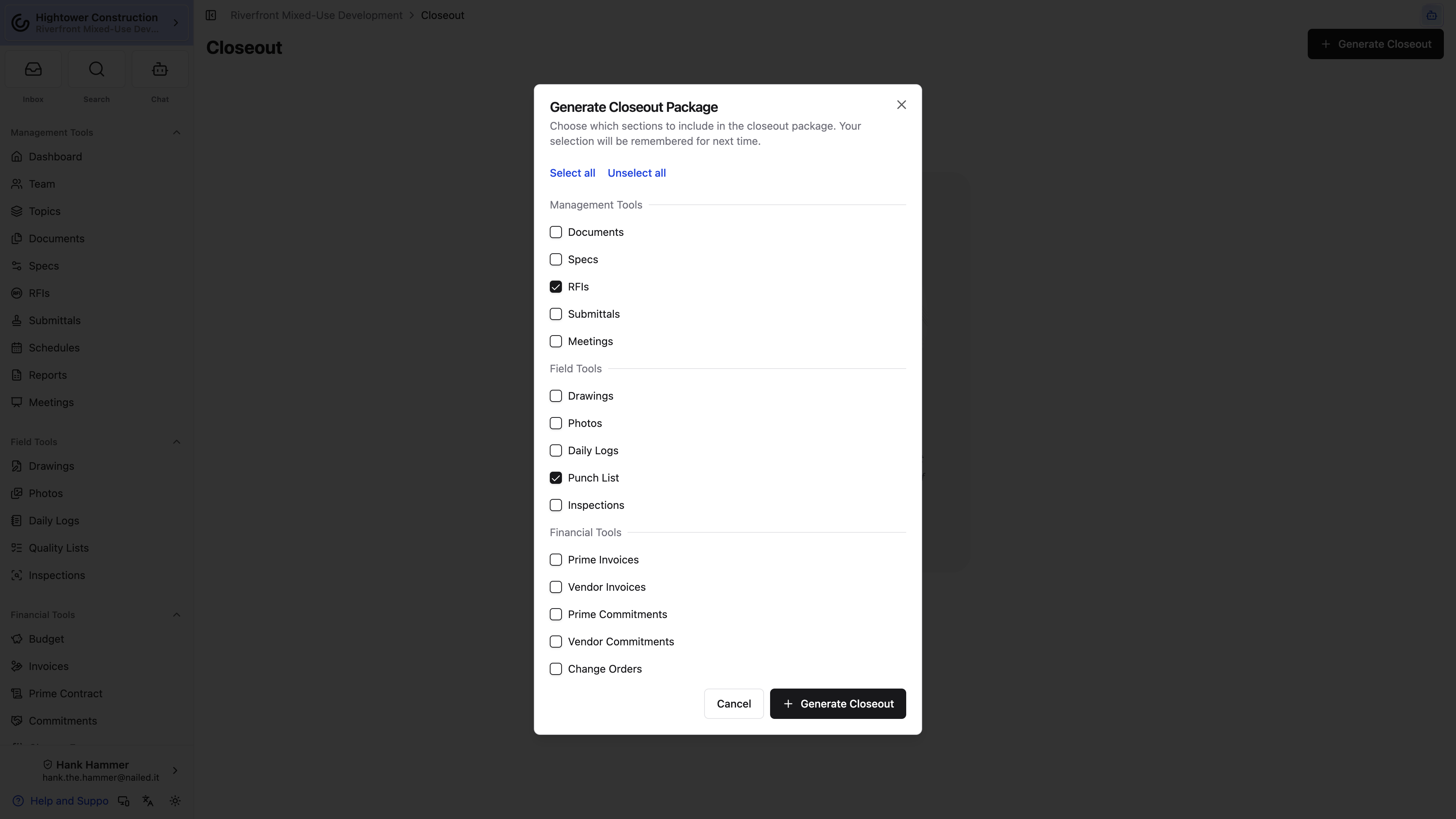
- Open Project Settings, then select Open Closeouts in the Closeouts panel.
- Select Generate Closeout. In the app, it's the + button in the header.
- Read the checkboxes under Management Tools, Field Tools, and Financial Tools. The first time you open the dialog every section you can reach is ticked.
- Untick what this recipient shouldn't get, or select Unselect all and tick only what they should. Select all puts everything back.
- Select Generate Closeout.
You must choose at least one section, and the button stays disabled until you pick one.
Warning: Nothing starts unticked, so the risk here isn't forgetting a section — it's shipping one. A default package hands the owner every Daily Log, every photo, and every invoice you can read, and nobody reviews a ZIP that arrived looking complete. Work down the three groups before you generate and turn off what this recipient has no business seeing.
After that first time, the dialog reopens on whatever you chose last, and that selection isn't tied to the project. Generate a financials-only package on one job and the next job's dialog opens financials-only too — with the field and management sections silently off. Read the checkboxes every time rather than trusting what you set last month.
Pro Tip: You don't have to wait for one package to finish before starting the next. Kick off the owner handoff and a separate records-only package back to back; they build side by side and appear as two tiles in Generated Closeouts.
Do I have to stay on the page?
No. Generation runs in the background, and you get an email when your package completes or fails.
Why is Generate Closeout missing?
You don't have Generate closeout packages on this project. With only View closeout packages you can still open the page and download your own completed packages.
Select the right sections and the archive assembles itself while you get on with something else.
Export a single tool from its own page
When someone asks for "the RFI log" rather than a full turnover package, you don't have to open Closeout and untick fourteen boxes. Two tools hand you a one-section export directly.
- RFIs: open the settings menu in the page header and select Export RFIs.
- Submittals: open the settings menu in the page header and select Export Submittals.
Each one takes you to Closeout with the Generate Closeout Package dialog already open and only that section ticked. Review the selection, then select Generate Closeout. From there it behaves like any other package: it builds in the background, lands in Generated Closeouts, and emails you when it's done.
Daily Logs works differently: Export Daily Logs on the Daily Logs page downloads up to 60 days of logs straight to your device without a Closeout package. For the full Daily Log history, tick only Daily Logs in Generate Closeout Package yourself. See Export one or many Daily Logs.
Single-section packages are named for the section, so an RFI export arrives as "RFIs Export" rather than Closeout Package — much easier to pick out of a list later.
Note: These menu items need Generate closeout packages, not just read access to the tool you're exporting. Someone who can read every RFI on the project still won't see Export RFIs without it.
Does this change my saved section selection?
Yes. The dialog remembers whatever was ticked when you generated last, so a one-section export becomes your new default. Check the checkboxes the next time you build a full handoff.
One menu item and the log you were asked for is already building.
Review and distribute
Follow Closeout generation status
The generated package tile carries the whole status story: where the package is, how far along it is, and what to download when it's ready. You don't need to keep the page open while we work.
Each tile sits under Generated Closeouts and shows:
- Its name — Closeout Package for a multi-section package, or the section name for a single-section one
- Pending, Processing, Complete, or Failed
- Generation date and time
- Who asked for it, under Generated by
- A progress bar reading "Starting closeout..." and then a count like "214 of 903 items" while processing
- On failure, the section it died in — "This closeout failed while generating Photos. Try generating a new one." — and how far it got
- Final ZIP size and a Download button when complete
We email you when your package completes or fails, so the honest answer to "should I wait here?" is no.
Note: Progress that looks frozen usually isn't. Large projects and media-heavy sections take time, and generation continues in the background. If it stays unchanged for an unusually long time, contact support with the project, generation date, creator, status, and displayed counts.
Can other people see the package I generated?
Not from their own Closeout page — the list shows each person only their own packages. To hand one to a colleague, download the ZIP and send it, or use Copy Link in the tile's ⋯ menu to copy the archive link.
Will I be told if it fails?
Yes, by email. The tile also names the section it failed on and the count it stopped at.
Between the tile and the email, you'll know the moment the archive is ready.
Download, review, and distribute a Closeout package
Treat every generated ZIP as a draft until you or another reviewer has opened it. Complete means we finished assembling the archive, not that the archive contains everything the contract asks for.
- Wait for Complete.
- Select Download. To send someone the archive without downloading it yourself, open the tile's ⋯ menu and choose Copy Link.
- Open the ZIP outside Constructable.
- Review its top-level sections.
- Spot-check record counts, file names, dates, PDFs, attachments, and media.
- Compare the package with the turnover checklist.
- Deliver it through the project's approved file-transfer method.
Note: Don't distribute the ZIP on Complete status alone. The archive may still omit records that were unpublished, deleted, unavailable to you when you generated it, or simply not selected.
The review is also your last access check. Once the ZIP is in someone else's hands, nothing in Constructable governs where it travels next, so the time you spend opening it beforehand is the cheapest part of the handoff.
It says Complete, so why is a record missing?
Four usual suspects: the record was unpublished, it was deleted, it wasn't available to whoever generated the package, or its section was never selected. Sort out the cause, then generate a new package.
Should I fix the ZIP by hand?
Correct the source records and generate again instead. A hand-edited archive is one nobody can reproduce later, which defeats the purpose of having a generated record of the handoff.
Review it before it ships and the handoff stops being something you have to send twice.
Retain and regenerate Closeout packages
An existing ZIP never updates itself. Each package is a snapshot of the project at the moment it was generated, so whenever the source records or the handoff scope change, the answer is a new package rather than a corrected old one.
- Keep prior generated entries as evidence of when packages were prepared.
- Generate a new package after source changes; an existing ZIP does not update.
- Use a narrower selection when producing a supplemental handoff.
- Preserve the delivered ZIP and its delivery record in the organization's approved records system.
That accumulating list is worth more than it looks when someone asks what was handed over and when. An entry with a creator, a date, and a status answers the question; memory doesn't — which is the argument for tidying it sparingly.
To remove a package you generated, open its ⋯ menu, choose Delete, and confirm at "Delete closeout?". The tile and its archive link go away for good, so keep the packages that record a real handoff and delete only the mistakes and test runs.
Note: Deleting a package doesn't touch a single project record. It removes the generated archive, not the RFIs, photos, or invoices that went into it.
I generated the wrong package. How do I remove it?
Use Delete in the tile's ⋯ menu. Generate the corrected package first if you want to compare the two before the wrong one is gone.
Do I need to store the ZIP somewhere else?
Yes. Keep the delivered archive and its delivery record in your organization's approved records system. Closeout preserves the record that a package was prepared; your records system is where the delivered copy belongs.
Keep the trail and you can always show what was handed over, and when.