Schedule of Values: Construction Template and Example (November 2026)
How to build a schedule of values for a construction contract: which lines to include, how to avoid front-loading, a worked example, and a free SOV template.
The prime contract is signed, and the architect wants your schedule of values before the first pay app goes in. It's tempting to paste the bid summary into a G703 and send it. But the SOV you submit this month is the yardstick for every pay application on the job. If a line is too big to verify, the architect cuts your percentages. If general conditions are loaded into month one, the SOV comes back. If the line structure doesn't match how your subs bill, your project accountant rebuilds the pay app by hand every month for the next 18. This guide shows how to build a schedule of values that gets approved and bills cleanly, with a worked example that ties to the dollar and a template you can copy into Excel.
TLDR:
- A schedule of values (SOV) breaks the whole contract sum into lines of work. On AIA jobs, the contractor submits it to the architect before the first application for payment, and it becomes the G703 continuation sheet.
- Build it from your estimate or bid breakdown, by CSI division or by subcontract, with lines small enough that the architect can check each percentage on a site walk.
- Spread general conditions over the job's duration and keep early lines such as mobilization to what you can back up. Front-loading gets the SOV rejected, and if it slips through, it can leave you underbilled at the end with retainage still held.
- After approval, keep the line structure fixed. Add each executed change order as a new line rather than editing the original values.
- Require a schedule of values from every subcontractor at buyout, with lines that roll up into yours, so sub pay apps flow into the owner G703.
- Constructable holds the Prime SOV and every Commitment SOV, imports them from CSV or PDF including AIA G703 sheets, collects each subcontractor's line-by-line breakdown for your approval, and bills owner and sub invoices against the same lines.
What is a schedule of values in construction?
A schedule of values in construction is a list that divides the contract sum into portions of the work, with a dollar value on each line. The lines add up to the contract sum exactly. The SOV is the basis for progress billing: each month, the contractor bills a percentage of each line based on the work in place, and the architect and owner check those percentages against the field.
The general contractor prepares the schedule of values, usually the project manager working from the estimate with the project accountant. The architect reviews it, and the owner, or the owner's lender, often reviews it too. On a job without an architect, the owner or the owner's representative approves it.
Under AIA A201-2017, the General Conditions of the Contract for Construction, Section 9.2 requires it. Where the contract is based on a stipulated sum or a guaranteed maximum price, the contractor submits a schedule of values to the architect before the first application for payment, allocating the entire contract sum to the portions of the work. The architect can require the SOV in a particular form and with data that supports its accuracy. Unless the architect objects to it, the SOV is the basis for reviewing the contractor's applications for payment, and later changes to it go back to the architect with the same support. AIA's article on what a schedule of values is and why it's required summarizes the clause.
ConsensusDocs agreements and most public owners' general conditions have their own schedule of values requirements, with their own deadlines and formats. Read the payment article of your contract before you build the SOV, and check whether the owner, the lender, or a public agency has its own form.
On AIA jobs, the approved SOV becomes the G703 continuation sheet. Its Item No., Description of Work, and Scheduled Value columns are the SOV, and the rest of the columns track billing against each line. For how the G703 rolls up into the G702 each month, see the AIA G702 and G703 pay application guide.
What goes on a schedule of values
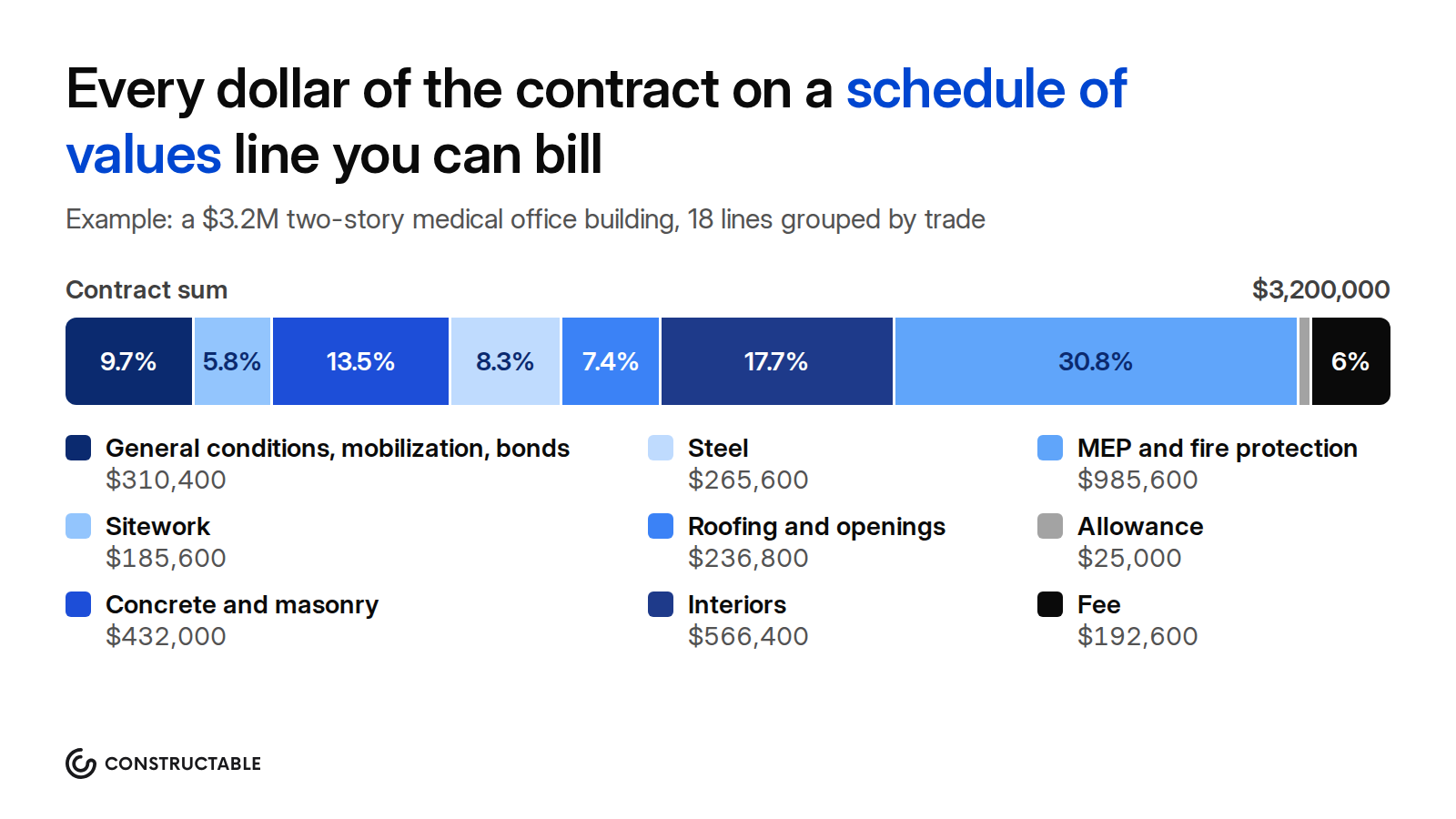
Every dollar of the contract sum has to sit on a line. Most SOVs mix three kinds of lines: the trade or division lines for the work itself, the lines for the GC's own costs and fee, and lines for money the contract carries for a specific purpose, such as allowances.
Trade lines by CSI division or by subcontract
Most GCs structure the work lines in one of two ways:
- By CSI division. One line or a few lines per MasterFormat division: 03 Concrete, 05 Metals, 09 Finishes, 23 HVAC, and so on. Architects like it because it matches the specifications. See the complete guide to CSI divisions for the numbering.
- By subcontract or trade package. One line per subcontract, such as "Mechanical subcontract." This makes it easy to roll sub pay apps into the owner billing, because each sub's billing feeds one line.
Many SOVs do both: division numbers for the lines, with each line matched to the subcontract that performs it. Whichever you choose, use the same structure as your cost codes where you can, so the project accountant can match billing to cost.
How detailed the lines should be
There's no set number of lines. The test is whether the architect can look at the work and agree with your percentage. "MEP: $985,600" is hard to verify. Separate lines for fire suppression, plumbing, HVAC, and electrical are easier, and on a large job, splitting each into rough-in and trim, or by floor or building, is easier still.
Some owners and lenders ask for separate labor and material lines, so they can pay for stored or delivered material separately from installed work. Do it when the contract asks for it. Otherwise it doubles the line count without telling the architect much.
Too many lines has a cost too. Every line is a percentage you estimate, the architect checks, and the accountant tracks every month. Your contract, owner, and lender decide the right number, so ask the architect what level of detail it expects before you build the SOV.
General conditions and general requirements
General conditions are the GC's time-based field costs: the superintendent, the project manager's time on site, the field office, temporary utilities, cleanup, and site safety. Show them as their own line, valued at what your estimate carries, and bill them evenly over the duration of the job. Some GCs split this into two lines: general conditions for staff and time, and general requirements for Division 01 items such as temporary facilities, testing, and final cleaning. Either works, as long as the architect can see how each bills.
Mobilization
Mobilization covers the cost of starting the job: moving in the trailer, setting up temporary facilities and fencing, and getting crews and equipment to site. Owners usually accept it as a separate line billed early. Keep it to costs you can show. A mobilization line that is really general conditions or profit billed up front is front-loading.
Bonds and insurance
Payment and performance bond premiums and project-specific insurance are often their own line or lines. The GC pays these at the start of the job, and many owners let the GC bill them on the first application with the premium invoices as backup. Some owners spread them across the other lines instead, so check the contract.
Fee, overhead, and profit
How the fee shows depends on the contract:
- Stipulated sum. Some owners want overhead and profit as one line, while others accept it spread across the trade lines. The contract or the architect usually decides.
- GMP or cost of the work plus a fee. The fee is usually its own line, often billed in proportion to the cost of work completed, because the fee is calculated from the cost of the work.
On cost-plus and GMP work, how the fee is calculated and billed comes from the agreement. See how stipulated sum, GMP, and cost-plus contracts work.
Allowances and contingency
An allowance is money the contract carries for work that isn't yet defined, such as signage or hardware, with the actual cost settled later. Give each allowance its own line with the amount the contract states, so the reconciliation is easy to see.
Contingency depends on the contract. On a GMP, a contractor's contingency is often its own line, and the agreement decides who can use it and how it's billed. On a stipulated-sum job, contingency is usually the GC's own risk money inside its price, and it doesn't show on the SOV at all. Owner contingency belongs to the owner and isn't part of your contract sum.
How to build a schedule of values, step by step
- Read the contract. Find the schedule of values clause, the deadline, any required form, whether the owner wants labor and material split, how the fee shows, and the retainage rate. Note any lines the contract names, such as allowances or alternates the owner accepted.
- Start from the estimate or bid breakdown. The SOV should match the numbers you bid. An architect who compares your SOV with the bid breakdown and finds concrete $80,000 higher will ask why. For how the estimate itself is built, see the construction cost estimation guide.
- Pick the structure. Choose CSI divisions, subcontracts, or both, and use the same numbering as your cost codes where you can.
- Size the lines. Split any line the architect can't verify from a site walk. Combine small scopes that would bill in one month.
- Spread general conditions. Value general conditions at what your estimate carries, and plan to bill them evenly by month over the contract duration.
- Place the fee, bonds, and insurance. Show them as the contract asks: separate lines, or spread across the work.
- Check the sum. Total the lines. They must equal the contract sum to the dollar. Check the percentages too: they should add to 100%.
- Submit it with backup and get it approved. Send the SOV with the backup the architect asks for, often the bid breakdown or subcontract values. Resolve the architect's comments before the first pay app, not with it.
Schedule of values example
Here is a schedule of values for a two-story medical office building, shell and interiors, on a $3,200,000 stipulated-sum contract with a 14-month duration. The owner asked for general conditions, mobilization, bonds and insurance, and fee as separate lines. The numbers are illustrative, and every total ties out.
| Item No. | Description of Work | CSI Division | Scheduled Value | % of Contract |
|---|---|---|---|---|
| 1 | General conditions | 01 | $224,000 | 7.0% |
| 2 | Mobilization | 01 | $32,000 | 1.0% |
| 3 | Bonds and insurance | 01 | $54,400 | 1.7% |
| 4 | Sitework and site utilities | 31, 32, 33 | $185,600 | 5.8% |
| 5 | Concrete | 03 | $313,600 | 9.8% |
| 6 | Masonry | 04 | $118,400 | 3.7% |
| 7 | Structural and miscellaneous steel | 05 | $265,600 | 8.3% |
| 8 | Roofing and waterproofing | 07 | $96,000 | 3.0% |
| 9 | Doors, frames, hardware, and storefront | 08 | $140,800 | 4.4% |
| 10 | Framing and drywall | 09 | $284,800 | 8.9% |
| 11 | Flooring, ceilings, and paint | 09 | $172,800 | 5.4% |
| 12 | Specialties and casework | 10, 12 | $108,800 | 3.4% |
| 13 | Fire suppression | 21 | $57,600 | 1.8% |
| 14 | Plumbing | 22 | $262,400 | 8.2% |
| 15 | HVAC | 23 | $348,800 | 10.9% |
| 16 | Electrical and low voltage | 26, 27 | $316,800 | 9.9% |
| 17 | Allowance: exterior signage | 01 | $25,000 | 0.8% |
| 18 | Fee | $192,600 | 6.0% | |
| Contract sum | $3,200,000 | 100.0% |
A few choices in this example are worth noting:
- General conditions are $224,000 over 14 months, so they bill $16,000 a month.
- The fee is 6.4% of the $3,007,400 cost of the work, and it bills in proportion to the work completed on the other original lines.
- The signage allowance carries the amount the specifications state. When the owner picks the signs, a change order adjusts the contract sum for the difference.
The same schedule of values two months in, on a G703
Two months later, the GC submits Application No. 2. Mobilization and bonds billed in full on Application No. 1, with the bond and insurance invoices as backup. Sitework is 70% complete, concrete has started on footings, and the underground plumbing is in. Change Order 1, for $21,760 to remove unsuitable soil at the building pad, was executed this month and the work is done. It goes on the G703 as a new line at the bottom. Line 4, sitework, keeps its original value.
The columns are C, scheduled value; D, work completed from the previous application; E, work completed this period; F, materials presently stored; G, total completed and stored to date; and H, balance to finish. Amounts are in dollars.
| A | B | C | D | E | F | G | G ÷ C | H |
|---|---|---|---|---|---|---|---|---|
| 1 | General conditions | 224,000 | 16,000 | 16,000 | 0 | 32,000 | 14.3% | 192,000 |
| 2 | Mobilization | 32,000 | 32,000 | 0 | 0 | 32,000 | 100.0% | 0 |
| 3 | Bonds and insurance | 54,400 | 54,400 | 0 | 0 | 54,400 | 100.0% | 0 |
| 4 | Sitework and site utilities | 185,600 | 55,680 | 74,240 | 0 | 129,920 | 70.0% | 55,680 |
| 5 | Concrete | 313,600 | 0 | 47,040 | 0 | 47,040 | 15.0% | 266,560 |
| 6 | Masonry | 118,400 | 0 | 0 | 0 | 0 | 0.0% | 118,400 |
| 7 | Structural and miscellaneous steel | 265,600 | 0 | 0 | 0 | 0 | 0.0% | 265,600 |
| 8 | Roofing and waterproofing | 96,000 | 0 | 0 | 0 | 0 | 0.0% | 96,000 |
| 9 | Doors, frames, hardware, and storefront | 140,800 | 0 | 0 | 0 | 0 | 0.0% | 140,800 |
| 10 | Framing and drywall | 284,800 | 0 | 0 | 0 | 0 | 0.0% | 284,800 |
| 11 | Flooring, ceilings, and paint | 172,800 | 0 | 0 | 0 | 0 | 0.0% | 172,800 |
| 12 | Specialties and casework | 108,800 | 0 | 0 | 0 | 0 | 0.0% | 108,800 |
| 13 | Fire suppression | 57,600 | 0 | 0 | 0 | 0 | 0.0% | 57,600 |
| 14 | Plumbing | 262,400 | 0 | 26,240 | 0 | 26,240 | 10.0% | 236,160 |
| 15 | HVAC | 348,800 | 0 | 0 | 0 | 0 | 0.0% | 348,800 |
| 16 | Electrical and low voltage | 316,800 | 0 | 0 | 0 | 0 | 0.0% | 316,800 |
| 17 | Allowance: exterior signage | 25,000 | 0 | 0 | 0 | 0 | 0.0% | 25,000 |
| 18 | Fee | 192,600 | 10,120 | 10,480 | 0 | 20,600 | 10.7% | 172,000 |
| 19 | CO 1: Unsuitable soil removal at building pad | 21,760 | 0 | 21,760 | 0 | 21,760 | 100.0% | 0 |
| Totals | 3,221,760 | 168,200 | 195,760 | 0 | 363,960 | 11.3% | 2,857,800 |
The fee line bills 6.4% of the cost billed to date on the original lines, rounded to the nearest $10. The change order carries its own markup inside its $21,760, so it doesn't add to the fee line.
With 5% retainage, the G702 for this application works out like this:
| G702 line | Amount |
|---|---|
| 1. Original Contract Sum | $3,200,000 |
| 2. Net Change by Change Orders | $21,760 |
| 3. Contract Sum to Date | $3,221,760 |
| 4. Total Completed and Stored to Date | $363,960 |
| 5. Retainage, 5% of $363,960 | $18,198 |
| 6. Total Earned Less Retainage | $345,762 |
| 7. Less Previous Certificates for Payment | $159,790 |
| 8. Current Payment Due | $185,972 |
| 9. Balance to Finish, Including Retainage | $2,875,998 |
Two checks tie it out. Line 8 equals this period's $195,760 of work less 5%, or $185,972. Line 9 equals the Column H total of $2,857,800 plus $18,198 of retainage, or $2,875,998. Line 7 assumes the architect certified Application No. 1 in full: $168,200 less 5%, or $159,790.
Schedule of values template
Copy this table into Excel or Google Sheets as your starting template. Replace the descriptions and values with your own, keep one row per line, and keep the numbering once the SOV is approved.
| Item No. | Description of Work | CSI Division or Cost Code | Scheduled Value | % of Contract | Notes |
|---|---|---|---|---|---|
| 1 | General conditions | 01 | Billed monthly over the duration | ||
| 2 | Mobilization | 01 | Backup: setup costs | ||
| 3 | Bonds and insurance | 01 | Backup: premium invoices | ||
| 4 | Sitework | 31 | |||
| 5 | Concrete | 03 | |||
| 6 | (Add one row per division or subcontract) | ||||
| Allowance: (name) | 01 | Amount stated in the contract | |||
| Fee | As the contract requires | ||||
| Contract sum | =SUM(D2:D9) | 100.0% | Must equal the agreement |
Set the % of Contract column to each line's scheduled value divided by the contract sum, such as =D2/$D$10 when the contract sum is in D10, and check that it totals 100%.
How the template extends into the G703 columns
Once billing starts, the same rows become a G703. Columns A to C come straight from the SOV, and the rest track billing:
| G703 column | Name | Where it comes from |
|---|---|---|
| A | Item No. | SOV Item No. |
| B | Description of Work | SOV Description of Work, plus a row for each executed change order |
| C | Scheduled Value | SOV Scheduled Value, or the change order amount |
| D | Work Completed: From Previous Application | Last application's D + E, as certified |
| E | Work Completed: This Period | Work installed this period |
| F | Materials Presently Stored | Stored material not yet in D or E |
| G | Total Completed and Stored to Date | D + E + F |
| G ÷ C | % | G divided by C |
| H | Balance to Finish | C − G |
| I | Retainage (If Variable Rate) | G × the line's rate, when rates vary by line |
Keep your SOV workbook and your G703 on the same row order. When they match, each month's pay app starts from last month's sheet.
Front-loading a schedule of values
Front-loading means putting more value on early work than it costs, and less on late work, so the GC bills ahead of its costs. The usual places are mobilization, sitework, concrete, and a general conditions line weighted to the first months. Total contract value stays the same. It moves toward the start of the job.
Why owners and architects reject it
The owner's risk is paying for work that isn't in place. If a front-loaded GC defaults halfway through, the money left on the contract may not cover the work left to finish. Lenders protect against the same risk, so a lender's construction reviewer often checks the SOV against the cost breakdown before the first draw. An architect who sees a 7% mobilization line, or a concrete line far above the bid, will ask for backup or send the SOV back.
Why it backfires on the GC
Front-loading looks like cash flow, but the extra billing comes out of the lines at the end of the job. By the last months, the remaining lines are worth less than the work left to do, so you're underbilled while you're still paying subs and suppliers in full. Retainage is held on everything billed, so it doesn't help either. You can end the job with the owner holding retainage on money you already spent, while your trade lines don't cover the trades. And a front-loaded SOV makes the architect look harder at every pay app on the job.
What the architect looks for
- Lines that don't match the bid breakdown or the subcontract values.
- A mobilization or bonds line larger than the costs behind it.
- General conditions that bill faster than the schedule.
- Early-trade lines, such as sitework and concrete, priced above their share of the estimate, with late trades below it.
There's no standard percentage that counts as front-loaded. It varies by owner, lender, and project. The safe rule is to put each line at what the work costs plus its share of fee, and to be ready to show the backup.
How the schedule of values changes during the job
Change orders as new lines
Add each executed change order to the SOV as its own line, usually at the bottom of the G703, with the change order number in the description. Don't edit the original lines to absorb a change order. The original SOV should stay as the architect approved it, so anyone can trace the contract sum from the agreement through each change order. Only executed change orders go on the SOV. A pending change order or a change order request doesn't. For the full process, see how change orders work on a commercial job.
Reallocations
Sometimes value needs to move between lines, such as when a scope moves from one subcontract to another, or when a line turns out to be split wrong. Under A201, changes to the SOV go to the architect with the data that supports them. Submit a reallocation before the pay app that uses it, keep the contract sum unchanged, and don't move value from a line that's already billed past the new amount.
Buyout savings
When you buy out a subcontract for less than you carried, the savings don't change the SOV on a stipulated-sum job. The owner's contract sum stays the same, and the savings are your margin. On a GMP job, buyout savings usually belong to the owner or are shared, or they move to contingency, as the agreement sets. Moving them on the SOV takes the architect's approval.
Allowances
When the owner selects the allowance item, a change order adjusts the contract sum by the difference between the allowance and the actual cost. The allowance line then bills against its final value. Keep the allowance on its own line until it's settled, so everyone can see what's left.
Why the line structure must stay the same
The architect compares each pay app with the last one. Column D on each line must equal the previous application's D plus E, and a line that moves, merges, or renumbers breaks that check. Keep item numbers and descriptions fixed for the whole job, and add new lines at the bottom.
Schedule of values vs budget vs cost-loaded schedule
All three put dollars on pieces of the job, and people mix them up. They hold different numbers for different readers.
| Schedule of values | Budget | Cost-loaded schedule | |
|---|---|---|---|
| What it holds | Contract revenue: what the owner pays for each portion of the work, including fee | Cost: what the GC expects to spend, by cost code and cost type | Contract value or cost assigned to each schedule activity |
| Who it's for | Owner, architect, and lender, for progress billing | The GC's project team and accounting, for cost control | Owner and scheduler, to tie payments or cash flow to the schedule |
| When it's built | After the contract is signed, before the first pay app | At award or buyout, then updated monthly | With the baseline schedule, when the contract requires it |
| Who approves it | Architect, and often the owner and lender | The GC's own management | Owner or owner's scheduler, when the contract requires it |
Cost-loaded schedules are most common on public and federal work, where the contract can require progress payments to follow the schedule's activities. On most private commercial jobs, the SOV is the billing tool, and the budget stays internal. Keep the SOV and the budget in step by using the same codes, but don't send the budget to the owner as your SOV, since it shows your costs and not the contract value.
Subcontractor schedules of values
Your SOV is only as easy to bill as your subs' SOVs. If the electrical sub bills on three lines and your G703 has rough-in and trim by floor, someone has to translate it every month.
At buyout, require each subcontractor to submit a schedule of values with the subcontract, or before its first pay app, and approve it before you pay. Ask for:
- Lines that roll up into yours. Each sub line should map to one of your SOV lines, so the sub's billing on a scope feeds the matching line on your G703.
- The same split the owner wants. If the owner wants rough-in and trim, or labor and material, the sub's SOV needs the same split.
- A total that equals the subcontract amount. The lines must add to the subcontract sum to the dollar.
- No front-loading. Hold subs to the same standard the architect holds you to. If you pay a sub ahead of the owner, you carry that money.
- The subcontract's retainage rate. Most GCs hold at least the rate the owner holds on them.
- Change orders as new lines. The same rule as yours: executed subcontract change orders get their own lines.
When a sub's SOV lines match yours, sub progress turns into owner billing line for line, and a cut the architect makes on one of your lines is easy to pass down to the right sub.
Schedule of values checklist before you submit
How Constructable keeps the schedule of values tied to billing
Constructable keeps the owner SOV, every subcontract SOV, and the invoices that bill against them in one place. Here is what it does for the schedule of values:
- The Prime SOV holds your owner billing lines. Each line has a description, a revenue code when your organization uses them, a subproject, Qty, Unit, and Unit Price or a lump-sum Amount, a retention rate, and a Billing Type for progress or time-and-material billing. The grid shows Original Amount, Approved COs, Pending COs, and Revised Amount for each line.
- Import an SOV from CSV or PDF. Import SOV Line Items reads a CSV or a PDF, including an AIA G703 continuation sheet, on both the Prime Contract and Commitments, so you don't retype a schedule of values you already have.
- Lock the SOV once it's approved. Later owner scope goes on a Prime Change Order, and an executed change order adds its lines to the SOV, so the original lines stay as approved.
- Commitment SOVs for every subcontract. Each Commitment has its own SOV, coded by cost code and cost type, with retention on each line.
- Collect Subcontractor SOVs. From a Commitment's More menu, Collect Subcontractor SOVs invites the sub to break each original SOV line into detail items. The sub submits the breakdown for review, and you approve it, which locks the SOV. Submit and approve stay disabled until every line is fully allocated, so a breakdown can't come in short.
- Start the budget from the owner SOV. Copy from Prime SoV uses owner SOV lines as a starting point for the cost budget. Owner revenue and project cost differ, so you adjust the budget from there.
- Bill against the same lines. Owner invoices bill progress, stored materials, and retainage against Prime SOV lines, and subcontractor invoices bill against Commitment SOV lines. Each invoice prints an AIA-style payment application with a G702-style summary and continuation-sheet detail.
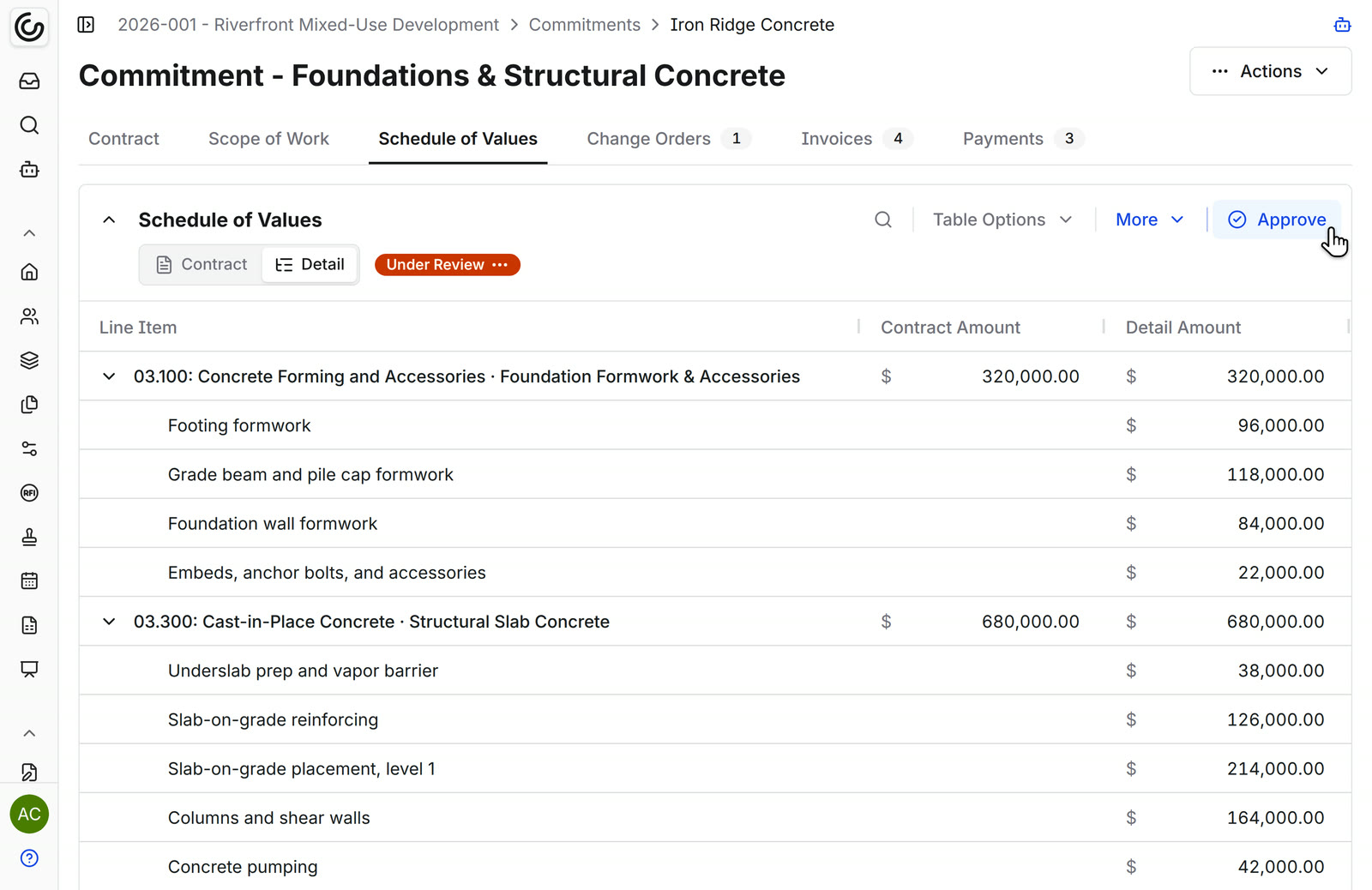
For more on billing and buyout, see the pay application software and subcontract management software pages.
Final thoughts on the schedule of values
The schedule of values you submit before the first pay app sets how every pay app on the job gets reviewed. Build it from your estimate, size each line so the architect can check it in the field, spread general conditions over the job, keep early lines honest, and hold your subs to the same structure. Add change orders as new lines and keep the numbering fixed, and each month's G703 starts from the last one. To see how Constructable keeps your owner and subcontractor SOVs tied to billing, book a demo with our team.
FAQ
What is the purpose of a schedule of values?
A schedule of values divides the contract sum into lines of work so the contractor can bill for progress each month. The architect and owner use it to check each pay application against the work in place. On AIA contracts it becomes the G703 continuation sheet.
Who prepares the schedule of values?
The general contractor prepares it, usually the project manager working from the estimate with the project accountant. The architect reviews it and can ask for supporting data, and the owner or lender often reviews it too. Subcontractors prepare their own SOVs for the GC to approve.
Is a schedule of values required on every construction contract?
No. AIA A201-2017 Section 9.2 requires one on stipulated-sum and guaranteed maximum price contracts, before the first application for payment. Other contracts, such as ConsensusDocs agreements and public owners' general conditions, have their own requirements. Unit-price and some cost-plus contracts bill on quantities or actual costs instead, so check your agreement.
What is front-loading a schedule of values?
Front-loading is putting more value on early lines, such as mobilization, sitework, or concrete, than the work costs, so the contractor bills ahead of its costs. Owners and architects reject it because it puts them at risk if the contractor defaults. It also leaves the contractor underbilled at the end of the job, with retainage still held.
What is the difference between a schedule of values and a budget?
A schedule of values holds contract revenue: what the owner pays for each portion of the work, including fee, and the architect approves it for billing. A budget holds the GC's expected costs by cost code and cost type, and it stays internal. Use the same codes for both so billing and cost line up.
How detailed should a schedule of values be?
Detailed enough that the architect can verify each line's percentage from a site walk. Split large trades, such as MEP, into separate lines, and split rough-in and trim or labor and material when the contract or owner asks for it. The contract, owner, and lender decide the final level of detail.
Can you change a schedule of values after it's approved?
Yes, with the architect's approval. Under A201, changes to the schedule of values go to the architect with supporting data. Add executed change orders as new lines rather than editing the originals, and keep reallocations between lines inside the same contract sum.
Is the schedule of values the same as the G703?
On AIA jobs, the approved schedule of values becomes the G703 continuation sheet. Its item numbers, descriptions, and scheduled values fill G703 Columns A to C, and the remaining columns track work completed, stored materials, and balance to finish each month. The SOV is the list of lines, and the G703 is how you bill against them.