AIA G702 and G703: How to Fill Out a Pay App (November 2026)
How to fill out the AIA G702 and G703 pay application line by line, with a worked example, retainage math, and the mistakes that get pay apps sent back.
The pay app is due to the architect on the 25th. Last month's came back with a note that Line 7 didn't match the certificate they actually issued, so the owner paid nine days late, and your concrete sub has called twice about it. The owner's lender won't fund the draw without a certified G702, and your project accountant needs your numbers by Friday. This guide walks the AIA G702 and G703 one line and one column at a time, then works a full pay application from the continuation sheet to the current payment due.
TLDR:
- The AIA G702 is the one-page application and certificate for payment, and the G703 is the continuation sheet that breaks the contract into schedule of values lines.
- Fill out the G703 first. Its Column G total becomes G702 Line 4, and every other G702 line comes from that number, the contract sum, retainage, and the last certificate.
- Line 7 is the Line 6 total from the last certificate the architect actually issued, not the amount you applied for. Getting that wrong is one of the most common reasons a pay app comes back.
- Retainage rates and release rules come from your contract and state law. A 5% to 10% rate is common, but there is no single rule.
- The architect can certify less than you applied for. You bill the difference again next period once the work supports it.
- Constructable turns subcontractor invoices into AIA-style (G702/G703) payment applications and rolls them up into your owner pay app in a few clicks. It automatically calculates retainage, stored materials, and change-order adjustments, and you can generate conditional and unconditional lien waivers on any invoice and send them for e-signature.
What are the AIA G702 and G703?
The AIA G702 and G703 are the two standard American Institute of Architects documents a contractor uses to request a progress payment on a project. The G702-1992, Application and Certificate for Payment, is a one-page summary of the whole contract: the contract sum, change orders, work completed, retainage, previous payments, and the amount due this period. The G703-1992, Continuation Sheet, is the detail behind it. Each row is one line of the schedule of values, with its scheduled value, the work completed before and during this period, stored materials, and the balance to finish.
The two documents work as a pair. You build the G703 line by line, total its columns, and carry the totals to the G702. The G702 then does the contract-level math: retainage, the amount already certified, and the current payment due.
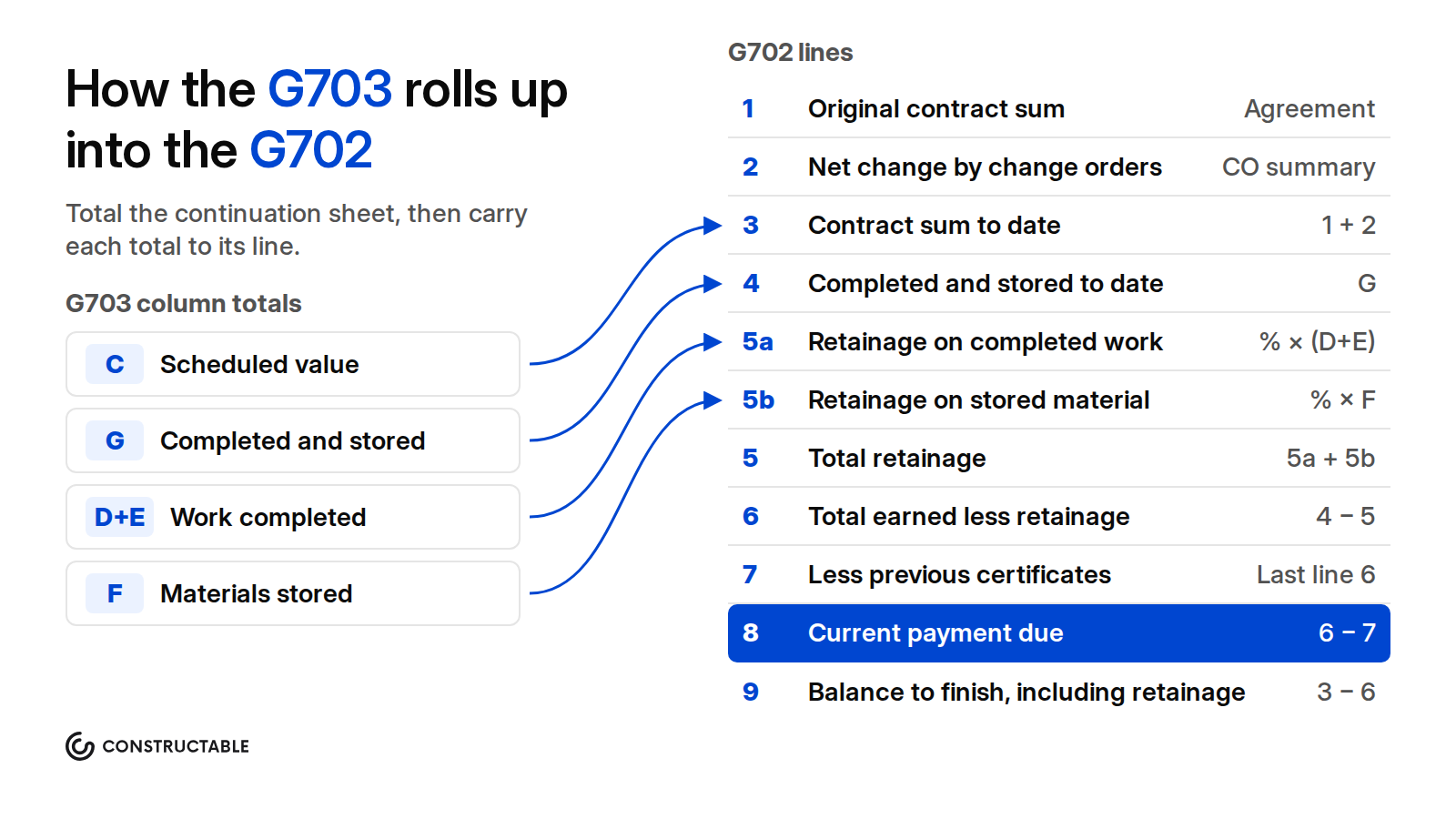
The G702 is two documents on one page. The top half is the contractor's application, which the contractor signs. AIA's instructions say the contractor should have the G702 notarized, and the form has a notary block below the contractor's signature. The bottom half is the architect's certificate for payment. The architect fills in the amount certified and signs, and that certificate is what the owner pays against.
Who signs what on a G702:
| Party | What they do on the form |
|---|---|
| Contractor | Prepares the G702 and G703, and signs the application certifying the work is complete as shown and that previous payments were applied to the work |
| Notary | Notarizes the contractor's signature when the contract or owner requires it |
| Architect | Reviews the application, fills in the amount certified, initials any figures it changes, and signs the certificate |
| Owner | Pays the certified amount within the time the contract sets |
AIA G702 and G703 editions and variants
AIA publishes several versions of the application for payment. Use the one that matches your contract, because the lines change with the payment basis.
| Document | Edition | When to use it | Continuation sheet |
|---|---|---|---|
| G702, Application and Certificate for Payment | 1992 | Owner-contractor progress billing by percent complete, the most common case | G703-1992 |
| G702S, Application and Certificate for Payment, Contractor-Subcontractor Version | 2017 | A subcontractor billing the general contractor | G703S-2017 |
| G702GMP, Application and Certificate for Payment for Cost of the Work Projects with a Guaranteed Maximum Price | 2021 | Cost of the work plus a fee, with a GMP | G703CW-2021 |
| G702CW, Application and Certificate for Payment for Cost of the Work Projects without a Guaranteed Maximum Price | 2021 | Cost of the work plus a fee, with a control estimate and no GMP | G703CW-2021 |
| G703CW, Continuation Sheet for Cost of the Work Projects | 2021 | The continuation sheet for both cost-of-the-work forms. It splits Column C into the original value, earlier changes, changes this period, and the current value | |
| G732, Application and Certificate for Payment, Construction Manager as Adviser Edition | 2019 | Projects with a construction manager as adviser, where the construction manager and the architect both certify | G703-1992 |
The G702-1992 and G703-1992 are the forms most commercial GCs mean when they say "AIA billing." The rest of this guide uses them. If your contract is a cost-of-the-work agreement, read how cost-plus and GMP contracts work before you pick a form, since those editions bill actual cost rather than percent complete.
Before you start: schedule of values, change orders, and billing period
Set up the schedule of values
The G703 is your schedule of values. Its lines and scheduled values come from the SOV the owner and architect approved at the start of the job, usually in the Contract Sum breakdown the general conditions require. Set the SOV up once, in the same order and with the same line amounts every month. An architect compares each G703 against the last one, and a line that moves or changes value draws questions.
Keep each line small enough to verify in the field. "MEP: $540,000" is hard to check. Separate lines for plumbing, HVAC, and electrical, or for rough-in and trim within each trade, let the architect walk the building and agree with your percentages.
Owners and architects watch for front-loading, where a contractor puts more value on early work such as mobilization or sitework so it bills ahead of the actual cost. A little is common and expected. Heavy front-loading gets the SOV rejected at the start of the job, and if it slips through, it leaves the job underbilled at the end, with retainage held on money you already spent.
Add only executed change orders
Line 2 on the G702 and the change order lines on the G703 include only change orders that the owner has signed. A pending change order, a change order request, or a construction change directive that hasn't become a change order doesn't go on Line 2. Most GCs add each executed change order to the G703 as its own line at the bottom, so the original SOV stays intact. For the full approval process, see how change orders work on a commercial job.
Confirm the billing period and the pencil draft
Each application covers a period, shown in the "period to" field on both forms, and carries an application number that goes up by one each month. Many owners ask for a pencil draft, sometimes called a pencil requisition, a week or so before the formal submission. The GC sends the G703 percentages in draft, the architect and owner's rep walk the job, and everyone agrees on the numbers before anyone signs or notarizes. A pencil draft takes a day of back and forth and saves a returned application.
How to fill out the G703 continuation sheet
Fill out the G703 first, because the G702 takes its numbers from it. Work across each row, then total every column.
| Column | Name | What goes in it | How to calculate it |
|---|---|---|---|
| A | Item No. | The line number from the schedule of values | Copy from the SOV |
| B | Description of Work | The scope on that line, such as "Concrete" or "CO 1: Added storefront" | Copy from the SOV or change order |
| C | Scheduled Value | The dollar value of the line, including executed change orders added as lines | Copy from the SOV |
| D | Work Completed: From Previous Application | Work billed on this line in all earlier applications | Last application's D + E |
| E | Work Completed: This Period | Work installed on this line during this period | Your field estimate of the work put in place |
| F | Materials Presently Stored (Not in D or E) | Materials delivered and stored but not yet installed | Value of stored material on hand at the end of the period |
| G | Total Completed and Stored to Date | Everything billed on the line to date | D + E + F |
| G ÷ C | % | Percent complete for the line | G ÷ C |
| H | Balance to Finish | Value left to bill on the line | C − G |
| I | Retainage (If Variable Rate) | Retainage held on this line when rates differ by line | G × the line's retainage rate |
A few rules keep the G703 clean:
- Column D is arithmetic, not an estimate. Copy it from the last application's D plus E. If the architect certified less than you applied for last month, use the certified figures.
- Stored materials move. Once you install material you billed in Column F, take it out of F and bill it in E. Column G doesn't double-count it, because F only holds material not yet in D or E.
- Change order lines follow the same math. An executed deductive change order shows a negative scheduled value. If nothing was billed on it, its balance to finish is negative too, and the column totals still tie out.
- Leave Column I blank when one rate applies to the whole contract. You calculate retainage on G702 Line 5 instead.
How to fill out the G702 application for payment
With the G703 totaled, the G702 is mostly transfer and subtraction.
| Line | Name | Formula | Where the number comes from |
|---|---|---|---|
| 1 | Original Contract Sum | Fixed | The agreement |
| 2 | Net Change by Change Orders | Additions − deductions | The change order summary on the G702 |
| 3 | Contract Sum to Date | Line 1 + Line 2 | Also equals the G703 Column C total |
| 4 | Total Completed and Stored to Date | Copy | G703 Column G total |
| 5a | Retainage on completed work | Rate × (D + E) | G703 Columns D + E totals |
| 5b | Retainage on stored material | Rate × F | G703 Column F total |
| 5 | Total Retainage | 5a + 5b, or the Column I total | G703 Column I when rates vary by line |
| 6 | Total Earned Less Retainage | Line 4 − Line 5 | |
| 7 | Less Previous Certificates for Payment | Copy | Line 6 from the prior certificate the architect issued |
| 8 | Current Payment Due | Line 6 − Line 7 | |
| 9 | Balance to Finish, Including Retainage | Line 3 − Line 6 | Also equals G703 Column H total + Line 5 |
Lines 3 and 9 each have a second way to check them. Line 3 should match the G703 Column C total, and Line 9 should equal the Column H total plus total retainage. When either check fails, a change order is missing from one form or a column total is wrong.
The change order summary
The bottom left of the G702 has a small table of change orders: additions and deductions approved in previous months, additions and deductions approved this month, the totals, and the net change. The net change is Line 2. Fill it in from executed change orders only, and match it to the change order lines on the G703.
The contractor's signature and the notary block
The contractor signs the application under a statement that, to the best of its knowledge, the work covered by the application is complete as shown, that amounts from earlier certificates were paid out to the people owed, and that the current amount is due. Read that statement before you sign. If you haven't paid your subs out of the last check, you are certifying something that isn't true. AIA's instructions tell the contractor to sign the G702 and have it notarized. Whether your owner insists on it depends on the contract and the lender. Check before the first application, because finding a notary on the 24th is how pay apps go out late.
The architect's certificate for payment
The architect's half of the page holds the amount certified and the architect's signature. If the architect certifies a different amount from Line 8, the form asks the architect to attach an explanation and initial every figure it changes on the G702 and the G703. Leave this section blank when you submit.
AIA G702 and G703 example: a worked pay application
Here is a complete pay application for a small commercial job, worked from the G703 through every line of the G702. The numbers are illustrative, and every total ties out.
The job is a two-story retail and office building. The original contract sum is $1,850,000, with 10% retainage on completed work and stored materials. Change Order 1, approved in a previous month, added a storefront system for $58,000. Change Order 2, approved this month, deleted exterior site lighting for $15,500. This is Application No. 6. The last certificate the architect issued was for $709,650 total earned less retainage, on $788,500 of work completed and no stored materials. To keep the table short, the example bills mechanical, electrical, and plumbing work on one line, which a real SOV would split.
G703 continuation sheet
The columns are C, scheduled value; D, work completed from the previous application; E, work completed this period; F, materials presently stored; G, total completed and stored to date; and H, balance to finish. Amounts are in dollars.
| A | B | C | D | E | F | G | G ÷ C | H |
|---|---|---|---|---|---|---|---|---|
| 1 | General conditions | 185,000 | 92,500 | 18,500 | 0 | 111,000 | 60.0% | 74,000 |
| 2 | Sitework | 210,000 | 199,500 | 10,500 | 0 | 210,000 | 100.0% | 0 |
| 3 | Concrete | 320,000 | 256,000 | 48,000 | 0 | 304,000 | 95.0% | 16,000 |
| 4 | Steel | 265,000 | 132,500 | 79,500 | 0 | 212,000 | 80.0% | 53,000 |
| 5 | MEP | 540,000 | 108,000 | 81,000 | 64,000 | 253,000 | 46.9% | 287,000 |
| 6 | Finishes | 330,000 | 0 | 16,500 | 0 | 16,500 | 5.0% | 313,500 |
| 7 | CO 1: Storefront | 58,000 | 0 | 23,200 | 0 | 23,200 | 40.0% | 34,800 |
| 8 | CO 2: Site lighting | −15,500 | 0 | 0 | 0 | 0 | 0.0% | −15,500 |
| Totals | 1,892,500 | 788,500 | 277,200 | 64,000 | 1,129,700 | 59.7% | 762,800 |
Item 5 covers mechanical, electrical, and plumbing work. Its $64,000 in Column F is switchgear and rooftop units delivered to the site and stored in a locked container. Next month, when the units are set, that value moves out of F and into E. With a single 10% rate, Column I stays blank.
G702 application, Lines 1 to 9
| Line | Formula | Amount |
|---|---|---|
| 1. Original Contract Sum | From the agreement | $1,850,000 |
| 2. Net Change by Change Orders | $58,000 − $15,500 | $42,500 |
| 3. Contract Sum to Date | $1,850,000 + $42,500 | $1,892,500 |
| 4. Total Completed and Stored to Date | G703 Column G total | $1,129,700 |
| 5a. 10% of Completed Work | 10% × ($788,500 + $277,200) | $106,570 |
| 5b. 10% of Stored Material | 10% × $64,000 | $6,400 |
| 5. Total Retainage | $106,570 + $6,400 | $112,970 |
| 6. Total Earned Less Retainage | $1,129,700 − $112,970 | $1,016,730 |
| 7. Less Previous Certificates for Payment | Line 6 from Certificate No. 5 | $709,650 |
| 8. Current Payment Due | $1,016,730 − $709,650 | $307,080 |
| 9. Balance to Finish, Including Retainage | $1,892,500 − $1,016,730 | $875,770 |
Check the work two ways before you sign:
- Line 8 should equal this period's billing less retainage on it. This period's work is $277,200 plus $64,000 of new stored material, or $341,200. Less 10%, that is $307,080, which matches Line 8.
- Line 9 should equal the G703 Column H total plus total retainage. $762,800 plus $112,970 is $875,770, which matches Line 9.
The change order summary shows $58,000 of additions approved in previous months and $15,500 of deductions approved this month, for a net change of $42,500.
How retainage works on a G702
Retainage is the part of each payment the owner holds back until the end of the job, as security that the contractor finishes the work and closes out. On the G702 it lives on Line 5.
Lines 5a and 5b
Line 5a is retainage on completed work, the rate times G703 Columns D plus E. Line 5b is retainage on stored material, the rate times Column F. The two rates are often the same, but some contracts set a different rate on stored materials, and the form gives each its own line for that reason.
Variable retainage in Column I
When retainage differs by line, fill in G703 Column I with each line's retainage and carry the Column I total to Line 5. Rates differ by line when a contract reduces retainage on trades that have finished, such as sitework, or sets a different rate on certain scopes. On projects with one rate throughout, AIA's instructions say Column I doesn't need to be filled in.
Retainage rates and reduction
There is no single retainage rule. Rates of 5% to 10% are common on commercial work, but the number comes from your contract, and many states cap retainage by statute, especially on public work. Virginia, for example, limits retainage on public construction contracts to 5% under Va. Code § 2.2-4333, while federal construction contracts allow up to 10% under FAR 32.103. Read your agreement and your state's prompt payment and retainage laws before you set up the first pay app.
Many contracts reduce retainage partway through the job. A common pattern drops the rate to 5%, or stops withholding on new work, once the project reaches 50% complete. When that happens, Line 5a keeps the retainage already held on earlier work and applies the new rate only to work after the reduction, unless the contract says to release part of what was held. Note the reduction on the application so the architect sees why the rate changed.
Releasing retainage
Retainage usually comes back in two steps. At substantial completion, many contracts release most of it, less an amount held for punch list work and closeout items. The final payment application releases the rest, once the punch list is done and the closeout documents are in. To release retainage on a G702, reduce Line 5, which raises Line 6 and therefore Line 8. The final application usually shows Line 5 at zero. The construction project closeout guide covers what the owner will ask for before it pays the final application.
What happens after you submit: architect certification and payment
The architect reviews the application
The architect checks the application against what it saw on its last site visit and against the contract. The architect looks at whether percentages match the work in place, whether stored materials have backup, whether change orders are executed, and whether the math ties. The architect isn't auditing every quantity. Under A201-2017 Section 9.4.2, issuing a certificate isn't a representation that the architect made exhaustive or continuous inspections to check the quality or quantity of the work. The certificate says that, based on the architect's site observations and your application, the work has progressed as indicated.
Under A201-2017 Section 9.4.1, the architect has seven days after receiving the application to certify the full amount, certify part of it with reasons, or withhold certification with reasons. Under Section 9.6.1, the owner then pays in the manner and within the time the contract documents set. A201 doesn't set that number of days, so check your agreement. AIA's explainer on payment for contractors covers what you can do when the certificate or the payment is late.
When the architect certifies less than you applied for
A partial certification is common, and it isn't a rejection. Say the architect walks the job and agrees steel is 75% complete, not the 80% you billed. The architect reduces Column E on item 4, structural steel, by $13,250, or 5% of $265,000, initials the change on the G703 and the G702, and certifies the lower amount:
| Line | As applied for | As certified |
|---|---|---|
| 4. Total Completed and Stored to Date | $1,129,700 | $1,116,450 |
| 5. Total Retainage | $112,970 | $111,645 |
| 6. Total Earned Less Retainage | $1,016,730 | $1,004,805 |
| 8. Current Payment Due | $307,080 | $295,155 |
The owner pays $295,155. Next month, Line 7 is $1,004,805, the certified Line 6, not the $1,016,730 you applied for. Column D on the steel line is $198,750, the certified $132,500 plus $66,250. If the steel crew finishes the disputed work, bill the $13,250 again in Column E with the next period's progress.
If you believe the work was in place, raise it with the architect before the next pencil draft, with photos, daily logs, or an inspection report. Don't carry the original figure forward as if it was certified, because the next application's Line 7 then won't match the certificate, and the architect will send it back.
Payment and lien waivers
The owner pays the certified amount within the time the agreement sets. Most owners and lenders also want lien waivers with each application: a conditional waiver from the GC for this payment, and conditional or unconditional waivers from subcontractors and suppliers covering the previous payment. For which waiver goes when, see how lien waivers work in construction.
Common G702 and G703 mistakes that get pay apps rejected
These are the errors that come back from architects most often:
- Line 7 uses the amount applied for. Line 7 is the Line 6 total from the last certificate the architect issued. After a partial certification, the two differ.
- Column D doesn't match last month. Column D must equal the last application's D plus E as certified. A change here means someone edited history.
- Pending change orders on Line 2. Only executed change orders go on Line 2 and on the G703. A change order request doesn't.
- Stored materials with no backup. Owners want an invoice or bill of sale for stored materials, and often proof of insurance and a secure storage location, on site or bonded off site.
- The wrong retainage rate. The rate must match the contract, including any reduction at 50% complete or at substantial completion.
- Percentages ahead of the field. An architect who sees 80% billed on a line it saw at 60% two weeks ago will cut the line and look harder at the rest.
- Totals that don't tie. Line 3 must equal the G703 Column C total, and Line 4 must equal the Column G total.
- Wrong application number or period. Each application number goes up by one, and the "period to" date must match the billing period.
- Missing notarization or lien waivers. When the contract requires either, a pay app without them isn't complete.
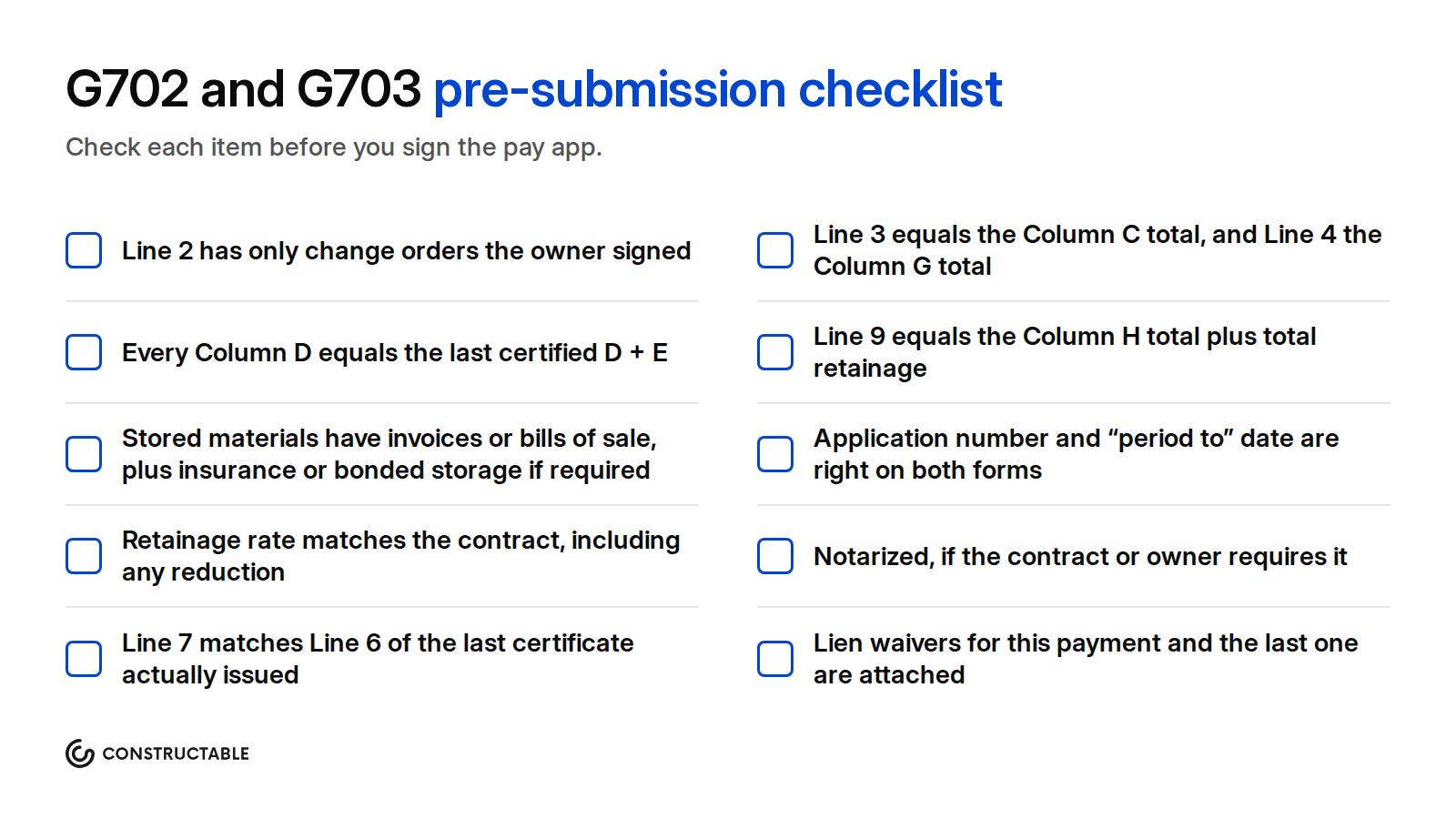
Pre-submission checklist
Before you sign, check each item:
Reviewing a subcontractor's G702 as the GC
The GC is also on the other side of the form. Subcontractors bill the GC each month, often on the G702S and G703S or a form that follows the same structure, and the GC rolls their billing into its own owner pay app. A bad sub pay app becomes a bad owner pay app.
When a sub's application comes in, check:
- Percent complete against the field. Ask your superintendent whether each line's percentage matches what is installed. Your own G703 line for that trade can't be higher than the work in place.
- Stored materials. Ask for the same backup the owner asks of you. If the owner won't pay for the material, you shouldn't either.
- The sub's retainage. Hold retainage at the rate in the subcontract. Most GCs hold at least the rate the owner holds on them, so they aren't paying subs money the owner is still keeping.
- Change orders. Only subcontract change orders you have executed belong on the sub's Line 2.
- Lien waivers. Collect a conditional waiver for this payment and an unconditional waiver for the last one before you release money.
- The tie to your owner billing. The sub's billing on a scope should feed the matching line on your G703. If the owner certifies less on that line, pass the cut down to the sub's next application.
Collect sub pay apps a few days before your own is due. You need time to review them, fix them, and add their progress to your G703 before the pencil draft.
How Constructable builds AIA-style pay applications from your invoices
Constructable keeps owner billing and subcontractor billing in one place, organized by billing period, and prints an AIA-style payment application from each invoice. Here is what it does for the monthly pay app:
- Billing Periods set the monthly cycle. Each invoice belongs to a Billing Period, and invoices on a contract go in order, one period at a time, so each application builds on the one before it.
- Import the schedule of values from a G703. The Prime Contract's SOV, and each Commitment's SOV, imports from a CSV or a PDF, including an AIA G703 continuation sheet.
- Bill the owner from your subs' invoices. An Owner invoice bills progress against the Prime SOV. Copy Line Items to Prime maps a subcontractor invoice's lines onto Prime SOV lines, so sub progress flows into the owner billing without retyping.
- Retainage and stored materials on every line. Each invoice line takes work completed, materials stored, retainage held, and retainage released. A default retention percent sets the starting rate for new contract lines, and Release All Retainage releases held retainage across every line at once. Executed change orders add to a line's billable amount once their billable date falls inside the period.
- An AIA-style PDF from each invoice. Download Default Payment Application gives a PDF with a summary sheet that follows the G702's lines, including retainage on completed work and stored material and a change order summary, and a detail sheet with continuation-sheet columns. Customize Payment Application saves column layouts for the whole organization. Approved invoices print from a snapshot saved at approval, so the PDF you sent doesn't change underneath you.
- Review subs before you bill. Subcontractor invoices can go through approvers in a set order before they're approved. Import invoice in the Agent turns a sub's PDF pay app into a Draft invoice matched to the Commitment, the SOV, and the Billing Period, for you to review. Download Pay Applications packages subcontractor pay apps for the periods you choose, with their attachments and lien waivers.
- Lien waivers on every invoice. Each invoice has a conditional and an unconditional waiver, sent for e-signature. Lien Waiver Templates let you upload your state's or your lender's form and fill it from the invoice, with a Payment Amount that is this period's billing less retainage held, plus retainage released.
- Accounting sync. Approved invoices sync to QuickBooks Online, QuickBooks Desktop, and Sage Intacct, and QuickBooks retainage posts to the retention receivable and payable items you choose.
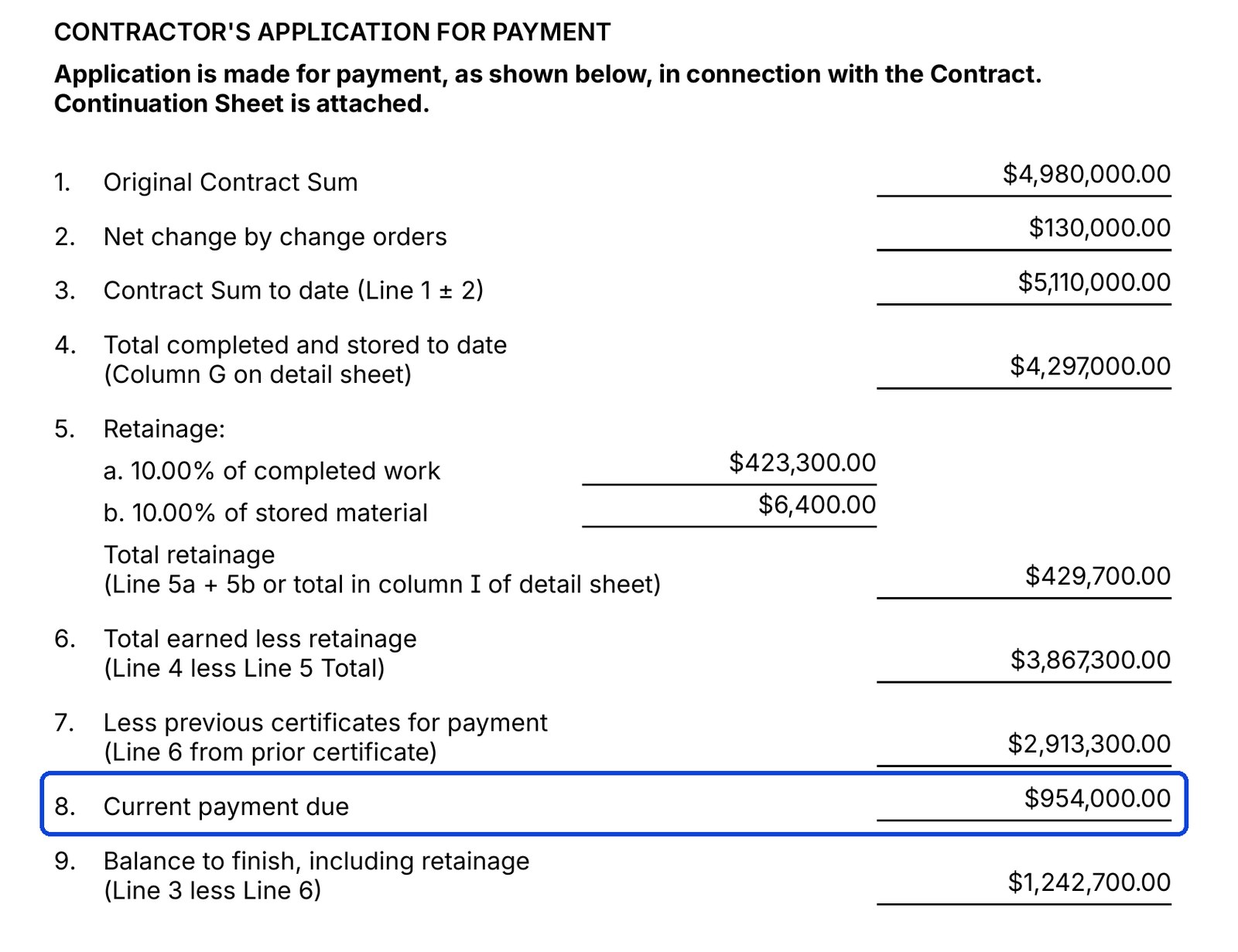
What Constructable doesn't do: it doesn't sell or reproduce official AIA documents, and it doesn't notarize. The PDF prints the notary block blank. On owner pay apps it fills the architect's Amount Certified with Line 8, and the architect still reviews it, changes it if needed, and signs the certificate. Many owners accept an AIA-style pay application generated by software, but check your contract first, since some require the official AIA form. See the pay application software and lien waiver software pages for more.
Final thoughts on AIA G702 and G703 pay applications
A G702 is a page of subtraction, and most returned pay apps fail on the same few lines: a pending change order on Line 2, a Line 7 that doesn't match the last certificate, or stored materials with no backup. Build the G703 from an approved schedule of values, carry the certified figures forward each month, and check the totals two ways before you sign. To see how Constructable turns your invoices into an AIA-style pay application each month, book a demo with our team.
FAQ
What is the difference between the AIA G702 and G703?
The G702 is the one-page Application and Certificate for Payment that summarizes the whole contract, with the contract sum, change orders, retainage, previous certificates, and the current payment due. The G703 is the Continuation Sheet, which lists every schedule of values line with its work completed and stored materials. You fill out the G703 first and carry its column totals to the G702.
Does the AIA G702 need to be notarized?
AIA's instructions say the contractor should sign the G702 and have it notarized, and the form includes a notary block. Whether a notarized application is required on your job depends on your contract and your owner or lender. Check the agreement before the first pay app.
Where do I get an official AIA G702 form, and can I use an AIA-style pay app instead?
The official G702 and G703 come from AIA Contract Documents, which licenses them. They're copyrighted, so a free copy online isn't a licensed form. Many owners accept an AIA-style pay application generated by construction software when the contract allows it, but some contracts require the official AIA document, so check yours.
How is retainage calculated on a G702?
Line 5a is the retainage rate times completed work, G703 Columns D plus E. Line 5b is the rate times stored materials, Column F. When retainage varies by line, total G703 Column I instead. The rate comes from your contract and state law, and 5% to 10% is common.
What does "less previous certificates for payment" mean on Line 7?
Line 7 is the Line 6 total earned less retainage from the last certificate the architect issued. It's the total already certified on the job, not the amount you applied for. When the architect certified less than you asked for last month, Line 7 uses the certified figure.
Can the architect certify less than the amount applied for?
Yes. The architect can certify a different amount, attach an explanation, and initial every changed figure on the G702 and G703. The owner pays the certified amount. Bill the difference again in a later application once the work supports it.
What is the G702S?
The G702S-2017 is the Application and Certificate for Payment, Contractor-Subcontractor Version. A subcontractor uses it with the G703S continuation sheet to bill the general contractor. The math follows the same lines as the G702.
How do stored materials work on a pay application?
Materials delivered and stored but not yet installed go in G703 Column F, and you can bill them when the contract allows it. Owners usually want an invoice or bill of sale, and often insurance and a secure storage location. Once the material is installed, its value moves out of Column F and into Column E.