RFI Tracking: Stop Losing Requests in Email and Spreadsheets (August 2026)
Fix the gaps that let RFIs vanish across email and disconnected tools. A practical RFI tracking guide updated for August 2026.
Your RFI tracking best practices are only as good as the system holding the record. When that record is split between email chains, a shared spreadsheet, and a drawing set in a separate folder, things fall through the gaps, and you end up taking the hit for delays that were never really yours to own. Here's what a tighter process actually looks like.
TLDR:
-
Email and spreadsheets break RFI tracking because no tool ties the question to the sheet, the owner, or the deadline.
-
A well-structured RFI has one question, an exact drawing location, a proposed solution, attachments, and a stated schedule impact.
-
Flag any RFI past 75% of its response window, follow up in writing, and log the date so the delay is on record.
-
Projects running above roughly 10 RFIs per $1M in value signal incomplete design, and owners now track that rate as a KPI.
-
Constructable pins RFIs to the exact spot on the drawing, sorts open items by ball-in-court assignment, and you can create an RFI right on the drawings without ever having to leave.
Why email and disconnected tools break RFI workflows
A question leaves someone's inbox and disappears into a thread. No due date attached, no record of who owns the answer, no way to tell whether the field crew waiting on it ever got word.
The trouble sits in the design of the tools, not the people using them. Email was built for correspondence, spreadsheets for tracking rows, shared drives for storage. None of them tie a question to the exact sheet it references, and none carry accountability forward once the message is sent.
So a response lands three replies deep in a chain the superintendent was never copied on. A spreadsheet log drifts out of sync the moment two people edit it at once. The drawing that prompted the question lives in a different construction drawing management system entirely.
Split across those disconnected tools, email-based RFIs produce predictable failures: questions that vanish into inboxes and duplicate requests that pile up. This is precisely why RFI management in construction breaks down the way it does.
RFIs as a risk management and accountability system
An RFI is a paper trail before it is anything else. Every question logged, every response documented, every date stamped becomes the record you fall back on when a delay dispute lands on your desk months later. When RFIs live in email and disconnected tools, that record fractures.
For a deeper look at RFI management in construction, treating RFI tracking as accountability infrastructure changes what you protect:
-
Ball-in-court clarity, so responsibility for a stalled question is never ambiguous and delays trace back to the party actually holding it.
-
Timestamped response history, giving you defensible dates when an owner or architect questions why the schedule slipped.
-
Cost and schedule impact tied to each question, so the financial weight of a slow answer is visible while there is still time to act.
Lose that trail and you take the hit for delays you never had a chance to prevent.
What every well-structured RFI needs
An RFI that gets answered in one pass keeps the job moving. A vague one bounces back with a follow-up question, and every round trip adds days to a cycle you were trying to shorten. The difference comes down to what you put in the request before you hit send.
Choosing the right RFI management software for GCs starts with knowing what a well-structured RFI carries. Five things:
-
One question, and only one. Bundling three unrelated issues into a single submission means the whole thing stalls until the slowest answer comes back. Industry guidance is consistent on sticking to one question per RFI.
-
The exact location. Sheet number, detail callout, revision, and area, so the designer opens the right drawing instead of hunting for the spot you meant.
-
A proposed solution wherever you have one. Giving the reviewer something to approve or reject beats asking them to author an answer from scratch.
-
Supporting attachments. A marked-up sheet or a site photo shows the condition faster than a paragraph describing it.
-
A stated schedule impact tied to a real deadline. When the reviewer sees which crew is waiting and when, the needed-by date carries weight.
Leave any of these out and you hand the designer a reason to write back with a question of their own.
Submission timing and workflow sequencing
Timing is where most RFI slippage starts. Teams relying on inadequate drawing management software compound the problem: a question raised too late lands in someone's inbox when the ball-in-court party is already buried, so the answer waits, and the field waits with it. Good sequencing keeps that from happening.
A few habits keep RFIs moving in the right order:
-
Raise the question at the point of discovery, not at the end of the day when the detail is half-remembered and the drawing reference is fuzzy.
-
Route it to the right ball-in-court party first, so it does not bounce between the architect, engineer, and owner before anyone owns the answer.
-
Tie the RFI to the schedule activity it affects, so the due date reflects when the field actually needs the answer, not an arbitrary two-week default.
-
Batch related questions where it makes sense, so reviewers see the full context instead of piecemeal follow-ups.
Sequenced this way, the question reaches the right person while there is still room to respond before the work is blocked.
Ball-in-court tracking and escalation protocols
One owner per stage keeps an RFI from stalling in the quiet space between people. The right construction communication and collaboration tools make this handoff visible. When the GC submits, the ball sits with the architect. When the answer comes back, it moves to the PM to distribute. Name that person every time the RFI changes hands.
Build the escalation on dates, not memory:
-
Flag any RFI that has passed 75 percent of its response window.
-
Send a written follow-up, never a verbal one, and log the date it went out.
-
Note the potential schedule impact on that follow-up so the delay is on record.
A response that lands without answering the question is not a closed RFI. Reopen it, re-route it to the party who still owes the answer, and keep the original thread intact so the follow-up reads as one continuous record instead of a fresh request.
Common RFI mistakes that cost time and margin
A handful of habits show up on almost every job, and each one quietly extends a cycle you were trying to close.
-
Bundling several questions into one RFI, which stalls the whole thing behind the slowest answer.
-
Proceeding on a verbal direction nobody wrote down, so the record splits the moment a dispute starts.
-
Letting a request sit past its window with no follow-up.
-
Writing an RFI for something the contract documents already answer.
-
Sending a needed-by date with no stated schedule impact behind it.
None of these is carelessness. They are what an unstructured process produces on its own. And the cost compounds fast: across 1,362 projects studied, RFIs averaged 796 per project at roughly $1,080 each, or about $859,680 per project in direct processing alone. Trim a day off each cycle and shave a few dollars off each handoff, and that number moves in your favor.
RFI metrics that reveal process health
A structured log turns individual questions into a read on how the job is actually running. Watch a handful of numbers, and the workflow problems underneath them show up before they cost you.
| Metric | What it signals |
|---|---|
| Average response time by RFI type | Which categories consistently stall and where to push |
| Percentage unanswered within the contractual window | Whether ball-in-court parties are meeting their obligations |
| RFI volume per $1M of project value | Design completeness and coordination quality |
| Percentage tied to a specific drawing location | How traceable your record is when a dispute starts |
| Rate of RFIs that turn into construction change orders | How much design ambiguity is converting into cost |
Volume is the one owners now read most closely. A project running far above the roughly 10-per-$1M benchmark points to incomplete design, poor coordination, or ambiguous specs, and more owners treat that rate as a designer-performance KPI.
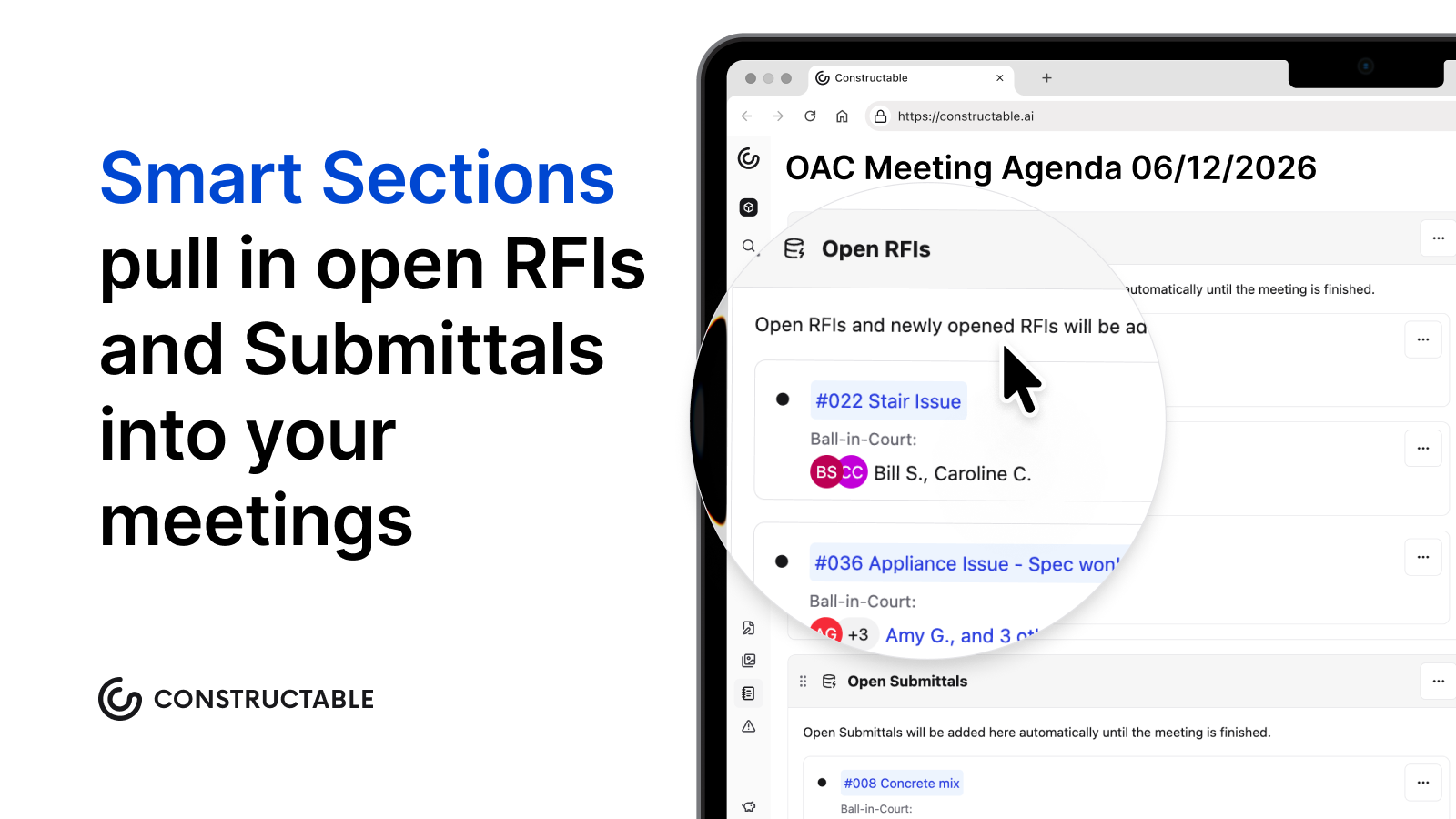
Pull these into the weekly OAC meeting. (Constructable's Smart Section in meeting minutes makes this super easy.) When response times drift past the contractual window or volume climbs well over the benchmark, escalate to the design team or owner in writing while there is still schedule left to protect. None of it works if the log lives in scattered inboxes, so the numbers depend on one centralized record.
How Constructable keeps RFIs from getting lost
Every breakdown this post has walked through traces back to the same root: tools that were never built to hold a question in one place. Constructable's construction RFI software closes those gaps through how the system is built, not through features bolted on after the fact.
-
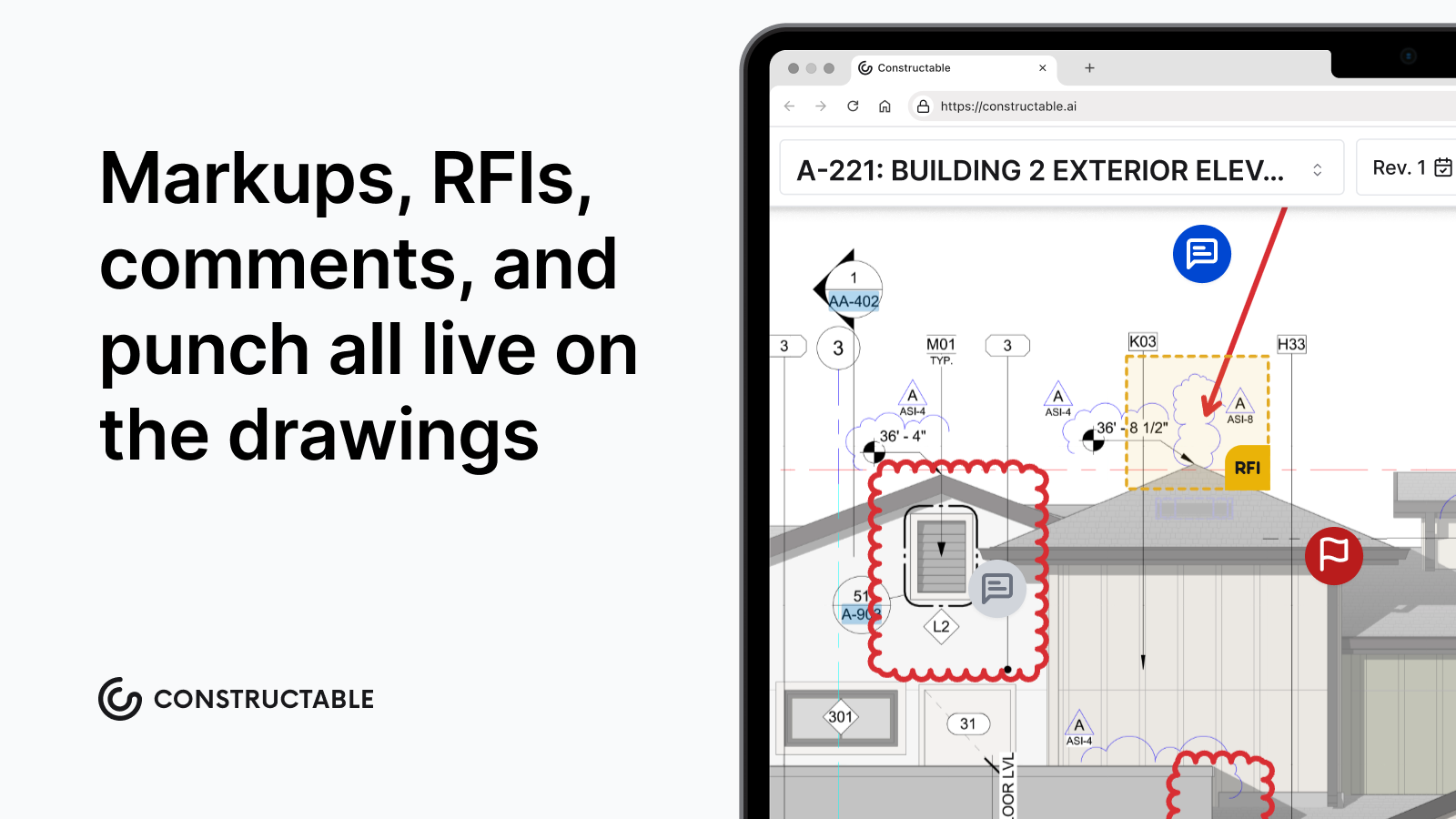
RFIs pin to the exact spot on the sheet they reference, with markups, responses, and comments all tied to that pin. The context lives on the drawing instead of in a separate log you cross-reference by hand, which is the pattern that defines drawing-centric collaboration workflows.
-
An RFI stays in draft, private and silent, until you deliberately open it, so no one gets a premature notification and the record stays clean.
-
Open RFIs sort by ball-in-court assignment, pushing the most pressing action items to the top without any manual filtering.
-
When you close and distribute, AI drafts the distribution message from the response itself, taking the friction out of the final step email workflows tend to skip.
-
The AI Answer Engine links every answer back to its primary source, so a response points to the drawing, document, or log entry behind it.
-
Subcontractors can open draft RFIs directly, with a default manager auto-assigned, clearing the bottleneck of routing every field question through a GC first. It's the same pin-to-plan logic that drives plan-linked punch lists and issue management.
If you want to see how it holds up on a real project, book a demo and put your own RFI log in front of it.
Final thoughts on running a tighter RFI workflow
None of the habits covered here require a total overhaul, just a consistent structure applied at the right points in the cycle. One question per request, a stated schedule impact, a named ball-in-court owner, and a log that lives in one place, that is the whole system. Get those pieces right and your response times shrink, your disputes get shorter, and your field crew spends less time waiting. Talk to us if you want to see what that looks like in practice with Constructable.
FAQs
What's the difference between managing RFIs in Constructable vs. email and spreadsheets?
Email and spreadsheets break RFI accountability the moment a response lands in a thread the superintendent wasn't copied on, or two people edit the log at once. Constructable, as a connected system, pins each RFI to the exact sheet location it references, with responses, markups, and ball-in-court assignments all tied to that pin, so the record stays in one place instead of fracturing across inboxes and disconnected files.
How do I write an RFI that gets answered in one pass?
Include one question only, the exact sheet and detail callout, a proposed solution where you have one, supporting attachments like a marked-up sheet or site photo, and a stated schedule impact tied to a real deadline. Each of those elements removes a reason for the reviewer to write back with a follow-up question before answering yours.
What RFI metrics should I be tracking to catch workflow problems early?
Track average response time by RFI type, the percentage of RFIs unanswered within the contractual window, volume per $1M of project value, the percentage tied to a specific drawing location, and the rate of RFIs that convert into change orders. Volume is the number owners now watch most closely: a project running well above roughly 10 RFIs per $1M points to incomplete design or ambiguous specs, and pulling these numbers into the weekly OAC meeting gives you time to escalate in writing while schedule room still exists.
Should I be tracking RFI ball-in-court manually or through a dedicated system?
A dedicated system with named ball-in-court assignments at every handoff beats manual tracking. When you rely on memory or a spreadsheet, the accountability gap between submission and response has no owner, follow-ups go unlogged, and you lose the written record you need when a delay dispute starts. Constructable sorts open RFIs by ball-in-court assignment automatically, so the most pressing items stay visible without manual filtering.
Can subcontractors submit RFIs directly in Constructable without going through the GC?
Yes. Subcontractors can create limited draft RFIs directly within Constructable, with a default manager auto-assigned and notified on draft creation. This removes the bottleneck of routing every field question through a GC team member before the request even enters the system.