OAC Meeting Best Practices: Your Complete Guide for June 2026
Learn OAC meeting best practices for construction projects in June 2026. Get agendas, action items, and documentation tips to keep projects on track.
OAC meetings in construction are supposed to keep everyone aligned, but they often turn into status updates where nothing gets decided. You walk through the schedule, someone mentions an RFI that's been open for two weeks, the owner says they'll look into it, and you move on. Then next week, same RFI, same non-answer. The difference between a meeting that moves the project and one that just fills the calendar comes down to a few specific habits: sending the agenda early, assigning every action item to a name, and documenting decisions before people forget what was actually agreed on.
TLDR:
- OAC meetings align the owner, architect, and contractor on decisions before they become change orders
- Weekly cadence works best during active construction; scale back only when open issues clear
- Run meetings under 45 minutes by distributing agendas 24 hours early and assigning action items to named owners with deadlines
- Poor communication costs the U.S. construction industry $177.5 billion in labor annually, and construction pros waste 5.5 hours weekly searching for information
- Constructable connects OAC agendas directly to drawings, RFIs, and change events for instant answers during meetings
What Is an OAC Meeting in Construction?
OAC stands for Owner-Architect-Contractor. An OAC meeting is a regularly scheduled check-in that brings the three core parties of a construction project into the same room (or call) to align on progress, decisions, and next steps.
If you've searched for "oac meaning" across different industries, you'll find it appearing in medical, legal, and law enforcement contexts as well. In construction, OAC has one clear meaning: the meeting where the people who fund the project, design it, and build it get on the same page.
These aren't optional catch-ups. On commercial projects, OAC meetings are the primary forum where schedule updates are reviewed, open issues are resolved, and decisions are made before they become expensive problems.
Who Participates in OAC Meetings?
Three parties. That's it. The owner, the architect, and the contractor each bring something different to the table.
The owner funds the project and holds final say on budget and scope decisions. Their job in the meeting is to receive updates, raise concerns, and make calls when cost or schedule changes land on their desk. The architect represents the design intent, answers technical questions, and responds to RFIs. The general contractor runs the field and owns the schedule, so they come prepared with progress updates, open issues, and anything blocking the work.
When to Bring in Others
Most OAC meetings stay small by design. But certain agenda items call for additional voices:
- Structural or MEP engineers when a design issue needs a technical decision before work can move forward
- Key subcontractors when their scope is directly affecting schedule or an open RFI needs resolution
- The owner's lender or project manager if financial approvals are on the table
- Specialty consultants when a specific system such as AV, medical equipment, or similar is under review
A crowded room rarely moves faster. Bring the right people in for the topics that need them, and structure the meeting so each contributor's time is well spent.
Why OAC Meetings Matter for Project Success
Construction projects fail in the gaps between conversations. Work expanding past what was originally agreed on, missed RFI responses, delayed decisions from the owner side, a subcontractor waiting on an answer that nobody realized was outstanding. OAC meetings exist to close those gaps before they turn into change orders.
The numbers back this up. A PlanGrid and FMI survey found that 96% of construction professionals believe better collaboration directly improves project outcomes. The same research found that poor communication costs the U.S. construction industry $177.5 billion in labor annually, and construction professionals spend 5.5 hours per week searching for project information.
A well-run OAC meeting isn't a status report. It's where problems get assigned an owner before they get a price tag.
When OAC meetings run consistently, the downstream effects are real: fewer surprise change orders, faster decision-making, and less rework because questions are answered before the wrong thing is built.
Skip them or let them drift into unfocused conversations, and you lose the one recurring moment where the owner, architect, and GC are all accountable to each other in the same room.
How Often Should You Hold OAC Meetings?

There's no universal answer here, but there are smart defaults. Most active commercial projects run weekly OAC meetings during heavy construction phases. Bi-weekly works for projects with a slower pace or fewer open issues. Monthly is rarely enough unless you're in early pre-construction or the tail end of closeout.
A few factors worth weighing:
- Phase of work; weekly during structure and MEP rough-in, potentially bi-weekly during finish work
- Number of open RFIs and decisions still waiting on owner response
- How often the schedule is actually moving and requiring adjustments
When issues pile up between meetings, that's your signal to increase frequency. When meetings start feeling like reruns with nothing new to report, pull back. Let the project tell you what it needs.
Core Components of an Effective OAC Meeting Agenda
A good agenda separates an OAC meeting from a group call where everyone talks, but nothing gets decided. Structure it around decisions and accountability, not updates for their own sake.
Here are the standard items worth covering in roughly this order:
| Agenda Item | Purpose |
|---|---|
| Schedule review | Walk the current schedule, flag delays, and identify upcoming critical path items |
| RFI log | Review open RFIs, confirm responses, and escalate anything blocking field work |
| Submittal status | Track what's approved, what's pending, and what's holding up procurement |
| Budget and change orders | Review pending change events, owner decisions required, and cost impacts |
| Action items from last meeting | Confirm what was done and what's still open |
| Upcoming milestones and decisions | Set expectations for what's coming in the next two to four weeks |
| Open issues | Anything else that needs a decision before the next meeting |
Budget and change orders sit in the middle intentionally since they often depend on RFI and submittal status being resolved first.
One item most teams skip: the action item recap from the previous meeting. Opening with accountability on what was assigned last time changes how people show up. If something slipped, it gets named early instead of being buried.
Preparing for OAC Meetings
Good preparation is what separates a 45-minute OAC meeting from a two-hour one where nobody leaves with answers.
Before each meeting, every party should do its part:
- Review action items and open issues from the previous meeting minutes so nothing falls through the cracks between sessions.
- Pull current schedule and RFI/submittal logs with project management tools so numbers are fresh, not recalled from memory.
- Flag any items requiring an owner decision so they are not a surprise mid-meeting.
- Distribute the agenda at least 24 hours ahead so attendees arrive ready to decide, instead of just listening.
The agenda should go out before the meeting, not at the start of it. If the owner sees a budget discussion for the first time when they sit down, expect delays instead of decisions.
With some simple preparation, you can come away with solid alignment between parties and workable action items.
Running an Effective OAC Meeting
Start on time. End on time. That alone puts you ahead of most OAC meetings.
A few habits that keep things moving:
- Start with a roll call! Make sure everyone who needs to be "in the room" is there—and if they're not, take note so that you can send them the recap later.
- Stick to the agenda order. When conversations drift, note the issue and move on instead of letting it eat up time meant for other topics.
- Ask for decisions out loud. Silence is not agreement, and assumptions made in a meeting room become RFIs in the field.
- Keep language plain. Not everyone in the room reads drawings for a living, and clarity beats precision every time.
- Assign every action item to a person by name. "The architect will handle it" means nobody will.
- Set a deadline for every open item before the meeting wraps.
The GC typically runs the meeting, which makes sense since they own the schedule and carry the most exposure when decisions stall. That puts the burden on you to keep the room focused and to surface anything that blocks field work before it becomes a delay.
Close every meeting the same way: read the action items back, confirm who owns what, and lock in the next meeting date. Thirty seconds of recap can prevent a week of confusion.
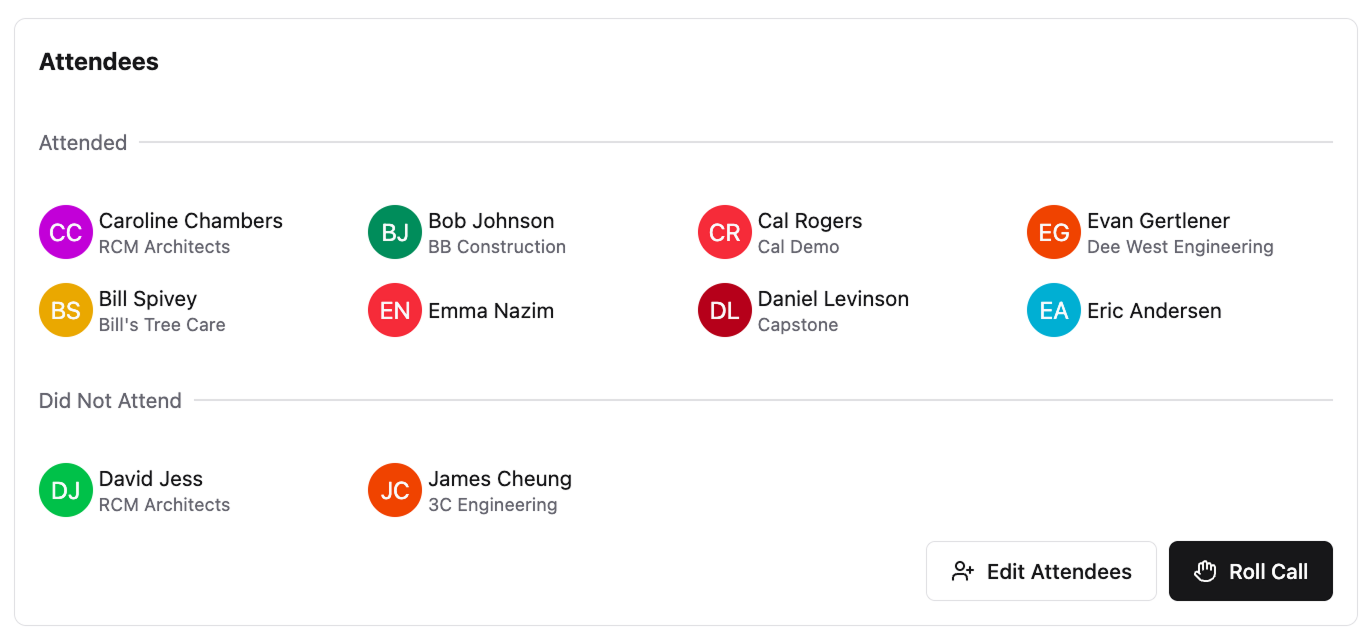
Constructable makes it easy to take a quick roll call right as you start your meetings
OAC Meeting Minutes and Documentation
Minutes aren't a formality. They're the legal record of what was decided, who committed to it, and when it was due.
The GC typically owns documentation, though some teams rotate this responsibility to a dedicated project manager or the owner's rep. Whoever does it, minutes should go out within 24 hours. Waiting three days means people forget what was actually agreed on versus what they think was agreed on.
Capture these every time:
- Decisions made and who made them, so there's no ambiguity later about who approved what.
- Action items with a clearly assigned owner and hard due date, beyond just a vague "we'll follow up."
- Open issues carried forward from prior meetings, so nothing quietly falls through the cracks.
- Any RFI or submittal responses confirmed during the meeting, documented while everyone's still in the room.
- A full attendance log, because who was present matters if a decision gets disputed.
Keep the format consistent across every meeting so anyone can scan minutes from week six and week sixteen and read them the same way. A template helps, but discipline is what actually keeps it clean.
One practical note: minutes should reflect decisions, not transcripts. Nobody needs a word-for-word account of the schedule discussion. They need to know what was resolved, what's still open, and who has the ball.
Common OAC Meeting Challenges and How to Solve Them
Even well-structured OAC meetings run into the same recurring problems. Here's what derails them and how to fix it.
- Owner no-shows or sends a rep without decision authority: Set expectations upfront that the meeting requires someone who can approve costs and scope changes. If proxy attendance becomes a pattern, escalate directly.
- Meetings that run long: Timebox agenda items before the meeting starts. When a topic needs more than five minutes, table it and schedule a separate working session.
- Action items that disappear: Assign every item to one person by name, with a due date. If it doesn't have an owner, it doesn't get done.
- Poor follow-through between meetings: Send minutes within 24 hours and open the next meeting by reviewing what was due. Public accountability moves things.
- Office-to-field communication gaps: If a decision gets made in the OAC meeting but never reaches the superintendent, it may as well not have happened. Build a direct handoff into your post-meeting process.
Using Technology to Improve OAC Meeting Effectiveness
Construction projects are already running behind before the first OAC meeting even happens. 98% of projects face delays, with average durations running 37% longer than originally projected. Poor information access is a big part of that.
The right construction management tools cut the time teams spend hunting for answers before and during meetings. A few areas where tech actually helps:
- Drawing management systems keep the current set accessible to everyone, so nobody walks into a meeting referencing a superseded sheet
- RFI and submittal tracking in one place means the log is always live, not assembled the morning of the meeting
- Shared action item tracking removes the "I didn't see the email" problem entirely
- Search that lets you pull a document, a photo, or a daily log entry in seconds instead of hunting through folders
If your team spends the first 20 minutes of every OAC meeting getting on the same page about basic status, that's a data access problem, not a meeting problem.
Managing OAC Meetings in Constructable
Constructable's Meetings workflow is built for exactly this. Create an agenda with sections, items, and sub-items, then share it with attendees before anyone shows up. Smart sections automatically pull in open RFIs and submittals, so you don't have to manually copy status into a document the morning of the meeting.
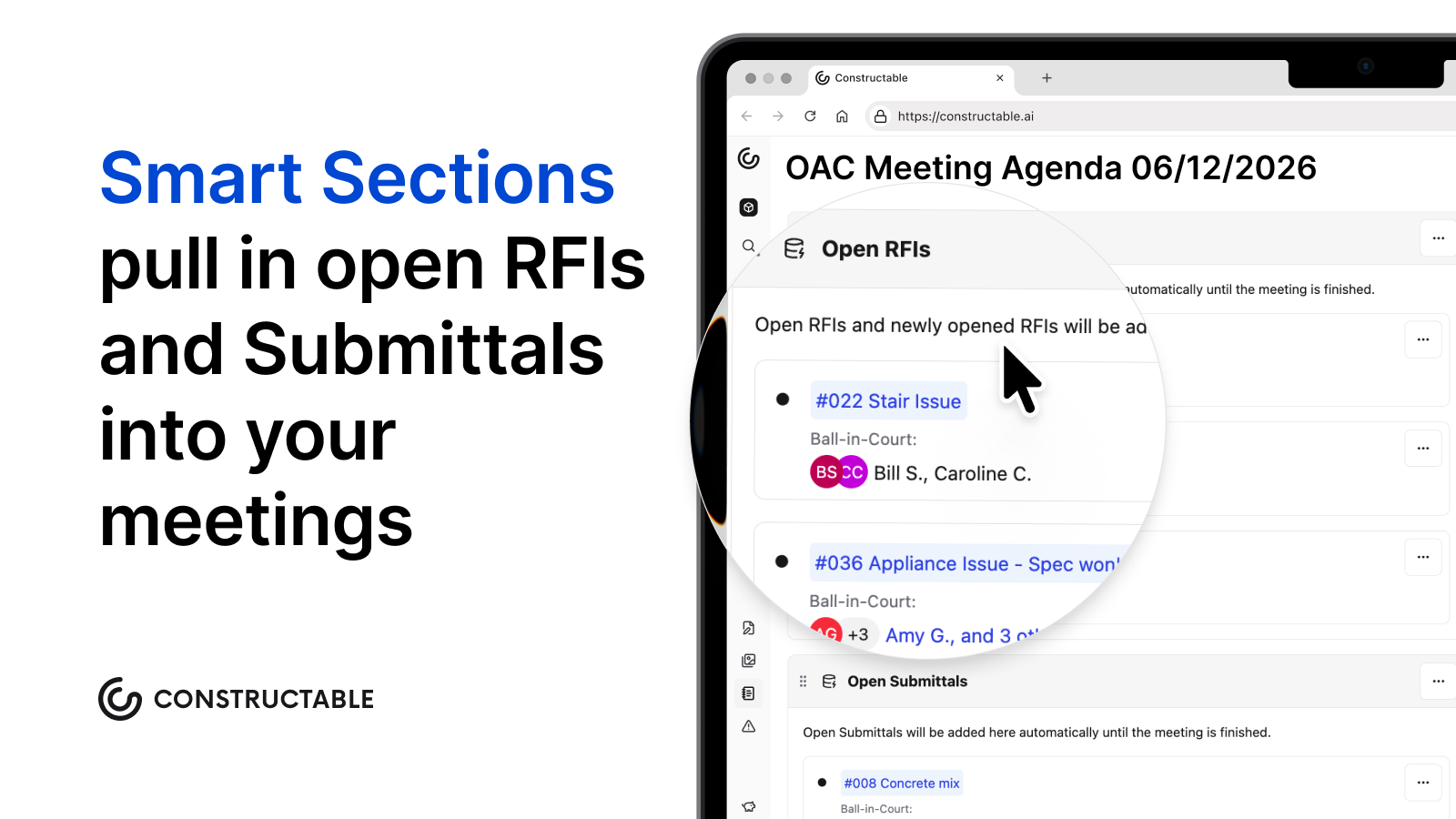
During the meeting, take notes directly in the workflow. After, the record lives inside the same system as your drawings, change events, and daily logs, so it's searchable alongside everything else. When you export meeting notes, attendees also get access to previous meeting notes alongside the current ones, so everyone has the full history in hand without hunting through old emails or shared drives.
Because all project data lives in one place, questions that come up mid-meeting get answered fast. Search pulls the relevant drawing, photo, or document instantly, with a direct link to the source. No tab-switching, no "I'll follow up after."
That's the difference between a meeting tool and a connected project system.
Final Thoughts on Making OAC Meetings Count
What is an OAC meeting supposed to accomplish? Decisions, not status updates. When you walk into a meeting with live data instead of last week's notes, you spend less time catching up and more time solving problems before they cost money. Your project already has enough friction without adding more between the office and the field. We built Constructable to close that gap: see it in action.
FAQ
What is an OAC meeting in construction?
An OAC meeting is a regularly scheduled check-in between the three core parties of a construction project: Owner, Architect, and Contractor. It's where schedule updates get reviewed, open issues get resolved, and decisions get made before they become expensive problems, not merely an optional catch-up.
How often should you run OAC meetings?
Most active commercial projects run weekly OAC meetings during heavy construction phases, bi-weekly for slower-paced projects, and monthly only during early pre-construction or closeout. When issues pile up between meetings, increase frequency, and when meetings feel like reruns with nothing new, pull back.
Weekly vs bi-weekly OAC meetings: which is better?
Weekly works best during heavy construction phases like structure and MEP rough-in when the schedule is moving fast and decisions need quick turnaround. Bi-weekly fits projects with fewer open issues or slower work phases. Let the volume of RFIs, submittals, and owner decisions tell you what the project needs.
Can I run effective OAC meetings without a project management system?
You can, but you'll spend the first twenty minutes of every meeting getting everyone on the same page about basic status instead of making decisions. When teams hunt for drawings, RFI logs, or action items before the meeting even starts, that's a data access problem that slows down the whole project.
How do you keep OAC meetings from running long?
Start on time, stick to the agenda order, and timebox each item before the meeting starts. When a topic needs more than five minutes, table it and schedule a separate working session. Then close by reading the action items back, with names and deadlines assigned to each open issue.