Top RFI Software for GCs - May 2026
Compare the top RFI management software for general contractors in May 2026. See which tools offer ball-in-court tracking, drawing integration, and unlimited users.
RFI management software should tell you who has the ball, where the question lives on the drawings, and when a response is overdue—without making you dig through email to find out. In this post, we compared the top general contractor RFI solutions on drawing integration, field usability, response tracking, and pricing structure. Included in our analysis are Constructable, Procore, Autodesk Construction Cloud, Fieldwire, and RedTeam, so you can see where each one fits and where they fall short.
TLDR:
- RFI software keeps project questions from getting lost in email by tracking who asked, who answers, and when responses are due
- Constructable pins RFIs directly to drawing locations with full context and unlimited users at no extra cost
- Ball-in-court tracking shows exactly who owns the next action so responses don't stall out
- AI search finds answers across all project data instantly without digging through folders
- Constructable unifies RFI management with one cohesive system built for how general contractors work
What is RFI Management Software?
RFI management software helps construction teams ask, track, and close out questions that come up during a project. When a detail is unclear, a dimension doesn't match, or the design intent needs clarification, you create an RFI. The software documents who asked, who's responsible for answering, and when a response is due.
Without it, RFIs get scattered across email and printouts. Responses get buried. Nobody knows who has the ball. By the time you find the answer, you've already lost days.
For general contractors coordinating architects, engineers, owners, and subs, RFI software creates a single source of truth. Questions get logged, assigned, and answered in one place. You can see what's open, who's waiting on what, and whether responses actually came back. It's accountability you can point to when schedules slip or costs change.
How We Reviewed RFI Management Software
We focused on what keeps RFIs from turning into another headache. The goal wasn't to rank feature lists but to see which tools actually close questions without adding steps.
First, we checked drawing integration. If someone has to write a paragraph describing where the issue is instead of dropping a pin on the sheet, you're asking for confusion. Second, we tested field access. Can your super pull up an RFI on site without fumbling through menus, or does it need a desktop and a tutorial?
Response tracking came next. You need to know who's sitting on an answer and when it's overdue, or RFIs just become polite delays. We also looked at how the tool fits with the rest of your project work. If you're uploading the same drawings twice or switching systems to check related submittals, that's wasted time.
Pricing structure mattered too. Per-user pricing often means you avoid adding subs and consultants who need access, which defeats the purpose.
Best Overall RFI Management Software: Constructable
Constructable delivers the strongest RFI management experience for mid-market general contractors because RFIs live directly on the drawings where work happens. Pin questions to exact locations on plans, add markups and photos, and track ball-in-court accountability without jumping between systems.
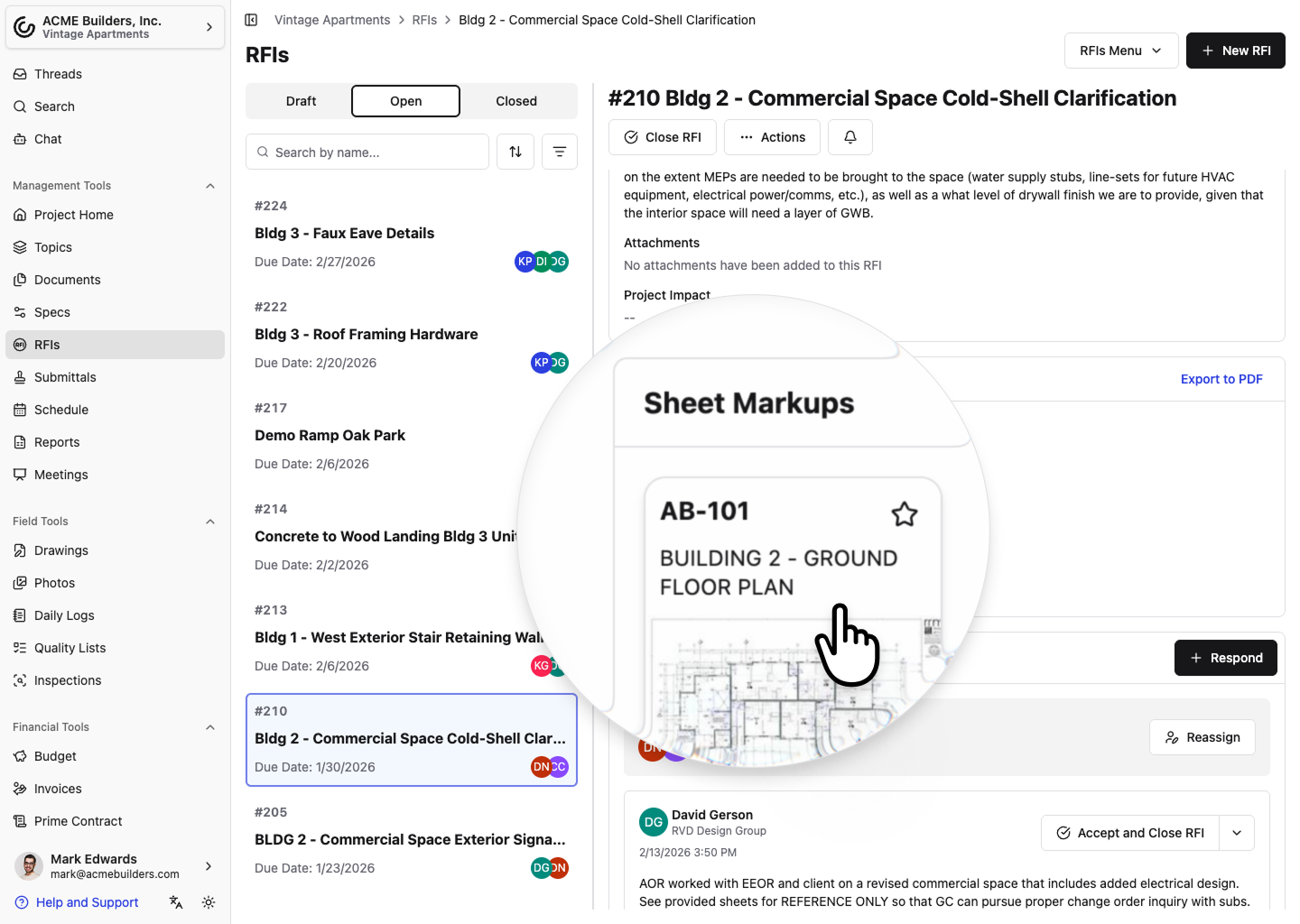
The AI Answer Engine pulls context from your project to speed up responses. Unlimited users means you can include everyone who needs visibility without per-seat costs eating into your budget.
Core strengths:
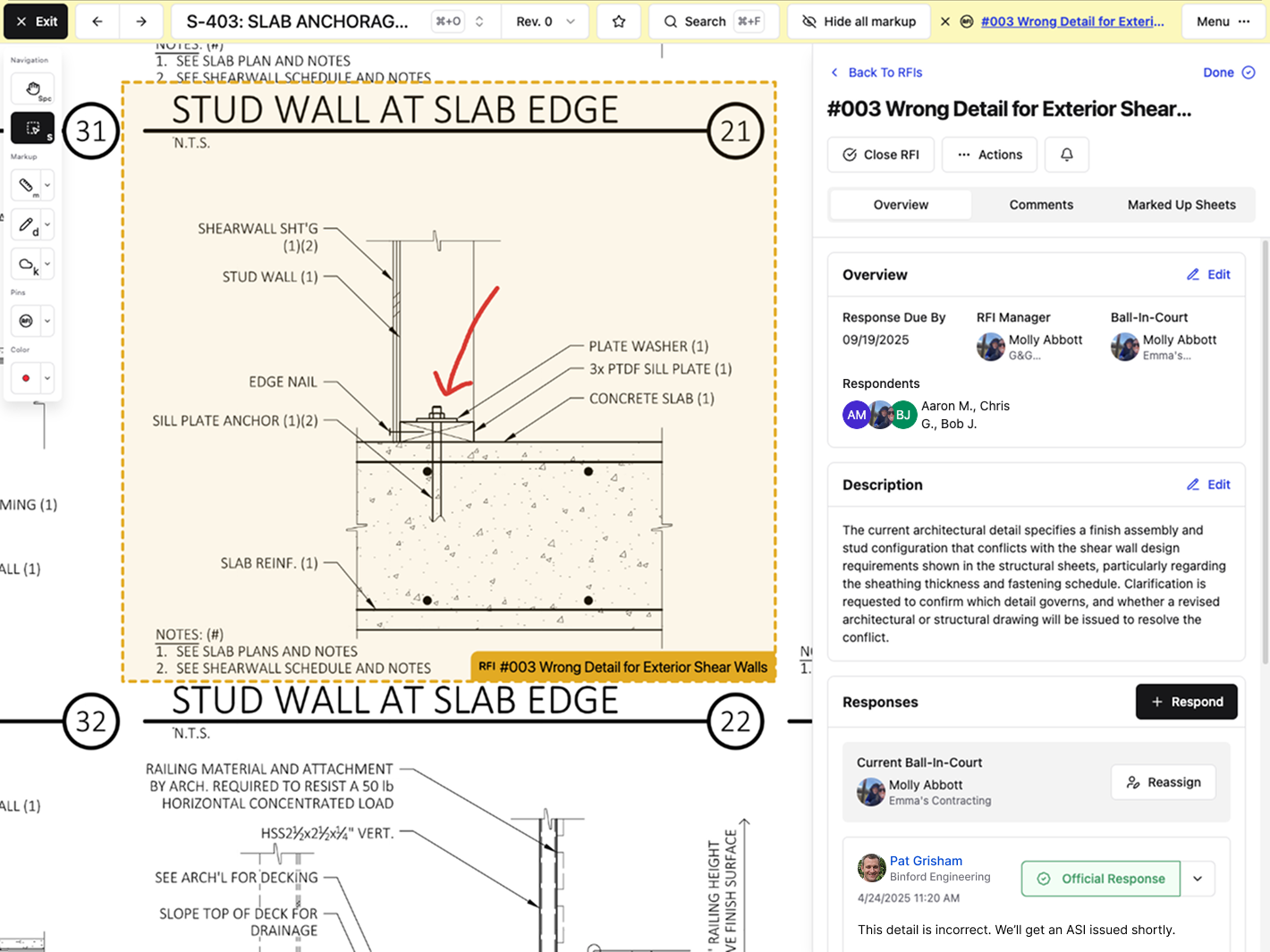
- RFIs pin directly to drawing locations with full markup and comment threads
- Ball-in-court tracking shows who owns each response at any moment
- AI Answer Engine finds answers across drawings, documents, and past RFIs instantly
- Unlimited users across the internal team, owners, consultants, and subcontractors
- Onboarding averages under 21 days with hands-on support and no extra fees
Constructable was built as one cohesive system. RFIs connect naturally to drawings, daily logs, submittals, and change orders. Field teams can create RFIs from their phones by dropping a pin on a drawing and adding a photo. The workflow stays visual and context-rich, which cuts down the back-and-forth that drags out responses.
Procore
Procore handles RFI workflows for large enterprise contractors with complex organizational structures and heavy process requirements.
The system provides customizable RFI workflows with multiple review stages and approval paths, letting external stakeholders respond via email without logging in. It integrates with Procore's broader project management ecosystem and sends automated reminders when RFI responses approach deadlines.
Procore works for large enterprise contractors running standardized processes across multiple concurrent projects who need deep customization and can support the training overhead.
The tradeoff: Procore requires extensive onboarding, often involving multiple training sessions and ongoing user support. Mid-size teams frequently report that the interface feels heavy and click-dense, and that field teams struggle to adopt it without dedicated internal champions. Pricing scales steeply as you add users and features, which is why many teams look at Procore alternatives for mid-market contractors.
Autodesk Construction Cloud
Autodesk Construction Cloud bundles RFI management with other project tools after acquiring and combining several construction software companies.
RFI creation and tracking sit inside Autodesk Build. Teams can attach RFIs to 2D drawings and 3D models using pushpins, customize review workflows, and connect RFIs to sheets, issues, meetings, and change orders.
This setup works if your company is already locked into the Autodesk world and you're willing to deal with inconsistent experiences across different parts of the system.
The inherited architecture from multiple acquisitions creates fragmented workflows. Migrations cost real money and take serious time, often requiring third-party consultants on top of licensing fees. Field teams face a steeper learning curve because navigation changes depending on which module you're in.
Autodesk Construction Cloud fits large enterprises chasing vendor consolidation. Constructable offers a more unified system built for GC workflows from day one.
Fieldwire
Fieldwire focuses on field execution tasks, including basic RFI submission and task management for superintendents and field crews.
The tool offers mobile-first RFI creation with photo attachments from the jobsite, task management and punch list workflows tied to drawings, markup and annotation tools for plan review, and offline drawing access for areas without connectivity.
Good for small teams focused narrowly on field task execution who do not need project management or financial visibility beyond basic RFI and punch workflows.
The limitation: Fieldwire lacks native project management capabilities, budgeting tools, and financial workflows for mid-size contractors. Teams requiring cost visibility, owner reporting, or coordination between field and office must layer on other systems, creating fragmentation and duplicate data entry. Per-user pricing scales linearly, making broader team collaboration expensive as subcontractors, owners, and consultants need access.
Fieldwire works as a point solution for field-only teams. Constructable delivers equivalent field functionality while also supporting the full project lifecycle without tool fragmentation.
RedTeam
RedTeam offers budget-focused construction management software with broad feature coverage that trades user experience for lower cost.
RedTeam covers the basics: RFI creation and response workflows with tracking to manage questions between project teams; document management and file storage in a central repository; accounting and financial system integrations; and office-focused project management tools built for desk-based coordination.
RedTeam attracts teams on tight budgets who accept dated interfaces and slow product updates in exchange for lower licensing fees; long-standing usability issues get tolerated because switching costs feel higher than enduring the friction. Field adoption is weak due to interfaces designed for office use, as covered in this Constructable vs RedTeam comparison.
Bottom line: RedTeam attracts buyers who optimize purely on price, with workflows that often feel disjointed across modules.
Feature Comparison
Here's how the major RFI management tools stack up on features that matter for general contractors running multiple projects with mixed teams.
| Feature | Constructable | Procore | Autodesk Construction Cloud | Fieldwire | RedTeam |
|---|---|---|---|---|---|
| Pin RFIs to Drawing Locations | Yes | Yes | Yes | Yes | No |
| Unlimited Users | Yes | No | No | No | No |
| Mobile RFI Creation | Yes | Yes | Yes | Yes | Limited |
| AI-Powered Search | Yes | Limited | No | No | No |
| Ball-in-Court Tracking | Yes | Yes | Yes | No | Limited |
| Drawing Markups on RFIs | Yes | Yes | Yes | Yes | Limited |
| Native Financial Integration | Yes | Yes | Yes | No | Yes |
| Onboarding Under 30 Days | Yes | No | No | Yes | Yes |
| Field Team Adoption | High | Low | Low | High | Low |
Most solutions cover the basics, but what defines the best construction management software shows up in onboarding time and whether your field crews will actually use it. Tools with unlimited users and faster setup tend to get more consistent adoption across project teams.
Why Constructable is the Best RFI Management Software for General Contractors
Constructable solves the core problem with RFI management: keeping context and accountability clear without adding administrative burden. RFIs pin directly to the exact spot on drawings where questions arise, with all markups, photos, and responses living together in one visual thread. Ball-in-court tracking removes confusion about who owns the next action, and AI search instantly finds answers buried in past project data.
Unlike enterprise systems that require training and internal champions, or point solutions that force the use of multiple tools, Constructable matches how GCs actually work. With the construction industry projected to face a 350,000-worker shortfall in 2026, AI-assisted RFI workflows have become a competitive necessity for doing more with leaner teams.
Poor RFI management delays projects, but most software adds complexity instead of removing it. The system naturally aligns with how your team already thinks about work.
The unlimited user model means everyone who needs visibility can have it without inflating costs. Onboarding happens in weeks, not months, because the interface is intuitive from day one. Field teams start using it day one without needing a dedicated internal champion to keep adoption alive.
Final Thoughts on RFI Software for General Contractors
Your general contractor RFI solutions should close questions faster, not create more administrative work. We keep everything visual and connected so your team spends less time chasing answers. Unlimited users means everyone gets access without budget games. Give us a call when you're ready to talk through your specific workflow.
FAQ
How do I choose the right RFI management software for my team?
Start with how your field crews will actually use it: if they can't create an RFI by dropping a pin on a drawing from their phone, adoption will be low. Then check whether unlimited users are included, because adding subs and consultants on a per-seat basis can kill your budget. Finally, look at onboarding time. If it takes months and needs dedicated champions, you're adding overhead instead of removing it.
Which RFI tool works best for smaller teams versus larger GCs?
Smaller teams and mid-market GCs get the most value from systems that balance field usability with office visibility and do well with tools like Constructable or Fieldwire that work from day one with little training. Larger enterprise GCs tend to choose Procore or Autodesk because they have the resources to support longer onboarding.
What's the difference between RFI software that integrates with drawings versus basic tracking tools?
Tools that pin RFIs directly to drawing locations keep all the context (markups, photos, comments) tied to the exact location of the question on the plan. Basic tracking tools treat RFIs like email threads with file attachments, which means people waste time writing paragraphs describing locations instead of just pointing. When responses come back weeks later, visual context prevents confusion about what was actually being asked.
Can I include subcontractors and architects without paying per-user fees?
Some systems, like Constructable, offer unlimited users across your entire project team: internal staff, subs, consultants, and owners all get access without additional costs. Most other tools charge per seat, which means you either pay steep fees as your team grows or you restrict access and lose the visibility that makes RFI software worth having in the first place.
When should I switch from managing RFIs in email to a dedicated software solution?
If you're losing track of who owes responses, can't find answers when you need them, or are spending more than a few hours per week chasing down RFI status, you've outgrown email. Once you're running multiple projects with mixed teams, the accountability and search capability of dedicated RFI software saves more time than the switch costs.