Why RFI Management in Construction Breaks Down (And How to Fix It in 2026)
Find out why RFI management breaks down in construction, the hidden costs of poor tracking, and how to fix it for better project control in March 2026.
RFI volume keeps climbing on most projects, and it's easy to assume the cause is inexperienced crews or rushed design. The truth is more straightforward: the work itself has gotten harder. Projects today involve more parties, run on tighter schedules, and leave less room for mistakes. Design gets compressed, coordination between trades multiplies, and what used to be straightforward new construction now means working around existing conditions that nobody fully documented before you broke ground.
Yet most teams are still managing RFIs the same way they did when projects involved one architect and a handful of trades. Spreadsheets and email threads don't scale when you're coordinating twenty parties across four time zones. Here's how to handle RFIs when the stakes are higher, and the old methods no longer work.
TLDR:
- RFIs cost $1,080 each and take 10 days to close, with 22% never getting responses
- Rising RFI volume stems from increasing complexity and tighter schedules
- Poor RFI tracking leads to rework, schedule compression, and margin erosion you can't see until closeout
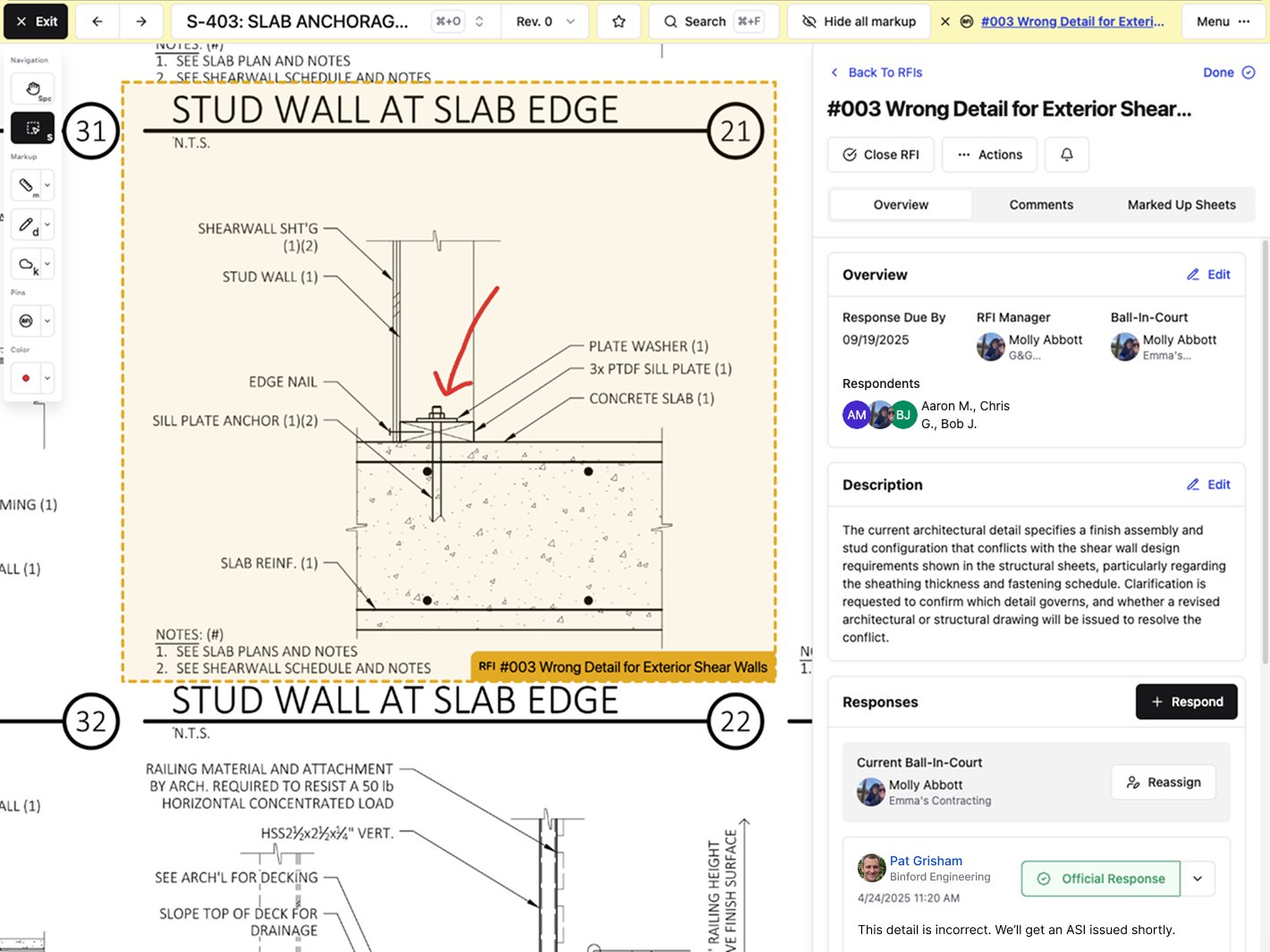
- Pin RFIs directly to drawings so questions, responses, and markups stay connected to exact locations
- Constructable manages RFIs on the plans with ball-in-court tracking and auto-distribution when closed
Why RFI Volume Is Increasing
RFI counts keep climbing on most projects, and it's easy to assume sloppy plans or inexperienced crews are to blame. The truth is different: the work has simply gotten harder.
Projects today pull in more parties, run on tighter timelines, and leave less room for mistakes. Design schedules get squeezed. Coordination between trades has multiplied. Simple renovation jobs now require navigating undocumented site conditions, incomplete as-builts, and surprises buried in walls you can't see until demo starts.
The numbers back this up. While brownfield projects have climbed to 22% of the construction pipeline (up from 13% a decade ago), it's not just renovation work driving RFI counts higher. Schedules have tightened across all project types. Teams are more distributed. Consultant coordination has multiplied. Even relatively straightforward new builds now involve more parties, more systems integration, and less margin for error than they used to.
Factor in distributed teams working across time zones, consultant teams that never meet in person, and owners who want a say at every stage. You end up with more questions. Not because someone failed, but because the work itself requires constant clarification.
RFIs are how you stay in control when the variables keep stacking up, and good construction management software can help coordinate these moving pieces.
What an RFI Actually Does (Beyond Asking a Question)
An RFI does more than surface a question. It freezes a moment of ambiguity in writing before decisions get made in the field that you can't walk back.
When you submit an RFI, you're creating a record that says: the documents were unclear, we asked for direction, and here's what we were told to do. That record becomes protection when an owner disputes a change order six months later or when a design error surfaces during inspection. You have proof that you asked, proof of what you were told, and proof that you followed it. Better project management tools keep these records organized and accessible.
RFIs also force accountability. A question sitting in someone's inbox for three weeks is more than an annoyance—it's a project risk with a timestamp. When responses lag, schedules slip, and costs climb. The RFI log makes that visible to everyone who needs to see it.
Contractors treat RFIs like insurance. You file them early, document everything, and hope you never need to pull the thread later. But when conflicts arise, that paper trail makes the difference between eating the cost and getting paid for the extra work.
The Lifecycle of an RFI (And Where It Usually Breaks)
The workflow is clear: spot the issue, write the question, send it to the right person, wait for review, get the answer, share it with the trades who need it, do the work, and close it out.
The breakdown happens in the gaps between those steps.
Context gets lost when field observations move to the office. Questions get routed to the wrong consultant because the architect passed structural work to the engineer without telling anyone. Responses sit unread because no one owns the inbox. Answers arrive but never reach the crew waiting on site. Work wraps up, but the RFI stays open in the system for months because no one closed the loop.
Each stall creates a ripple. A question that should take three days balloons into two weeks after bouncing between four inboxes before reaching the right architect. That delay pushes the next three trades back, and your schedule buffer disappears.
RFIs work when every handoff has a name and a deadline. Without those, the system freezes, and you spend your week chasing answers instead of keeping crews moving.
The Hidden Costs of Poor RFI Management
Most teams see RFIs as a necessary hassle but miss what poor management actually costs. The numbers tell a clearer story: for every million dollars in project value, you're likely to see roughly 10 RFIs. Each one costs about $1,080 and takes nearly 10 days to close. Almost 22% never get a response.
| Metric | Value | Impact |
|---|---|---|
| Average RFI volume | 10 per $1M project value | Scales with project complexity |
| Cost per RFI | $1,080 | Includes coordination time and delays |
| Average time to close | 10 days | Compresses the schedule buffer |
| Unanswered RFIs | 22% | Creates crew downtime and liability |
Those aging RFIs pile up fast. A subcontractor waiting on clarity can't move forward, so the crew moves to other work or sits idle. The schedule compresses downstream. You lose your buffer chasing answers that should have arrived a week ago.
Untracked responses create more complications. When clarifications live in email threads, field teams work off outdated information, and someone builds to the wrong spec because they never saw the revised answer. You catch it during inspection. Now it's rework, delay, and a tense conversation about who pays.
Verbal clarifications feel faster but create liability. Six months later, when the owner disputes an extra, you have no record of what was agreed to. The answer you thought you had doesn't exist in writing, you're stuck negotiating from memory, and that rarely ends well. Field management tools that capture decisions in real time prevent these situations.
Poor RFI management slows things down and erodes margin in ways you can't see until the project closes and the numbers come back thinner than they should have been.
Best Practices for RFI Management That Actually Work
The difference between a manageable RFI process and one that bogs down your week comes down to a few core habits.
Keep everything in one place. When RFIs live in email, spreadsheets, and project folders scattered across different systems, you lose time hunting for context. A single log where questions, responses, and decisions live together gives everyone the same view. Communication and collaboration tools that centralize RFI management reduce the back-and-forth. No version confusion. No duplicate requests because someone didn't see that you already asked.
Make status visible at a glance. You should know which RFIs need your attention, which are waiting on someone else, and which are overdue without having to dig through tabs. Clear ownership at every stage keeps things from stalling in limbo.
Connect questions to the plans. An RFI without the drawing context forces people to search for sheet numbers and hunt down the relevant detail. Photo and video documentation tied to drawings adds another layer of clarity. When the question sits directly on the plan, the person answering it sees exactly what you're looking at.
Set response deadlines and track them. Without a due date, RFIs drift; with one, you have something to point to when a follow-up is needed. Accountability ultimately protects your schedule.
Close the loop deliberately. Mark RFIs as resolved only after the answer reaches the field and the work gets done. Half-closed RFIs create confusion about what's actually settled.
These habits don't remove the questions, but the friction that turns necessary communication into daily frustration.
How Constructable Handles RFIs
We built RFIs to live where the work actually happens: on the drawings.
When you create an RFI in Constructable, you pin it directly to the sheet. The question, the markup, the response, and every follow-up comment stay attached to that exact location. No one has to hunt through folders or cross-reference sheet numbers; the context is right there.
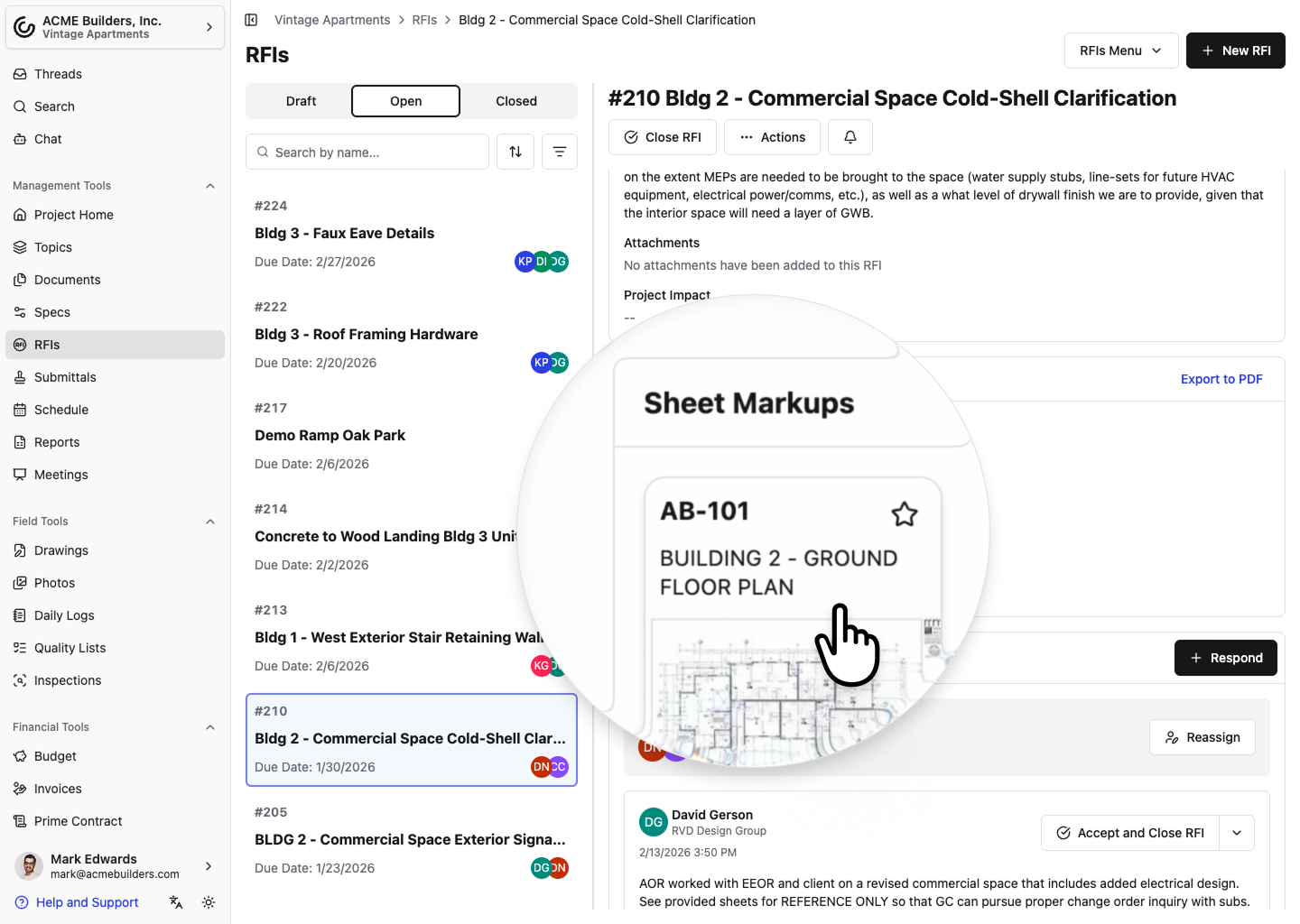
Ball-in-court assignments surface at the top of your RFI log, so the items that need your attention stay visible. Real customers have used this approach to cut RFI response times in half. When it's your turn to act, you see it; when you're waiting on someone else, they see it; and the handoffs that normally stall out become clear.
Closing an RFI triggers a distribution message to everyone subscribed. We can autofill a draft of that message so you don't have to start from a blank page every time. One click gets the answer to the field.
RFIs in Constructable aren't isolated documents. They connect to the same drawings your field team marks up, the same photos tied to daily logs, the same project timeline everyone's tracking. That connection cuts out the coordination work that eats hours every week and thins your margin by the time you close out. Learn more about how your team can save time with Constructable.
Final Thoughts on Controlling RFI Chaos
Construction RFIs aren't going away, but the coordination mess that comes with them can. You already know what it costs when answers sit in someone's inbox for two weeks or field crews work off outdated information they pulled from an email thread. The fix is simpler than most teams think: put the question on the drawing, make ownership visible, and close the loop deliberately. If that sounds like something your team needs, tell us what you're dealing with, and we'll figure out if we can help.
FAQ
How long does it take to respond to an RFI on average?
Industry data shows most RFIs take nearly 10 days to close, though many sit longer when they bounce between inboxes or get routed to the wrong consultant. Assigning clear ownership and setting response deadlines helps keep things moving instead of watching your schedule buffer disappear.
What's the real cost of an RFI beyond the time it takes to write one?
Each RFI costs roughly $1,080 when you factor in coordination time, delays, and the ripple effects on your schedule. Projects typically generate about 10 RFIs per million dollars in value, and when responses lag or never arrive (which happens about 22 percent of the time), you lose crews waiting on clarity and margin you can't recover.
Why should I pin RFIs directly to drawings instead of just writing them up?
When your RFI lives on the drawing itself, the person answering it sees exactly what you're looking at without hunting for sheet numbers or searching through folders. The question, markup, response, and every comment stay attached to that exact spot, so nothing gets lost when the answer finally arrives.
When should I close out an RFI?
Mark an RFI as resolved only after the answer reaches the field and the work gets done. Half-closed RFIs create confusion about what's actually settled and leave your log cluttered with items people think are handled but aren't.
Can verbal clarifications replace written RFIs?
Verbal answers feel faster but create liability you can't afford. Six months later, when an owner disputes an extra, you have no record of what was agreed to. Just competing memories and no paper trail to back your position.