Top Construction Drawing Management Software (2026 Guide for GCs)
Compare the top construction drawing management software in February 2026. Version control, mobile markups, and pricing for commercial GCs.
Construction drawing management software should solve one core problem: making sure everyone is building from the correct set of plans.
On modern projects, drawings change constantly. Architects issue updates, engineers adjust details, and coordination shifts in the field. Superintendents need immediate access to the latest set. PMs need clarity on what changed between versions. And no one has time to dig through shared drives and email threads to confirm whether revision C or E is current. The right platform makes version control invisible—and keeps drawings connected to the rest of the project workflow.
We reviewed the leading platforms used by mid-sized GCs and evaluated them based on version control, field usability, integration with project workflows, and implementation speed.
TLDR
- The best drawing management tools make version control automatic and eliminate guesswork.
- Mobile usability and offline access determine whether your field team will actually adopt the software.
- Integration with RFIs, submittals, and project workflows reduces duplicate work and context switching.
- Constructable combines drawing management and project workflows in one system, with onboarding measured in days rather than months.
As construction firms increasingly invest in digital tools, the number of software options has multiplied. The global construction software market is projected to continue to grow strongly in the coming years, underscoring the need for contractors to choose platforms that deliver both core functionality and real workflow integration.
What is Good Construction Drawing Management Software?
Construction drawing management software centralizes project plans, blueprints, and revisions in a single system.
Instead of manually organizing PDFs or tracking changes through email, the software:
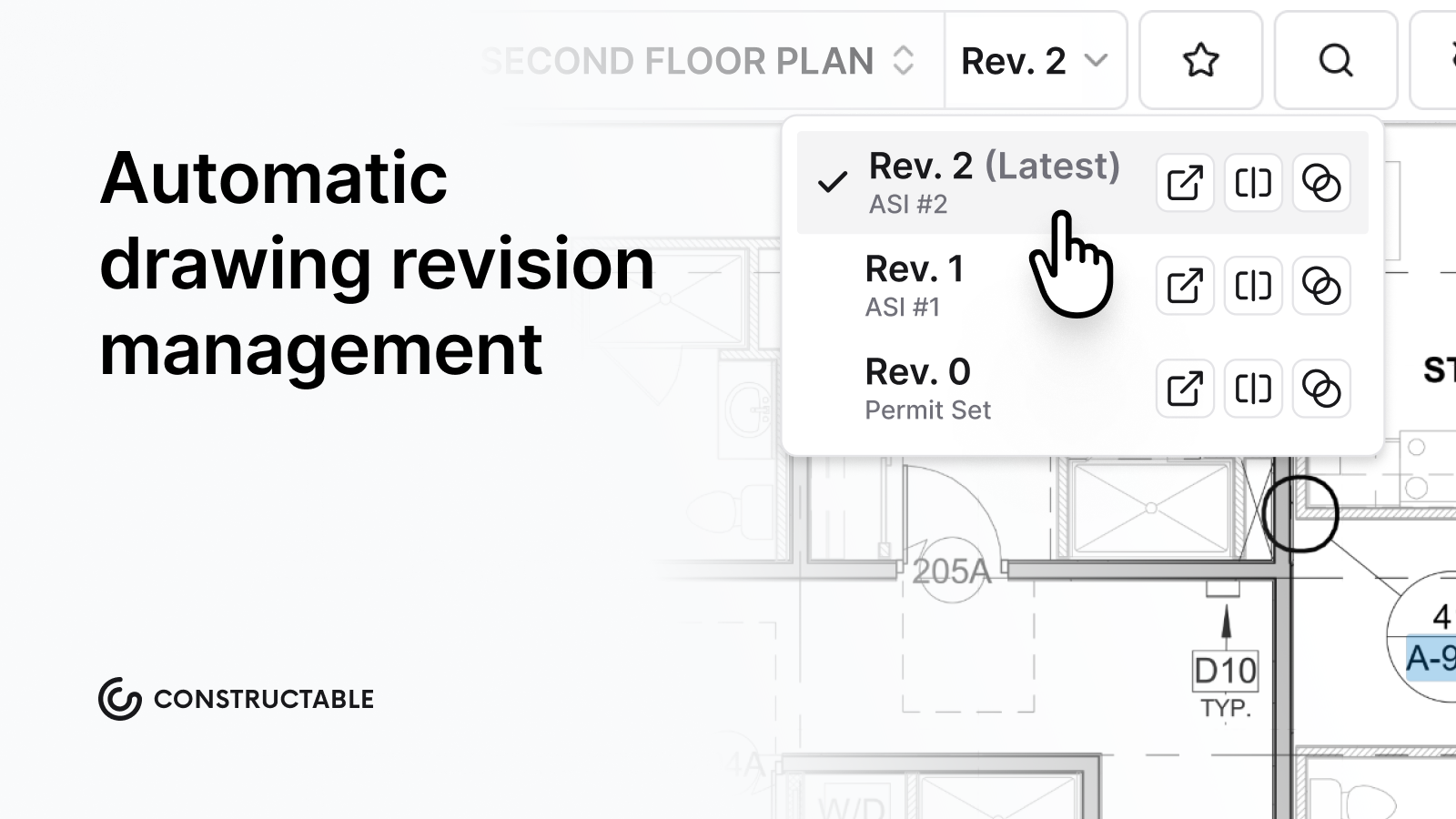
- Automatically logs new revisions
- Preserves historical versions
- Highlights changes between sets
- Enables digital markups and comments
- Distributes updates to field teams in real time
The primary outcome is alignment. Field teams and office staff reference the same current information, reducing the risk of rework, miscommunication, or outdated details entering the build.
Modern systems also connect drawings to RFIs, submittals, punch lists, and documentation, reducing the need to switch between tools.
How We Evaluated Construction Drawing Management Software
We focused on what matters most to general contractors running active projects.
Version control comes first. The system should track revisions automatically and clearly display changes between versions. Manual tracking introduces risk.
Field usability is equally important. If a super can't quickly pull up drawings, add markups, or work offline on an iPad, adoption and efficiency will suffer regardless of feature depth.
Collaboration tools such as markups, comments, and drawing comparisons help teams communicate without resorting to email and PDF attachments.
Workflow integration also matters. When drawings exist in a separate system from RFIs, punch lists, and photos, teams end up duplicating effort and losing context.
Finally, we considered implementation time and pricing transparency, since onboarding delays can impact active projects.
Best Overall for Mid-Market GCs: Constructable
Constructable is a unified construction management platform that embeds drawing management directly into project workflows. Drawings, RFIs, submittals, photos, and field logs operate within the same system and data structure.
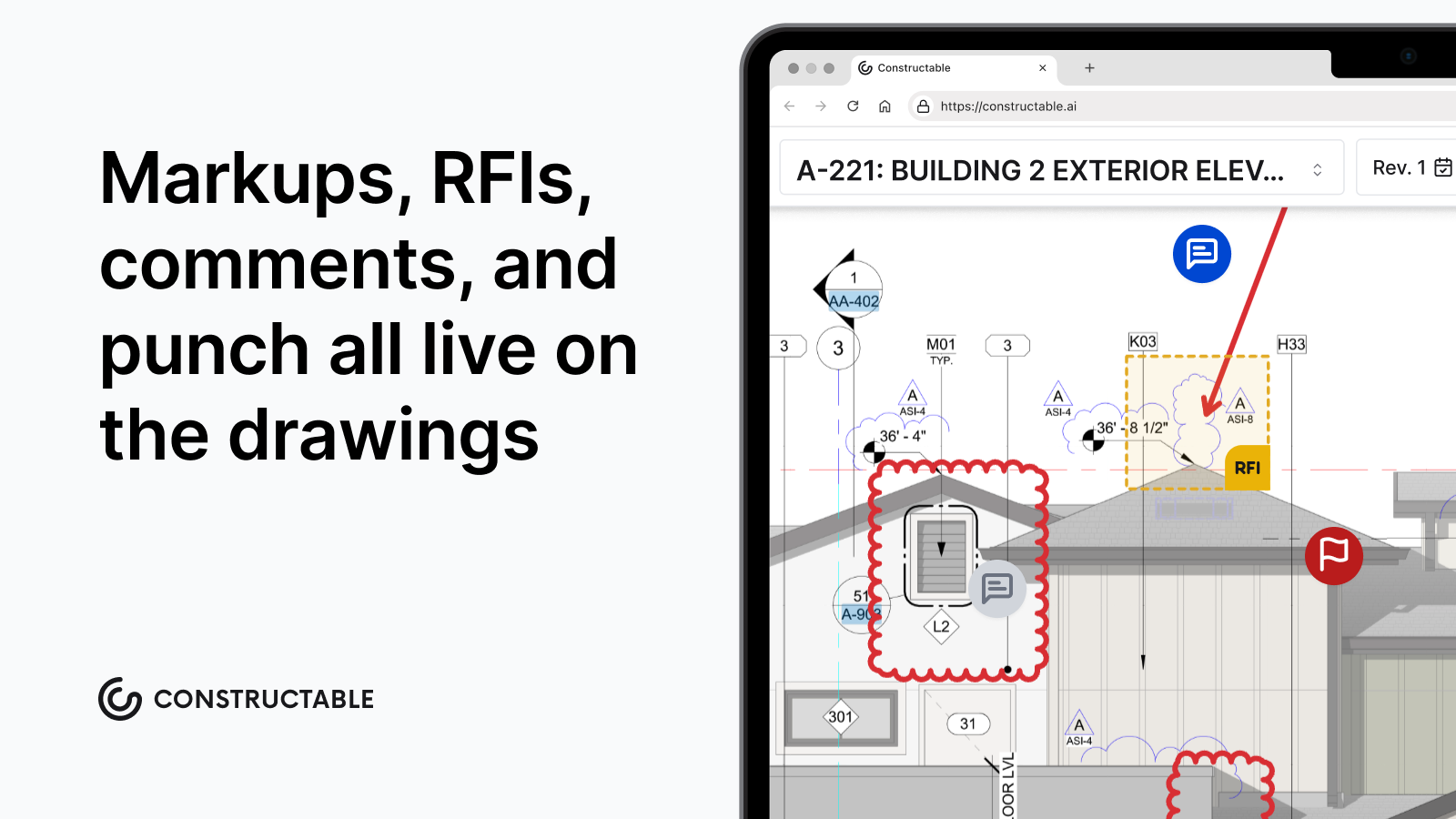
Version control is automatic, with drawing comparison tools that highlight changes between revisions. Field teams can mark up plans with comments, photos, and videos tied to specific locations, and offline functionality supports work on jobsites with limited connectivity. AI-powered search helps users locate plans and documents quickly without navigating complex folder structures.
Constructable is designed for mid-market general contractors typically running $20M-$150M projects who want enterprise-grade capability without the overhead of large-scale implementations. As an added bonus, onboarding timelines are typically measured in days rather than quarters.
Procore
Procore includes drawing management within its broader construction management suite and primarily serves large enterprise contractors with complex portfolios.
They provide document control, drawing distribution, markup tools, and deep integration across project management modules. Its ecosystem and third-party integrations are significant strengths, particularly for firms seeking vendor consolidation at scale.
Implementation often involves structured onboarding and configuration, which can extend timelines for mid-sized teams. The system's breadth can also require more formal training to ensure consistent adoption in the field.
Procore is generally best suited for enterprise contractors with dedicated IT resources and longer rollout times.
Autodesk Construction Cloud
Autodesk Construction Cloud delivers drawing management alongside BIM and design coordination tools, particularly for firms already standardized on AutoCAD and Revit.
The platform supports drawing coordination, document control, and model-based workflows at enterprise scale. Its integration with Autodesk's design ecosystem is a significant advantage for design-build firms.
Because Autodesk combines several acquired products, user experience can vary across modules. Implementation often requires planning and configuration, which may extend setup timelines.
The downside: the acquisition history shows. Different modules feel stitched together rather than built as a single system. Migrations take months and often require consultants. The learning curve is steep, and the pricing reflects enterprise expectations.
Autodesk Construction Cloud is well-suited for large firms locked into the Autodesk ecosystem.
Fieldwire
Fieldwire focuses primarily on field execution and plan viewing.
Key strengths include:
- Mobile-first plan viewing and markup
- Task management tied directly to drawing locations
- Photo documentation linked to plans
- Simple punch list workflows
Fieldwire works well for small teams running straightforward projects where the primary need is basic plan viewing and field task tracking, without office-level project management.
Because it is focused on field execution, contractors typically maintain separate systems for project management, financial tracking, and owner reporting.
RedTeam
RedTeam provides a broader construction management system that includes drawing management, project tracking, and financial tools.
The platform competes in part on pricing and includes standard document version control capabilities. Its interface reflects a more traditional construction software design, and product updates typically follow an incremental release cycle.
RedTeam can work for contractors, prioritizing lower license costs and straightforward functionality.
Ingenious Build
Ingenious Build is designed primarily for owners and portfolio managers overseeing multiple projects.
The platform emphasizes approval workflows, document routing, and high-level project oversight. This structure aligns well with owner-driven processes and compliance tracking.
General contractors focused on daily field coordination may find the system oriented more toward portfolio governance than hands-on project execution.
Feature Comparison Table of Construction Drawing Management Software
| Feature | Constructable | Procore | Autodesk Construction Cloud | Fieldwire | RedTeam | Ingenious Build |
|---|---|---|---|---|---|---|
| Version Control | Yes | Yes | Yes | Yes | Yes | Yes |
| Plan Markups | Yes | Yes | Yes | Yes | Yes | Yes |
| Mobile Access | Yes | Yes | Yes | Yes | Yes | Yes |
| Offline Functionality | Yes | No | No | Yes | No | No |
| Collaboration Features | Yes | Yes | Yes | Yes | Yes | Yes |
| RFI Integration | Yes | Yes | Yes | No | Yes | Yes |
| AI Search | Yes | No | No | No | No | No |
| Drawing Comparison Tools | Yes | Yes | Yes | No | No | No |
| Pricing Transparency | Yes | No | No | Yes | Yes | No |
| Fast Onboarding | Yes | No | No | Yes | Yes | No |
Across the platforms reviewed, version control and digital markups are now standard capabilities. The meaningful differences appear in how drawings connect to the rest of the project workflow.
Offline access remains critical for field teams working from job trailers or sites with inconsistent connectivity. Beyond that, the real separation shows up in integration—whether RFIs, submittals, and field documentation are directly linked to drawings, or whether teams must manage those processes in separate systems.
Some platforms layer AI features on top of existing workflows, while others embed AI more quietly to reduce manual effort, improve search, and accelerate common tasks. As AI adoption accelerates across the industry (a recent study found that 94% of AEC professionals currently using AI plan to increase their use in 2026), the real question for GCs isn’t whether a tool offers advanced features. It’s whether those features reduce friction in daily project execution.
Final Thoughts
The right drawing management software makes revision control invisible. When someone asks which plan is current, that answer should be immediate.
Beyond version tracking, the platform should connect drawings to active project work (RFIs, markups, submittals) so that information can move without duplication.
Field teams will adopt software that mirrors how construction actually happens. Simplicity, clarity, and integration tend to matter more than feature volume.
If you want drawing management that fits into your workflow—not around it—see how Constructable gets teams up and running in days, not months.
FAQ
How do I choose the right construction drawing management software for my team?
Start with your biggest operational risk. If teams struggle to access the latest revisions in the field, prioritize mobile usability and offline access. If coordination issues stem from disconnected systems, look for integrated workflows linking drawings to RFIs and submittals.
Which drawing management tool works best for mid-size GCs?
Mid-market GCs often benefit from unified systems that combine drawing management with broader project workflows. Enterprise platforms such as Procore and Autodesk Construction Cloud are commonly used by large contractors with dedicated IT resources. Fieldwire is often selected for smaller, field-focused teams.
Can drawing management software work without cell service?
Some platforms support offline functionality, allowing teams to access and mark up drawings without an internet connection. This is particularly important for jobsites with inconsistent service.
What's the difference between built-in drawing management and standalone tools?
Built-in systems connect drawings directly to project workflows such as RFIs and submittals, reducing duplicate data entry and context switching. Standalone tools may handle plan viewing well, but require additional systems for broader project management tasks.
How long does implementation take?
Implementation timelines vary widely. Some platforms can be configured within days, while enterprise systems may require structured onboarding over several months. Contractors should factor in rollout time when making decisions if active projects are already underway.