Submittal Schedule Guide: Stay on Track in September 2026
Build your submittal schedule right in September 2026. Set review windows in writing, rank long-lead items, and avoid the mistakes that cause projects to slip.
Building a submittal schedule backward from your installation dates sounds simple, but most teams skip it and pay for it when long-lead items hit the critical path without enough runway. If yours tends to slip by the time steel or mechanical gear is due, the fix is usually in how the schedule gets built, not how it gets tracked.
TLDR:
-
A submittal schedule tracks when paperwork must clear, separate from the master project schedule governing when work happens.
-
Set your required approval date first by working backward from installation, subtracting procurement lead time, review period, and resubmittal buffer.
-
Build the schedule in preconstruction; per industry estimates, structural steel runs 10-12 weeks, mechanical 8-10, electrical 6-8, and late starts can't be recovered.
-
Lock review windows into subcontracts before mobilization so the design team is contractually bound to a turnaround, not merely asked nicely.
-
Constructable scans uploaded spec documents and auto-generates a spec-referenced submittal log, keeping routing, ball-in-court tracking, and revision control in one place.
What is a submittal schedule?
A submittal schedule is the timeline that governs when every required submittal gets produced, submitted, reviewed, and returned. It sits apart from the master project schedule: the project schedule tracks when work happens, while the submittal schedule tracks when the paperwork authorizing that work has to clear. Miss a submission window and the crew waiting on approved material stalls.
The document does three things at once:
-
Identifies every submittal the contract requires, pulled from the specs
-
Sets the date each one must be delivered for review
-
Assigns review windows so architects, engineers, subs, and the GC all know their turnaround obligations
That last point is what gives the schedule teeth. It puts each party on a clock and makes a late review visible instead of buried in an email chain.
What goes on a submittal schedule
Every submittal schedule is built from the same set of columns. Whether you keep it in Excel or a purpose-built log, these are the fields that make it usable.
| Field | What it captures |
|---|---|
| CSI specification section | The spec division and section number the submittal answers to (e.g., 09 91 00 for painting) |
| Submittal type | Shop drawing, product data, sample, or test report |
| Responsible subcontractor | The party on the hook for preparing and sending it |
| Submission due date | When the sub must hand the submittal to the GC for review |
| Required approval date | When the returned, approved submittal has to be in hand |
| Review period | The turnaround window allotted to the architect or engineer |
| Resubmittal allowance | Buffer days reserved for a revise-and-resubmit cycle |
| Procurement lead time | Days from approval to material delivery on site |
| Current status | Draft, submitted, under review, approved, or rejected |
The two dates people conflate are the submission due date and the required approval date. The submission due date is when the paperwork leaves the sub's desk. The required approval date is the deadline for returning the signed-off version so procurement and fabrication can start without delaying installation.
Set the required approval date first by working backward from the installation milestone: subtract procurement lead time, then the review period, then a resubmittal allowance. What lands is your submission due date. Treat those two as interchangeable, and you lose every day of review and lead time hiding between them.
How to build a submittal schedule step by step
Building the schedule is a job for the preconstruction window, before anyone mobilizes. Long-lead items are the reason: structural steel runs 10 to 12 weeks, mechanical equipment 8 to 10, electrical gear 6 to 8. Start those submittals late, and no review speed will recover the delivery date. Work through the sequence in order.
-
Pull every submittal requirement from the specs. Read each CSI division and log every shop drawing, product data sheet, sample, and test report the contract calls for. This becomes your master list.
-
Sequence submissions against the CPM schedule. Find the installation date for each item, then work backward so the paperwork clears before the crew shows up.
-
Add review periods and procurement lead times to each line. The review window plus the lead time, subtracted from the installation date, sets the submission due date.
-
Assign responsibility. Every line names the subcontractor or vendor who prepares and sends it, part of what a GC actually does, so nothing sits unowned.
-
Flag critical path items. Mark the submittals feeding milestone activities so they get processed first when the log gets crowded, a core part of what project managers do.
-
Lock review windows into the subcontracts before mobilization. When the agreed turnaround is written into the agreement, architects and engineers are contractually bound to respond within it instead of treating a review as optional.
Ranking submittals: critical path items vs. long-lead items
Two questions decide where a submittal lands in your queue, and they answer different problems. First: is the item on the critical path, feeding a milestone with no float to absorb a slip? Second: does it carry a long procurement lead time, the kind ordered weeks ahead regardless of when it installs?
Those dimensions overlap, but they differ. A long-lead item off the critical path still needs early submission. A critical-path item with a short lead time needs fast routing, not early ordering.
A three-tier ranking holds up better than "critical" or "non-critical":
-
High: critical path and long lead time. Route first, order first.
-
Medium: one dimension but not both.
-
Low: short lead time, ample float.
Tag every line and your log stops reading as a flat list.
The submittal review process and how it connects to the schedule
The chain has three handoffs, and each one needs a date. The subcontractor prepares and submits to the GC. The GC checks completeness and forwards to the architect or engineer. The design team stamps and returns. Leave any handoff un-timeboxed and the schedule stops holding anyone accountable.
Seven to fourteen days is the standard review window for most submittals. Long-lead or complex items may need longer lead times, but agree to that in writing before the schedule is final.
Every returned submittal carries one of four stamps:
-
Approved: proceed to fabrication and procurement.
-
Approved as noted: proceed with the marked corrections, no resubmission.
-
Revise and resubmit: fix and route again, restarting the review clock.
-
Rejected: the item fails outright and returns to square one.
The last two are where float disappears. First-submission rejection rates run high across commercial construction, and each rejection adds weeks to the cycle, cascading directly into fabrication and delivery on critical-path items, according to submittal rejection rate data.
Managing resubmittals without losing schedule float
A "revise and resubmit" is a scheduled event, not a surprise, so build the resubmittal allowance into every high-complexity line from the start. A rejected rooftop mechanical unit costs more than a review cycle; miss the production slot and the reorder can slip months.
Sort rejections before you react. Some clear on a single call between the engineer and the sub, with a marked-up correction. Others need a full resubmission that restarts the review clock. Treat the two the same, and you burn float on problems a conversation could have closed.
Your submittal log is where the pattern shows up. Track revision history and you can see which spec sections keep bouncing, which subs generate repeat rejections, and where float is quietly draining.
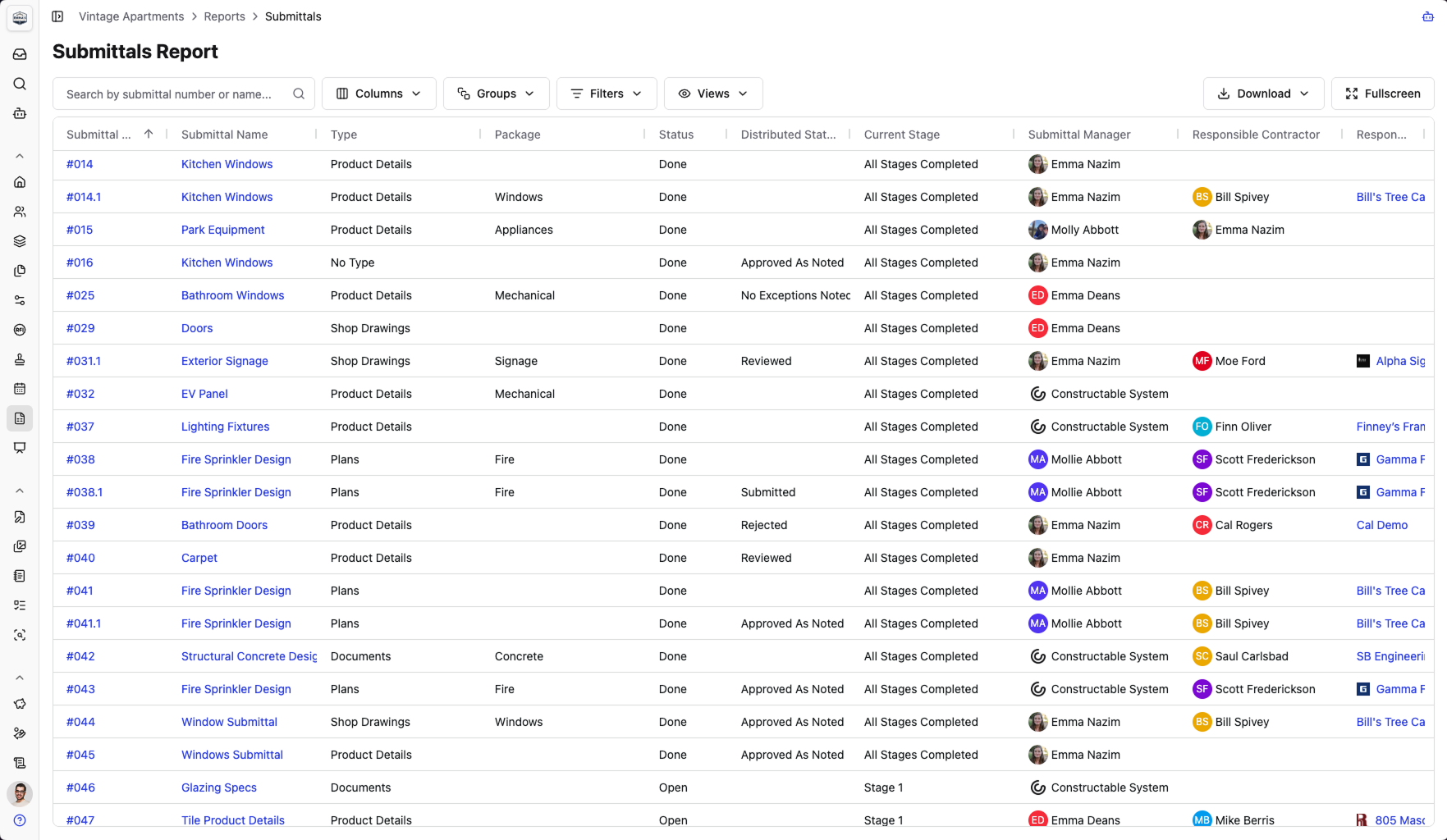
Constructable has a robust Submittals log report that makes it easy to stay on top of all Submittal progress.
What a submittal schedule template should include
A workable template is both a log and a schedule. It tracks what must be submitted and when, while also displaying the current status and date history. Beyond the column structure already covered, a template earns its keep with three things:
-
Status codes that read at a glance: draft, submitted, under review, approved, rejected.
-
Date tracking that captures both the planned and actual dates for each handoff.
-
A ball-in-court field that names whose desk the item sits on right now.
Excel and Word versions are fine starting points. For a small project or a team formalizing its process, a free submittal schedule template beats a whiteboard and gets you moving in an afternoon.
They break down as the log grows. Manual updates spawn version control problems: three people editing three copies, and no reliable way to tell whether a submittal is waiting on the sub, the GC, or the design team. That is the core problem that submittal management software is built to solve.
Common mistakes that derail submittal schedules
Most schedules that slip fail in one of a few predictable ways. If yours is drifting, check for these:
Building it after mobilization. By the time crews are on site, the long-lead procurement windows are already closing, and a late schedule cannot reopen them.
Assigning arbitrary submission dates instead of working backward from installation. A date pulled from thin air ignores the review and lead time that gate delivery.
Never locking review windows into the design team's contract. Without an agreed-upon turnaround in writing, an architect can take as long as they want, and you have no basis to claim schedule impact due to a slow review. That documentation discipline is the same standard that matters when issuing a change directive.
Ignoring resubmittal cycles on complex items, so the first rejection eats float you never reserved.
Treating the schedule as a one-time document. It needs weekly updates, or the dates go stale and stop telling you who is late.
The contractual point matters most. Skip the schedule entirely and the design team owes you no response deadline, and you lose the documentation to prove a delay was theirs.
How Constructable handles the submittal schedule
Everything above assumes a spreadsheet you build by hand. The step that eats a project engineer's first week is reading every CSI division and transcribing each required submittal into a log. Constructable scans your uploaded spec documents and auto-generates a structured, spec-referenced submittal log for you. Review it for accuracy first, but you start from a populated draft instead of a blank sheet.
From there, the submittal workflow keeps routing, ball-in-court tracking, revision control, and status in one place, as part of Constructable's broader project management tools, so the schedule stays current without a parallel spreadsheet. Submittals pin directly to drawing sheets, anchoring approval history to the plans where the work happens. When a PM rotates off mid-job, the experimental AI agent can reassign a reviewer across many submittals at once.
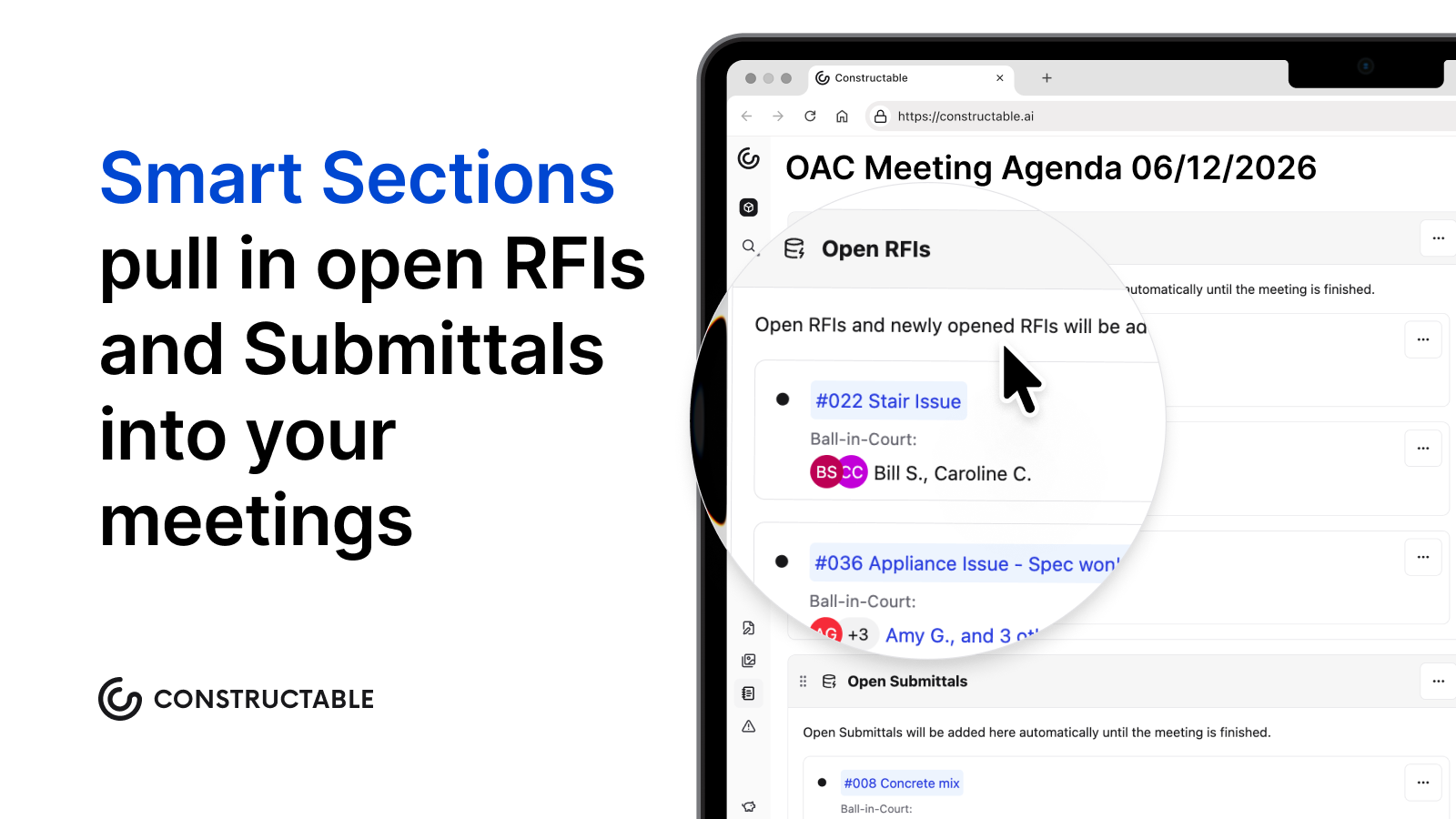
Constructable also helps you track Submittals during your next OAC meeting as well. A feature called Smart Sections pulls in open Submittals automatically, so the team can discuss any blockers and keep approvals moving.
Built for mid-size commercial GCs running $20M to $150M, the flat-fee pricing includes unlimited subcontractor and consultant access.
Final thoughts on keeping your submittal schedule from falling apart
The submittal schedule is only as good as the dates behind it and the people accountable to them. Build it early, sequence it against your CPM, and get review windows in writing before anyone mobilizes. From there, keeping it current is the job. Constructable keeps routing, ball-in-court tracking, and revision history in one place so the schedule stays accurate without a parallel spreadsheet running alongside it.
FAQs
What's the difference between a submittal schedule and a submittal log in construction?
A submittal schedule sets the timeline: when each submittal must be submitted, reviewed, and returned relative to installation milestones. A submittal log tracks the live status of each submittal as it moves through the timeline, recording actual submission dates, review outcomes, revision history, and who currently holds the ball-in-court. You need both: the schedule tells you what was planned, the log tells you where things actually stand.
How do I build a construction submittal schedule without starting from a blank spreadsheet?
Work backward from each installation milestone: subtract procurement lead time, then the review window, then a resubmittal buffer to land on your submission due date. Pull every requirement from the CSI spec divisions first to build the master list, then sequence against your CPM schedule. If you want a faster starting point, Constructable scans uploaded spec documents and auto-generates a structured submittal log; you review it for accuracy and start from a populated draft instead of a blank sheet.
Procore submittal schedule vs. Constructable: what's the main workflow difference for a mid-size GC?
Procore's submittal workflow is capable and works well for teams already invested in the broader Procore ecosystem. The trade-off is configuration overhead: setup takes time, and per-user pricing means subcontractors and consultants often get left out, undercutting the tracking you built the schedule to enforce. Constructable auto-generates the submittal log from your spec documents, keeps routing and ball-in-court tracking in one place, and includes unlimited subcontractor and consultant access on a flat fee, so the schedule stays current without a parallel spreadsheet.
Can I manage submittal review windows and resubmittal cycles without losing track of schedule float?
Yes, but only if you build the resubmittal allowance in from the start and treat rejections as expected events, not surprises. Set your required approval date first by working backward from the installation date, reserve buffer days for at least one revise-and-resubmit cycle on complex items, and lock agreed review turnaround windows into the design team's contract before mobilization. A submittal log that tracks planned versus actual dates for every handoff makes the pattern visible before the float is gone.
What does a shop drawing submittal schedule example need to include beyond basic due dates?
Beyond submission and required approval dates, a workable shop drawing submittal schedule needs the responsible subcontractor named on every line, the CSI specification section each drawing answers to, the review period allotted to the architect or engineer, a resubmittal allowance for complex items, procurement lead time, and a current status field (draft, submitted, under review, approved, or rejected). A ball-in-court field that names whose desk the item sits on right now is what separates a schedule that holds people accountable from one that just documents slippage after the fact.