What Is a Change Order? A Complete Guide for June 2026
Learn what a change order is in construction, banking, and project management. Complete guide for June 2026 with examples and best practices.
Most projects see at least one change order, and the triggers are always familiar: the owner wants something new, site conditions surprise you, or the drawings have a conflict that nobody caught at bid time. From there, you document the change, calculate the cost and schedule hit, route it for signatures, and update your budget. When that's happening across email chains and scattered files, things fall through the cracks faster than anyone realizes. This guide breaks down what a change order is in construction, banking, engineering, and project management, plus how to handle them without the usual mess.
TLDR:
- A change order is a signed, written amendment to a contract that modifies scope, cost, or schedule, and it carries full legal weight once executed.
- Most construction projects see at least one change order, and when they stack up, costs can climb well above the original contract value due to design gaps, site conditions, and owner requests.
- Document every change immediately before work starts. Missing that step creates disputes, forfeits payment rights, and makes consequential costs impossible to recover.
- Free templates exist in Word, PDF, and Excel, but purpose-built software eliminates approval delays, duplicate entry, and disconnected budget tracking.
- Constructable groups change orders under change events in Financials, where they tie directly to RFIs, submittals, and live budgets, with built-in e-signing and automatic status tracking.
What Is a Change Order?
A change order is a formal, written document that modifies the original terms of a contract, whether by scope, cost, schedule, or a combination of the three. Once both parties sign off, it carries the same legal weight as the original agreement.
The concept shows up across industries, and construction uses them constantly. So do engineering firms, project managers, and banks. The format looks different depending on the field, but the purpose stays the same: something changed, and there needs to be a written record of it.
Change Orders in Construction
Construction is where change orders are most common. The vast majority of projects see at least one, and when they stack up, costs can climb well above the original contract value. FMI's 2026 Project Management Study found that 41% of construction executives cite change order management as a top risk to profit goals, ranking it third behind schedule/logistics and staffing/labor.
The triggers are usually the same: unexpected site conditions, design errors caught mid-build, owner requests for upgrades, and materials that become unavailable after contract signing. Each requires a formal written amendment before work proceeds under the updated terms.
Three categories cover most situations:
| Type | Price Impact | What It Means |
|---|---|---|
| Additive | Increases | More scope added to the contract |
| Deductive | Decreases | Scope removed, price reduced |
| Zero-sum | No change | One item traded for another |
In states like California, change order rules carry strict notice requirements and approval timelines. Miss those windows, and you can forfeit your right to additional payment or schedule relief entirely.
What Is a Change Order in Banking?
In banking, a change order has nothing to do with contracts. It refers to a request for specific denominations of currency or coin that a bank prepares for a commercial customer, usually fulfilled through a cash vault and delivered via armored carrier.
Retailers, restaurants, and other cash-heavy businesses use this service regularly. Instead of keeping large amounts of cash on-site, they call or submit a form to their bank, specify what they need (say, two rolls of quarters and fifty ones), and the bank has it ready for pickup or delivery.
What Is a Change Order in Project Management and Engineering?
Outside construction, the term still signals the same thing: a formal record of something that changed.
In engineering, these are called Engineering Change Orders (ECOs). They document modifications to product designs, components, or manufacturing specs. An ECO might get triggered by a supplier switching materials, a design flaw caught during testing, or a regulatory update that affects how something is built or assembled.
In project management, change orders serve as tools for change control. When scope creeps or requirements shift, a change order keeps the contract aligned with reality and holds both parties accountable to the same updated terms.
Types of Change Orders
Beyond the three core types covered above, two others come up regularly on commercial jobs.
A Construction Change Directive (CCD) allows an owner to direct the contractor to proceed before both parties agree on the price. Work moves forward; cost gets settled after. It exists for situations where the project schedule won't wait on negotiation, and it carries real risk for the contractor if that cost conversation stalls.
A Change Order Request (COR) works in the opposite direction chronologically. The contractor submits it before any work starts, flagging a potential change and documenting the cost and schedule impact. If the owner approves it, the COR becomes the change order.
Knowing which type applies matters because each one carries different obligations, timelines, and exposure for both sides.
Common Causes of Change Orders
A January 2025 report from the U.S. DOT Volpe National Transportation Systems Center identified design errors and omissions as the leading technical cause of construction change orders across federally funded transportation projects nationally. That finding holds across commercial work too. The full range of triggers that project teams run into includes:
- Owner-requested scope changes after contract signing
- Unforeseen site conditions like buried utilities, soil surprises, or hidden structural issues
- Material availability or price changes that invalidate original specs
- Drawing errors or conflicts between disciplines
- Regulatory updates that affect design or construction methods mid-project
- Scope items that needed clarification but got papered over at bid time
Most of these aren't emergencies on their own, but they become expensive when teams are slow to document them.
The Change Order Process
Every change order follows roughly the same path from discovery to approval, and knowing that path keeps projects from bleeding money and time. The sequence below works for most commercial jobs.
- Identify the change and flag it immediately in writing
- Document scope and justification before any related work starts
- Calculate cost and schedule impact with supporting detail
- Prepare the formal change order document
- Route for signatures from all required parties
- Update the project budget and relevant documentation
- Execute the authorized work
- Close out with signed records and final accounting
Speed matters most at step one. The longer a change goes undocumented, the harder it becomes to determine who knew what and when.
What Should Be Included in a Change Order?
Every change order should contain specific elements to hold up legally and protect all parties involved.
The basics include a change order number and date, a reference to the original contract being modified, and a clear description of the work being changed. Beyond that, you need a justification for the modification, a cost impact with line-item breakdown, any schedule impact with a revised completion date, an updated contract total, and authorization signatures from everyone required.
Gaps in any of these create room for disputes later.
Change Order Examples and Templates
A change order request typically follows a recognizable pattern regardless of project size. The contractor identifies a scope change, documents the work and cost impact, submits it to the owner or GE for review, and gets a signature before proceeding.
Here is a simple change order example in table form:
| Field | Example Entry |
|---|---|
| Project Name | Riverside Office Renovation |
| Change Order Number | CO-007 |
| Date Submitted | May 12, 2026 |
| Description of Change | Add (3) additional electrical outlets per owner request |
| Reason for Change | Owner-directed scope addition |
| Labor Cost | $420 |
| Material Cost | $180 |
| Total Cost Impact | $600 |
| Schedule Impact | 1 day |
| Authorized Signature | **____** |
For teams that need a starting point, free change order templates are available in Word, PDF, and Excel formats through sites like Levelset and PandaDoc. A simple change order template in Word works well for smaller jobs, while an Excel version helps when you need running cost totals across multiple COs on a larger project.
Change Order Costs and Financial Impact
The line item price on a change order is rarely the whole story. Direct costs cover labor, materials, and equipment. Indirect costs add overhead, markup, and profit adjustments. Both are easy to identify and price out, which is why they get negotiated.
The consequential costs are where margins quietly disappear. Schedule compression forces crews into tighter windows. Extended general conditions keep superintendents and site trailers on the job longer than anyone planned. When changes stack up mid-project, productivity drops—sometimes sharply on heavily changed jobs. A $50,000 change order can quietly cost twice that once the ripple effects go untracked. Contractors who only price the direct work and miss the downstream impact are the ones who finish a job and wonder where their profit went.
Change Order Disputes and How to Avoid Them
Most change order disputes trace back to a short list: scope ambiguity, pricing disagreements, authorization gaps, and documentation too thin to hold up in arbitration.
The fix starts in the original contract. Spell out the change order process before the first shovel hits the ground, then hold to it throughout the job.
From there, the rules stay consistent:
- Never start changed work without written, signed authorization
- Document every directive, verbal or written, immediately after it happens
- Put cost and schedule impacts in writing before work begins, not after
Managing Change Orders with Construction Software
Change orders are inevitable. Managing them poorly is optional.
Email chains and scattered documents create the same predictable problems: missed signatures, stale budget numbers, and approvals that lag behind the work already underway. Software built for this keeps everything in one place.
When change orders live in one system, approvals route automatically, status updates happen in real time, and every line item ties directly to the project budget. The paper trail builds itself. Nothing falls through the cracks between field and office, and no one has to enter the same thing twice.
How Constructable Simplifies Change Order Management
In Constructable, change orders live inside Financials, grouped under change events alongside commitments, prime contracts, and budget tracking. Teams create a change event, attach change orders, add line items with cost codes, and route for e-signature without leaving the system.
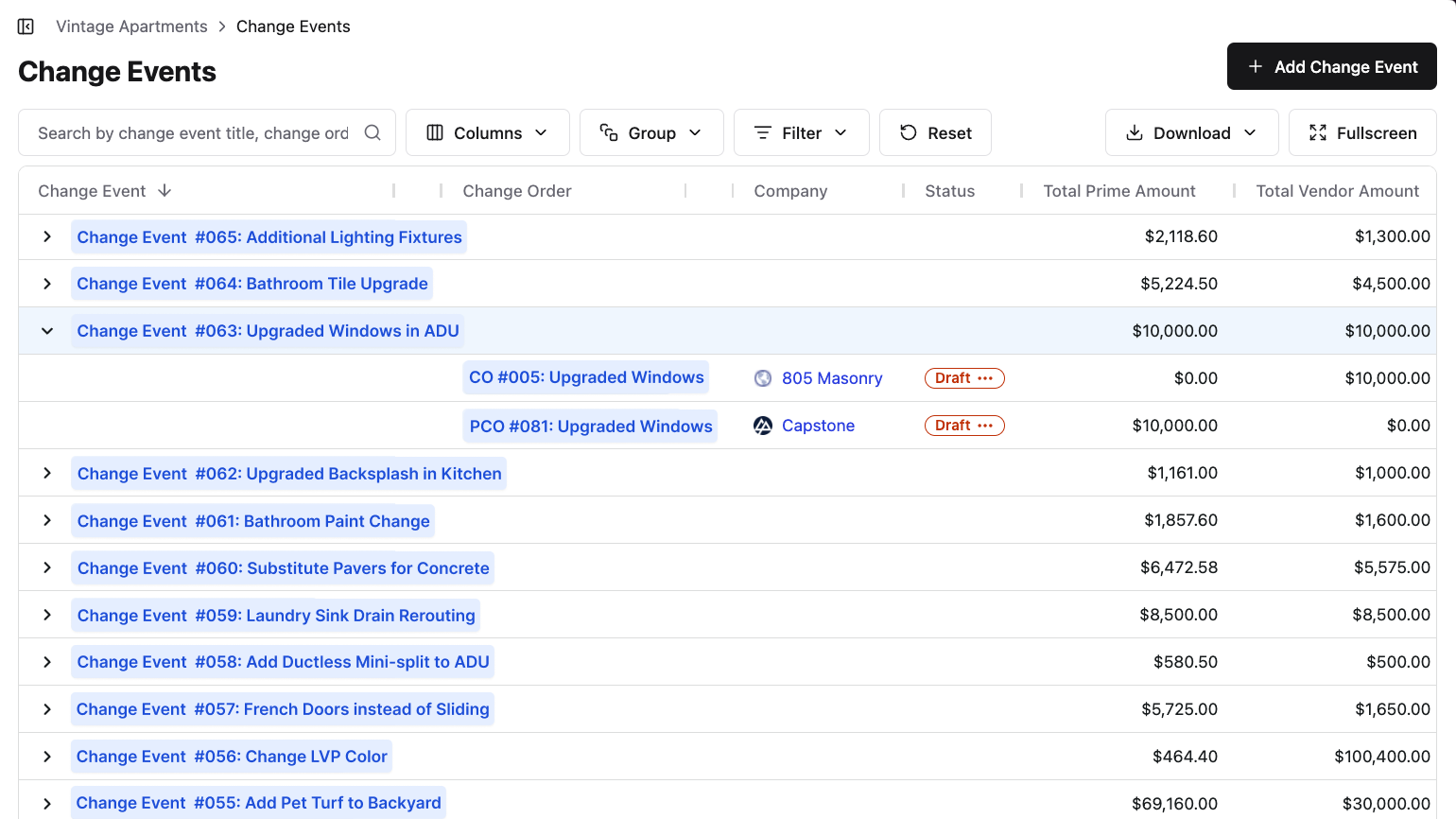
Status moves from draft through execution in one place, tied directly to the live budget. Because change orders sit next to RFIs, submittals, and daily logs, teams already have the context they need when a change comes up and can act quickly without losing visibility.
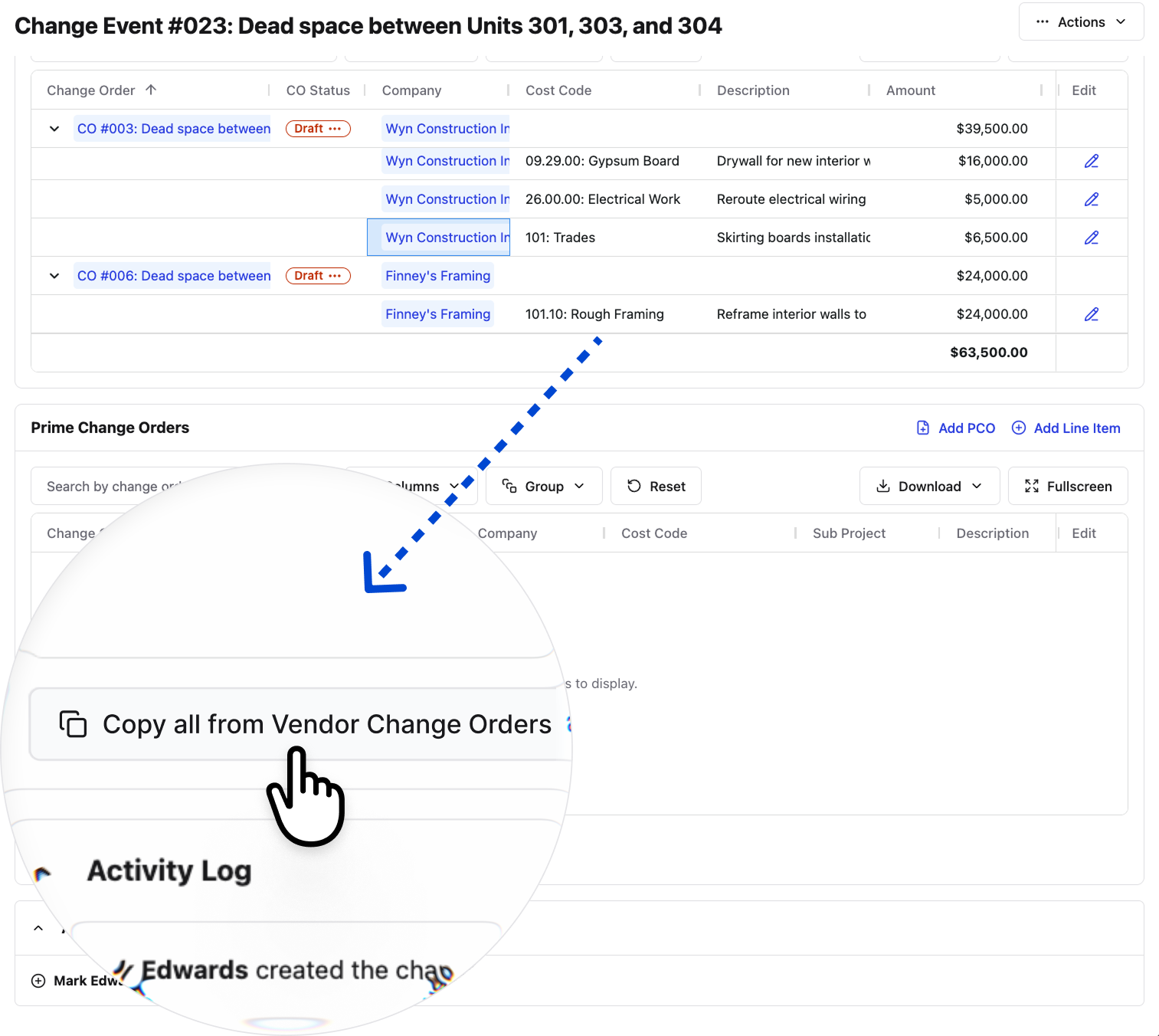
Something our customers love about Constructable is how we're always finding ways to reduce user effort. When it comes to Change Events, there can be a host of different Change Orders on the vendor/subcontractor side, each with their own line items. And commonly, there are commensurate line items on the Prime Change Order side. So, we added a button to the Change Event page that copies over all the vendor side line items to a Prime Change Order with just a click, as shown here:
Change orders are part of the job. We built the software to treat them that way.
Final Thoughts on Contract Modifications
Change orders are part of the job, but the mess they create doesn't have to be. When you document scope changes immediately, tie them to your live budget, and keep approval timelines tight, change order management stops feeling like damage control and starts feeling like normal work. That's how Constructable treats them, because we know you're not looking for more complexity. Talk to someone on our team to see it in action on your projects.
FAQ
What's the difference between a change order and a change order request?
A change order is the signed, executed document that formally modifies your contract. It's already approved and carries legal weight. A change order request (COR) is what the contractor submits before any work starts, flagging the potential change and documenting cost and schedule impact so the owner can decide whether to approve it.
Can I use the same change order template for construction and project management work?
Yes, the core structure stays the same across industries: original contract reference, description of the change, cost impact, schedule impact, and authorization signatures. You can start with a simple change order template in Word or Excel and adjust the language to fit your field, whether that's construction, engineering, or general project management.
What is a change order in construction vs a Construction Change Directive?
A change order requires both parties to agree on scope and price before work begins, while a Construction Change Directive (CCD) lets the owner direct the contractor to proceed immediately, with cost negotiations happening after the work is done. CCDs exist for situations where the schedule won't wait, but they carry real risk for contractors if the cost conversation stalls later.
What should I include in a change order to avoid disputes later?
Every change order needs a change order number, date, reference to the original contract, clear description of the work, justification for why it's needed, cost breakdown by line item, any schedule impact with revised completion date, updated contract total, and signatures from all required parties. Gaps in any of these create room for disputes down the line.
How does Constructable handle change orders differently than email or spreadsheets?
In Constructable, change orders live in Financials under change events, where they're tied directly to your live budget, commitments, and prime contract. You create the change event, attach change orders, add line items with cost codes, and route for e-signature without leaving the system. No email chains, no scattered spreadsheets, and status updates in real time so nothing falls through the cracks between field and office.