Punch Lists in Construction: Close Out Projects Without the Usual Delays (March 2026)
Learn construction punch list management in March 2026. Close projects faster with digital tracking, rolling lists, and better documentation practices.
Your project hits substantial completion, and suddenly you're managing a punch list template with dozens of items scattered across emails, phone calls, and a spreadsheet nobody trusts. The electrician swears he fixed that outlet. The painter says she never got the list. The owner wants weekly updates, but your tracking system is little more than memory and hope. Meanwhile, retainage sits there waiting for signatures that won't come until every single item gets verified and closed. Let's talk about how to run punch lists so they close out in days instead of dragging on for months.
TLDR:
- Rework from poor punch list management costs 4-10% of the total project cost and delays retainage release.
- Rolling punch lists catch deficiencies during construction, not at the end, cutting closeout time by weeks.
- Digital tracking eliminates version confusion and lets field teams update status in real time with photos.
- Constructable pins punch items directly to drawings with AI-powered autofill for faster documentation and closeout.
The Hidden Cost of Poor Punch List Management
Poor punch list management delays closeout and cuts into profit margins while locking up cash flow when you need it most.
Rework accounts for 4 to 10% of total project cost, with some projects hitting 20%. Every punch list item that should have been caught earlier means another crew mobilization, materials reorder, and schedule disruption.
Retainage stays locked until the list is complete. For contractors running tight margins across multiple jobs, that final payment funds the next project. A two-week punch list delay creates payroll problems, subcontractor tension, and the need for bridge financing.
The relationship cost matters too. Owners remember projects that dragged at the finish. Architects get cautious about recommending you. Your reputation takes hits that don't show up on balance sheets but absolutely appear in future bid invitations.
The Punch List Lifecycle: From Walkthrough to Closeout
The punch list process runs in six stages. Each one builds accountability into the workflow so nothing gets missed between substantial completion and final payment.
Before the official walkthrough, do your own internal review. Walk the site with your superintendent and key trades to identify and fix obvious issues. This saves face during the formal inspection and speeds up closeout.
The formal walkthrough includes the owner, architect, and general contractor. Walk every space systematically. Document each deficiency with location, description, and the responsible trade. Photos help eliminate disputes later about what needs correction.
Every item gets assigned to a specific subcontractor with a completion deadline. Status tracking moves items through open, in progress, and ready for review. Update the list daily so everyone knows where things stand.
When subs mark items complete, inspect before signing off. Rushed verifications create callbacks. If the work doesn't pass, it goes back to in progress with clear notes about what still needs correction.
Once all items pass verification, the owner and architect conduct a final walkthrough to confirm completion. Their signatures release retainage and close out the contract.
Rolling Punch Lists: Catching Issues Before They Pile Up
Waiting until substantial completion to start your punch list means you're already behind. Rolling punch lists track deficiencies as they arise throughout construction, rather than only at the end.
The logic is simple: fix problems as you spot them, not when everything else is stacked on top. A drywall issue caught during framing takes twenty minutes to repair. The same issue found at the final walkthrough means cutting out finished wall sections, patching, repainting, and scheduling another inspection.
Most teams won't hit a zero-item punch list, but treating it as the goal changes behavior. Superintendents start documenting issues in real time. Trades fix small problems within their scope instead of passing them to the next job. The final walkthrough becomes verification instead of discovery.
The payoff shows up in your schedule. Projects with rolling punch lists close out faster because you're not scrambling to coordinate six trades back to the site at once. Retainage releases sooner. Owners remember smooth handoffs.
Best Practices for Effective Punch List Management
Walk the site weekly with your superintendent, starting well before substantial completion. Document issues as they surface. A quick photo with location and responsible trade takes thirty seconds now and prevents three callbacks later.
Use the same template across all projects. Consistency means less explaining and faster adoption. Every item needs an assigned person and a due date. "Plumber will fix" isn't accountability. "Mike's crew, Friday by 3 pm" is.
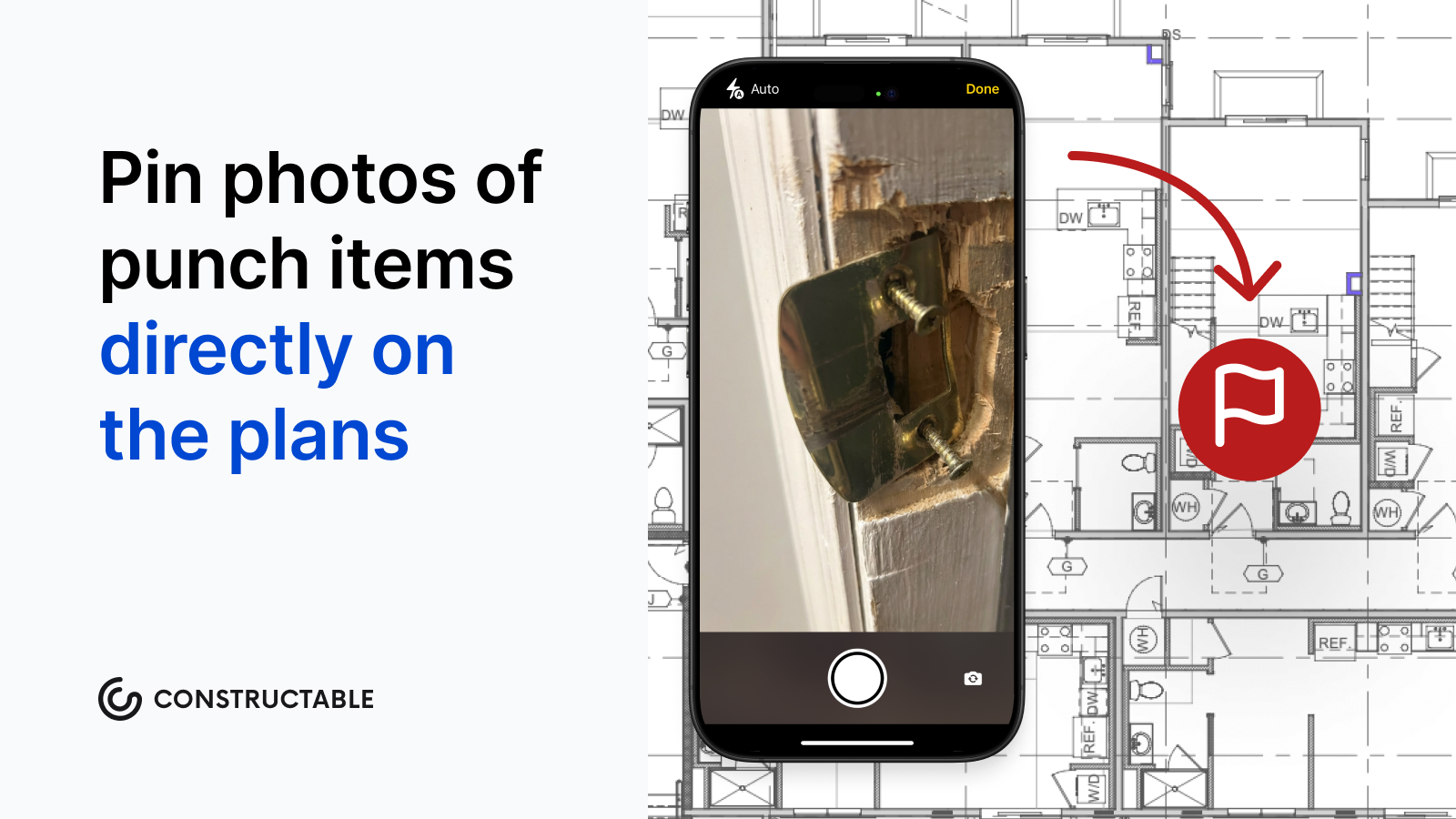
Photos matter more than descriptions. "Door doesn't close properly" becomes a debate. A photo of the misaligned strike plate ends the conversation.
Start with safety and code items first, then functional defects, then cosmetic touches. You can't occupy without a fire alarm sign-off. You can occupy with one scuffed baseboard.
Loop in the owner and architect before the formal walkthrough. No one likes surprises when retainage is on the line.
Track how long items sit open. Anything past seven days needs a conversation.
Who Is Responsible for the Punch List?
The general contractor owns the punch list. You create it, coordinate the walkthrough, assign items to trades, track completion, and verify corrections before asking for owner sign-off.
Subcontractors fix the items assigned to them. Once they mark work complete, they notify the GC for verification. Their contract obligations aren't finished until you approve their punch list items, and the owner accepts the work.
Architects and engineers verify that corrections meet design intent and specifications. They're not there to manage the list, but they do confirm that what's fixed actually meets the contract requirements before recommending final payment.
Owners and their representatives participate in walkthroughs and give final acceptance. They identify deficiencies during inspection and approve completed corrections before releasing retainage. Their signature closes the contract.
Clear roles prevent confusion about who fixes what and who approves it.
How Constructable Simplifies Punch List Management
We built Quality Lists in Constructable to offer our users flexibility throughout the lifecycle of their projects. Create To-Dos, Incidents, Observations, and Punch Lists that reflect how things actually happen on site. Punch items pin directly to drawing sheets with exact problem locations, not vague room descriptions. When you're walking the job, our AI can autofill punch items from speech to text, including the title, trade, location, and assignee from what you say.
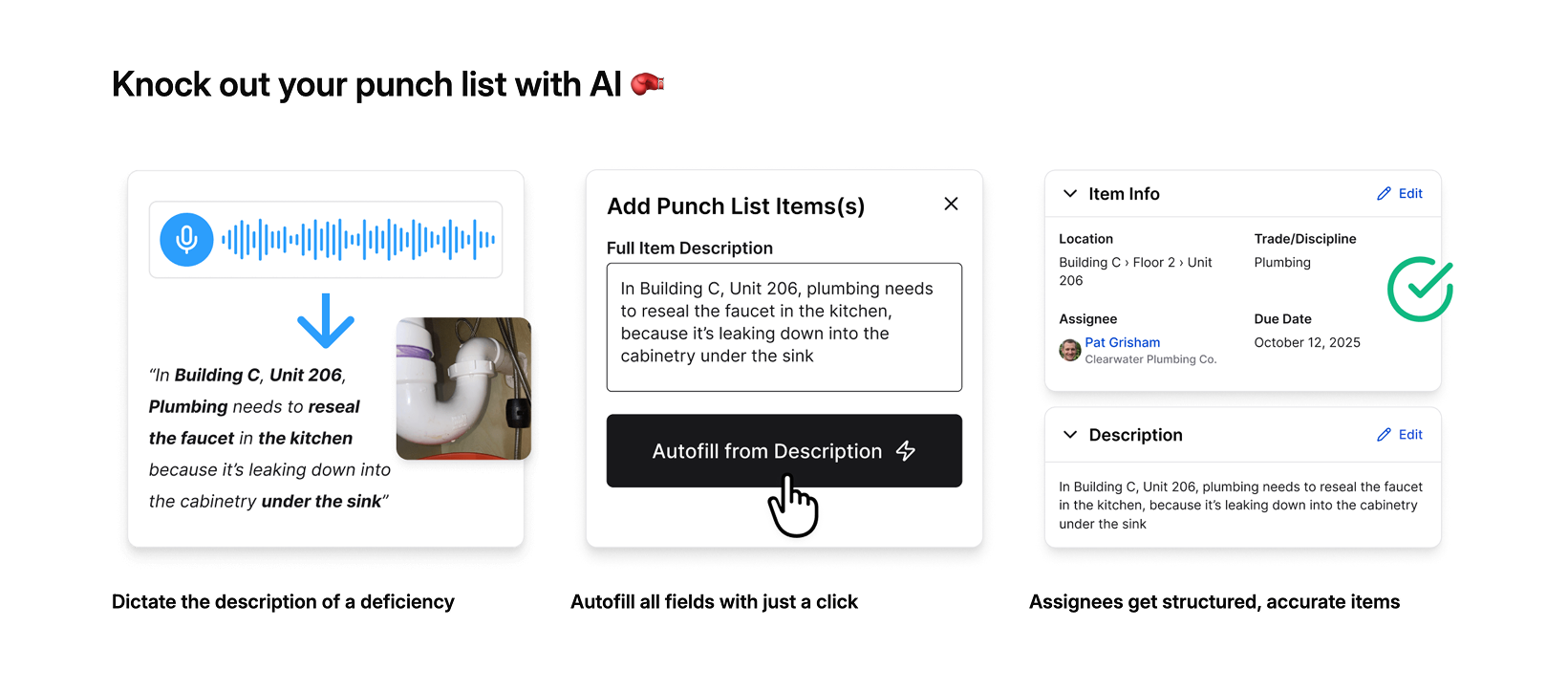
Status moves from Open to In Review to Completed with automatic notifications, so you don't have to chase people down. Approvers get notified when items need sign-off. Everything stays connected to the same drawings, photos, and RFIs already in the project.
You're not managing punch lists in isolation. You're closing out projects with centralized context, which means faster closeout and earlier release of retainage.
Digital Punch List Management: Moving Beyond Paper
Paper punch lists and shared spreadsheets create the same problems on every project. Someone marks an item complete on site but forgets to update the master list. Email threads spawn conflicting versions. Photos live in text messages instead of next to the deficiency they document.
Digital punch list systems address coordination problems and improve the format. Field teams update status in real time from their phones. Photos are attached directly to items, with automatic timestamps and location data. Everyone sees the same list at the same time. No version confusion, no lost updates, no wondering whether the electrician actually finished that outlet rough-in. For mid-market contractors evaluating different software options, these core capabilities should be table stakes in any system you're considering.
| Feature | Paper and Spreadsheet Method | Digital Punch List System |
|---|---|---|
| Status Updates | Superintendent manually updates master spreadsheet after collecting handwritten notes from site walks, creating delays between completion and documentation | Field teams update item status directly from mobile devices on site, with changes visible to all stakeholders immediately |
| Photo Documentation | Photos taken on personal phones, sent via text or email, stored separately from punch list items, often lost or difficult to locate weeks later | Photos attach directly to specific punch items with automatic location data and timestamps, creating permanent linked records |
| Version Control | Multiple versions circulate via email attachments, team members work from outdated lists, conflicting updates require manual reconciliation | Single source of truth accessible to entire team, all edits tracked with user attribution and automatic version history |
| Trade Coordination | Superintendent calls or emails each subcontractor individually to communicate assignments and check completion status | Automatic notifications sent when items are assigned or need review, subcontractors see only their items and update status themselves |
| Location Reference | Text descriptions like room numbers or vague directions, field teams spend time searching for exact problem locations on large sites | Items pinned to specific locations on digital drawings, field teams steer directly to precise coordinates with visual reference |
| Approval Workflow | Manual tracking of which items are ready for inspection, superintendent must remember to verify completed work before owner walkthrough | Status progression from open to in review to completed triggers approval notifications, nothing gets marked done without verification |
82% of employees now use work or project management software, and 79% of building contractors use software to gather data and handle project information. The shift isn't about being fancy, but about cutting friction that delays closeout into a three-week mess.
The right digital tool doesn't require training manuals or custom workflows. It just works.
Final Thoughts on Effective Punch List Templates
Starting with a solid punch list template saves hours during the walkthrough and keeps everyone on the same page about what needs correction. Photos attached to specific locations eliminate the back-and-forth about what work actually needs fixing. Your closeout moves faster when the documentation is clear from the start, and your team stops wasting time chasing down which version of the spreadsheet is current.
FAQ
How early should I start my punch list?
Start documenting issues as soon as you spot them during construction, well before substantial completion. A rolling punch list catches problems when they're quick to fix, before other trades build on top of defective work and turn a 20-minute repair into a multi-day callback.
What's the difference between Category A, B, and C punch list items?
Category A items prevent occupancy and must be fixed before the building can be used. Category B items are visible defects that need correction before final payment release. Category C items are minor issues that can sometimes be resolved after occupancy.
Who approves punch list items as complete?
The general contractor verifies and approves all completed work before requesting final sign-off from the owner and architect. Subcontractors fix their assigned items and notify the GC when they are ready for inspection, but the GC owns the entire list and confirms that everything meets contract requirements.
Can punch list items be pinned directly to drawings?
Yes. Modern digital systems let you pin punch items to exact locations on drawing sheets, so field teams see precisely where the problem is. Photos, notes, and status updates attach to that specific spot on the plans instead of living in scattered emails or vague location descriptions.
How long does punch list work typically delay final payment?
Poor punch list management can extend closeout by weeks, keeping retainage locked up when you need that cash for the next project. Teams using rolling punch lists and daily tracking close out faster because they're verifying corrections instead of finding problems and coordinating six trades back to the site all at once.