O&M Manual Contents and Assembly Steps (October 2026)
A practical October 2026 guide to O&M manual contents, common failures, and the assembly process for construction closeout.
Your facilities team is going to live with your O&M manual for the next 20 years. They'll crack it open at 2am when a chiller goes down, when a warranty dispute surfaces, when a new tech has no idea how the BAS sequences were set up. What's in it and how it's organized matters a lot more than whether you hit the closeout deadline with something that technically qualifies. Here's what a good one actually looks like.
TLDR:
-
An O&M manual is the document package the GC delivers at closeout covering every installed system: HVAC, electrical, plumbing, and fire suppression.
-
Most closeout scrambles trace back to one structural failure: nobody collected source material during construction, only at the end.
-
Cut sheets must match the exact installed model and configuration; generic catalog pages covering an entire product family get rejected.
-
Read Spec Section 01 78 23 before building any template, as it prescribes format, copy count, and submission deadline.
-
Constructable keeps approved submittals, warranty documentation, and drawings in one place during the project, so assembly starts from organized source material instead of scattered email threads.
What Is an O&M Manual in Construction?
An O&M manual (short for Operation and Maintenance manual) is the document package a general contractor delivers to the building owner at project closeout. It contains everything the operations team needs to run, maintain, and troubleshoot the systems and equipment installed in the facility: HVAC controls, electrical systems, plumbing, fire suppression, and any other building systems covered under the contract.
The terms "O&M," "O and M," "operating and maintenance manual," and "operation and maintenance manual" all refer to the same deliverable. The variation in wording reflects regional preference; in practice, they're used interchangeably across the industry.
Without it, a facilities team is left guessing at maintenance schedules, warranty terms, and shutdown procedures, usually at the worst possible time.
Why O&M Manuals Matter Beyond the Closeout Checkbox
Poor O&M manuals come back to the GC. When maintenance staff can't find shutdown procedures or warranty terms, they call the contractor who built the building. Those calls cost time, create liability exposure, and can escalate into disputes over whether improper maintenance voided a warranty the GC is still on the hook for. A common example: a chiller fails 18 months post-handover; the owner's tech can't find the manufacturer's refrigerant charge and startup procedure because the O&M package includes a generic product-family brochure instead of the installed unit's documentation; maintenance intervals are missed; and the manufacturer denies the warranty claim. The GC, still in the warranty period, is now the first call and potentially the liable party.
The stakes are real. Most of the data captured on engineering and construction projects never gets used again, and O&M manuals are a clear example of that problem. They sit in binders on a mechanical room shelf or buried in a shared drive folder nobody remembers.
The consequences are predictable: maintenance mistakes from missing procedures, equipment failures from skipped service intervals, and warranty voids from undocumented work.
When to Start Building the O&M Manual
Most project teams treat the O&M manual as part of the broader project closeout process. That framing is the source of the scramble.
When the GC sends an email with 10 days' notice, subcontractors start digging through inboxes for warranty certificates, cut sheets, and maintenance schedules they should have filed months earlier. The documents exist, but they're scattered across email threads and vendor portals, and nobody owns the collection process.
Missing O&M documentation consistently ranks as one of the primary drivers of closeout delays on commercial projects, and those delays compound the longer the collection gap goes unaddressed.
The fix is straightforward in principle: start collecting O&M source material the moment submittals are approved and equipment is installed. Warranty certificates arrive with the equipment, so file them then. Cut sheets and manufacturer literature are already part of the submittal package, so retain them then. By the time punch lists close out, the manual should be substantially assembled, not barely started.
Who Is Responsible for Creating the O&M Manual
The GC owns the O&M manual at handover, but very little of its content originates with the GC's team. The actual source material comes from trade contractors and equipment suppliers: manufacturer cut sheets, warranty certificates, maintenance schedules, and equipment data.
The typical flow starts with Division 01, Section 01 78 23 (Operation and Maintenance Data), which defines what types of submittals each subcontractor must submit and in what format. Subs collect documentation from their equipment manufacturers and submit it to the GC, who consolidates, verifies completeness against spec requirements, organizes by system or division, and delivers the final package to the owner.
Where it breaks down is accountability. Subcontractors treat O&M submittals as a low-priority afterthought, the GC assumes subs are tracking it, and nobody enforces collection until the project is winding down. On owner-occupied facilities with active commissioning programs, that review gets detailed fast. Missing sections or generic manufacturer literature that doesn't match the installed equipment configuration will get rejected.
The GC must actively manage O&M collection as a formal submittal workflow using proper submittal management software, not assume it happens on its own.
What Goes into an O&M Manual: The Full Contents List
The table covers the core components well. A few entries are worth calling out directly.
As-built drawings must reflect actual field conditions, which is easier with drawing-centric collaboration workflows that track revisions as they happen. Substitutions, field adjustments, and RFI-driven changes all need to be captured there. The original issued-for-construction set does not qualify. Similarly, cut sheets must match the exact installed model and configuration. Any owner who reviews the manual carefully will reject generic catalog pages covering an entire product family.
| Component | What to include |
|---|---|
| Cover sheet | Project name, site location, owner, GC, key contacts, and contract number |
| As-built drawings | Field-condition record drawings, not the original issued-for-construction set |
| Product data / cut sheets | Manufacturer literature for the exact model and configuration installed |
| IOMM | Startup, operation, routine maintenance, and troubleshooting instructions |
| Spare parts list | Recommended parts by system with part numbers and supplier contacts |
| Test and commissioning reports | Startup reports, balance reports, and performance verification |
| Warranty documentation | Manufacturer and contractor warranties with start dates, expiration dates, and contacts |
| Contact list | Subcontractors, equipment suppliers, and service reps organized by system |
How to Format an O&M Manual
O&M manuals follow two structural approaches: physical binders organized by CSI MasterFormat division, and digital PDF packages organized into indexed folders. Digital delivery has become the practical standard. A PDF package is searchable, can be distributed to multiple stakeholders simultaneously, and does not require someone to physically locate a binder in a mechanical room three years after handover.
A typical O&M manual table of contents runs in this order:
-
Cover page with project name, owner, GC, key contacts, contract number, and date
-
Master index listing all sections and subsystems
-
Section tabs by system or CSI division (mechanical, electrical, plumbing, fire suppression, specialty systems)
-
Product data and cut sheets per system
-
Installation, operation, and maintenance manuals (IOMMs)
-
Test and commissioning reports
-
Warranty documentation
-
As-built drawings
-
Contact directory
Good jobsite photo documentation linked to the right locations makes verifying as-built conditions far easier later. Spec Section 01 78 23 often prescribes the exact format the owner expects, including whether submittals arrive as physical binders, PDFs, or both. Read it before building any template. If the spec requires three hard copies plus a digital version, delivering only a PDF will generate a rejection regardless of content quality.
For digital packages, folder naming conventions matter. "Section 15 - Mechanical" is more useful than "HVAC docs final v3." Every folder should open to logically named files, not a flat dump of manufacturer PDFs.
The five most common O&M manual failures
Each failure below is a workflow problem, not a personnel one.
-
Generic manufacturer literature instead of project-specific content. Subcontractors download standard product literature and submit it. That literature covers every model, every option, every configuration, but not the one installed. The facility team opens the manual and cannot find their unit. This happens because the spec requirement ("submit O&M documentation") is vague enough to let generic content pass initial review.
-
No system context. Equipment is documented in isolation. The AHU manual explains the AHU, but it doesn't explain how that AHU interacts with the BAS setpoints, the VAV sequence, or the economizer controls. When something malfunctions, the technician has component manuals but no system map. The Whole Building Design Guide's commissioning documentation guidance describes a Building Systems Manual that organizes the commissioning record for the staff who operate the building.
-
Obsolete on arrival. Change orders happen. Substitutions happen. The manual goes out with cut sheets for the originally specified equipment, not what was actually installed. Nobody updated the package when the mechanical sub swapped the chiller mid-project.
-
Paper-only delivery. Three binders go into a mechanical room. Within a year, they're out of order, water-damaged, or simply missing. A PDF on a shared drive isn't much better if the folder structure is a flat dump and nobody remembers the path.
-
No update mechanism after construction closes. Systems get modified. Warranty periods extend or transfer. None of that finds its way back into the manual because there was never a process for it; the manual was a closeout deliverable, not a living document.
O&M Manual Checklist: A Section-by-Section Review Guide
Before submitting for owner review, run each section against these specific quality checks, because presence alone is not enough.
| Manual section | Quality checks |
|---|---|
| Cover sheet | Project name, site location, GC, owner, and submission date all populated |
| Product data / cut sheets | Model number on cut sheet matches the installed equipment tag; generic catalog pages flagged and replaced |
| IOMMs | Startup, operation, maintenance, and troubleshooting sections all present; not placeholder pages |
| As-built drawings | Stamped, dated, and reflect field conditions including substitutions and RFI-driven changes |
| Spare parts list | Part numbers listed with current supplier contacts; not generic "consult manufacturer" entries |
| Test and commissioning reports | Signed startup reports included; balance reports reference the actual installed system |
| Warranty documentation | Start date, expiration date, and warranty contact populated for every item; no blank fields |
| Contact directory | Subcontractor, supplier, and service rep contacts organized by system; verified as current |
One check that catches most rejections: compare every model number on the cut sheets against the commissioning report equipment list. Substitutions approved mid-project, often the product of poor RFI management, rarely make it back into the O&M package on their own.
Hard copy vs. digital O&M manuals
Hard copies have a legitimate claim: they require no software to open, owners accept them without debate, and their legal standing is unambiguous. The problem is everything that happens after year one. Binders get misfiled, water-damaged, or disappear when the original facilities manager leaves. The technician troubleshooting a chiller failure in year seven cannot search three inches of tabbed paper quickly, which is exactly the kind of construction document search problem digital delivery is meant to solve.
Digital delivery has become the working standard on commercial projects, but a flat folder dump with inconsistent file names is only marginally better than a missing binder. Folder structure and naming conventions need to be decided before assembly begins.
Some specifications still require both formats. Section 01 78 23 will say so explicitly. When it does, produce the digital package first, then generate the physical binders from that same organized source. Building the two formats independently invites version drift.
How to assemble an O&M manual step by step
Assembly works backward from the manual's final structure. Every section has a source, and every source has an owner. Knowing both before the project starts is what separates a smooth handover from a 10-day scramble.
-
Pull Division 01 Section 01 78 23 and every technical section's closeout requirements before the project begins. Note the required format, number of copies, and submission deadline relative to substantial completion; teams connecting external AI clients through the Constructable MCP server can query this directly against project data.
-
Build a submittal log that flags each item requiring O&M documentation at the time of original submittal. Tag it then, not during closeout.
-
Collect source materials from subcontractors as work is installed and approved. Warranty certificates arrive with the equipment; cut sheets are already in the submittal package. File both immediately.
-
Verify each submission against what was actually installed. Compare model numbers on cut sheets to equipment tags and commissioning reports. Flag substitutions before they reach the final package.
-
Organize by CSI division or system, build the folder structure or binder tabs, then write the cover sheet and master index last, once contents are confirmed.
-
Run the quality checklist against every submission before sending.
-
Deliver in the format the spec requires: physical binders, PDF package, or both. Confirm recipient and submission date in writing.
How Constructable Reduces the O&M Assembly Scramble
The O&M scramble happens because nobody builds a collection system during construction. Warranties arrive with equipment and disappear into email. Approved submittals sit in a shared drive folder that six people organized differently. By day 300, the PM is chasing subs who stopped returning calls months ago.
Constructable organizes the source material that feeds the O&M manual as a natural byproduct of how the project runs. Approved submittals, product data sheets, test reports, and warranty documentation live in one structured location alongside the submittal workflow itself. Drawings track through every revision, so the published set at closeout reflects actual field conditions. When a substitution happened in month four, the system keeps that revision, just as reliable RFI tracking keeps a record instead of losing it in email.
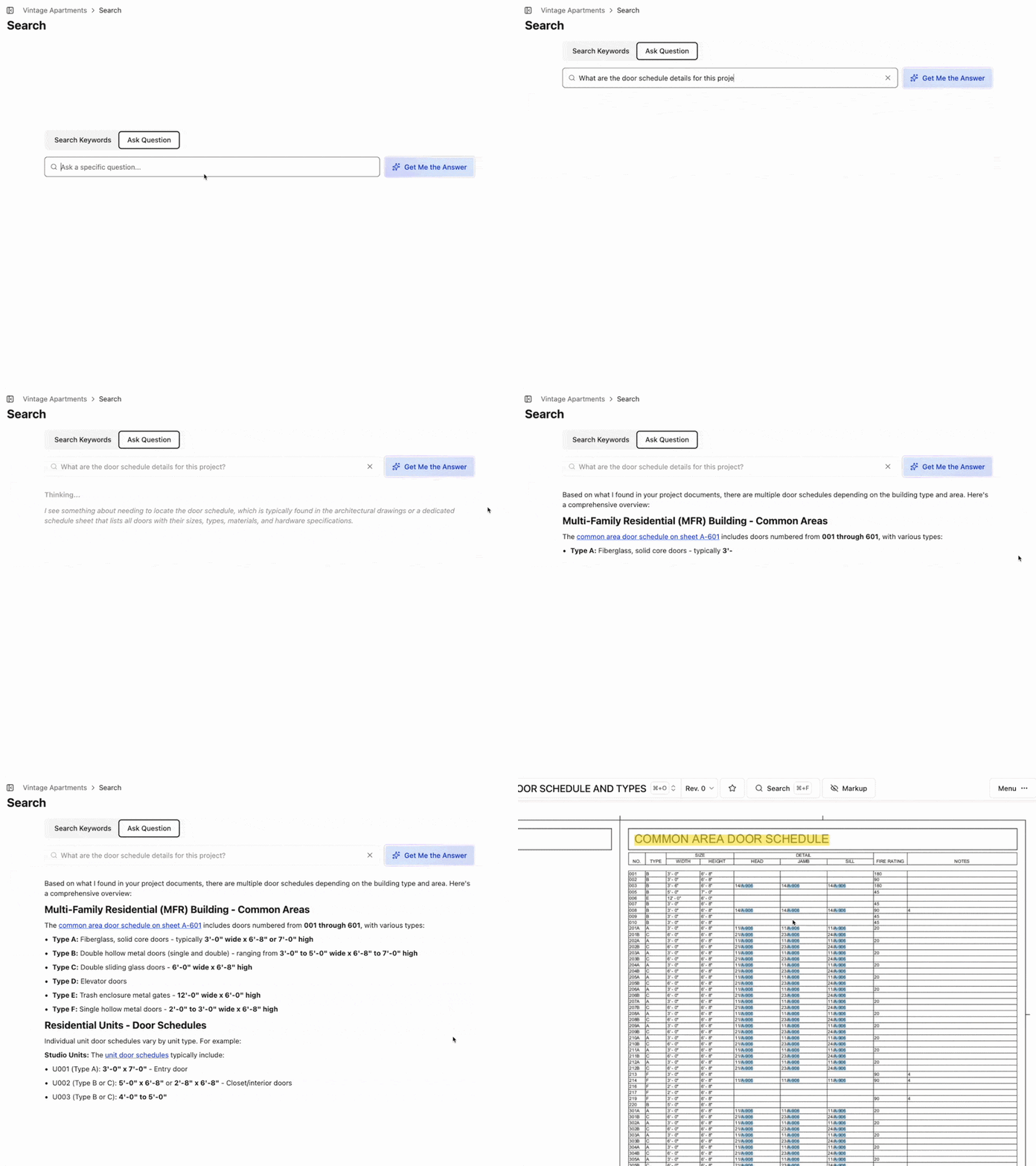
The AI Answer Engine can query across drawings, submittals, specs, daily logs, and documents to surface warranty details or product data for any installed system, with a direct link back to the source record:
When assembly time arrives, the Closeout feature compiles documents, specs, drawings, submittals, and photos into a downloadable ZIP organized by section. Two real caveats: document storage is project-scoped, and Constructable does not automate O&M report consolidation. A PM still decides what to include and how to structure the final package.
For mid-size GCs running multiple simultaneous projects, the value is the starting point. Source material organized from day one means a two-day closeout instead of three weeks of document archaeology.
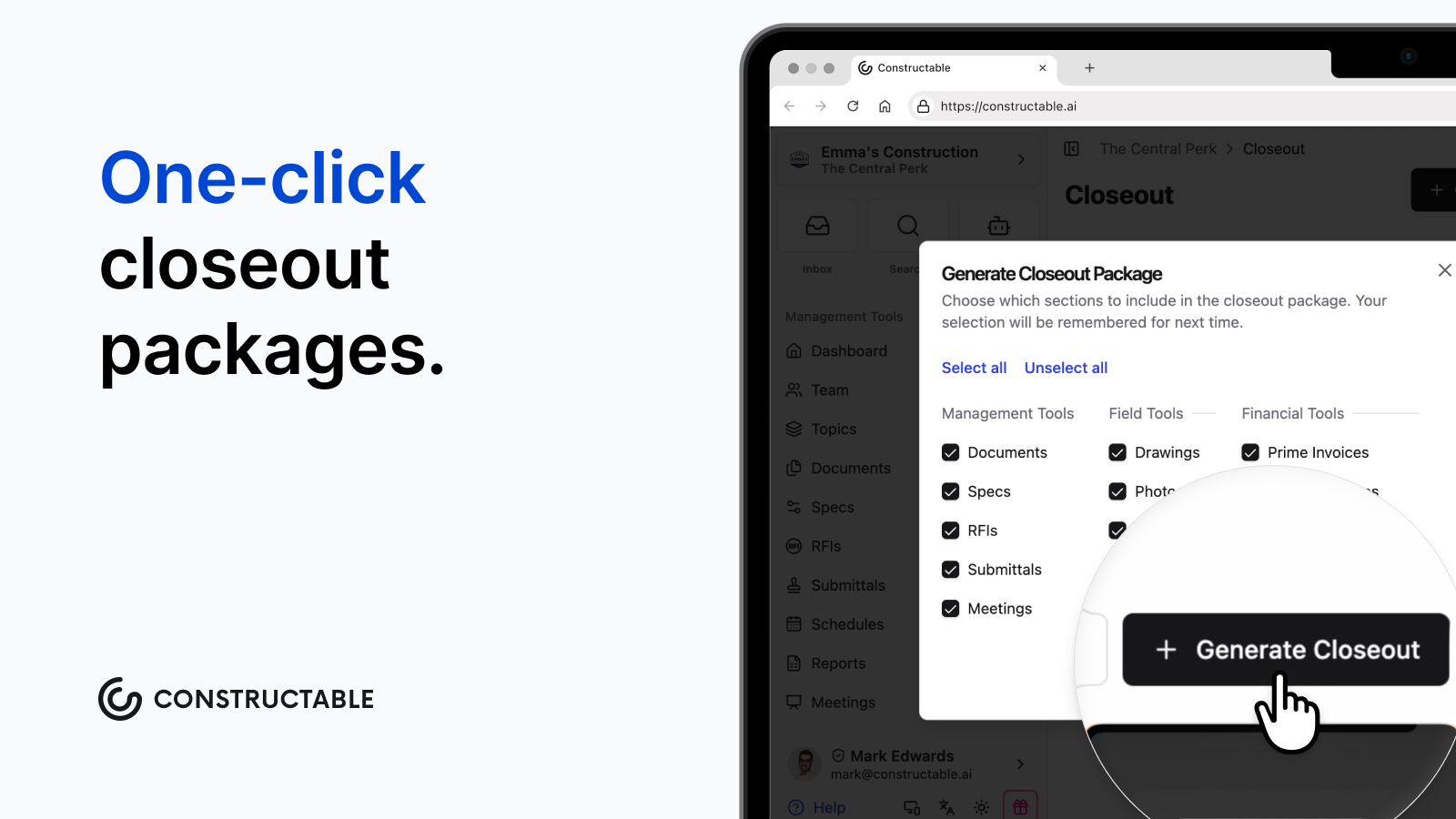
It's true. Constructable can generate a full closeout package with the press of one button.
Final thoughts on what makes an O&M manual worth handing over
A well-built O&M manual saves the GC from callbacks, warranty disputes, and facilities staff who don't know what was installed or when it needs service. The content already exists on every project; it just needs a home from the start. Give it one early, and the closeout manual writes itself. Treat collection as part of the submittal process. Reach out to the Constructable team to see how that fits into the way your projects already run.
FAQ
What is an O&M manual in construction, and what should it include?
An O&M manual (operation and maintenance manual) is the document package a general contractor delivers to the building owner at project closeout, covering everything needed to run, maintain, and troubleshoot the installed building systems. A complete construction O&M manual contains as-built drawings reflecting actual field conditions, project-specific product data and cut sheets matched to installed model numbers, installation and maintenance manuals (IOMMs), test and commissioning reports, warranty documentation with start and expiration dates, a spare parts list, and a verified contact directory organized by system. The most common rejection cause is generic manufacturer literature submitted in place of project-specific content: cut sheets must match the exact model and configuration installed, not the full product family catalog.
What should an O&M manual checklist include before submitting to the owner?
Run each section against specific quality checks; a presence check alone is not enough. Verify that model numbers on every cut sheet match the installed equipment tag and commissioning report, that as-built drawings are stamped, dated, and reflect substitutions and RFI-driven field changes, that warranty documentation has start dates, expiration dates, and contact information populated for every item with no blank fields, and that IOMMs include startup, operation, maintenance, and troubleshooting sections and not placeholder pages. A free O&M manual checklist built around this logic should also flag whether the format (physical binders, PDF package, or both) matches what Spec Section 01 78 23 actually requires.
When should O&M manual collection start on a commercial construction project?
Collection should start the moment submittals are approved and equipment is installed, not during closeout. Warranty certificates arrive with the equipment; file them then. Cut sheets and manufacturer literature are already part of the submittal package; retain them at approval. Missing O&M documentation is a well-documented driver of closeout delays on commercial projects. By the time the punch list closes, the manual should be substantially assembled.
What's the best way to manage O&M documentation collection across multiple subcontractors without a last-minute scramble?
Treat O&M documentation as a formal submittal workflow with the same accountability structure as any other submittal, not as a closeout task you assign to subs via email with 10 days' notice. Build a submittal log at project start that flags every item requiring O&M documentation, collect source materials as work is installed and approved, and verify each submission against installed equipment before it reaches the final package. Constructable organizes the source material (approved submittals, product data sheets, test reports, warranty documentation) as a byproduct of the standard submittal workflow, so when assembly arrives, the documents are already in one structured location instead of scattered across email threads and shared drive folders. The Closeout feature then compiles documents, specs, drawings, submittals, and photos into a downloadable ZIP organized by section.
How do you format an O&M manual for digital delivery, and does it need to follow CSI MasterFormat?
Digital delivery has become the working standard on commercial projects: a PDF package is searchable, distributable to multiple stakeholders simultaneously, and accessible years after handover without locating a physical binder. Organize folders by CSI division or system ("Section 15 - Mechanical" is more useful than "HVAC docs final v3") and build the cover page and master index last, once contents are confirmed. Whether CSI MasterFormat structure is required depends on what Spec Section 01 78 23 prescribes; some owners specify exact format, number of copies, and whether both hard copy and digital delivery are required. When a specification mandates both, produce the digital package first and generate physical binders from that same organized source to avoid version drift between the two formats.