Constructable MCP Server: What It Means for Your Projects (August 2026)
As of August 2026, Constructable has an MCP server connecting drawings, RFIs, submittals, and logs to AI clients like Claude and ChatGPT. Here's what that means
The Constructable MCP server is live, and we want to be upfront about what that actually means before you read another announcement that oversells it. At its core, it lets AI clients like Claude and ChatGPT reach the project data already in your system, so your team can ask real questions and get answers grounded in your actual drawings, RFIs, and logs, not from whatever you remembered to paste in.
TLDR:
-
MCP is an open standard that lets AI models connect to your tools without custom integration code for every pairing.
-
When a vendor ships an MCP server, ask what it actually exposes: read-only resources behave very differently from tools that can act on your data.
-
41% of software organizations run MCP servers in production, and Claude, ChatGPT, and GitHub Copilot already speak the protocol.
-
Before connecting any server to live project data, check for revocable authentication, role-based access controls, and first-party maintenance.
-
Constructable's MCP server exposes a complete view of all your project data in Constructable, including drawings, RFIs, submittals, daily logs, and change events to any MCP-compatible AI workflow your team already runs.
What is an MCP server?
The Model Context Protocol, or MCP, is an open standard that Anthropic introduced in November 2024 and is now widely adopted across major AI clients. It gives AI systems a common way to connect to external data sources, tools, and workflows through a single shared interface, instead of needing a one-off connection for each pairing.
A server, in this context, is a program that exposes specific capabilities to AI applications. Think of it as a defined set of things an AI can ask for or do, published in a format that any MCP-compatible AI construction management client already knows how to read.
Because the protocol is shared, the AI client can find those capabilities and use them on its own. No custom integration code sits in between. If a tool speaks MCP and an AI application speaks MCP, they can work together right away.
The problem MCP was built to solve
Before MCP existed, connecting an AI system to your tools meant building a dedicated connector for each pairing. Want your AI assistant to read your project documents? Someone wrote code for it. Want a second AI tool to read the same documents? Someone wrote that one too—from scratch.
That math gets ugly fast. With N tools and M AI systems, you maintain N times M separate software integrations. Ten different tools and five different clients mean fifty connectors, each one a small project with its own breakages and code upkeep.
The result kept most AI systems cut off from live data; teams either accepted stale exports or paid engineers to babysit these brittle connections. The best software avoids this entirely.
MCP collapses that burden. Each tool implements the protocol once, each AI system once, and the equation drops to N plus M. Add a new client later, and it already speaks to everything supporting the standard.
How MCP servers work
Every MCP setup runs on three parts working together. Understanding how they split up the work tells you exactly what is happening when a software provider says they shipped an MCP server.
-
The "host" is the AI application you sit in front of, like a chat assistant or a coding tool. For example, ChatGPT, Claude, and Copilot.
-
The "client" is the protocol adapter living inside that host, translating requests into the shared format and managing the connection.
-
The "server" is the piece that a software provider builds to expose its own system's capabilities to anything speaking the protocol.
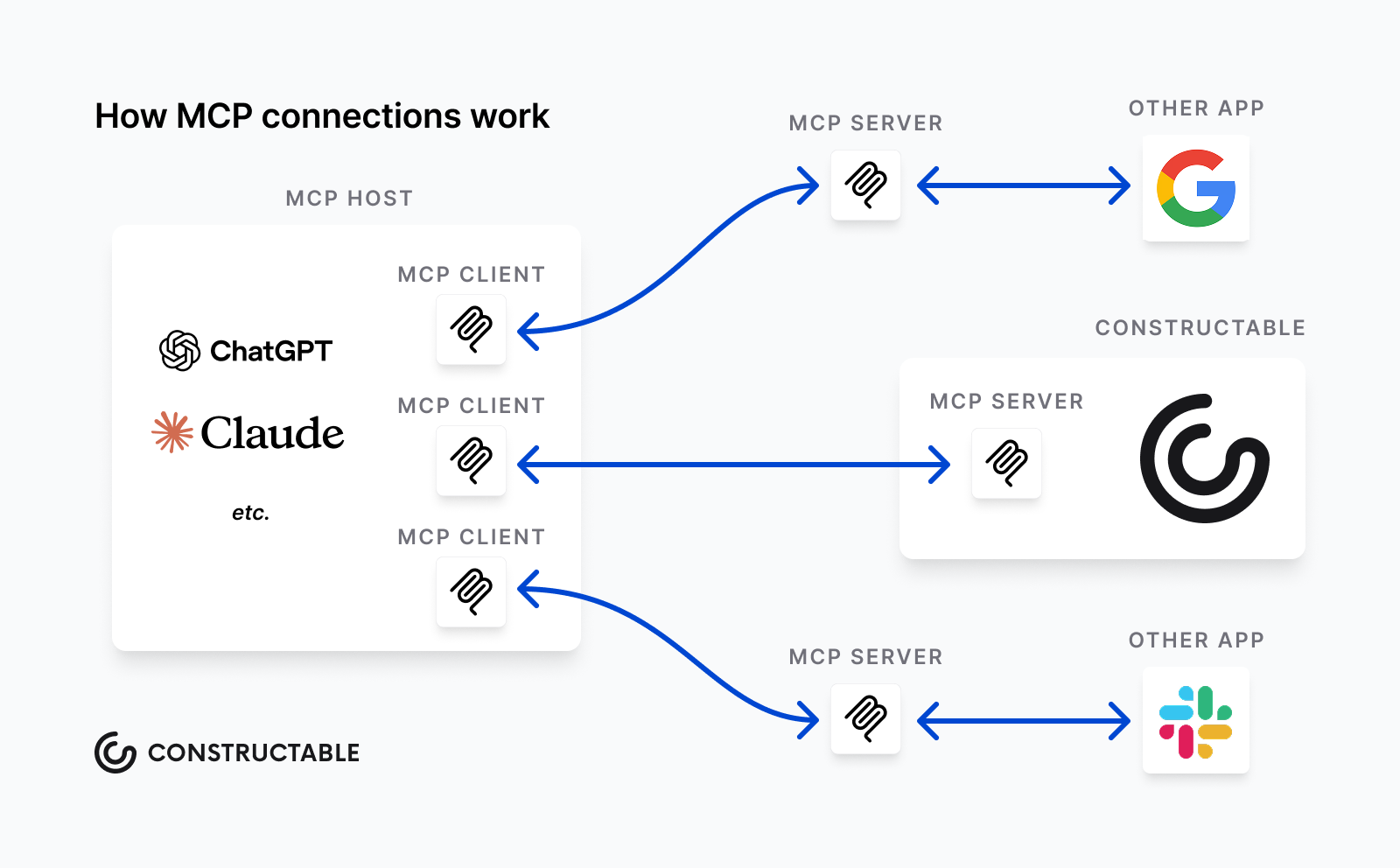
A server can offer three kinds of capabilities, and the distinction matters when you read an announcement:
-
Tools are executable functions that the AI can invoke, like creating a new record or running a search query.
-
Resources are data the AI can read as context, such as a document or a daily log entry.
-
Prompts are reusable instruction templates that package a common task so the AI runs it consistently.
So when someone announces an MCP server, ask which of these three they actually expose. A server with read-only resources behaves very differently from one with tools that can act on your data, a distinction that matters when thinking about how AI makes SaaS better.
MCP vs. APIs: what's actually different
If you have worked with software integrations before, you might assume that MCP is an API (Application Programming Interface) with a new label. The difference comes down to who sits on the other end of the connection.
An API is built for a developer: you read the docs, learn which endpoints exist, and write code that calls the right one at the right moment.
MCP puts that responsibility on the AI model. The server publishes its capabilities in a format the model reads at runtime, so the AI figures out what is available on its own. It also holds session state across a multi-step task.
| Built for | Discovery | State | |
|---|---|---|---|
| API | Developers | Read docs ahead of time | Usually stateless |
| MCP | AI models | At runtime, automatically | Maintained across a session |
The two work together. Most MCP servers call existing APIs underneath, so the server acts as a translation layer, routing a model's request to the API that already handles the work. You are adding a way for AI to reach your tools, not replacing your existing plumbing.
What teams are using MCP servers for
Most of what teams do with MCP servers comes down to letting AI reach project data and act on it in plain language. A few patterns show up again and again:
-
Reading live project data instead of stale exports, so answers reflect what is true right now.
-
Creating records from a spoken or typed request, like logging an issue without opening a form.
-
Generating status summaries from structured data across drawings, logs, and open items.
-
Pulling document search results from several systems into one AI conversation.
-
Letting non-technical staff query complicated data by asking a question.
MCP adoption: where the ecosystem stands
At the April 2026 MCP Dev Summit, co-creator David Soria Parra reported tens of millions of SDK downloads a month. Per a third-party summary of the Stacklok State of MCP in Software 2026 report, 41% of software organizations were running MCP servers in some form of production.
The client side is just as broad. Claude, ChatGPT, Cursor, GitHub Copilot, and Microsoft Copilot all speak the protocol, so a server you connect today reaches the tools your team likely already uses.
Security and access control in MCP deployments
Connecting AI to live project data raises a real question: who can reach what, and how do you pull it back? Knostic's July 2025 research scanned nearly 2,000 internet-exposed MCP servers and found that the vast majority lacked authentication, a risk that extends to data when left unguarded, underscoring how easily a deployment can become open without explicit controls.
Before you connect any server to sensitive data, check for:
-
Revocable, scoped authentication you can pull back without rebuilding the connection.
-
Role-based access controls that mirror who should see what.
-
Whether the server is first-party maintained by the vendor or community-built; this will tell you who owns patches and security fixes.
Build vs. buy: choosing your MCP server
Once you decide an MCP server fits your data, you face three ways to get one. Each carries a different mix of control and upkeep.
-
Building your own gives you the most control over what gets exposed and how, though AI workflows for your team remove that burden entirely. You also own every patch, breakage, and protocol update for as long as you run it.
-
Using a community-built server can save that effort, but coverage and reliability vary widely. Some track the underlying system closely, others lag behind changes or quietly stop getting updates.
-
A first-party server, published by the software provider, tends to map more accurately to the actual data model because the people who built the system built the connector. It usually comes with a longer support commitment, too.
Which path makes sense depends on how much engineering time you want to spend and how closely the server needs to track a system you do not control.
How Constructable's MCP server connects your project data
The MCP server we built exposes the structured project data already living inside Constructable to AI clients like Claude and ChatGPT. That means drawing-centric collaboration workflows, RFIs, submittals, daily logs, photos, and change events become reachable from the AI workflows your team already runs.
Our AI Answer Engine has long returned source-linked answers from within a project, giving you real-time project cost visibility alongside every response that points back to the real drawing, document, or log entry behind it. The MCP server extends that reach. The same project context can now surface inside any MCP-compatible AI workflow, beyond the interface inside Constructable.
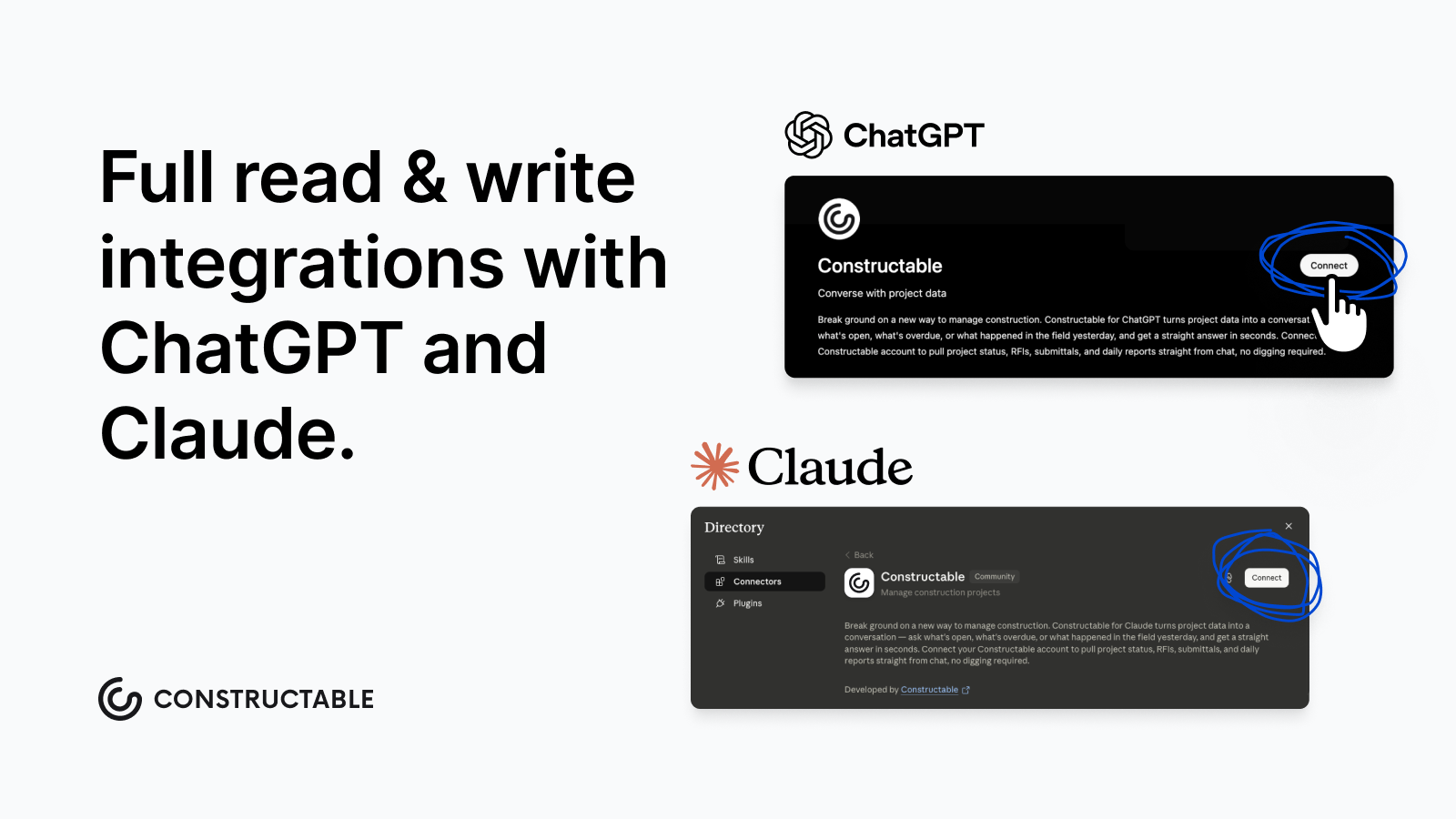
This follows how we think about AI in general. It stays built-in and assistive, never performative. Your data stays organized in a single connected system, accessible from wherever your AI workflows live, with no copying or screen switching.
Final thoughts on using MCP servers to connect AI to construction project data
MCP removes the one-off integration problem and lets your AI tools reach project data the way they were built to. The ecosystem is real, the major AI clients already support it, and first-party servers give you the most reliable path to accurate data. Your team does not need to be deeply immersed in AI tooling to benefit from it. Talk to us to see what Constructable's MCP server can surface from your project data today.
FAQ
What is the Constructable MCP server and what does it actually expose?
The Constructable MCP server connects your live project data (drawings, RFIs, submittals, daily logs, photos, and change events) to MCP-compatible AI clients like Claude and ChatGPT. It extends the same source-linked project context that Constructable's AI Answer Engine already provides, so your data stays organized in a single connected system and is accessible from any AI workflows your team already runs.
Should I build my own MCP server or use a first-party one?
Use a first-party server when accuracy to the underlying data model matters and you'd rather not own every patch and protocol update yourself. Community-built servers vary widely in reliability and often lag behind product changes, while vendor-built servers are maintained by the people who designed the system, which typically means tighter integration and a longer support commitment.
MCP vs. API: which one do I actually need for connecting AI to project data?
If you want an AI model to find and act on project data on its own, without a developer writing custom call logic, MCP is the right layer. APIs are built for developers who write code ahead of time; MCP puts capability discovery at runtime, so the AI figures out what's available and holds context across a multi-step task. For most construction teams connecting AI to live project workflows, MCP removes the integration work an API approach would require.
How do I make sure an MCP deployment doesn't expose sensitive project data?
Before connecting any server to live project data, confirm you have revocable, scoped authentication you can pull back without rebuilding the connection; role-based access controls that mirror who should see what in the first place; and clarity on whether the server is first-party maintained or community-built. That last point tells you who owns security patches when the protocol updates.
What can the Constructable MCP server do that the built-in AI Answer Engine can't?
The AI Answer Engine operates within Constructable's interface and returns source-linked answers within a single project. The MCP server takes that same project context and makes it reachable from external AI workflows, so your team can query drawings, logs, and open items from inside Claude, ChatGPT, or other MCP-compatible tools without switching screens or copying data out of the system.