A meeting is where decisions get made, and Constructable Meetings is where those decisions stop living in somebody's notebook. You prepare the agenda before anyone walks in, notify the attendees, capture what was actually said, issue the minutes, and carry the unfinished work into the next meeting. Start with the role that matches your work, or jump straight to the task in front of you.
Start here
- I organize meetings: Create a Draft → Build the agenda → Publish and finish.
- I attend meetings: Find meetings → Review the agenda and minutes.
- I issue meeting minutes: Finish the meeting → Distribute the minutes → Create the next meeting.
- Something is missing or blocked: Start with Troubleshooting meetings.
Common task recipes
- Prepare a new agenda: Select Draft Meeting, complete Overview and Attendees, add sections and items, then select Publish Agenda.
- Reuse another project's format: Select Import from Project and pick a source project. Every meeting on that project arrives as a Draft, so delete the ones you don't need before you publish anything.
- Track live open work: Add the Open RFIs or Open Submittals smart section before starting the meeting.
- Record who attended: Once the meeting is Started, select Roll Call, check off who's in the room, and select Save Roll Call.
- Issue minutes: Select Finish Meeting, confirm attendee notifications, then use Distribute or Export to PDF.
- Continue a recurring series: From a Finished meeting, select Create Next Meeting.
Prepare
Create or import a Draft meeting
Every meeting starts as a Draft, which is your chance to get the agenda, the timing, and the attendee list right before anyone sees it. Build one from scratch, or import a format another project already uses.
Create a new meeting when you are building an agenda from scratch:
- Open Meetings.
- On desktop, select Draft Meeting. On native, open the add menu and select New Draft Meeting.
- Enter the meeting title.
- Open the Draft and complete its overview, attendees, sections, and items.
If another project already has a useful format, import it as a starting point:
- Open the dropdown beside Draft Meeting.
- Select Import from Project.
- Pick the source project. Import Meeting Structure copies all of that project's meetings into yours as Drafts.
- Select Import.
- Delete the Drafts you don't need, then work through the ones you're keeping.
Note: You get the structure — sections, items, and attendees — but no notes, and the imported meetings aren't linked to each other as a series. That last part matters later: Include prior meeting notes in the PDF export has nothing to pull from until you've run a meeting and used Create Next Meeting to build the chain.
Note: An imported Draft is a starting point, not a finished agenda. Check the dates, attendees, links, and open items before you publish it — the content came from a different project, and not all of it will apply here.
Pro Tip: Do the setup work while it's still a Draft. Publishing notifies attendees immediately, so it's better for them to arrive at a complete agenda than to watch one get assembled.
Does anyone get notified when I create a Draft?
No. Attendees hear from us when you publish the agenda, so a Draft stays yours until you're ready.
I only wanted one meeting and I got twenty. What happened?
That's how the import works — it copies every meeting on the source project. Delete the Drafts you don't want; nothing has been sent to anybody, because Drafts don't notify.
The imported meeting doesn't fit this project. What should I fix first?
Start with dates and attendees, then work through links, open items, and anything else that pointed at the source project.
You have a Draft you can shape privately, with nothing sent until you decide it's ready.
Configure the meeting overview and attendees
Attendees need two things before a meeting: how to show up, and what it's about. Overview carries the logistics and context, and the Attendees list decides who receives the agenda and minutes notifications.
Open Overview and set the Host, the Date & Time with its time zone, a Conferencing Link if the meeting is remote, and a Description of what you're covering. Put the trailer, the gate, or the conference room in the Description so the location travels with the agenda and into the PDF. In a recurring series, Overview also shows a Previous Meeting link straight to last meeting's minutes, and a Next Meeting link once a successor exists.
The meeting title isn't part of Overview. You set it when you create the Draft, and change it later with Rename Meeting.
In Attendees, add the people who should receive agenda and minutes notifications. Once the meeting is Started, the same panel gains a Roll Call button for recording who actually turned up — see Publishing, starting, and finishing a meeting.
Rich-text fields support bold, italic, lists, links, and preset text colors. Select the text first, then choose a color.
Note: Custom colors and background colors aren't available, so use color to emphasize meaning rather than as the only way an attendee can understand a note.
The host and creator affect who can see a participant-restricted meeting, while the attendee list determines who receives notifications. Add someone as an attendee because they should participate and receive the agenda and minutes, not only to make the meeting visible to them.
If I add someone as an attendee, can they see the meeting?
Yes. Participants include the creator, host, and attendees, so an attendee can reach a participant-restricted meeting. Add people because they belong in the meeting, though, rather than as a way to hand out access.
Where do I put the room or the gate number?
Put the location in the Description so it appears in the agenda notification and exported PDF.
Why isn't my text color showing the way I picked it?
Select the text before choosing a color, and stay with the presets. Custom and background colors aren't available.
Attendees know where to be, what's on the table, and they'll be told when the agenda and minutes are ready.
Build sections, items, and smart sections
Build the agenda in the order you plan to discuss it. Sections keep related topics together, items and sub-items give you somewhere to capture details, and smart sections keep open RFIs and submittals in front of the room.
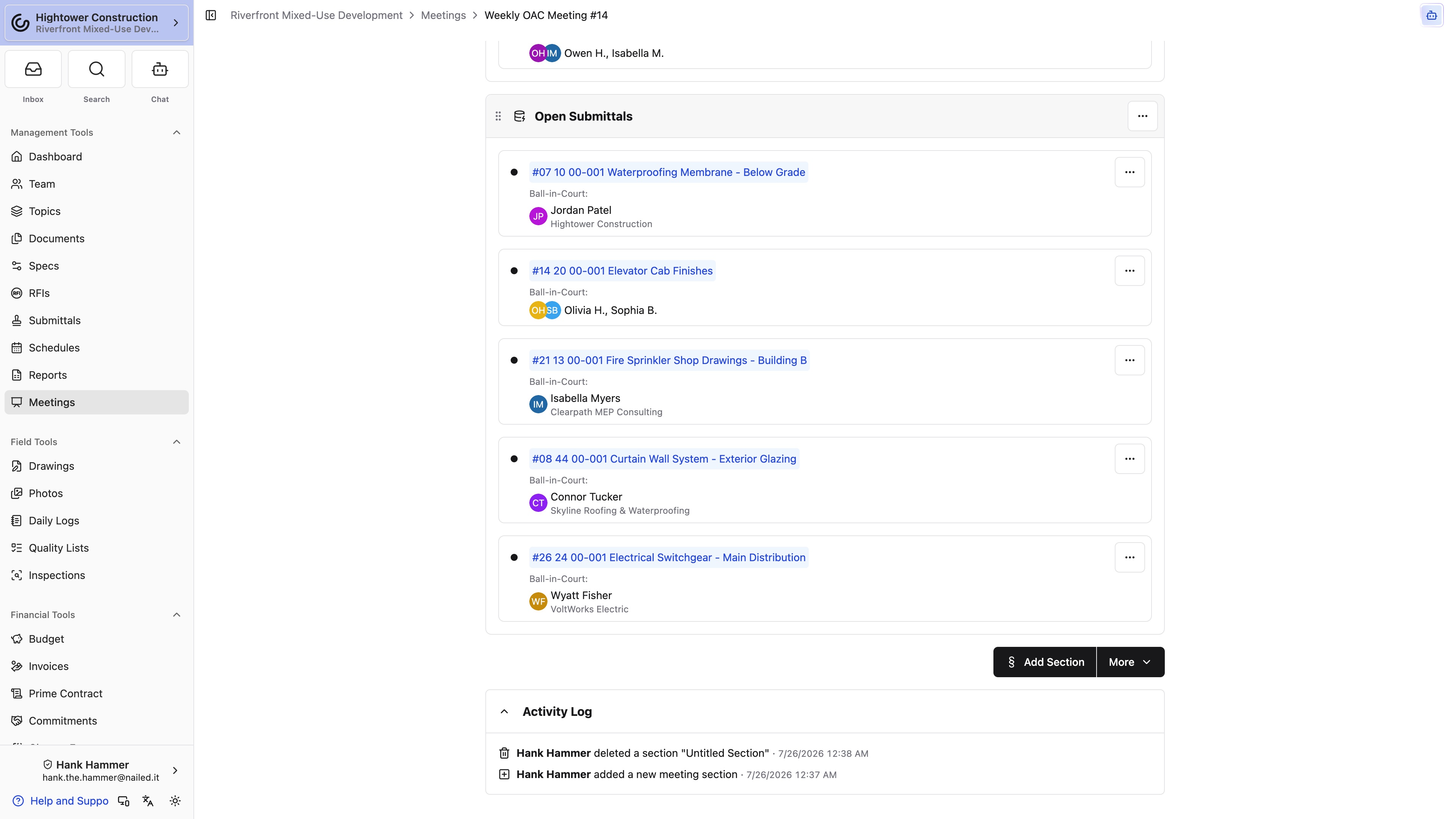
- Select Add Section.
- Name the section and add notes.
- Add agenda items and optional sub-items.
- Add attachments to the applicable item.
- Reorder sections and items to match the agenda.
Use the rich-text formatting menu for emphasis and text color in descriptions and notes.
From More, under Smart Sections, choose:
- Add Open RFIs
- Add Open Submittals
These sections automatically include records that are already open and records opened before the meeting is Finished.
Note: Smart sections give your agenda live references to the source records rather than creating copies. What the room sees is the current state of the RFI or submittal, not a snapshot from the day you built the agenda.
Pro Tip: Add the smart sections early. They keep picking up newly opened records until the meeting is Finished, which saves you from rebuilding an open-items list by hand before every meeting.
For how these records behave elsewhere, see Using RFIs on drawings, in meetings, and on mobile and Using submittals with drawings, meetings, and mobile.
An RFI was opened after I built the agenda. Will it show up?
Yes. The Open RFIs section keeps adding open and newly opened RFIs until the meeting is Finished.
A smart item disappeared from my agenda. Was the record deleted?
No. Starting the meeting removes already closed or completed items from that agenda. The source RFIs and submittals remain unchanged.
You walk in with an agenda that matches the conversation and a live list of what's still open.
Publish and conduct
Find meetings and understand visibility
Open Meetings to find the agenda or minutes you need. The index groups records by where they are in their life, so the meeting happening right now and the minutes from last month sit in separate places.
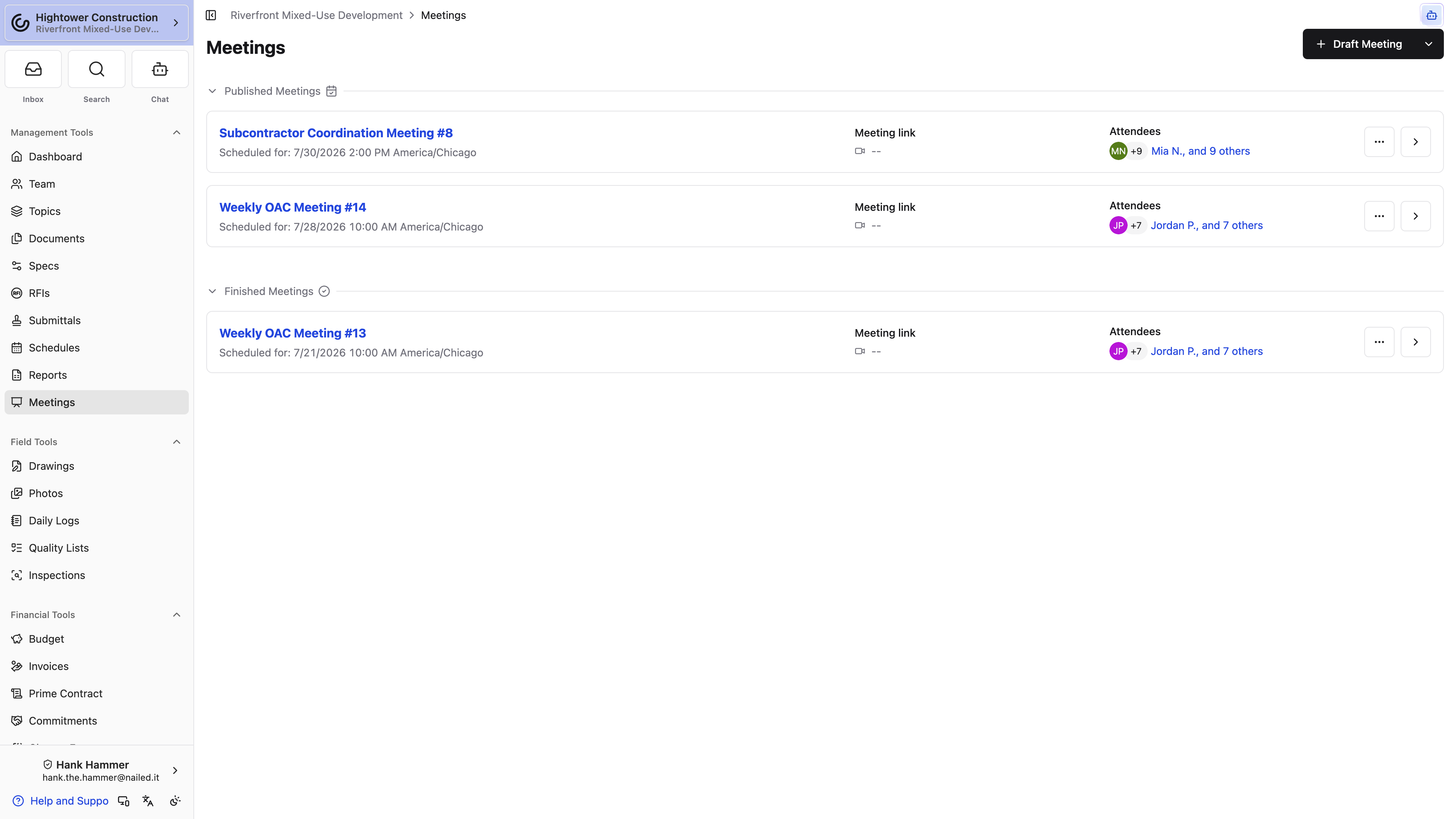
The Meetings index groups records into:
- Started Meetings
- Published Meetings
- Draft Meetings
- Finished Meetings
Drafts appear only when you have permission to view them. With participant-restricted access, you see meetings where you are the creator, host, or an attendee.
Note: A meeting you can't find isn't necessarily missing. Drafts need View draft meetings, and participant-restricted access shows you only the meetings you're part of.
A colleague mentioned a meeting I can't open. Why?
Your read access may be participant-restricted, which shows you only meetings where you're the creator, host, or an attendee. If it's a Draft, you also need View draft meetings.
From the index you can tell at a glance which meetings are still coming and which ones already have minutes.
Publish, start, and finish a meeting
These three actions are how the meeting tells everyone else where it stands: the agenda is ready, the meeting is underway, the minutes are issued. Publishing and finishing each show you the attendee list before the notification goes out.
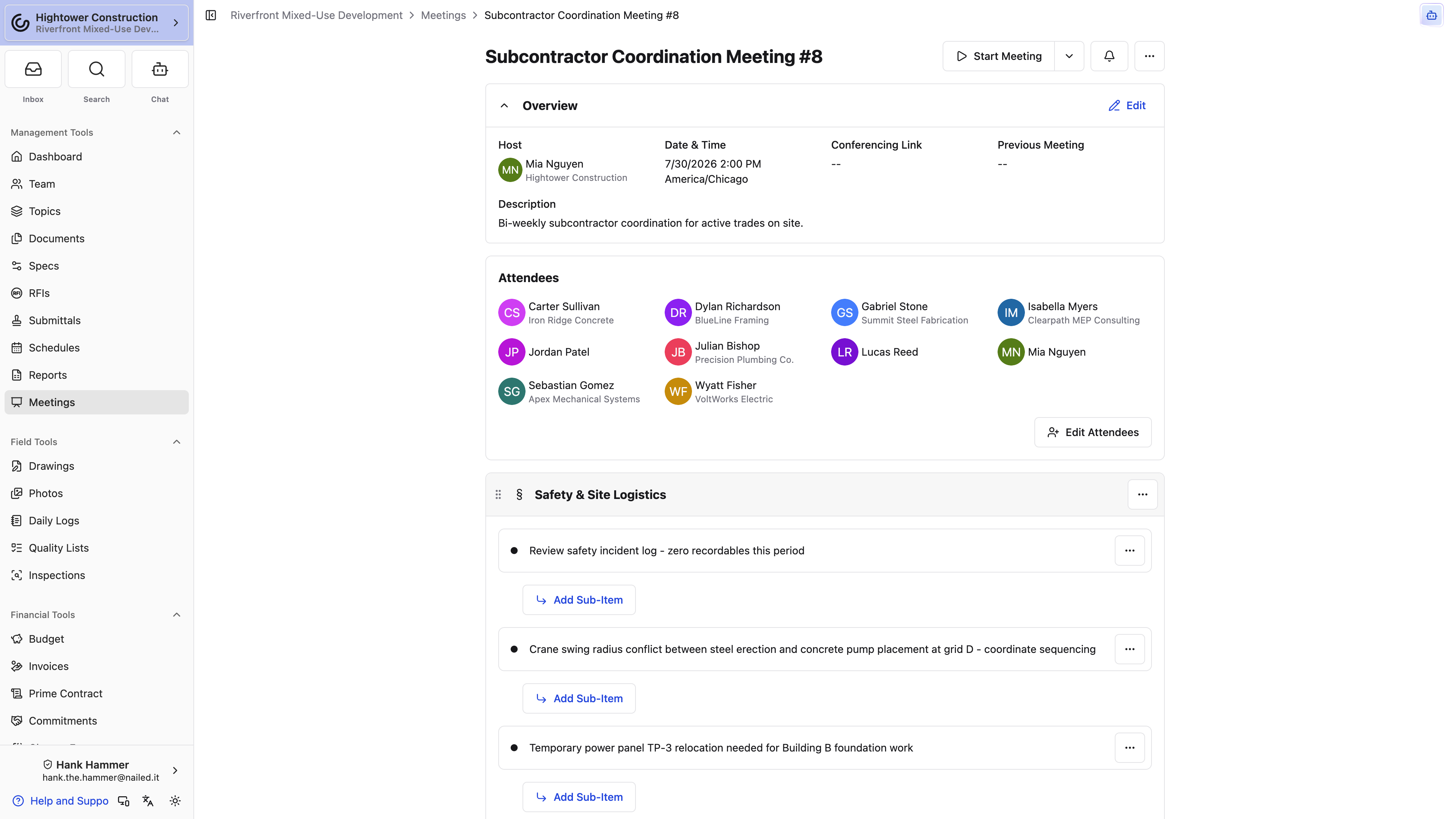
- From Draft, select Publish Agenda.
- Review the attendee list and select Continue. Every attendee except you gets a notification that the agenda is available, plus an immediate email rather than waiting for their digest — unless they've opted out of email notifications. We batch immediate emails for up to fifteen minutes, so the email can land a little after the in-app notification. Anyone you @-mentioned in the agenda is added as an attendee when you publish, so they're notified too.
- At meeting time, select Start Meeting.
- Once the meeting's started, select Roll Call on the Attendees panel, check off everyone who actually showed, and select Save Roll Call. The panel splits into Attended and Did Not Attend, and that's what the minutes carry. You can run Roll Call again while the meeting is Started if someone walks in late.
- Capture notes, decisions, and follow-up items.
- Select Finish Meeting.
- Review the attendee list and select Continue. Attendees receive a notification with a link to the minutes.
The adjacent menu lets you choose Draft, Published, Started, or Finished directly.
Note: Moving backward changes the meeting's status, but it doesn't take back notifications that were already sent. Once attendees have the agenda, they have it.
Note: Starting removes completed RFI and submittal entries from that meeting's smart sections. Only the agenda changes — the source records are untouched.
Nobody received the agenda. What happened?
Publishing notifies the attendee list and emails each attendee right away, so check who was on that list when you published. When the list is empty the confirmation reads No attendees will be notified. If someone was on the list and still has no email, check whether they've opted out of email notifications, and allow up to fifteen minutes for the batched email to go out. You don't get your own agenda email when you're the one who publishes.
I forgot Roll Call. Can I still record attendance?
Yes, as long as the meeting is Started — the Roll Call button sits on the Attendees panel and appears at that status. Take the roll before you finish the meeting, because that's the record the minutes carry.
Can I put a Published meeting back into Draft?
Yes, from the adjacent menu. The status changes, but a notification attendees already received still stands.
Attendees know when to read, when to show up, and when the minutes are final.
Review a Published agenda or Finished meeting
Whether you're preparing for tomorrow's meeting or checking what was decided last month, the record holds all of it. You need access to the meeting itself, plus access to any linked records you want to open from it.
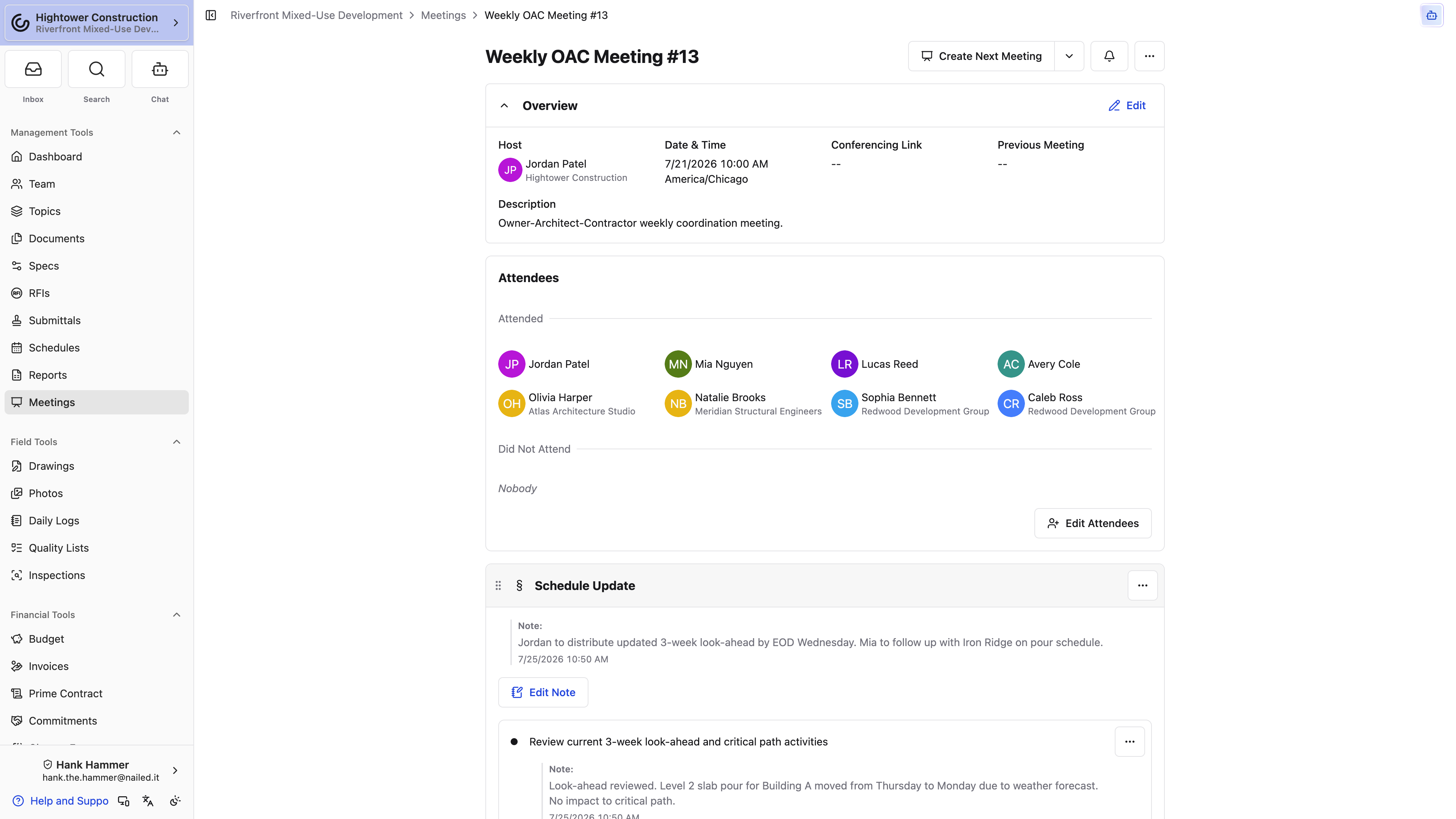
Open the meeting and you get the record as it was issued: who actually attended — Started and Finished meetings split the list into Attended and Did Not Attend — the notes and decisions under each agenda item, the attachments, and, at the bottom of the page, the Activity Log showing when it was published and finished. The log starts collapsed; select it to load the history. Overview holds the host, the date and time, and, in a series, a Previous Meeting link to the minutes before this one. Smart RFI and submittal entries can open their connected details when you have access to those records.
Note: A Finished meeting is the issued minutes record. If you notice a factual error, coordinate the correction with the meeting owner instead of creating an unrelated replacement meeting — a second meeting doesn't fix the first one, it just adds a record nobody was expecting.
An RFI is listed in the agenda but I can't open it. Why?
Smart entries open their connected details only when you have access to that record. Being able to read the meeting doesn't grant access to everything it references.
The minutes have a mistake. Can I correct them myself?
Coordinate with the meeting owner. A Finished meeting is the issued record, so the correction should come from the person who issued it.
You have the decisions, the notes, and who was there, in the form they were issued.
Distribute and repeat
Export meeting agendas and minutes
Export a PDF when someone needs the agenda or the finished minutes outside Constructable — an owner, a subcontractor's office, a project binder. You can bring notes from earlier meetings along when the reader needs context from the series.
- Open the meeting actions menu.
- Select Export to PDF.
- In Export Meeting to PDF, choose whether to Include prior meeting notes.
- Under Prior notes inclusion, select one, two, three, or all prior meetings.
- Leave Include photos on to add photo pages, or turn it off for a lighter file.
- Select Download PDF.
Each page of the PDF carries a footer in the form Page 1 of 3 so a printed agenda stays in order.
With Include photos on, image attachments on this meeting's sections, items, and sub-items print on photo pages after the minutes, in agenda order, each group headed with the section or item it came from — "Site logistics: photos," for example. Other files aren't added. Include photos starts on, and your choice is remembered on that device for the next export.
Note: The PDF captures the meeting as it appears when you generate it, including supported rich-text colors. After notes or attachments change, download a new file — the copy already on your machine won't update itself.
The prior notes I expected aren't in the PDF. Why?
Confirm Include prior meeting notes is selected, then check how many prior meetings you chose. Prior notes also depend on a connected meeting series, so a meeting with nothing before it has nothing to pull from.
How far back can the PDF reach?
One, two, three, or all prior meetings.
You have a shareable snapshot that reads the same for someone who's never signed in.
Distribute meeting minutes
Distribute emails the issued minutes. The meeting minutes PDF is always attached — you don't pick it. You only choose which extra attachments from sections, items, and sub-items go along.
- Open a Finished meeting.
- Select Distribute (or Redistribute after the first send).
- The dialog is Distribute Meeting Minutes or Redistribute Meeting Minutes.
- Review the recipients. Host and attendees start selected.
- Choose additional attachments. The copy reads The meeting minutes PDF is always attached. Choose which additional meeting attachments should be distributed. Attachments from sections, items, and sub-items are available.
- Send.
Export to PDF is still the way to download a file for yourself. Distribute is how the attendees get the same minutes in email, with the PDF already on the message. The emailed PDF leaves out photo pages, so send the photos people need as additional attachments.
Note: When the attachments add up to more than 25 MB, every one of them arrives as a download link below the message instead of a file. File types mail services refuse to carry —
.exe,.bat,.js, and.url, for example — always arrive as links.
You sent the minutes, and everyone on the list has the PDF.
Create the next meeting
When a recurring meeting wraps up, create the next one from the Finished meeting rather than rebuilding the agenda. You keep the structure of the series, you get a fresh Draft to review, and the finished record stays exactly as it was issued.
- Open the Finished meeting.
- Select Create Next Meeting. If this meeting already has a successor, the control reads Open Next Meeting and takes you to that Draft instead.
- Confirm the Meeting Title.
- Save. The toast reads Created next meeting as draft.
- Review the newly created Draft.
The new Draft carries forward the recurring structure and prior attendees who still have project access, including attendees with All Projects access who are not explicit Project Team members. It does not carry forward the notes captured during the finished meeting, and it does not notify attendees until the new agenda is published.
This is also what builds the series. The new Draft's Overview shows a Previous Meeting link back to the meeting you created it from, and that chain is what Include prior meeting notes follows when you export a PDF later.
Note: Only one next meeting can be created from a meeting. When a successor already exists, Open Next Meeting is the path in; Create Next Meeting in the menu stays disabled with A next meeting already exists. Delete that Draft (it's a soft delete) if you need to create a different successor.
Pro Tip: Review the attendee list before you publish. People roll on and off a project between meetings, and only attendees who still have project access come across.
Where did last meeting's notes go?
They stayed on the finished meeting, which is the point — the new Draft is a fresh agenda rather than a copy of the discussion. Open the previous meeting when you need what was said.
An attendee didn't come across. How do I get them back?
Create Next Meeting retains attendees only while they can still access the project. Confirm the person remains on the Project Team or has All Projects access, then add them to the new Draft.
The series keeps its shape and last meeting's record stays untouched.
Rename or delete a meeting
Titles pick up typos and meetings occasionally get created by mistake. Renaming is safe housekeeping; deleting is permanent and takes the whole record with it, so treat the two very differently.
Use Rename Meeting to correct the title.
Use Delete Meeting only when you no longer need the record. The meeting goes, and its sections, items, and sub-items go with it — there's no restore, and nobody on the project can reach any of it afterward. Source RFIs and submittals referenced by smart items aren't touched.
Note: The confirmation tells you that the action cannot be undone, and it means it. When a meeting documents decisions the project relied on, that record is usually worth more than a tidy list — export the PDF before you delete if there's any doubt.
If I delete a meeting, do I lose the RFIs and submittals it referenced?
No. Smart items reference the source records, and those aren't deleted along with the meeting.
Your meeting list reflects the meetings that actually happened.
Use Meetings on mobile and native devices
Meetings happen in trailers and on job walks, not only at a desk. Native layouts support creating or importing a Draft, opening the grouped meeting lists, editing content you're permitted to edit, changing status, running Roll Call, and exporting.
On a phone, the Draft Meeting button becomes a + in the page header; tap it for New Draft Meeting and Import from Project. Per-meeting actions like Rename Meeting, Export to PDF, and Delete Meeting sit behind the three dots on the meeting itself.
Pro Tip: Use desktop web when building a long agenda, reordering many sections, reviewing many attachments, or preparing a detailed PDF. All four go faster with room to see what you're doing.
Can I run the whole meeting from my phone?
Yes. Create or import a Draft, build the agenda, edit content with the required permissions, change status, take Roll Call, and export the meeting. On smaller screens, check the meeting actions menu for controls.
You can prepare, run, and share a meeting from wherever the meeting actually happens.
Troubleshooting
Troubleshoot meetings
Nearly every meeting problem is a permission you don't have, an attendee list that was empty when you published, or a smart section doing exactly what it's designed to do. Find your symptom and work through the checks in order.
A meeting is missing
- Confirm the Project Management package is active.
- Confirm View all meetings permission.
- For participant-restricted access, confirm you are the creator, host, or an attendee.
- For a Draft, confirm View draft meetings.
Draft Meeting or edit actions are missing
You need Create new meetings, make changes to existing meetings, distribute and redistribute. Read access alone lets you open meetings without changing them.
Attendees were not notified
Publishing and finishing notify the attendee list, so the usual cause is that someone wasn't on it yet. Confirm that everyone who should receive the agenda or minutes was added first. When the list is empty the confirmation reads No attendees will be notified. — worth reading before you continue.
A smart section contains completed work
This one looks wrong but isn't. The Open RFIs and Open Submittals smart sections update while the meeting is active. When you start the meeting, already closed or completed items are removed from that agenda. The source RFIs and submittals remain unchanged.
Create Next Meeting is disabled
It is available only on a Finished meeting. When that meeting already has a next meeting, use Open Next Meeting instead — Create Next Meeting stays disabled with A next meeting already exists.
An attendee is missing from the next meeting Draft
Create Next Meeting retains attendees only while they can still access the project. Confirm the person remains on the Project Team or has All Projects access, then add them to the new Draft if needed.
Prior notes are missing from the PDF
In Export Meeting to PDF, select Include prior meeting notes and choose one, two, three, or all prior meetings. Prior notes come from the meeting series, so a meeting with nothing linked before it has nothing to pull from. Meetings brought in through Import from Project aren't linked to each other — the series starts building the first time you use Create Next Meeting.