MCP Servers & Construction Software Integration Explained (June 2026)
In June 2026, MCP servers are changing how construction teams query project data. See how Constructable exposes RFIs, drawings, submittals, and logs to any AI client.
Your software tools do not talk to each other. You already knew that. You have been exporting files and re-typing numbers since before smartphones existed. AI was supposed to fix it, except AI has the exact same problem — it can only see inside the one tool it lives in. Construction software MCP integration is what finally gets everything in the same room, so AI can pull from drawings, RFIs, logs, and more without you playing telephone between five different apps.
TLDR:
-
Construction data lives in silos by design, and MCP fixes this problem by allowing your agent (Claude, ChatGPT or Grok) to talk to Constructable
-
When comparing MCP servers, check coverage, read vs. write access, permission scoping, vendor stability, and fallback options.
-
Over 10,000 active public MCP servers were running across industries by December 2025 (Digital Applied), so this is settled infrastructure.
-
Constructable exposes drawings, RFIs, submittals, daily logs, change events, and quality lists to any MCP-compatible AI client through a native integration built on one connected system.
The integration problem construction software has always had
You run RFIs in one system. Drawings live somewhere else, estimating and precon sit in a third tool, and your accounting data is walled off in a fourth. Moving information between them means exporting a file, re-keying numbers, or relying on a custom connector that someone built once and nobody fully understands. Construction management software should not work this way.
Those connectors break. A vendor ships an update on a Tuesday, the integration that quietly moved your data stops working, and you find out about it when a number looks wrong or a report comes up empty. The tools were designed this way on purpose, each one acting like it is the only system on the job.
The real problem is what it does to AI. Any AI search in your stack can only see inside the one tool it was built into. Ask it something that crosses drawings and submittals, or accounting and estimating, and there is nowhere for an answer to come from, especially when a lot of it is sitting in your email. The data exists. It just lives in five separate rooms with all the doors closed.
What is an MCP server
MCP stands for Model Context Protocol. Anthropic introduced it in November 2024 as an open standard for how AI systems connect to outside tools, data sources, and services.
MCP is a protocol, not a product. If the word "protocol" just made your eyes glaze over, think of it like a universal charging cable for software. Before USB-C, every device had its own weird proprietary plug. Before MCP, every AI tool needed its own custom connection to every data source. Now there is one standard that works everywhere.
In December 2025, the protocol moved to the Agentic AI Foundation under the Linux Foundation, with OpenAI, Google, Microsoft, and others all at the table. Translation: this is not a startup experiment. It is the kind of thing that gets boring in the best way possible.
Adoption fills in the rest. The Python and TypeScript SDKs alone see roughly 97 million monthly downloads (WorkOS, 2026), a sign MCP has crossed from experiment into infrastructure.
The three primitives that power an MCP server
An MCP server does three things. That is genuinely it. No code required to follow this part.
| Primitive | What it is | Example in practice |
|---|---|---|
| Resources | Data the AI can read | Documents, drawing records, database entries |
| Tools | Functions the AI can call to act or fetch live data | Pull the latest RFI status, create a log entry |
| Prompts | Reusable templates that shape how the AI works with the server | A standard format for summarizing change events |
Here is the short version of how it works: your AI app connects to an MCP client (Constructable's MCP), which looks at Constructable and asks "what can you do?" Then Constructable answers, and the AI gets to work. That "what can you do?" step has a proper name (tool discovery), but you can just think of it as the AI reading the menu. RFI management in construction is one workflow that benefits directly from this reach. Nobody has to program any of it in advance. It just figures out what is there.
How MCP differs from traditional API integration
Old-school API connectors are basically a second job. Someone reads the documentation, writes custom code for each connection, and then rebuilds the whole thing every time a vendor ships an update. Nobody enjoys this. It just keeps going indefinitely.
MCP skips all of that. The AI asks the server what is available when it needs to know, so new capabilities show up automatically. No one has to update any code to make it happen.
Here is where the old way really hurts. Say you have 5 AI tools and 5 data systems. That is 25 custom connectors to build, test, and keep alive. With MCP, you build once per side and any compatible client connects to any compatible server. 5 plus 5 instead of 5 times 5. Your team will appreciate this more than they will ever say out loud.
Why MCP integration matters for construction software in particular
A construction project does not store its data in one place, just go look at your email inbox. Drawings, specs, RFIs, submittals, daily logs, change events, and quality items each live as their own structured workflow, and each gets created and read by different people across the field and the office. Ask whether a change event is tied to an open RFI and a recent daily log entry, and an AI system has to pull context from several modules at once. Without a shared protocol, every one of those cross-module queries needs a separate custom integration that the vendor builds and keeps alive.
That math is why a standard matters. As of Anthropic's December 2025 ecosystem update, more than 10,000 active public servers were running across industries, a figure that has grown since, which tells you construction vendors are now building to settled ground instead of a private experiment.
Construction workflows where MCP integration delivers value
The everyday version looks like asking a question and getting an answer drawn from wherever the data actually lives:
-
A PM surfaces every open RFI alongside its ball-in-court assignment.
-
A superintendent checks what the scope in the contract says.
-
A project engineer pulls every construction submittal tied to a given spec section.
-
A foreman reviews the delay incidents logged over the past two weeks.
The same reach supports heavier lifts: generating a structured submittal log by querying uploaded specifications, or checking deficiency and inspection status across a whole project. Cross-module reach like this is what lets AI act as a project intelligence layer instead of a keyword box stuck inside one module.
What to look for in a construction software MCP integration
Comparing systems with MCP servers? Run each one through five checks before you commit:
-
Coverage: Does the server expose the full project record, or only a handful of modules? Drawings, RFIs, submittals, daily logs, and cost data should all be reachable across the board. See how AI-powered construction software stacks up on this front.
-
Read versus write: Can the AI retrieve data, or also trigger actions like creating a log entry or pinning an RFI to a sheet?
-
Authentication and scoping: Do project-level permissions carry into the MCP layer, so the AI only sees what the user already sees?
-
Stability: Officially maintained by the vendor, or community-built and possibly stale?
-
Non-MCP fallback: What do users get when their AI client does not yet speak the protocol?
How Constructable built its MCP server for construction teams
We built Constructable as one connected system for mid-size general contractors running $20M to $150M in annual volume, and our MCP server reflects that. It is native, and it exposes the core project record to any MCP-compatible AI client: drawings, RFIs, submittals, daily logs, change events, financials and quality lists.
This is the technology behind our AI Answer Engine, which already pulls answers from across plans, photos, documents, and log entries, with every answer linked to its primary source. The MCP server extends that reach to external AI interfaces.
Because the system was built as one product instead of a stack of separate modules, an integration touches the full project record and not isolated pockets, which settles the coverage question raised above.
Pricing keeps the door open. Flat fee, unlimited users, so field teams, office staff, and external AI tools can draw from the same project data at once with no per-seat penalty. That shared data layer also supports real-time project cost visibility across the whole project.
How to set up and use Constructable MCP with ChatGPT
-
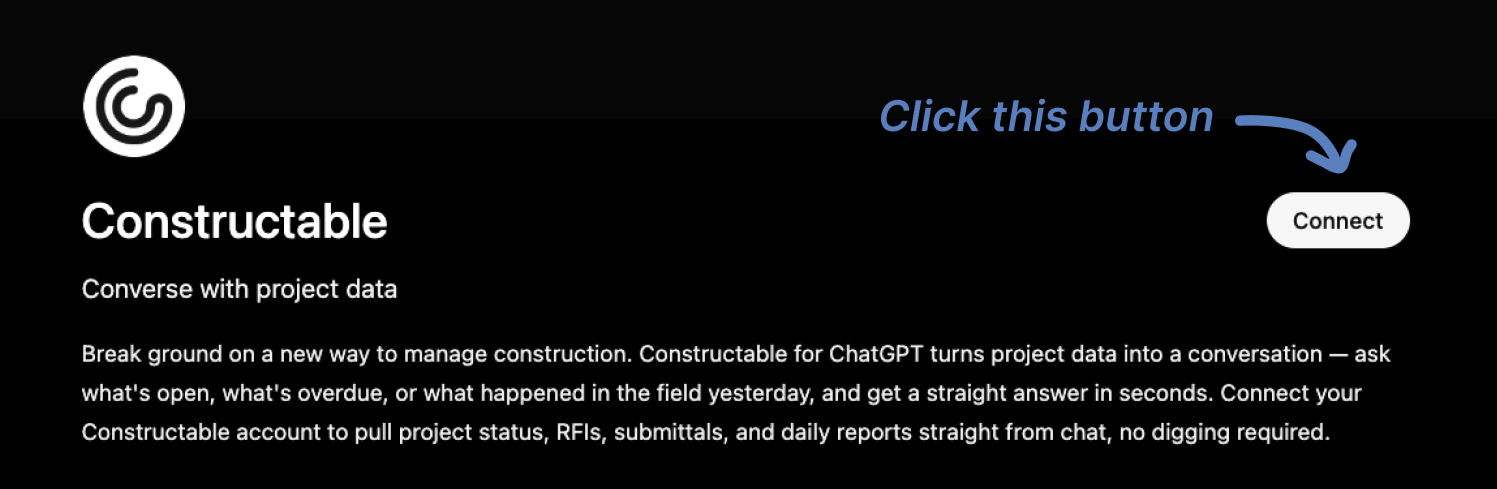
Go to our ChatGPT App listing at the following link: https://chatgpt.com/apps/constructable/asdk_app_6a10b761b5c081919958e281f32ff7e9
-
Click "Connect" and log in to your ChatGPT account if necessary
-
You'll then be redirected to Constructable. Log in if you haven't already, then click "Confirm" to grant access to ChatGPT.
-
Constructable will close and you should see a "Connection Successful" message in ChatGPT.
-
You can now click "Start Chat" and begin asking or prompting your Constructable from within ChatGPT!
How to set up and use Constructable MCP with Claude
-
Log in to Claude
-
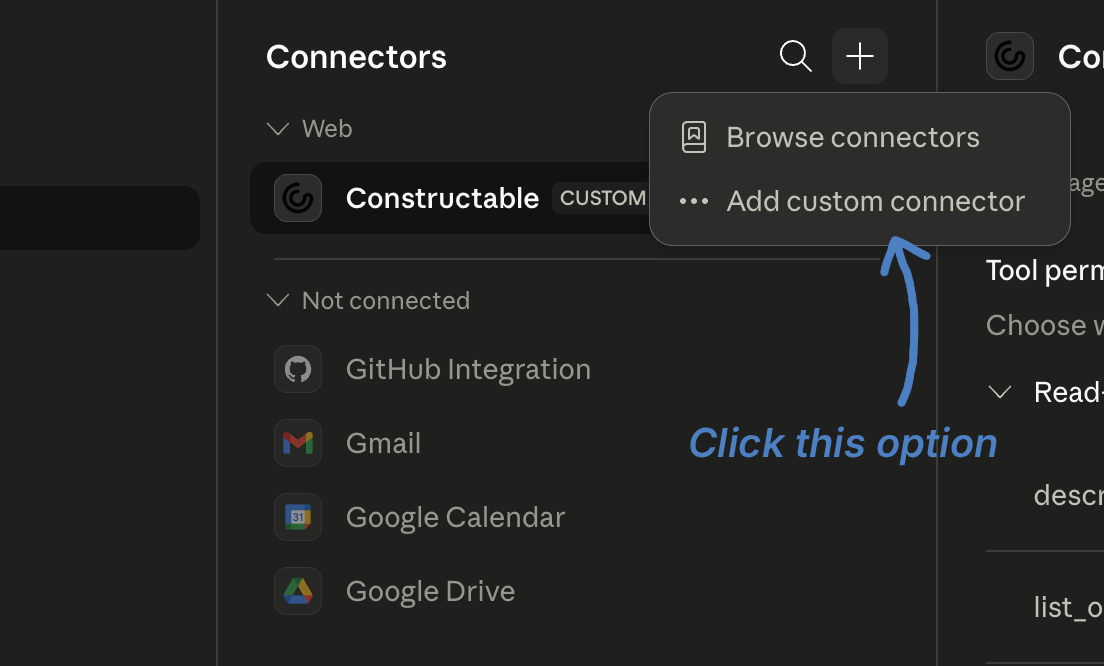
Open the "Customize" menu
-
Click "Connectors"
-
Click the "+" plus button
-
Click "Add Custom Connector"
-
Enter "Constructable" in the Name field
-
For the Remote MCP Sever URL, use "https://api.constructable.ai/mcp"
-
Click "Add"
-
We suggest that you then click the Constructable connector and set the "Read-only Tools" setting to "Always Allow" (so that you don't have to grant the MCP permission to read things every time) but leave the "Write/Delete Tools" set to "Needs Approval" to prevent unwanted executive/destructive actions without your explicit approval.
-
Open Claude and start asking or prompting your Constructable Project data!
Final thoughts on how MCP integration changes construction software
For construction teams, the value of MCP comes down to one thing: your project data stops being siloed by which tool created it. Your agent is working for you (ChatGPT, Claude or Grok), and now you can give your agent access to your Constructable data. And your agent can start working fro you in Construction. Get real answers and automate real workflows. If that sounds like a problem worth solving, the Constructable team is easy to reach.
FAQ
What is an MCP server and why does it matter for construction project management?
An MCP server is a piece of infrastructure that lets AI systems connect to external data sources using a shared open standard called the Model Context Protocol, introduced by Anthropic in November 2024. For construction teams, it matters because project data lives across drawings, RFIs, submittals, daily logs, and change events, and MCP gives AI a way to pull answers from all of those at once instead of being trapped inside a single module.
Should I use a construction software MCP integration or stick with traditional API connectors?
MCP integration is the better long-term bet for most teams: it collapses the maintenance burden from a grid of custom connectors (one per tool, per AI application) down to a single protocol that any compatible AI client can use. Traditional REST API connectors break silently when vendors ship updates, and rebuilding them is ongoing work that compounds across every tool in your stack.
How does Constructable's MCP server handle cross-module queries across drawings, RFIs, and daily logs?
Constructable built its MCP server against the same data layer that powers the AI Answer Engine, drawings, RFIs, submittals, daily logs, change events, financials and quality lists are all reachable through a single integration instead of separate connectors. Because the system was built as one product, a cross-module query (say, checking whether a change event ties back to an open RFI and a recent log entry) has one place to go for an answer.
Can I connect Constructable to an external AI tool like Claude or ChatGPT through MCP?
Yes. Constructable's MCP server exposes the core project record to any MCP-compatible AI client, so external tools can query drawings, RFIs, submittals, daily logs, and change events directly. And we give your agent write access too, so your agent can start working for you. Flat-fee, unlimited-user pricing means field teams, office staff, and external AI tools can all draw from the same project data without per-seat costs adding up as usage grows.