Best AI-Powered Construction Management Software (March 2026)
Find the best AI-powered construction software for March 2026. See which tools work where you already are and make your team faster, not busier.
Most AI tools for construction project management feel like they were built for the demo, not the jobsite. You open them up, and there's a chatbot, a special AI tab, maybe a dashboard that looks cool but doesn't actually speed anything up. What you need is AI that works inside the stuff you're already doing. Measuring on a drawing? It reads the scale. Searching for a detail? It checks drawings, RFIs, and specs at once. Closing out an RFI? It writes the message for you. The real test isn't how smart the AI sounds. It's whether using it removes a step or adds one.
TLDR:
- AI in construction should read drawings and answer questions instantly without extra steps or training
- Most tools add friction with per-user fees and enterprise complexity that mid-size contractors don't need
- Real ROI comes from finding answers in 30 seconds instead of 30 minutes across one connected system
- Constructable removes repetitive work by auto-reading drawing scales, searching all documents at once, prefilling certain data, and more
- Built for mid-size general contractors managing $20M-$150M projects who need reliable software that works without the learning curve
What AI in Construction Management Actually Means (And What It Doesn't)
Every vendor selling construction software has slapped "AI-powered" on their homepage. But walk into any jobsite trailer, and you'll find teams still drowning in spreadsheets, hunting through email threads, and manually entering the same information three times.
There's a reason only 27% of construction professionals use AI in their work when 78% of businesses across industries reported a 55% increase in AI usage in 2025. Most of what's marketed as AI is just basic automation with a new label. A search bar that returns filenames isn't intelligent. A chatbot that can't read your drawings isn't helpful.
Real AI in construction management does three things: it reads your documents and drawings, it answers questions in seconds instead of minutes, and it works without you having to teach it first.
Bolted-On vs Built-In AI: Why the Difference Matters
Most software adds AI as something extra that you open when you remember. A chat box. A separate tab. One more thing to check.
That's bolted-on AI. It sits next to your work instead of inside it. While tools like this can be helpful, you're still switching screens, copying data, and deciding whether asking the AI is faster than just doing it yourself.
Built-in AI works where you already are. Reviewing an RFI? It's already reading the drawing. Searching for a spec detail? It's already scanning project documents. Writing a response? It drafted one you can edit.
The difference isn't how smart the AI is. It's whether using it adds a step or removes one.
| Feature | Bolted-On AI | Built-In AI |
|---|---|---|
| Drawing scale detection | Manual calibration required in a separate tool | Reads scale automatically while measuring |
| Finding information | Keyword search through one document type at a time | Ask questions in plain language and get answers from all project data with cited sources |
| RFI responses | Open chatbot, describe context, copy response | Drafts distribution message from RFI context automatically |
| Weather data entry | Look up and manually enter weather conditions | Pre-fills hourly weather data using the project zip code |
| Quality list creation | Fill out form fields one by one | Autofills location, trade, and work item from description |
| Workflow integration | Switch to an AI tab or panel when needed | Works in context where you're already working |
Why Construction Teams Resist Software (Even "Smart" Software)
Software resistance isn't about being behind the times. It's about being burned too many times.
You've sat through demos that promised the world and delivered only half. You've paid for systems that required two weeks of training just to log an RFI. You've watched field teams ignore new tools because pulling out a phone takes longer than scribbling on paper.
When 98% of projects face delays and schedules stretch 37% longer than planned, the last thing you need is software that adds more steps. Teams resist because most tools make their day harder, not easier.
The problem isn't the people. It's that most software wasn't built for how construction actually works.
The Hidden Cost of Software Friction
Software friction shows up in minutes that add up to hours, then weeks. Three clicks to attach a photo. Five steps to copy a comment to an RFI. Logging into separate systems for drawings, specs, and submittals.
Project managers switching tools 40 times a day lose 20 minutes to context switching. Multiply that across a team, and you're burning full workdays jumping between software instead of managing projects.
The hidden cost is worse than money: decisions are delayed because finding the answer takes too long. Questions go unanswered because creating the RFI feels like homework. Field teams are skipping documentation because the app won't load their markup.
Friction trains people to avoid the system entirely. They go back to texts, email, and site walks. Your software becomes a filing cabinet you update after the fact.
The best construction software isn't the one with the most features. It's the one that gets out of your way.
What Actually Matters in AI Construction Software
Before you look at AI features, check if the software can run a construction project. Too many tools market their AI while missing the basics that matter.
A complete system needs drawing management that tracks revisions automatically and lets you compare versions side by side. RFI tracking should connect questions directly to drawing sheets. Submittal approval workflows should not require manual status updates. Daily logs should capture crew hours, equipment, deliveries, and weather without duplicate entry.
If the software can't handle these things well on its own, adding AI just makes an incomplete system slightly faster.
The AI that matters works in two ways: it removes steps from your existing workflow, and it doesn't announce itself. Performative AI is built for presentations. It shows well in demos, generates press releases, and gives sales teams talking points. You access it through a special mode, a separate panel, or by asking it questions you could answer yourself with three clicks.
Assistive AI reads drawing scales as you measure. It searches all project data—drawings, RFIs, submittals, specs, photos, and logs when you type one phrase. It fills the weather data before you open the daily log. You don't activate it. You just work, and it's already working.
Why Mid-Size Contractors Are Left Behind by Enterprise Software
Enterprise software vendors focus on larger accounts because the revenue makes the sales effort worth it. A $500M builder means bigger contracts, longer commitments, and dedicated IT teams to manage implementation.
Mid-size contractors get the same software with fewer discounts. You're paying for modules you won't use, user limits that restrict growth, and onboarding timelines that assume you have staff to manage the rollout full-time.
Per-user pricing turns every hire into a budget discussion. Adding subcontractors triggers overage fees. Annual contract audits penalize you for taking on more work.
The software carries enterprise baggage: approval chains with 8 steps, admin panels that require training, and features built for compliance officers versus superintendents running jobsites.
The Real ROI of Construction Software: Fewer Clicks, Faster Answers
ROI in construction software isn't about quarterly cost savings. It's about whether your project manager finds the answer in 30 seconds instead of 30 minutes.
When drawings, RFIs, submittals, and specs live in one system instead of five, you stop hunting. When search works across everything at once, you stop asking around. When AI reads context from the plans you're already viewing, you stop re-explaining.
The return is measured in faster decisions, questions answered before they delay work, and field teams who actually use the system because it doesn't waste their time.
How Constructable Uses AI to Remove Friction, Not Add Features
We built Constructable around one idea: AI should make your existing work faster, not give you new things to learn.
The AI Answer Engine lets you ask questions in plain language. Ask "what's the door hardware spec for the lobby?" and get instant answers pulled from RFIs, submittals, specs, drawing sheets, photos, and log entries with direct links to the source documents. Every answer links directly to the source document, drawing, or log entry so you can verify the information immediately. No keyword guessing, no digging through folders.
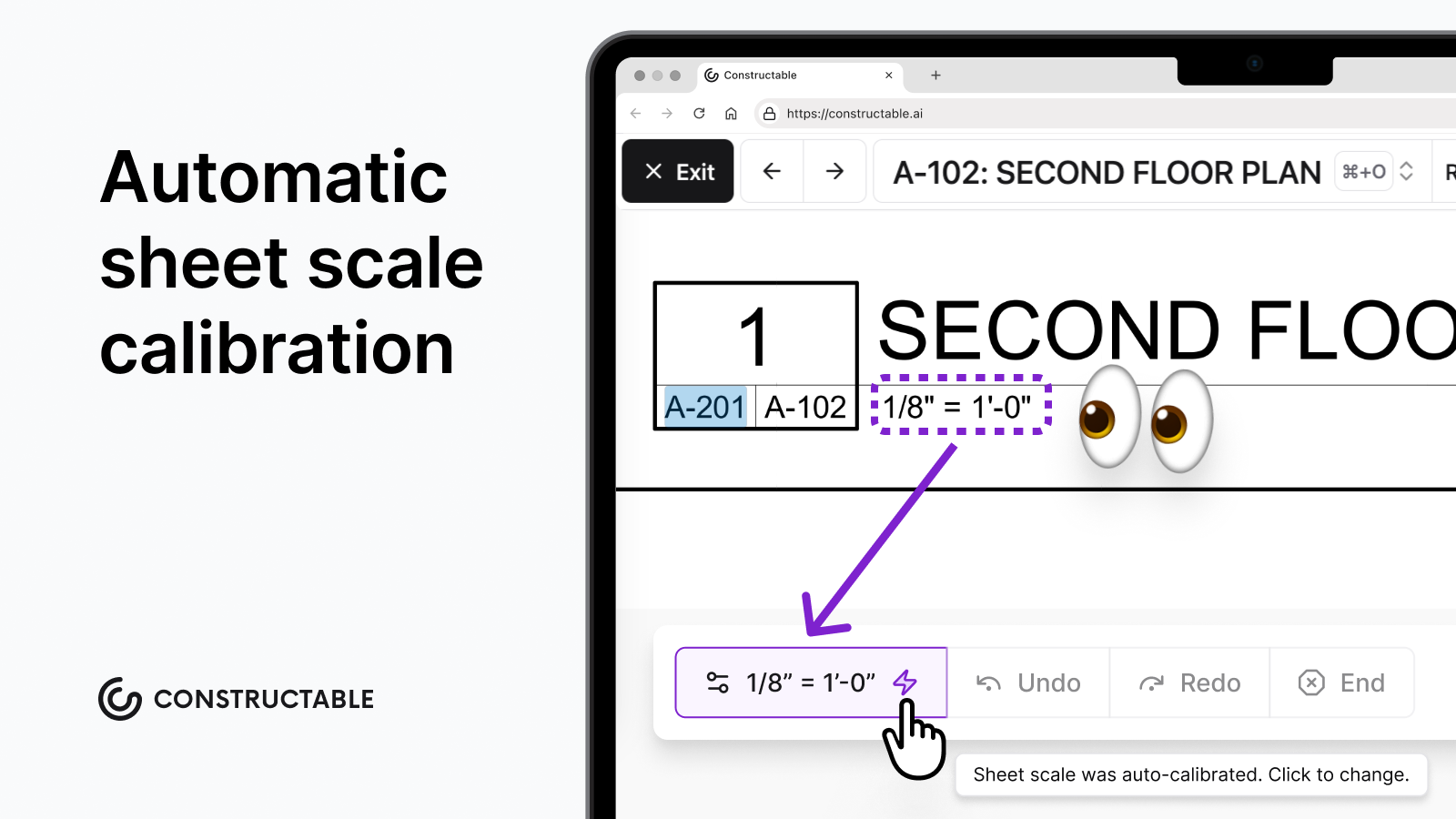
When you open a drawing and measure something, our AI has already read the page scale. No calibration step. No hunting for the scale bar. You measure, you get the right number.
Our Autofill from Description auto-populates title, location, and trade from a detailed description using AI. Say or type what needs fixing, and the system pulls out the location, trade, and work item. Saves the retyping.
Daily logs pull hourly weather data using your project's zip code. Temperature, wind, and precipitation are already there when you open the log.
When you close an RFI, AI drafts the distribution message. You edit it if needed, or just send it.
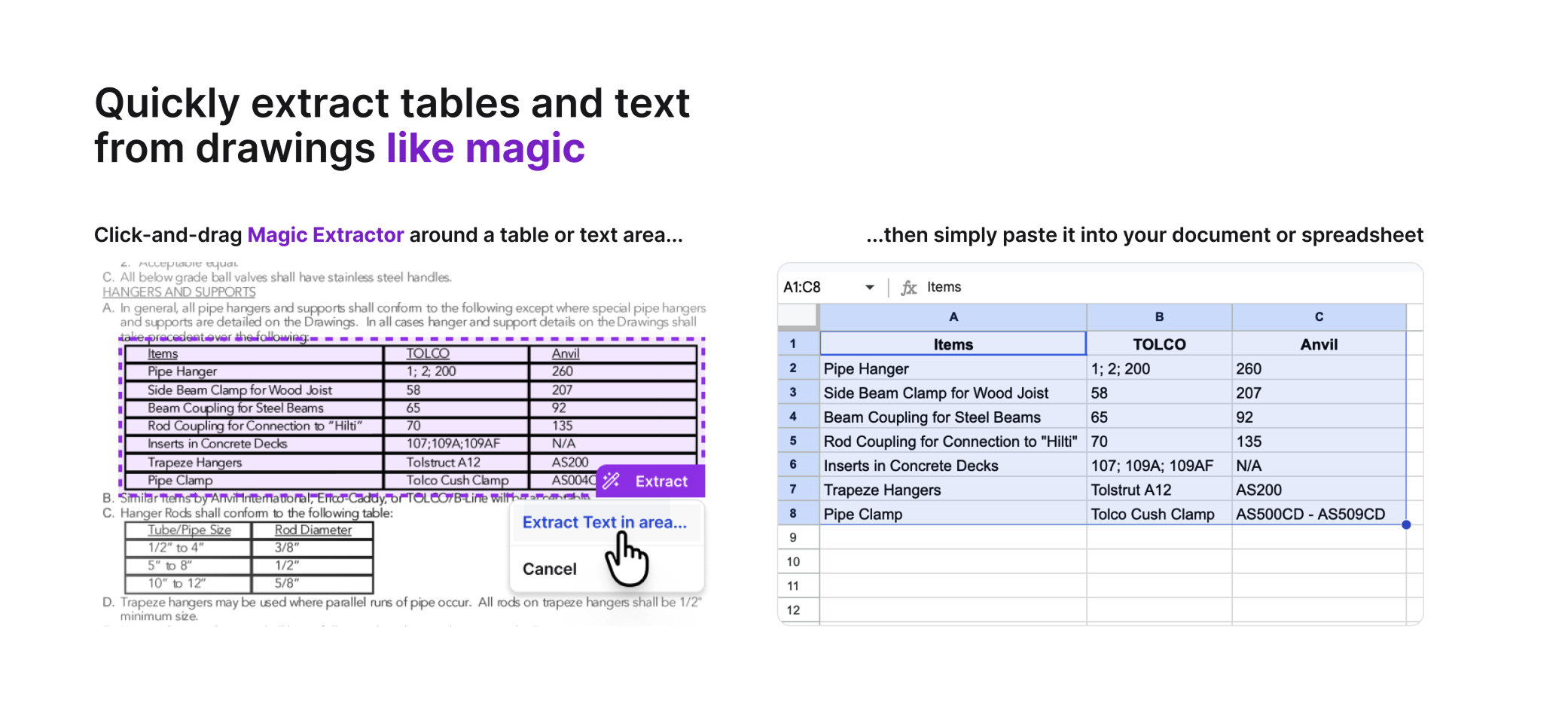
The Magic Extractor tool reads text and tables directly off of plan sheets so you can easily copy-paste instead of having to transcribe it all.
Two-way sync with QuickBooks Online and Sage Intacct keeps your financial data connected without duplicate entry.
None of this requires opening a separate AI panel or changing how you work. You're managing drawings, tracking RFIs, and logging jobsite activity the same way you always do. AI just removes the repetitive parts that slow you down.
Final Thoughts on AI Construction Management Tools
The best AI for construction management doesn't add steps to your workflow; it removes them. Your project managers need answers in seconds, not features they'll ignore. When AI reads your documents automatically, answers questions in plain language, and works where you already are, your team actually uses it. Constructable was built to remove friction from the work you're already doing, so you can find answers faster and keep your field teams on schedule.
FAQs
How does AI in construction software actually save time versus just adding another tool to learn?
Real AI removes steps instead of adding them: it reads drawing scales automatically while you measure, searches across all your documents at once instead of five separate searches, and fills in weather data before you open your daily log. You work the same way you always have; the repetitive parts just happen faster.
What's the difference between bolted-on AI and built-in AI in project management software?
Bolted-on AI lives in a separate chat box or tab you have to remember to use. Built-in AI works where you already are: reading drawings while you're creating an RFI, drafting distribution messages when you close one, pulling text from plan sheets while you're reviewing them. One adds a step, the other removes one.
When should a mid-size contractor consider switching from enterprise construction software?
When per-user pricing limits who you can add to projects, when your team avoids using the system because it takes too many clicks, or when you're paying for modules you never touch. If software friction is delaying decisions or your field teams are reverting to texts and emails, the tool isn't working.
Can construction management software actually reduce project delays, or is it just better at documenting them?
Software reduces delays by making finding answers faster than waiting: when your PM gets the spec details in 30 seconds instead of 30 minutes, when RFIs connect directly to drawing sheets so context is immediate, when search works across everything so you stop asking around. Documentation without speed just creates better records of the same problems.
What features matter most in AI construction software for teams who aren't "techy"?
Features that work without setup: automatic revision tracking on drawings, search that reads all document types at once, measurement tools that detect scale automatically, and quality lists that autofill from plain descriptions. The best AI for construction teams is the kind you don't have to think about using.