Real‑time project cost and commitment visibility in Constructable
How to keep your team aligned on evolving project costs—from change events and change orders to the full budget report that stays in sync.
Constructable is built for teams who can’t afford to learn about budget problems at the end of the month.
Why real‑time cost and commitment visibility matters
On most projects, cost visibility often lags behind reality. Change events get discussed via email, change order contracts live in Docusign, and budgets live in a spreadsheet. Managers see a static budget report that never quite matches what’s actually been executed or invoiced by accounting.
The result is a constant worry: “Do the numbers I have still reflect what’s really happening on the ground?”
Constructable takes a different approach. Your financial data is structured, live, and connected:
- The prime contract defines your revenue side.
- Vendor commitments and purchase orders define your cost side.
- Change events and change orders move money between “planned” and “executed.”
- A full Budget report rolls everything together—projected vs actual, cost vs revenue, and over/under by cost code.
All of this is available through a focused set of Financial Tools: Budget, Prime Contract, Commitments, Change Events, Invoices, and Non-Committed Costs.
Prime contract and revenue: a live picture of what you’re earning
At the top of the revenue stack is the Prime Contract. In Constructable, that’s just a special case of a Commitment where the counterparty is the owner:
- The Prime Contract page gives you a full view of:
- Contract number and date,
- Prime contract name,
- Status (Draft, Out for Signing, Fully Executed, etc.),
- Default retention rate for new line items,
- Contract document attachments.
- The Prime Contract’s Schedule of Values (SOV) is managed in the same way as vendor SOVs, but flagged as prime so the system knows these dollars live on the revenue side.
- Prime change orders (P‑COs) are treated as first‑class ChangeOrder records tied back to the prime commitment.
When you look at the Budget report, the prime side shows up as:
- Prime SOVs (base contract),
- Prime COs (executed change orders),
- Pending Prime COs (approved but not fully executed yet),
- Actual Revenue (what’s been invoiced against those SOV and CO line items).
That’s your real‑time view of projected vs actual revenue, by cost code.
Vendor commitments: where cost really lives
On the cost side, Constructable models every subcontract or purchase order as a Commitment:
- Each commitment tracks:
- Company (sub, vendor, or owner),
- Contract number and date,
- Status (Draft → Under Revision → Fully Executed, etc.),
- Default retention,
- Bill To / Ship To / delivery dates (for purchase orders),
- Contract documents and attachments.
- The commitment’s SOV line items form the base contract amount.
- Executed change orders against that commitment are stored as ChangeOrder records with their own line items.
- Together, these give you:
- Original Contract Amount (base SOV),
- Executed Change Orders Amount,
- Revised Contract Amount (original + executed COs),
- Invoiced to Date against all those line items,
- Contract Balance and Completion %.
All of this is continuously calculated as new SOV line items, change orders, and invoice submissions come in.
The Commitments index: a bird’s‑eye view of trade partner progress
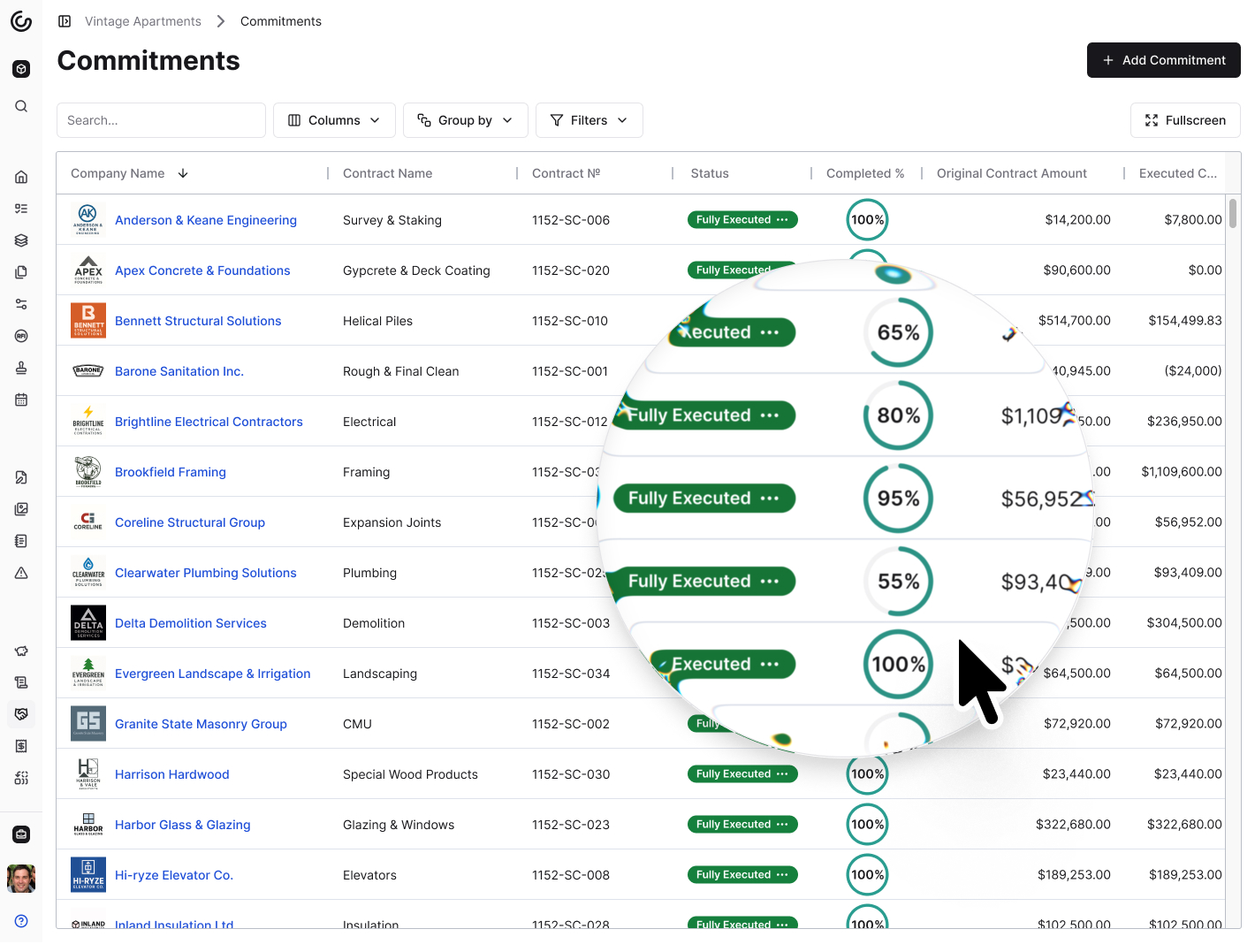
For day‑to‑day management, the Commitments index page is where project managers get a real‑time snapshot of vendor cost:
- A data‑grid style view shows one row per vendor commitment (excluding the prime), with columns for:
- Company (with logo and link),
- Contract Name and Contract Number,
- Status (with a visual badge),
- Completed % (based on approved invoicing vs revised contract amount),
- Original Contract Amount,
- Executed Change Orders Amount,
- Revised Contract Amount,
- Contract Balance.
- A handy search bar lets you quickly pull up commitments by company or contract name.
- You can export the grid to PDF with one click for sharing or offline review.
From this single screen you can explore the data and answer questions like:
- “How far along are we with Electrical vs HVAC?”
- “Which subs have most of their contract still unbilled?”
- “Where are we carrying the most executed change order exposure?”
If you need details, clicking the company takes you straight to their detailed Commitment page.
Commitment details: contract, SOV, invoices, and markups
Inside a specific Commitment, Constructable gives you a structured view of all the moving parts:
- Summary: high‑level contract value, revised amount, invoiced to date, and remaining balance.
- Contract:
- Company and contract metadata,
- Status (with an editable status flow when appropriate),
- Default retention rate,
- For prime commitments, a Change Order Markup section that shows markup rules and cost codes used for markup line items.
- Invoices: all invoice submissions against this commitment, tied back to SOV and change order line items.
- SOV: the breakdown of contract value, including which lines came from base scope vs which came from change orders.
Because every commitment is its own financial object, the system can always recompute revised amounts, balances, and completion percentages as soon as anything is changed by someone on the team.
Change events and change orders: tracking cost as scope evolves
Real projects almost never follow the original scope and budget exactly. Constructable’s Change Events and Change Orders are designed to show how cost evolves over time.
Change Events: the front door of scope change
The Change Events index is where new potential scope changes are captured and evaluated:
- Each change event has:
- A title and description,
- Links to related entities (e.g., RFIs, Topics, or other issues),
- One or more Change Orders associated with it, or none yet if it’s still being priced.
- The index uses a grid grouped by:
- Change Event (default),
- Company (for the related change orders),
- Status (of the change orders).
- Notification indicators show where there’s new activity on either the event or its related change orders.
From this view, managers can quickly see:
- Which change events have not yet turned into formal change orders,
- Which companies are impacted by each event,
- The status and total amount of each CO tied back to the event.
Change Orders: from draft to fully executed
Each ChangeOrder tracks the life cycle of a change:
- Status flow: Draft → Out for Signing → Ready to Countersign → Fully Executed, with Void as an off‑ramp.
- Line items with:
- Cost codes, cost types, sub‑project associations,
- Retention rates and amounts in cents,
- Relationships back into SOV line items for invoicing and progress tracking.
- Attachments (plans, backup, photos) with support for combined PDFs that include both the main CO document and attachment cover sheets.
The Change Order detail page shows:
- Company and commitment this CO belongs to,
- Status and executed date (with tools for editing executed dates when needed),
- A Line Items block that breaks down the dollars by cost code,
- Integration with e‑signing (sending for signing, cancelling in‑flight signing, marking status transitions).
Once a change order is executed:
- Its line items flow into the Budget report as part of Prime COs or Vendor COs (depending on whether they’re on the prime side or vendor side).
- Its value flows into the related Commitment as part of the Executed Change Orders Amount, updating the Revised Contract Amount and Contract Balance in real time.
Change Orders Report: detailed tracking by cost code and billing
For finance teams that want to go deeper, the Change Orders Report breaks CO value down by cost code and line item, with:
- Grouping by:
- Change Order,
- Company,
- Status,
- (Optionally) Sub‑project.
- Columns for:
- Amount per CO line item,
- Previous billing,
- Invoiced to date,
- Work vs materials (if enabled),
- Progress %,
- Retention %.
This is where you can ask and answer questions like:
- “How much of our approved CO value have we actually billed?”
- “Which COs are fully executed but under‑billed?”
- “Which vendors are still holding a lot of CO backlog on certain codes?”
Constructable also has a Non-Committed Costs tool specifically for budgeting and tracking project expenses which don't belong to a commitment or purchase order. Typically these are costs associated with general conditions, or things like home depot runs. We'll cover this in a future blog post.
The Budget report: one place to see revenue vs cost vs forecast
The Budget report is where everything comes together. For each cost code (plus general conditions and non-committed cost lines), Constructable builds a row that combines:
- Prime (Revenue) side:
- Prime SOVs,
- Prime Change Orders,
- Pending Prime Change Orders,
- Actual Revenue (invoiced to date),
- Revenue Remaining,
- Revenue % Complete.
- Cost side:
- Vendor SOVs,
- Vendor Change Orders,
- Pending Vendor Change Orders,
- Expense Budget vs Actuals,
- Projected Costs,
- Actual Costs (vendor invoices + general conditions),
- Cost Remaining,
- Forecast to Complete,
- Cost % Complete.
- Over/Under:
- Projected Revenue minus Projected Costs (with overrides factored in).
You can group and filter by:
- Cost Code,
- Source (Prime SOV, Vendor SOV, Change Orders, Expense Budget, etc.),
- Or Cost Code + Source together.
Forecast overrides for more realistic projections
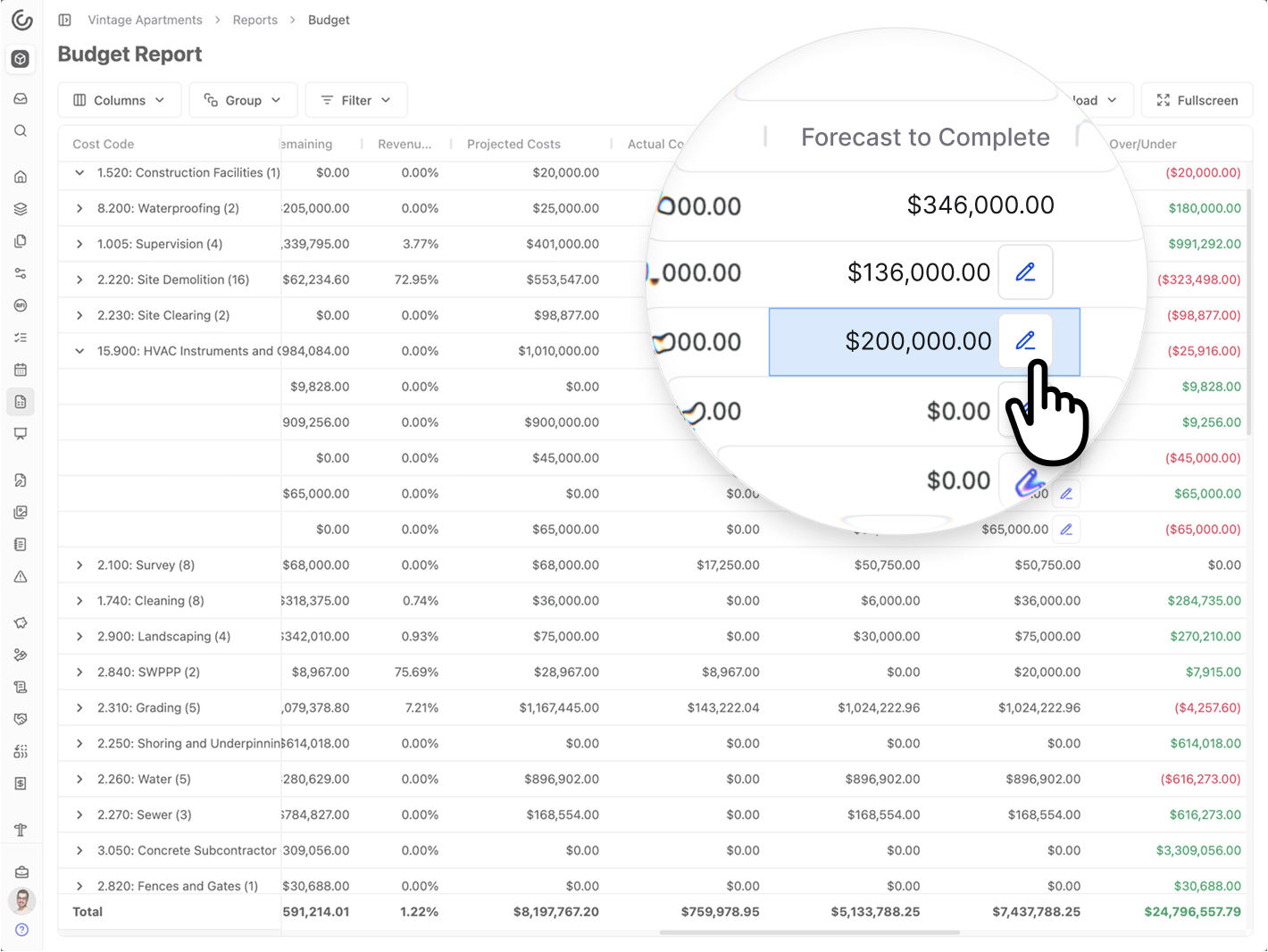
Constructable recognizes that math alone doesn’t always capture reality, so the Budget report supports Forecast to Complete overrides:
- For prime SOV and general conditions lines, you can open an Override sheet.
- Instead of blindly taking “Projected Costs – Actual Costs” as the remaining forecast, you can:
- Enter your own forecast amount for that line, and
- Let the system recompute Over/Under and other metrics using your override.
- Overridden lines are clearly marked, so you can distinguish between “purely calculated” and “manager‑adjusted” values.
This gives project teams a way to blend structured data (SOVs, COs, invoices) with real‑world judgment about where costs are actually likely to land.
Financial Tools that stay connected and up to date
All of these pieces—Prime Contract, Commitments, Change Events, Change Orders, Budget, Invoices, and Non-Committed Costs—are accessible from the Financial Tools section of the sidebar:
- Budget for the full revenue vs cost picture.
- Invoices for tracking billing activity by period.
- Prime Contract for the owner‑side agreement.
- Commitments for subs and vendors.
- Change Events for in‑flight scope changes.
- Non-Committed Costs for non‑commitment costs and budgets.
Because Constructable is built on an offline‑first sync engine, these views reflect changes as soon as they’re made:
- A superintendent approves an invoice submission in the field → the Commitment’s Invoiced to Date and Completion % update immediately.
- A PM executes a change order → the Commitment’s Revised Contract Amount, the Budget report, and the Change Orders report all incorporate the new value.
- Finance adjusts a forecast override on a key cost code → the Over/Under and Forecast to Complete numbers update across the Budget report.
You don’t have to wait for a monthly cost report to know where you stand; the live app is the report.
Seeing the whole cost story in motion
Real‑time cost and commitment visibility isn’t just about having more dashboards; it’s about having one consistent financial story that everyone can trust:
- Field teams log time, progress, and events.
- PMs create and execute commitments and change orders.
- Finance tracks invoicing, retention, and forecasts.
- Leadership reviews a single Budget report that actually matches what’s happening.
Constructable’s financial tools are designed to keep those perspectives connected—so when something changes in the field or in a contract, everyone's cost picture changes with it.
If you’d like to see how this works on a real project, we’d be happy to walk through your current cost tracking process and show how Constructable can help you get ahead of issues instead of reacting to them after the fact. Sign up for a demo to book a no-pressure meeting with our team.