The Straight Shooter's Guide to Drawing Management Software (March 2026)
Learn how drawing management software tracks revisions, prevents rework, and keeps field teams on current plans. Updated for March 2026 with real solutions.
When your field team can't trust the plans in their hands because revised sheets keep showing up in random emails, nobody's sure whether the set in the trailer matches what was uploaded yesterday, and questions about beam connections are floating around in text threads instead of pinned to the actual drawings, you've got a drawing management problem. Good drawing management software fixes this by automatically tracking revisions, connecting RFIs and markups directly to sheet locations, and keeping plans accessible on phones without cell service. The best tools work quietly in the background, so your team never has to think about version control. The alternative is paying for rework when someone builds off outdated plans or can't find the answer they need.
TLDR:
- Good drawing management software keeps your team working from current plans and stops rework caused by outdated sheets
- Version control tracks revisions automatically, so field teams always see the latest drawings without hunting through emails
- RFIs and markups should pin directly to sheet locations, keeping questions and answers tied to the exact detail that matters
- Mobile access with offline viewing lets supers reference and markup plans from the jobsite without cell service
- Constructable connects drawings to RFIs, daily logs, and quality lists in one system with flat-fee pricing and no per-user charges
What Drawing Management Software Actually Does (And Why You Need It)
Drawing management software is where your plans live, are updated, and are shared with everyone who needs them. Instead of drawings scattered across email, shared drives, and job trailers, you get one spot where the current set is always available.
The core job is version control. When an architect issues revised sheets, the system tracks what changed, archives old versions, and makes sure your supers and subs see the latest drawings. No more building off Sheet A-201 Rev 2 when Rev 3 came out last Tuesday.
Good drawing management systems let teams mark up plans, pin questions to specific details, and keep conversations tied to the sheets themselves. That context matters when someone asks about a door swing six weeks later.
The need is simple: rework is expensive, and most rework starts with someone looking at the wrong version of a plan.
The Real Cost of Poor Drawing Control
When your project team spends 35% of their time hunting down project information, that's not a filing problem. That's a payroll problem. Your PMs and supers are billing hours to find answers that should take seconds.
The costs stack up fast from there. Poor RFI management alone can cost up to $859,000 on a single project when questions sit unanswered because the right drawing version isn't clear. Subs stand around. Schedules slip. Owners get cranky.
Then there's the stuff that's harder to track. Change orders that wouldn't exist if everyone had been looking at the same sheet. Callbacks after closeout. The slow bleed of trust when your field guys stop believing the plans in their hands are up to date.
Bad drawing control doesn't create chaos; it creates costs you can't bill back.
Key Features That Separate Tools From Time Wasters
Automatic version control tracks revisions without relying on someone remembering to rename files. The software should recognize when Sheet A-304 Rev 3 replaces Rev 2 and display the latest version to your team without requiring you to dig through folders.
Drawing comparison tools matter when you're hunting for what changed between revisions. Side-by-side views or overlay modes that flag differences beat staring at two monitors trying to spot updates.
Mobile access means superintendents and foremen can work from their trucks. Plans need to load offline when cell service is unavailable, and the interface needs to work on a phone screen in direct sunlight.
Look for markup tools that let anyone circle a detail, drop a pin, and ask a question directly on the sheet. Those annotations should connect to RFIs and quality lists so context stays intact when conversations shift to email.
| Feature | Why It Matters | What to Look For |
|---|---|---|
| Automatic Version Control | Prevents building from outdated plans | System recognizes sheet numbers and revision codes, archives old versions automatically, displays latest by default |
| Drawing Comparison | Spots changes between revisions fast | Side-by-side view, overlay mode with color split or difference detection |
| Mobile + Offline Access | Field teams work without cell service | Full drawing viewer on phones, offline loading, markup sync when reconnected |
| Pin-Based Markups | Keeps questions tied to exact locations | Drop pins on sheets, attach photos, link directly to RFIs |
How Drawing Management Connects to RFIs
RFIs reference specific details on specific sheets. When those workflows live separately from your drawings, everyone wastes time translating between systems.
When a super has a question about a beam connection on Sheet S-301, that RFI should pin to the exact spot on the plan. The question, responses, and any follow-up discussion stay tied to that exact detail.
This setup cuts out the endless "see attached" emails where someone screenshots a plan, circles something in red, and hopes the recipient can figure out which revision they're looking at. When the RFI lives on the drawing itself, the context is permanent.
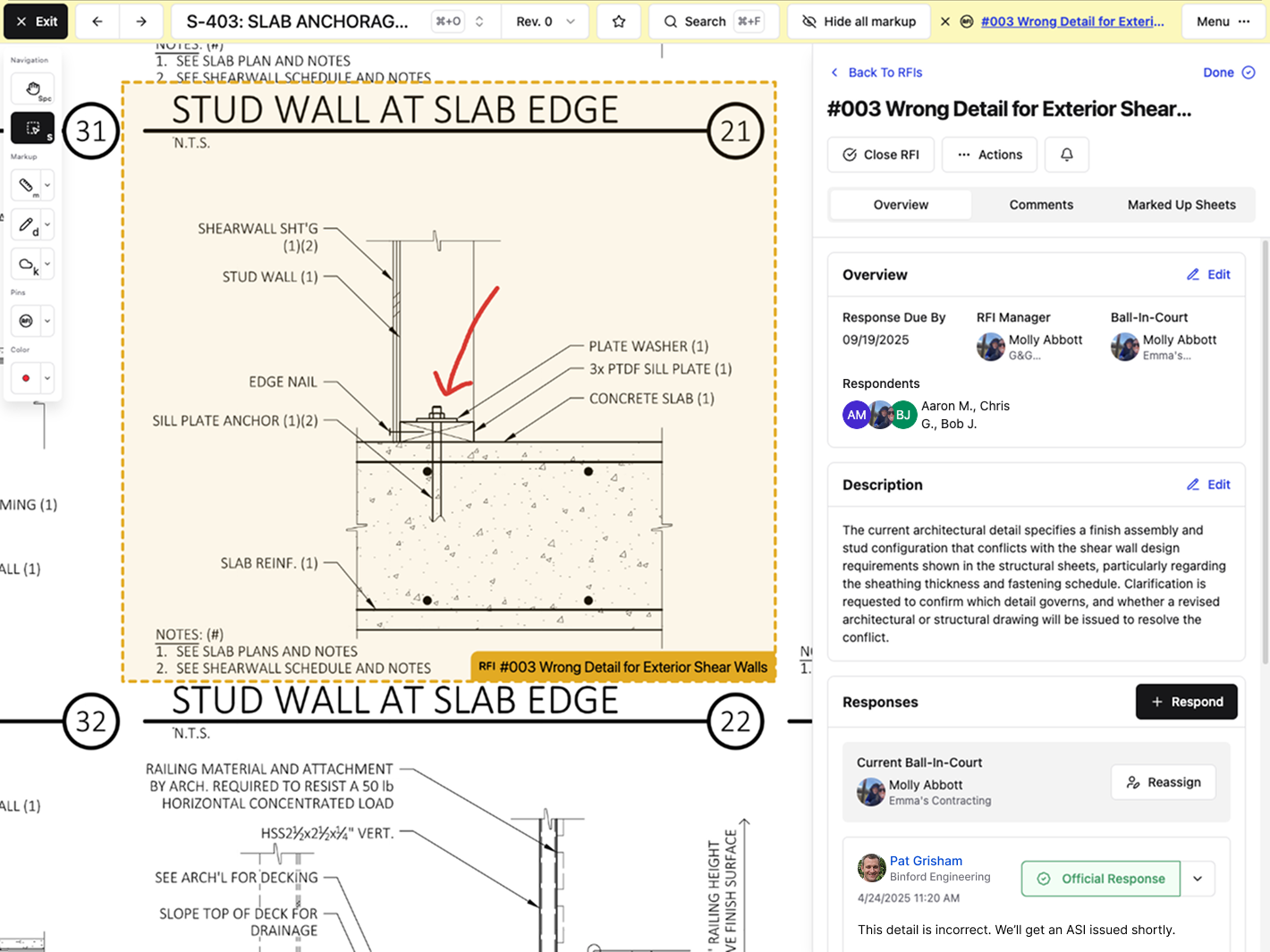
Projects generate hundreds of RFIs. Jumping between a drawing viewer, an RFI log, and an email thread to answer one question isn't a workflow. Keeping these tied together means fewer missed details and faster answers when someone needs to trace a decision back to the source.
Version Control: The Difference Between Building Right and Building Twice
Automatic version control stops the nightmare where your crew breaks out formwork based on plans that changed three days ago. The fix isn't procedural. It's automatic.
When revised sheets get uploaded, the system scans for sheet numbers and recognizes that S-304 Rev 4 replaces S-304 Rev 3. Old versions are archived automatically. The latest revision is displayed by default. Your field teams open the drawing set and see current plans without wondering if they missed an email.
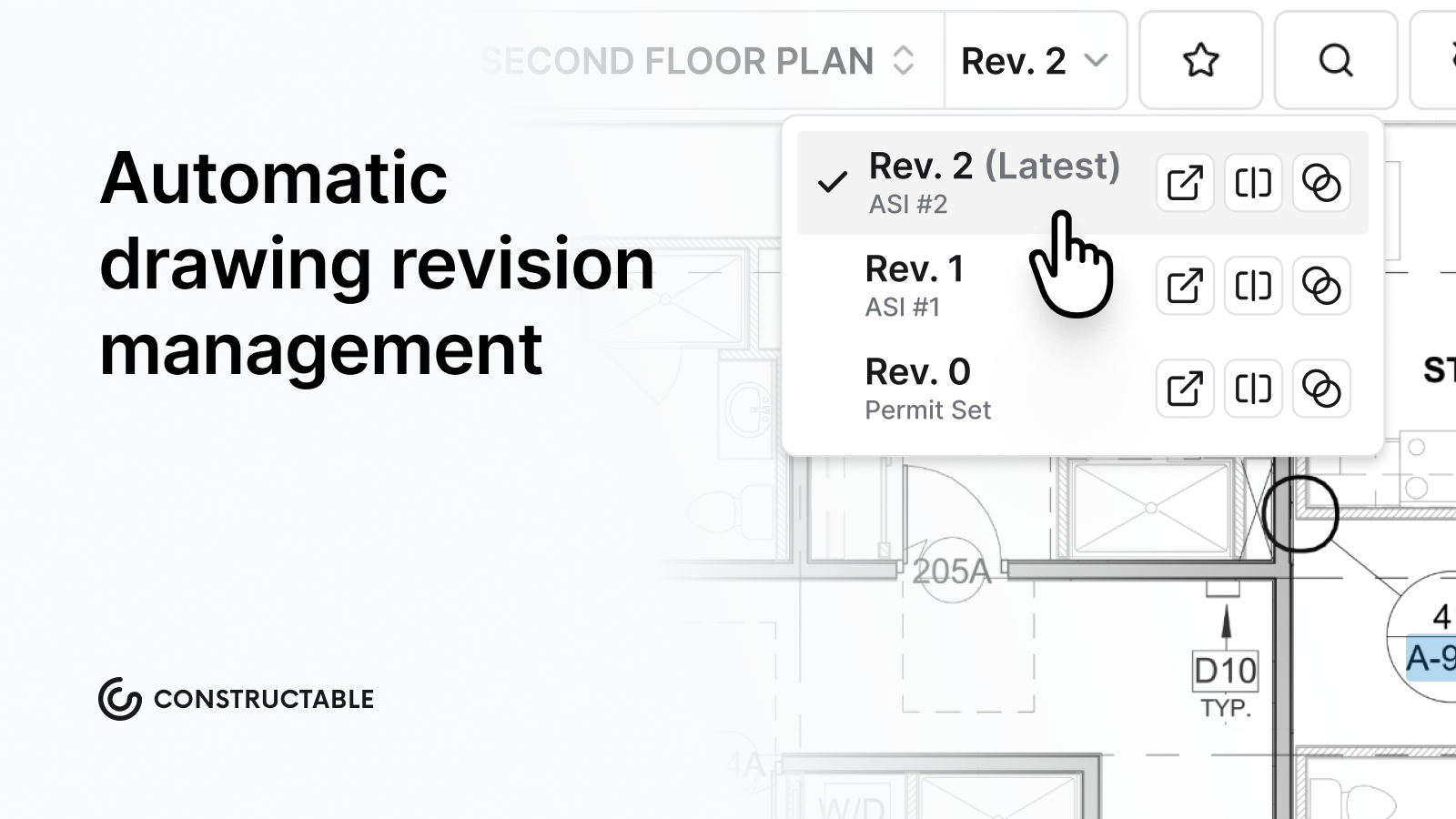
The prevention happens before anyone swings a hammer. A super pulls up foundation plans on their phone and sees Rev 5 with the updated footing detail. Not Rev 4 from last week. Not the version someone printed and left in the trailer. The system always puts the right sheet in front of them.
When someone does need to reference an older revision, archived versions remain accessible but are clearly marked as outdated, so nobody confuses last month's design with this week's buildable plans.
Mobile Access for Field Teams Who Don't Live at a Desk
Your supers aren't answering RFIs from a conference room. They're standing in front of a wall that doesn't match the plans, and they need answers before the next trade shows up.
Mobile access means the drawing viewer works on a phone. Full plans, not dumbed-down versions. Zoom, pan, measure, and mark up sheets from the same device they use to text their subs.
Offline access matters more. Cell service dies inside concrete structures and drops completely on sites outside town. When your field team opens a drawing set, those sheets should load without hunting for a signal. Markups and pins they create offline sync back once they're connected again.
Pinning issues directly to plans from mobile keeps questions tied to location. A foreman spots a conflict, drops a pin on the sheet, adds a photo, and fires off the RFI without heading back to the trailer.
What to Look for When Shopping for Drawing Software
Start with implementation time. If onboarding takes months and requires consultants, you'll burn budget before anyone opens a drawing. Look for systems that promise weeks, not quarters.
Pricing matters more than the demo. Per-user fees punish growth and create surprise bills when you add subs and consultants. Flat-fee models let you scale without renegotiating every expansion.
Storage caps and file size limits show up after you commit. Make sure the system handles unlimited files without throttling or upcharges.
Integration with QuickBooks or Sage Intacct saves double-entry. If your drawing tool doesn't integrate with your accounting system, someone will have to retype invoices.
Why AI-Powered Drawing Tools Matter (Without the Buzzword Nonsense)
AI in drawing software matters when it saves time on tasks you'd rather not do manually. Reading sheet numbers off 200 PDFs, hunting for a detail buried in last month's submittal, or calibrating measurements every time you open a plan.
AI-powered systems can automatically scan uploaded sheets and extract sheet numbers, disciplines, and titles. You review and confirm the details before publishing, but the tedious data entry is handled for you.
Search works across all project documents. Type "roof drain detail" and get results pinned to the exact sheets and conversations where it appears. That beats scrolling through 40 sheets hoping you'll recognize the right elevation. Ask questions in plain language and get answers from anywhere in your project—drawings, photos, documents, daily logs—with every result linking back to the primary source.
Measurement tools detect scale automatically by reading the scale bar on the drawing itself. Manual calibration is available when needed, but most of the time you just measure and move on.
The value isn't the AI itself. It's getting answers in seconds instead of minutes and skipping tedious tasks that slow you down.
How Constructable Handles Drawing Management From Bidding to Closeout
In Constructable, drawings aren't files you reference; they're where work happens. RFIs, quality list items, and topics are pinned directly to sheet locations, so every question and conversation stays tied to the plan itself.
When you upload a drawing set to our construction drawing management software, AI automatically scans each sheet and pulls the sheet number, discipline, and title. You review and confirm before publishing, but the tedious data entry is already done. When revised sheets come in, the system tracks them as new revisions under the same sheet number and shows the latest version by default. All previous revisions stay archived and accessible, clearly marked so nobody confuses old plans with current ones.
Split view in our construction drawing markup software lets you compare any two sheets side by side with optional lock-and-sync navigation. Overlay mode gives you three ways to spot differences: color split, ghost overlay, or difference view.
Photos from daily logs, pins from RFIs, and markup topics all reference back to specific sheets. When someone needs to trace a decision from three weeks ago, the thread is intact.
Final Thoughts on Drawing Control That Actually Works
You need construction drawing software that automatically tracks revisions and keeps your field teams up to date with the current plans. The system should work on phones, load without cell service, and connect RFIs directly to the sheets where questions come up. Get that right, and your project moves faster because nobody's building off outdated drawings or waiting around for answers.
FAQ
How does Constructable prevent rework from outdated plans?
The software automatically tracks revisions by recognizing when a new version of a sheet replaces an older one, then displays the latest revision by default while archiving previous versions. Your field teams always see the current plans without having to wonder if they missed an update email.
Can I compare drawing revisions to see exactly what changed?
Yes. Split view lets you place any two sheets side by side, and overlay mode shows differences using color split, ghost overlay, or difference view so you can spot changes between revisions without manually comparing details across monitors.
Do drawings work offline when cell service drops on the jobsite?
Drawings load and stay accessible without cell service. Your supers and foremen can view plans, add markups, and pin questions from their phones inside concrete structures or on remote sites, then sync changes back once they reconnect.
How do RFIs stay connected to the actual drawing details they reference?
RFIs are pinned directly to specific locations on drawing sheets. When someone asks about a beam connection on Sheet S-301, that question, any photos, and all responses stay attached to the exact spot on the plan so context doesn't get lost across email threads.
What happens to old drawing versions after new revisions get uploaded?
Previous revisions are automatically archived and remain accessible when you need to reference them, but they're clearly marked as outdated, so nobody confuses last month's design with current buildable plans.