Run Construction Projects in ChatGPT — Here's How (July 2026)
July 2026 guide to managing construction projects in ChatGPT, covering project setup, file uploads, MCP live data connections, and prompts that actually work on the job.
A lot of construction teams are using ChatGPT for one-off tasks and calling it a day. That works fine until you realize you're copying and pasting the same context into every new session. The better move is to use ChatGPT to manage construction projects from a proper workspace, so your project files stay loaded and every answer actually reflects your job.
TLDR:
-
ChatGPT handles drafting, summarizing, and templating well; it guesses when you ask about your actual project without feeding it context.
-
Set up a ChatGPT Project with up to 40 uploaded files so your specs, RFI log, and contract stay in context across sessions.
-
MCP connects ChatGPT to a live project system, so answers on overdue RFIs or submittal status reflect current records, not a stale export.
-
Keep bid sheets, signed contracts, and cost data out of public sessions; Business and Enterprise plans exclude your inputs from model training by default.
-
Constructable centralizes drawings, RFIs, submittals, and daily logs in one connected system, giving ChatGPT and its native AI Answer Engine actual project data to pull from.
Why construction teams are turning to ChatGPT in 2026
Walk any jobsite trailer in 2026 and someone has a ChatGPT tab open. Maybe drafting an RFI response, maybe untangling a spec section, maybe summarizing a 40-page submittal nobody had time to read. The tool showed up before the strategy did.
The numbers explain the gap between hype and habit. A survey cited by ASCE found that only 27% of AEC professionals use AI in their daily work. Per AGC's annual survey, as reported by Bridgit, 61% of firms use or plan AI, up from 44% in 2024. Those two numbers are measuring different things: the first is individual daily use, the second counts any firm that has touched AI or intends to. Intent runs well ahead of practice.
So most teams are curious, a smaller group is building it into how they run projects, and almost everyone wants to know which use cases hold up once the demo ends. That is the real question for a PM in 2026. Not whether AI works, but where it earns a place in your day.
What ChatGPT can and cannot do in construction
The split is simpler than the hype suggests. ChatGPT is good at language work and pattern work. It struggles the moment a task depends on your actual project.
Here is the real breakdown:
| Handles well out of the box | Cannot do without extra setup |
|---|---|
| Drafting RFI responses, emails, and meeting recaps | Pull live data from your drawings, logs, or financials |
| Summarizing long spec sections into the parts that matter | Recall a sub's history or past performance on your jobs |
| Structuring repetitive templates like daily logs or submittal cover sheets | Cite current building codes reliably, since training data lags and varies by jurisdiction |
| Explaining dense contract language in plain terms | Track what changed on a sheet between two revisions |
The pattern is consistent. Give ChatGPT the text and it works. Ask it about your project without feeding it the context, and it guesses. Knowing which column a task lands in saves you from trusting an answer that sounds right and is built on nothing.
Setting up ChatGPT as a construction project workspace
A blank ChatGPT session forgets everything the moment you close the tab. A Project does not. ChatGPT's Projects feature now holds up to 40 uploaded files per project, so your specs, RFI log, contract, and meeting notes stay in context across every conversation inside that project.
Set it up once, and ChatGPT will answer your actual job questions instead of guessing from general training.
Here is how to configure one for a single project:
-
Create a new Project named for the job, like "Riverside Medical Office Buildout."
-
Upload documents ChatGPT reads well as text: spec sections, your RFI log, the prime contract, submittal registers, and recent meeting minutes. Drawings upload too, though it reads sheet text better than geometry.
-
Write project-level instructions naming the parties, delivery method, phase, and response format.
Refresh the files when the job moves.
Connecting live construction data to ChatGPT
Uploaded files are a snapshot. The moment your RFI log changes or a new revision lands, that snapshot goes stale. Model Context Protocol (MCP) closes that gap by allowing ChatGPT to query a connected system directly and pull current records the moment you ask.
Think of it as a live line between ChatGPT and the system where your project actually lives. Instead of reading a file you exported last Tuesday, ChatGPT reaches into the source and returns what is there right now.
What can move across that connection:
-
Documents and spec sections
-
RFIs and their current ball-in-court status
-
Drawings and revision history
-
Submittals and their review state
-
Daily logs and field activity
Ask "which RFIs are overdue on this job," and the answer reflects today's log, not a frozen copy.
High-value use cases for construction project managers
Once your project context is loaded, the payoff shows up in the documentation work that eats a PM's afternoon without moving the job forward. These are the tasks worth handing over:
-
Drafting RFI language that states the question, references the spec section, and proposes an interpretation.
-
Condensing long specification sections or addenda into the parts that change your scope.
-
Writing subcontractor follow-ups on overdue submittals or unconfirmed deliveries.
-
Turning raw field notes into a structured daily report summary.
-
Drafting change order narratives that tie the cost to the triggering event.
-
Building meeting agendas from your open RFI and submittal list.
-
Outlining a weekly toolbox talk around the trades on site that week.
ChatGPT prompts that work for construction teams
Specificity is the whole game. A prompt with bracketed job context beats a vague request every time, so fill the brackets before you hit enter.
-
RFI request: "Draft a formal RFI for [project], [trade], asking [question]. Reference [spec section] and propose an interpretation."
-
Subcontractor follow-up: "Write a follow-up to [sub] on [overdue submittal/delivery], due [date], firm but professional."
-
Two-week lookahead: "Summarize a two-week lookahead for [project] in [phase] from these notes: [paste]."
-
Client progress update: "Write a progress update for [owner] covering work completed, upcoming, and open items: [paste]."
-
Delay notice: "Draft a delay notice citing [cause], affected [scope], and schedule impact."
-
Coordination agenda: "Build a weekly coordination agenda for [trades on site] from these open items: [paste]."
-
Scope of work: "Write a scope section for [trade] on [project] covering [inclusions/exclusions]."
-
Risk summary: "Summarize current project risks for [project] from: [paste]."
-
Closeout feedback: "Draft a post-project feedback request for [party]."
Swap project name, contract parties, trade, and phase each time. That context is what turns generic text into something you can actually send.
Where ChatGPT falls short in construction
Some gaps stay open no matter how sharp your prompts get. They are built into what the tool is.
A session knows nothing about your job until you hand it the context. Close the tab and that context is gone. ChatGPT also has no line to your historical subcontractor records or real cost data, so it cannot tell you what a sub bid last spring or how a cost code actually ran.
The riskier limit is confidence. ChatGPT will produce a plausible answer on a spec interpretation or a code requirement and state it with full assurance, even when it is flat wrong. For a technical decision in the field, that combination of fluency and error is where teams get burned.
So treat it as a writing tool. It drafts and summarizes well. It does not replace field judgment, estimating expertise, or a system of record for your project documentation. For a broader look at what AI-powered construction software can do natively, that comparison covers the tools built for the jobsite.
Keeping construction data secure in ChatGPT
Construction firms guard their bids for a reason. The moment you paste a subcontractor bid sheet, a signed owner contract, or a project budget into a public AI session, you lose control of where that data sits and who could see it.
Keep these categories out of any public session without enterprise controls in place:
-
Proprietary cost data and internal margins
-
Signed contract terms and owner financial details
-
Confidential bid submissions from subs
The tier you run on changes the math. Free and Plus sessions may use your inputs to train future models unless you opt out. Check your account's Data Controls settings to confirm the current default for your plan, as OpenAI's policies update periodically. Business and Enterprise plans exclude your data from training by default and add admin controls over retention and access.
Set a written team policy before anyone gets creative. Name what can go into a public session, what stays in a Business or Enterprise account, and what never leaves your own system. One sentence each is enough, so long as everyone on the job has read it. For example: Public session: spec summaries and draft emails. Business account: RFI logs and submittals. Never: bid sheets, signed contracts, or cost data.
How Constructable connects to ChatGPT
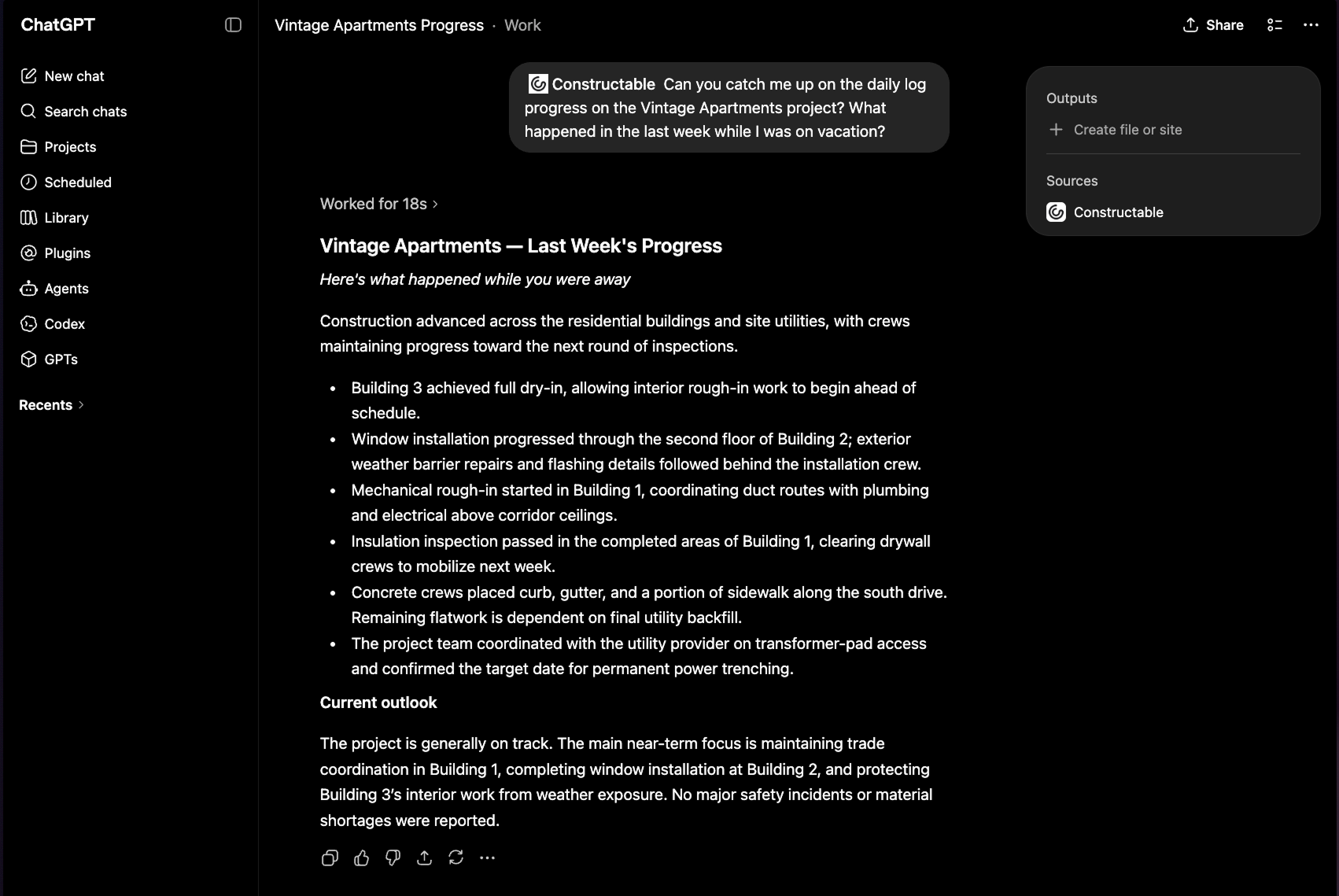
Everything that the earlier sections described works only when your project data is already centralized and structured. That is the gap Constructable closes. Your drawings, RFIs, submittals, photos, daily logs, and documents live in one connected system, and that data can connect to external AI tools, including ChatGPT. Ask a question in ChatGPT and get an answer drawn from your actual project records, not a guess.
We also run this search natively. The AI Answer Engine pulls answers from across your plans, documents, and log entries, and every answer links straight back to the source document, drawing, or log entry. You verify it in one click. No keyword digging, no hallucinated answers.
So the live connection MCP enables has a real place to reach into.
Here's how to connect ChatGPT to your project data in Constructable:
-
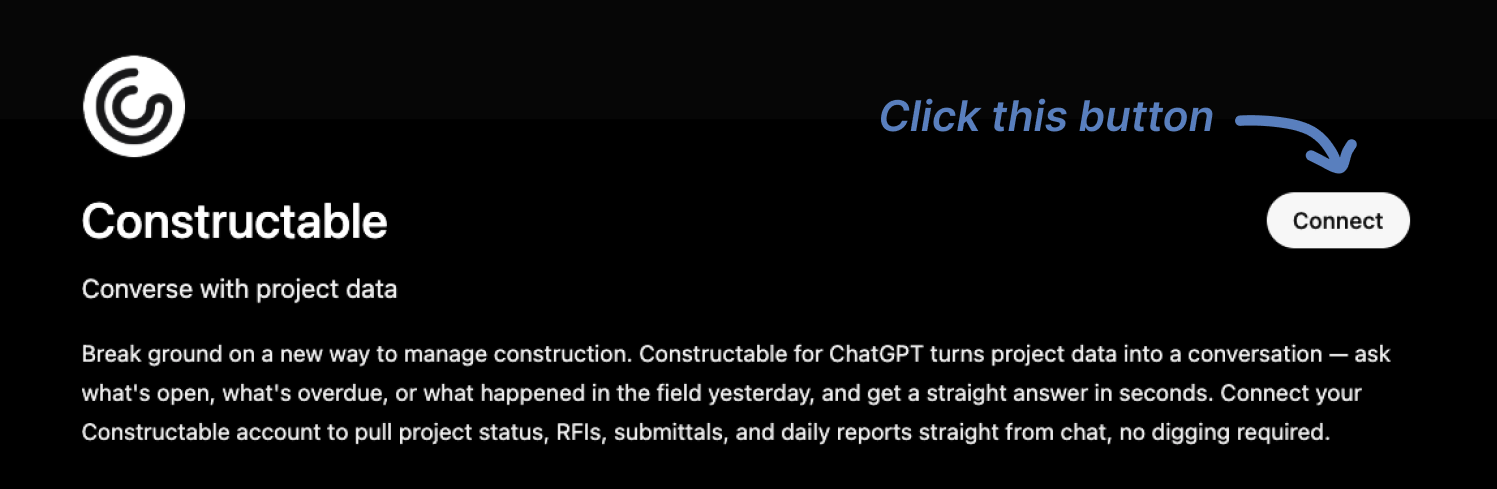
Go to our ChatGPT App listing at the following link: https://chatgpt.com/apps/constructable/asdk_app_6a10b761b5c081919958e281f32ff7e9
-
Click "Connect" and log in to your ChatGPT account if necessary
-
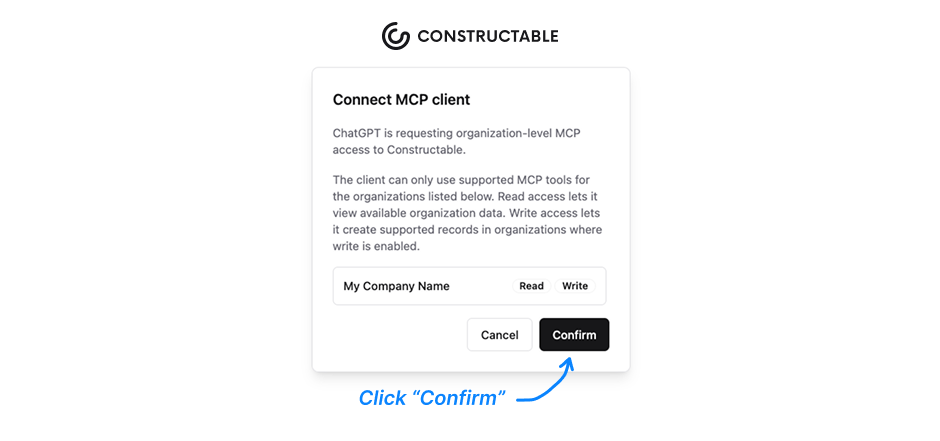
You'll then be redirected to Constructable. Log in if you haven't already, then click "Confirm" to grant access to ChatGPT.
-
Constructable will close and you should see a "Connection Successful" message in ChatGPT.
-
You can now click "Start Chat" and begin asking or prompting your Constructable from within ChatGPT!
Final thoughts on using ChatGPT to manage construction projects
The teams getting real value out of ChatGPT are not doing anything complicated. They load it with job context, use specific prompts, and hand off the documentation work that was eating up their afternoons. Keep your data organized, know which tasks belong in which column, and the tool earns its place in your day pretty quickly. If you want to see how live project data connects to AI answers, our team can walk you through it.
FAQ
What's the best way to use ChatGPT to manage construction projects without exposing sensitive data?
Use ChatGPT's Business or Enterprise plan for anything project-specific; those tiers exclude your inputs from model training by default and add admin controls. Keep proprietary cost data, signed contracts, and subcontractor bid submissions out of free or Plus sessions entirely, and write a short team policy before anyone starts experimenting.
Can I use ChatGPT to manage construction projects if my data lives across multiple disconnected tools?
You can get partial value (drafting RFIs, summarizing specs, writing follow-ups), but ChatGPT works best when your project data is already centralized. Without a connected system feeding it current records, you're pasting stale snapshots and ChatGPT is filling gaps with guesses instead of drawing from your actual job.
How do I set up a ChatGPT Project for a construction job?
Create a new Project named for the job, upload text-readable documents like spec sections, your RFI log, the prime contract, and recent meeting minutes, then write project-level instructions that name the parties, delivery method, and phase. Refresh the files whenever the job moves to a new phase or a major revision lands.
ChatGPT vs. a native AI Answer Engine for construction: which one actually works on the jobsite?
ChatGPT requires you to feed it context each time, and it goes stale the moment your files change, while a native Answer Engine built into your project system queries live records and links every answer back to the source document or drawing for one-click verification. For daily jobsite use where RFI status and drawing revisions change constantly, a live-connected system beats a manually updated ChatGPT Project.
When does connecting ChatGPT to live project data via MCP make sense?
MCP is worth setting up once your construction project data is centralized in a single system and you are asking questions often enough that stale uploaded files are slowing you down. A connected system like Constructable—where drawings, RFIs, submittals, and daily logs already live together—gives MCP a real source to pull from. If you are still pulling information from scattered tools, fixing the data fragmentation first will deliver more than any AI connection on top of it.