Best Punch List Software for GCs April 2026
Compare the best punch list software for general contractors in April 2026. Features, pricing, and real field adoption ratings for GCs managing closeout.
Closeout is where projects either finish clean or fall apart. A punch list that lives on a clipboard, in a spreadsheet, or scattered across email threads makes the final stretch harder than it needs to be. The right software changes that — items get logged in the field, assigned to the right trade, and tracked through completion without anyone having to chase updates.
We compared the top digital punch list tools available to general contractors today: how they handle drawing-linked items, whether subcontractors can actually use them without training, how they price as your team grows, and whether they connect to the rest of your project or sit in a silo. Your field team shouldn't need a manual to mark something incomplete, and your office shouldn't be hunting through email threads to know where closeout stands. We focused on tools that reflect how projects actually run, not how software companies think they should.
TLDR:
- Digital punch list software pins incomplete work and deficiencies directly to drawings and auto-assigns trades
- Constructable tracks quality items from day one through closeout, with AI autofill
- Flat pricing with unlimited users means subcontractors join without extra costs
- Best tools connect punch lists to RFIs, photos, and financials in one system
- Constructable unifies punch lists, drawings, and project docs with under 21-day onboarding
What Is Punch List Software?
Punch list software is a digital tool that tracks and closes out deficiencies before project handover. Instead of walking the site with a clipboard, you capture incomplete work and defects in an app, assign them to the right trade, and follow through until everything is done.
The traditional approach burns hours. You're writing notes on paper, transcribing them later, emailing back and forth, and hoping nothing falls through the cracks. By the time you circle back to check if an item is fixed, the responsible subcontractor is already off-site.
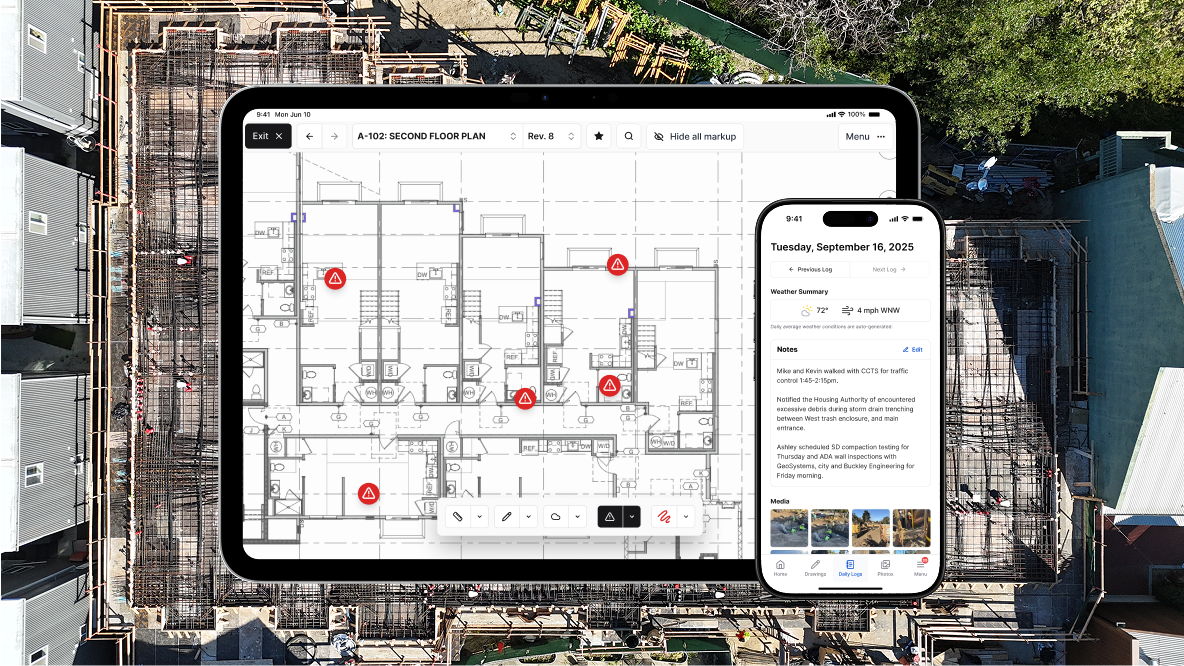
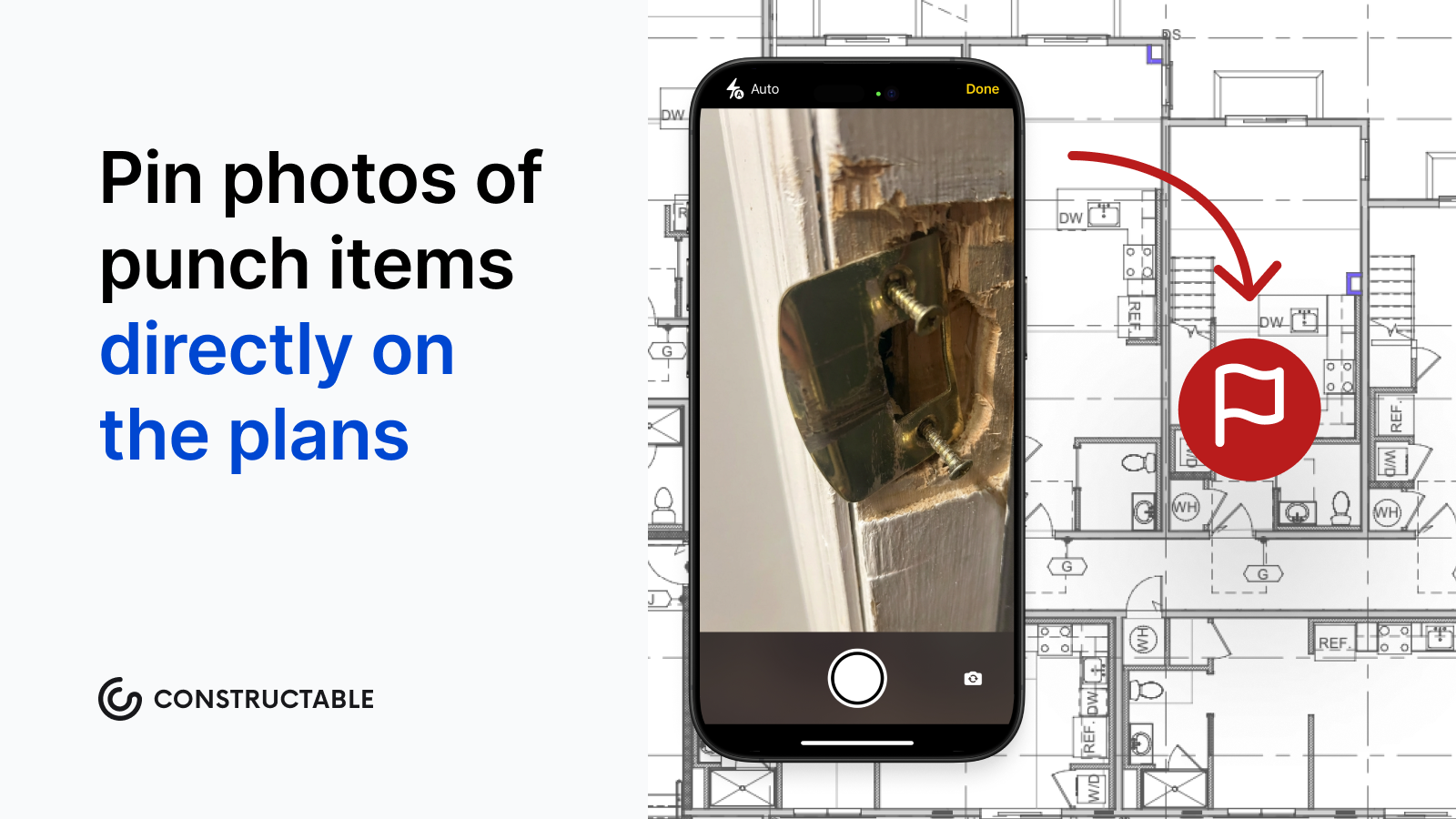
Digital punch list tools centralize that workflow. You photograph the issue, pin it to a drawing location, assign it to the trade responsible, and get notified when it's marked complete. No chasing people down or wondering what's still open. You know where the project stands, and closeout happens on schedule.
How We Ranked Punch List Software
We looked at what actually matters when you're trying to close out a project. Can your crew use it without a training manual? Does it work offline when cell service drops? Can you pin items directly to drawings so there's no confusion about location? Does it connect to the rest of your project documentation, or does it live in a silo?
We also considered whether the software respects how closeout really happens. Punch lists don't exist in isolation. They're tied to drawings, RFIs, photos, and daily coordination with multiple trades. Tools that treat punch as a standalone checklist miss the point.
The best solutions reduce friction instead of adding to it. They let you move fast in the field, keep everyone on the same page, and help you hand over the project without the usual chaos.
Best Overall Punch List Software: Constructable
Constructable gives you punch lists that work the way your projects actually run. Broadly labeled "Quality Lists" handle punch lists, observations, incidents, and to-dos from day one through closeout. Items are pinned directly to drawing locations, so you skip the "near the north wall" descriptions that send three trades to the wrong spot.
You create, assign, and track quality items right on the plans. Comments, photos, and videos attach to exact locations. When a subcontractor opens their assigned item, they see exactly what needs fixing and where it sits on the sheet.
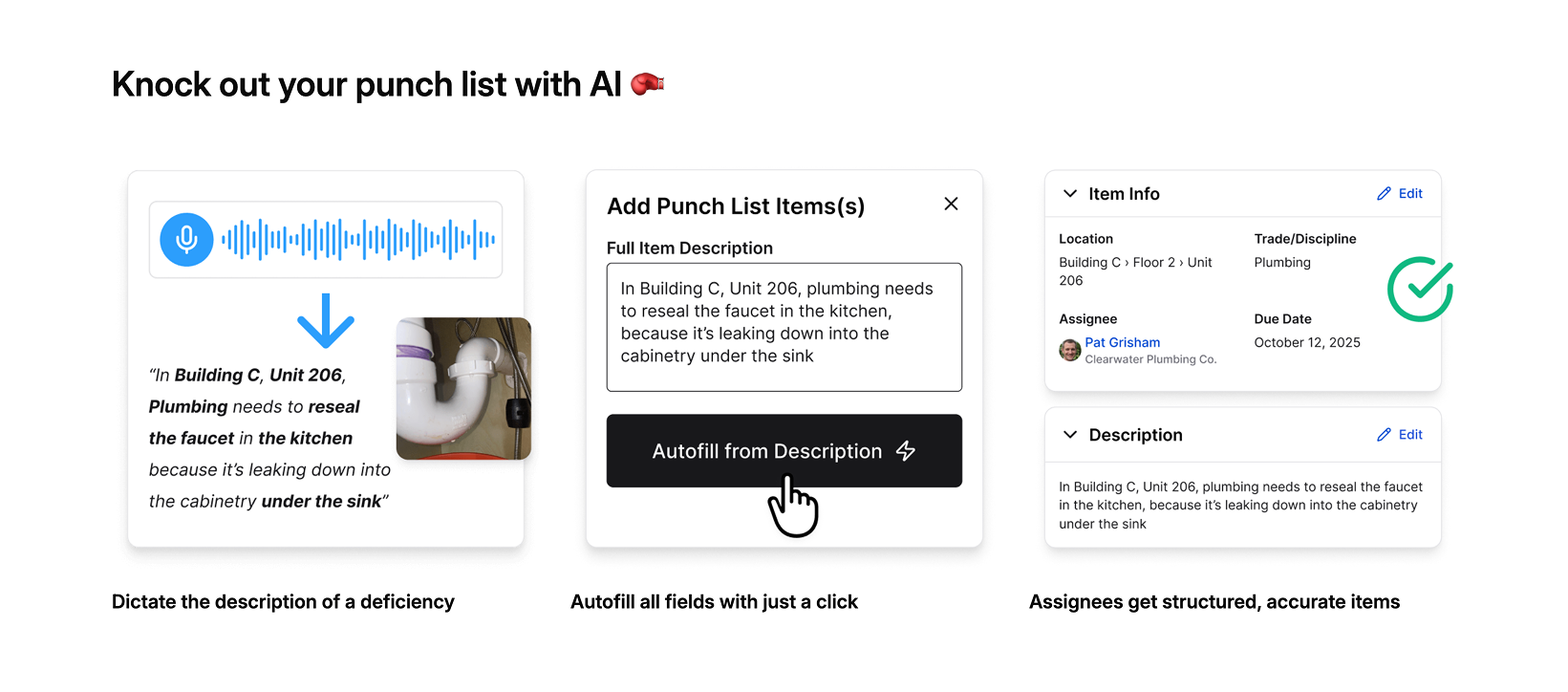
Autofill from Description uses AI to auto-populate title, location, and trade from your detailed descriptions. You talk through what's wrong, and the system handles data entry. Status workflows move items through Open, In Review, and Completed with automated notifications bundled to avoid inbox overload.
Constructable charges a flat monthly rate with unlimited users, and onboarding averages under 21 days with migration support included.
Procore
Procore offers punch list functionality within its enterprise construction management ecosystem. The tool provides a centralized place to document, assign, and resolve outstanding items, with templates, mobile capture, and reporting capabilities.
Customizable punch list templates exist at the project and company levels with pre-populated fields. Mobile Quick Capture and voice input help create items in the field. Integration with drawings, RFIs, submittals, and other Procore workflows connects closeout work to earlier project phases. Advanced filtering, status tracking, and analytics dashboards provide visibility across portfolios.
Procore works for large enterprises with complex multi-project portfolios that need extensive reporting and standardized workflows across many projects.
The limitation is structured onboarding and ongoing training requirements for full adoption, particularly for field teams and subcontractors. Configuration-heavy setup means slower time-to-value. Per-user pricing becomes expensive as teams scale, and customers report the interface as click-dense and hard to use for occasional users.
Autodesk Construction Cloud
Autodesk Construction Cloud includes punch list capabilities through its Issues tool within Autodesk Build. The system combines document management, field collaboration, and quality tracking across Autodesk's acquisition-assembled construction portfolio.
Issues tool tracks defects, observations, and quality items, integrating with BIM workflows and Autodesk drawing tools. Mobile app captures field data and status updates. Connection to the broader Autodesk ecosystem includes cost management and scheduling.
Autodesk Construction Cloud works best for organizations already standardized on Autodesk tools across design and construction, particularly those requiring tight BIM integration.
The limitation manifests as inconsistent UX across modules due to an acquisition-driven architecture. Migrations are expensive and time-consuming. Field adoption suffers from steeper learning curves compared to purpose-built solutions.
Constructable offers a more cohesive system, built natively as a single product, with faster iteration, hands-on onboarding, and less friction.
Fieldwire
Fieldwire focuses on field execution with task and punch list management built for superintendents and site teams. The tool focuses on mobile-first workflows and straightforward task tracking.
Fieldwire provides mobile-optimized task and punch list creation with photo capture, plan markup, and drawing-linked issue tracking, simple status workflows and assignment features, and integration with select project management tools.
The tool works well for field-only teams focused exclusively on task execution who don't need financial visibility, office-driven project management, or closeout documentation beyond basic punch lists.
The limitation: Fieldwire does not offer financial tooling, budgets, commitments, or Schedule of Values. Teams requiring cost visibility or owner-level reporting must introduce other systems, creating fragmentation. Per-user pricing scales linearly with headcount, discouraging broad collaboration.
Fieldwire serves narrow field-only workflows, while Constructable provides field experience parity plus office workflows, native project management, and financial depth that eliminate tool sprawl without compromising field usability.
RedTeam
RedTeam offers budget-friendly construction management with punch list tools bundled into its broader feature set. The approach appeals to teams where price outweighs polish.
RedTeam handles punch list creation and tracking inside project closeout workflows, provides basic mobile access for field teams, and covers estimating, project management, and financials. The low subscription cost attracts contractors watching margins closely.
Cost-conscious teams accept dated interfaces and slow product development in exchange for minimal licensing fees, particularly those already familiar with older software patterns.
Users report infrequent updates, long-standing usability problems, and workflows that feel stagnant. Field adoption remains limited because of weak UX. Contractors describe features as clunky and hard to learn, tolerating frustrations because perceived switching costs exceed daily friction.
RedTeam wins on price, not experience. Constructable delivers similar or lower total cost with better usability, ongoing development, and stronger field adoption.
Feature Comparison Table of Punch List Software
The table below breaks down how each tool handles core punch list capabilities. We focused on what matters during closeout and throughout the project lifecycle.
| Feature | Constructable | Procore | Autodesk Construction Cloud | Fieldwire | RedTeam |
|---|---|---|---|---|---|
| Pin items directly to drawings | Yes | Yes | Yes | Yes | No |
| Mobile punch list creation | Yes | Yes | Yes | Yes | Yes |
| AI-powered autofill features | Yes | No | No | No | No |
| QR code exports for jobsite | Yes | Yes | No | No | No |
| Multiple quality list types | Yes | Limited | Limited | No | Limited |
| Unlimited users included | Yes | No | No | No | No |
| Native financial tools | Yes | Yes | Limited | No | Yes |
| Onboarding included | Yes | Paid | Paid | Self-serve | Self-serve |
| Offline drawing access | Yes | Yes | Yes | Yes | No |
Most solutions cover the basics, such as mobile creation and drawing markups. The real differences show up in how much manual data entry you're stuck with, whether you're paying per seat, and if onboarding costs extra.
Why Constructable Is the Best Punch List Software
We built Quality Lists to work across your entire project timeline, from week one through the final walk. The same system tracking punch items at closeout also handles safety observations, coordination issues, and daily tasks from week one. Everything pins to drawings, connects to RFIs and submittals, and ties back to financial tracking without jumping between disconnected systems.
Teams onboard in under three weeks because the interface mirrors how you already work. Field crews start creating quality items on day one without training sessions or help desk calls. Flat monthly pricing means you can add subcontractors, owners, and consultants without your bill climbing every time someone needs access.
Constructable handles punch lists the way mid-size GCs need them: connected to the full project, easy enough for the field, and priced so collaboration doesn't cost extra.
Final Thoughts on Selecting Punch List Software
You can tell if digital punch list tools will work for your team within the first week of using them. The good ones feel obvious, your field crews start logging items without asking questions, and closeout actually moves forward instead of turning into a coordination nightmare. The bad ones require constant babysitting, charge you every time a sub needs access, and live in their own silo disconnected from the rest of your project. Don't settle for software that makes simple tasks complicated just because it checks boxes on a feature list.
FAQ
Which punch list software works best for mid-size general contractors?
Constructable is built for mid-size GCs running $20M to $150M in volume who need punch lists connected to the full project: drawings, RFIs, budgets, and daily coordination, without paying per user or managing a software stack.
How do I choose between punch list tools that all look similar?
Start with three questions: Does it pin items directly to drawings? Does it work offline when cell service drops? Does it connect to your RFIs, submittals, and financials, or does it sit in a silo? Most tools handle basic checklists, but only a few connect closeout to the rest of your project.
Can I use punch list software throughout the project or just at closeout?
Quality list tools like Constructable track punch items, safety observations, coordination issues, and daily tasks from day one through final walk-throughs. The same workflow that closes out deficiencies also handles ongoing site management without switching systems.
What's the real cost difference between per-user pricing and flat-rate plans?
Per-user pricing from Procore, Autodesk, and Fieldwire means you pay every time you add a subcontractor, consultant, or owner to collaborate. Flat monthly pricing with unlimited users lets you involve everyone without your bill climbing every time someone needs access.
Do field crews actually adopt punch list apps without constant training?
Field adoption depends on whether the tool mirrors how your crew already works. Apps requiring training sessions, help desk calls, or click-dense interfaces fail on-site. Mobile-first construction tools succeed when superintendents create and assign items on day one without reading a manual.