How Constructable helps general contractors engage with bidders and track their responses
Learn more about how Constructable keeps your team organized with a simpler, easier-to-use Bid Management workflow.
For preconstruction and estimating teams who are tired of chasing bids across inboxes, spreadsheets, and legacy tools.
Why bidder engagement still feels so hard
If you talk to any precon manager about bid day, you’ll hear the same story: dozens (or hundreds) of subs, scattered email threads, different versions of documents, and no easy way to know who actually saw what. Traditional construction platforms have added bidding modules over time, but they often feel bolted-on—separate from drawings, documents, and the day‑to‑day project context your team actually lives in.
Constructable takes a different approach. Our Bid Management feature is built directly on top of your live project data. That lets us keep bidders engaged, keep your team organized, and eliminate the double‑work that comes from re‑uploading files, rebuilding bid lists, and forwarding email chains.
In this article, we’ll walk through the Constructable bid workflow from both the GC and bidder perspectives, and highlight what makes it different from incumbent platforms like Procore and Autodesk.
A bid management workflow that matches how GCs actually work
Constructable organizes each opportunity around a Bid Package. Within a package, the workflow is structured into four clear steps:
- Bid Package: Define the package, add detailed bidding instructions, create clear scopes of work, and set the due date.
- Select Bidders: Build your bid list from your central directory, filtered by trades and/or bid tags which allow you to recall bidders from previous jobs that match the attributes you care about.
- Distribution: Send invites and project updates in bulk, track email delivery for each contact, and monitor the status across every bidder.
- Received Bids: Review responses, compare numbers by scope and trade, and see exactly who’s in, who’s out, and who needs follow‑up.
Because this is all built on the same data model as the rest of the project, you aren’t maintaining a separate “bidding universe” with its own documents and contacts. Bid Management is simply another lens on your project—one that’s tuned for preconstruction.
Define precise scopes inside each bid package
Most bidding tools treat scope as a blob of text in an invitation email or attachment. Constructable treats scope as first‑class structured data.
Inside each Bid Package, you can define one or more Bid Scopes. For every scope, bid managers can capture:
- Name: A clear label for the scope (for example, “Exterior Framing & Sheathing – Level 2”).
- Description: A rich‑text description of the work being priced.
- Inclusions: Detailed notes on what is included in this scope.
- Exclusions: Detailed notes on what is not included in this scope.
When bidders respond, they don’t just send a single lump sum. They can enter one amount per scope, along with their notes for each. They can also attach any files or documents they've prepared. Behind the scenes, Constructable tracks these as separate scope responses and rolls them up into a total bid amount for levelling when needed. And if a bidder replies to you outside Constructable, you can simply forward it to a special email address which automatically imports their bid into the system so you can skip the manual entry.
The result is a few key advantages:
- Apples‑to‑apples comparisons: When every sub bids the same scopes, it’s easy to see who’s covering what—and where there are gaps.
- Fewer clarifying emails: With inclusions and exclusions spelled out per scope, you cut down on follow‑up calls just to understand what’s in the number.
- Less scope creep on bid day: You can quickly see which scopes were priced and which were left out, even when a company is bidding multiple scopes in the same package.
Instead of spreading this information across PDFs, email threads, and one‑off spreadsheets, Constructable keeps it all in a single, structured view tied to the package. And you can easily create more bid packages as needed—for example, on projects which contain multiple phases, or which have distinct areas requiring different bidders.
Use your existing project files—instead of re‑uploading bid documents
Legacy bidding tools often force you to upload a separate set of “bid documents” even if those same drawings and specs already live in your main project. That duplication is painful to maintain, and it quickly drifts out of date.
Constructable does it differently. When you invite bidders, you’re granting them controlled, temporary access to the same project drawings, documents, and photos your team is using internally:
- Drawing Sheets: Bidders can open the current drawing set directly, complete with your latest revisions.
- Documents: Specs, addenda, RFIs, and other supporting documents are available from the project’s document library.
- Photos: Site photos or reference images are accessible from the project photo gallery.
The bid invitation email takes each bidder to a secure link into the project. From there, they land on a focused bidder experience that sits on top of these existing project files—no re‑uploads, no duplicate “bid folders,” and no risk that someone is working off the wrong PDF.
And because access is tied to project memberships, your team can always revoke or restore bidder access to the project with a couple of clicks.
Bid tags: build reusable bidder lists instead of starting from scratch
If you’ve managed bids in spreadsheets, you’ve probably built ad‑hoc columns like “Preferred Hospital/Healthcare Subs” or “Good at Design‑Assist” to remember who you want to invite next time. The moment you move to a new sheet, that knowledge gets lost.
Constructable codifies this pattern with Bid Tags—simple, reusable labels you can attach to companies across your organization.
You might create tags like:
- “TI – Class A Office”
- “Healthcare experience”
- “Self‑perform concrete”
- “Strong past performance on high-rise MFRs”
On the Select Bidders step for a package, you can:
- Filter your subcontractor directory by trade, geography, and bid tags.
- Apply tags in bulk to selected companies (for example, tagging a new group of subs as “Good for school work” after a successful project).
- Remove or edit tags in bulk when your lists evolve.
Over time, your organization builds a living memory of “who’s good for what,” directly inside the system—so the next time you spin up a bid package, you can recall the right bidders in seconds instead of re‑building lists from scratch.
Bulk messaging and invites that stay in sync with the package
Once your scopes are defined and your bidder list is ready, Constructable makes distribution simple—even when things change mid‑stream.
On the Distribution step, you can:
- Send bid invitations in bulk: Select one or many bidders and send standardized invitation emails that include your project description, instructions, and a secure link into Constructable.
- Send follow‑up messages in bulk: Draft a rich‑text update, attach additional files if needed, and send it to any subset of bidders (for example, everyone tagged “Healthcare experience” or everyone who hasn’t responded).
- Target messages based on status: Because each bid has a status (New, Sent, Will Bid, Will Not Bid, Received), you can focus outreach on the subs who still need a nudge.
These bulk actions are grounded in live bid data. You aren’t exporting a list to another tool, sending emails from your inbox, and hoping you remembered everyone. You’re working directly in the same place where statuses, scopes, and contact information already live.
Every bidder communication is tracked—down to each contact
One of the hardest questions to answer in traditional bidding tools is: “Who exactly got which email, and when?” When information changes—an addendum, a revised drawing, a clarified scope—you need to be confident that every relevant bidder received the update to ensure you get the most accurate bids.
Constructable treats every outbound message as a tracked object:
- Each email you send (whether an initial invite or a follow‑up message) is stored as a Bid Message, with subject, body, attachments, and type.
- For each recipient, Constructable creates a delivery record, including which contact received it, when it was sent, and the latest email status.
- At the bid level, you can open a message delivery history view and see every email that went to each contact at that company—complete with filters by recipient, date, and more.
Instead of hunting through your personal inbox, your team can answer questions like:
- “Did Acme Mechanical open the revised bid instructions yet?”
- “Who received the addendum at Pacific Electric—and whose email address bounced?”
- “Which contacts at this company have ever been invited to this project?”
Because this correspondence history is part of the core project data, it’s visible to the rest of your team—not trapped in one person’s email account.
The bidder experience: simple, fast, and focused
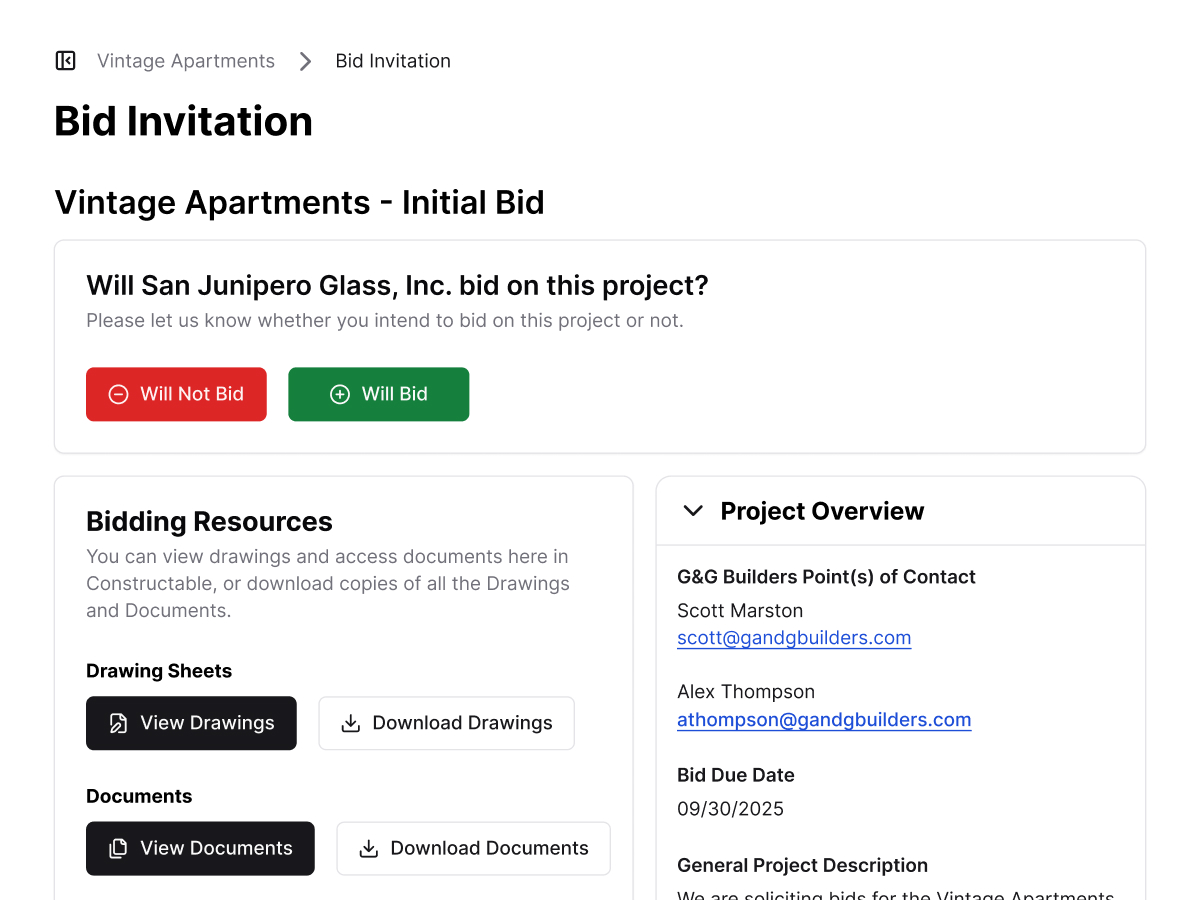
From the bidder’s perspective, Constructable is intentionally straightforward. When a sub receives an invitation:
- They click a secure link in the email and sign in (or use a temporary password if it’s their first time).
- They land on a dedicated bidder home page for your project that shows:
- The bid package they’ve been invited to.
- The due date and point‑of‑contact at your team.
- A concise project description and bidding instructions.
- Right at the top, they can quickly indicate their intention to bid (one-click “Will Bid” or “Will Not Bid” buttons), giving your team immediate visibility into who’s planning to participate.
- They can then:
- Open drawings, documents, and photos that they've been granted access to, directly in Constructable, without downloading massive ZIP files (unless they want to!).
- Use Constructable’s built‑in markup and takeoff tools to highlight questions, measure quantities, and organize their own internal notes.
- Enter their bid amounts per scope, including notes for each, and submit as many new updates as needed if their bid evolves.
Because the bidder is working in the same environment as your team (with appropriately scoped access), everyone stays aligned on which documents are current and which changes have gone out. There’s no separate “bid portal” with a different set of files to maintain.
How Constructable differs from legacy platforms
Compared to older tools like Procore and Autodesk Construction Cloud, Constructable’s Bid Management stands out in a few important ways:
- Scopes are structured, not buried in PDFs: Scopes live as first‑class objects with names, descriptions, inclusions, and exclusions—and bidders can price each one separately.
- No duplicate bid file repositories: Bidders access the same drawings, documents, and photos your team uses, so you maintain a single source of truth.
- Reusable bidder intelligence via bid tags: Tags give your organization a durable memory of who’s good for what, instead of rebuilding bid lists from scratch every job.
- End‑to‑end message tracking: Every invite and update is logged per contact, with an auditable history that survives staff changes and inbox clean‑ups.
All of this lives in a single product experience that also handles drawings, field management, and takeoffs—so you’re not stitching together separate point solutions just to get through bid day.
See Constructable Bid Management in action
If you’re ready to move beyond spreadsheets, ad‑hoc email threads, and bolt‑on bidding tools, we’d love to show you how Constructable can help your team run cleaner, more predictable bid cycles.
Visit our sales page to schedule a demo with us, or reach out to our team directly on Linkedin if you just want to keep in touch—we’re happy to walk through your current bid workflow and share how other general contractors are using Constructable to keep bidders engaged and responses organized.